Samsung Health
- 1.56M
- 3.6
- Installs
- 1.00B
- Price
- Free

Screenshots
Analysis by Reviewed APKs
Samsung Health is a fitness and wellness tracker for keeping everyday activity, workouts, meals and sleep in one place. I’d recommend it to people who like seeing patterns and setting manageable goals, especially Galaxy Watch owners who want more detail from their workouts and sleep. My overall take is that it covers a lot of ground, but its usefulness depends on your device, region and how much tracking you want to do.
A day in the activity log
When I first opened Samsung Health, I pictured using it as a quick check-in rather than a strict training diary. A normal day might mean glancing at steps and activity time, then adding a walk or workout later. If I also record meals and snacks, those entries sit alongside activity records instead of getting lost in a separate notebook or app.
The appeal is that the routine can stay lightweight. I can set goals that suit my own level, review daily activity and workout intensity, and add details when I want a fuller picture. For running, cycling and swimming, the app can record activities. With compatible Galaxy Watch features, the picture can include additional readings such as heart rate, stress and blood oxygen.
A tracker, not a clinician
Samsung Health makes most sense as a broad personal log. Compared with keeping step counts, workouts, food and sleep in separate places, it brings several kinds of wellness records together. It also offers coach-led fitness videos, meditation content and a way to challenge friends or family. That mix suits someone who wants a little structure without turning every part of the day into a training plan.
It is not a medical diagnostic tool, and I would not treat its records as a substitute for professional care. Nor is every feature equally useful on every phone: detailed sleep tracking is tied to Galaxy Watch, and some readings depend on supported devices. If you mainly want a simple timer or one focused workout tool, this wider dashboard may feel like more than you need.
Small habits that help
I get more out of a tracker when I make the routine easy to repeat. A quick look at steps and activity time at the end of the day can show whether I moved much, while entering meals when they happen is easier than trying to reconstruct them later. Setting a realistic goal helps keep the app useful as a record, not a daily scorecard to chase.
It can also help to choose just a few records to follow at first. Someone interested in sleep might pair the app with a Galaxy Watch, while a person focused on workouts can log runs or cycling sessions. Together challenges can add a social nudge if friends or family use the feature. I would avoid turning on every kind of tracking before deciding which information I actually use.
More From Our News Desk

Zoom Meetings, Google Meet, or Teams: Which Is Easiest to Join?

How I Build a Free Streaming Lineup With Tubi

Why Crunchyroll Is the Default Anime App for So Many Fans

YouTube TV: A Practical Guide to Cutting Cable

Rummikub and the Small Comfort of Phone Games

TeamViewer Remote Control or AnyDesk for Helping Family?
Who may find it useful
I’d recommend Samsung Health to people who want one place to keep tabs on everyday movement, exercise and food, and who are comfortable building a small logging habit. Galaxy Watch owners have a particular reason to try it: the watch can support more detailed exercise and sleep records. The coaching videos, meditation tools and family or friend challenges may also suit people who like gentle prompts alongside tracking.
It may be a less natural fit for someone who wants only a minimal step counter, dislikes entering meals, or expects every feature to work on every device. Tablet and some mobile support is limited, and available features can depend on region, model and carrier. The app is intended for fitness and wellness, not diagnosis or treatment, so I’d keep its role clearly in that lane.
Samsung Health is made by Samsung Electronics Co., Ltd. On Google Play it has over a billion installs and a 3.6-star rating from about 1.6 million ratings. It is free to download, with no in-app purchases or ads recorded in the provided store facts. Its content rating is Everyone.
The supplied Android requirement and app version can vary. The app was released on April 7, 2015, and its last update was December 11, 2025. The app description specifies Android 10.0 or later. Supported devices and individual features can vary by model, region and other factors.
How Samsung Health Fits Daily Life
A broad first impression
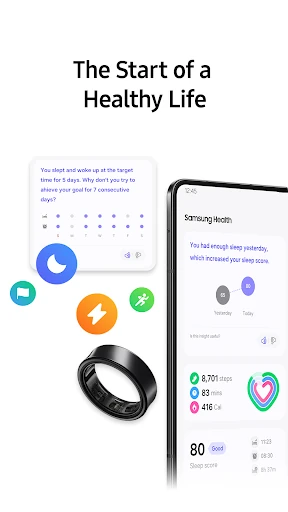
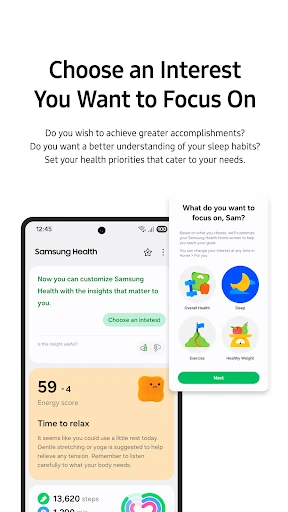
Samsung Health is built around keeping different wellness records close at hand. The home screen can show health records, and users can add or edit items they want to manage, including daily steps and activity time. I like that this gives the app a practical starting point: it can be a quick glance at movement rather than a demand to fill out a complicated journal.
There is more to explore beyond the basic activity view, so I would start by choosing a couple of areas that matter to me. The range includes activity, meals, workouts and sleep, with some information depending on connected devices. Because features vary across devices and locations, the first impression is best treated as a menu of possibilities, not a promise that every tool will apply.
The everyday tracking loop
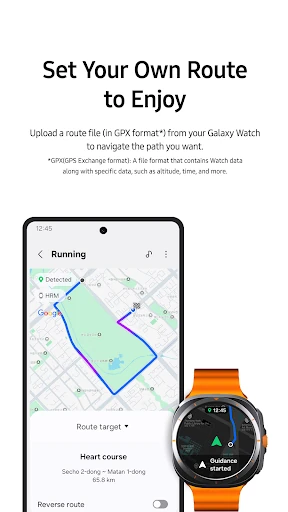
The day-to-day value comes from having a place to record activity and see it alongside personal goals. Samsung Health can automatically record many activities, while users can also record and manage workouts such as running, cycling and swimming. I find that combination helpful for a routine with both ordinary movement and planned exercise: the app can serve as a general log rather than a record of only formal workouts.
Food tracking is more hands-on. The app lets users record meals and snacks, so it can help build a habit of noticing what they eat. I would think of that feature as a log, not an automatic account of every meal. The more consistently I enter information, the more useful the record becomes; the trade-off is that keeping it current takes a little attention.
Features with extra reach
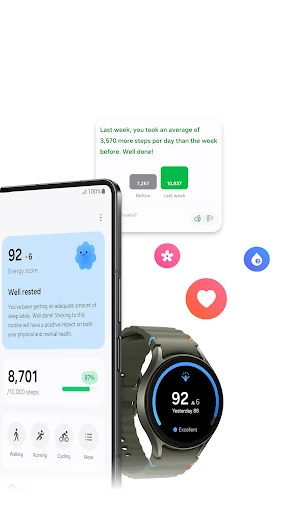
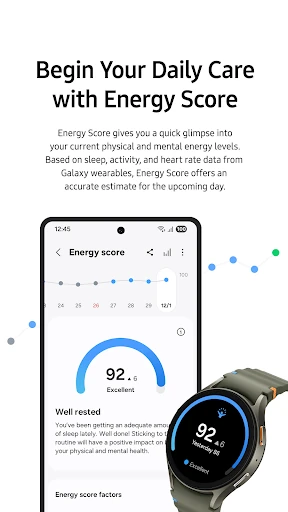
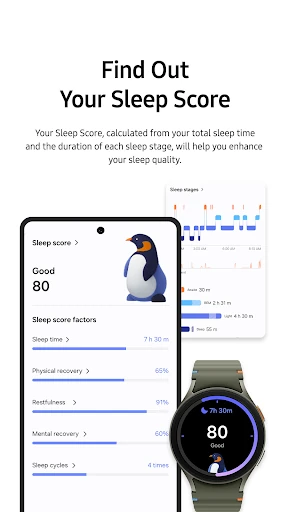
Galaxy Watch support is one of the more distinctive parts of the experience. The description highlights exercise tracking and more detailed sleep monitoring with a Galaxy Watch, including sleep levels and scores. It also mentions tracking items such as heart rate, stress and blood oxygen, depending on device support. That makes the app more compelling for someone already using compatible Samsung gear than for someone seeking identical readings from any phone.
For motivation and variety, Samsung Health includes expert-led fitness videos covering areas such as stretching and weight loss, as well as challenges with friends and family through Together. Mindfulness offers meditation tools, though some content requires an optional paid subscription. Cycle tracking includes menstrual cycle and symptom tracking with personalized insights and content through Natural Cycles. These additions broaden the app, but their availability can depend on location or device.
A routine I would keep
For a practical weekly routine, I would check steps and activity time once a day, record a workout after finishing it, and add meals when it is convenient. That is enough to create a useful trail without making the app another job. If I wore a Galaxy Watch, I could also use its sleep-related information to review patterns over time rather than judging one night in isolation.
I would keep goals modest and personal. Samsung Health lets users set goals that fit their level, and that is a better starting point than copying someone else’s targets. If friends or family are using Together, a challenge can make the routine more social. I would still choose which records to focus on instead of treating every available measure as equally important.
Limits behind the dashboard
The biggest practical limitation is that the experience is not identical for everyone. The description says tablets and some mobile devices are unsupported, while features may differ by country, region, carrier and device model. A Galaxy Watch is needed for the more detailed sleep experience described by Samsung. If a particular measurement or tool matters to you, checking compatibility before building a routine around it is sensible.
There is also a difference between a free app and every piece of content being free. Samsung Health is free in the supplied store facts and has no recorded in-app purchases there, but its description says some Mindfulness content is available through an optional paid subscription. More broadly, this is a fitness and wellness product, not a tool for diagnosing or treating health conditions. Its records are best used with that boundary in mind.
Samsung Health works best as a flexible home for everyday movement, workouts and other wellness notes. I like its breadth and the extra depth available to Galaxy Watch users, while the need to log some details and the uneven availability of features keep it from being a perfect fit for everyone.
I’d try it if I wanted a broad tracker and was willing to settle into a simple routine. Galaxy Watch owners have the clearest reason to explore it, particularly for exercise and sleep records. If you want a narrowly focused tool or expect health data to provide medical answers, this is probably not the right role for an app.
Samsung Health Frequently Asked Questions
What is Samsung Health used for?
Samsung Health is for tracking fitness and wellness information, including activity, workouts, meals and sleep. It can help users review records, set personal goals and keep an eye on everyday habits. The app also includes fitness videos, meditation tools and social challenges. It is intended for fitness and wellness, not for diagnosing or treating medical conditions.
Which devices can run Samsung Health?
Samsung Health is an Android app, and its description says it requires Android 10.0 or later. Tablets and some mobile devices are not supported, and features can vary by device, region and carrier. Galaxy Watch support is relevant for some exercise and sleep features. Check the Google Play store details for compatibility with your particular device.
Does Samsung Health cost money?
The supplied Google Play facts say Samsung Health is free and has no recorded in-app purchases or ads. However, the app description says some Mindfulness content is offered through an optional paid subscription. Availability and terms for specific content may vary, so check the Google Play store for current details.
What Android version does Samsung Health need?
The app description says Samsung Health requires Android 10.0 or later. The exact app version and device support can vary, so it is worth checking the Google Play store before installing or updating. Some features also depend on compatible devices, including Galaxy Watch support for more detailed sleep information.
Is Samsung Health a good fit for me?
It may suit you if you want to track everyday activity, workouts, meals or sleep in one app, especially if you use a Galaxy Watch. It may feel less appealing if you want a very minimal tracker or do not want to record details yourself. Samsung Health is for fitness and wellness, not medical diagnosis or treatment.
Pros
- Brings activity, workouts, meals and other wellness records together.
- Supports personal goals and several common workout types.
- Galaxy Watch can add detail to exercise and sleep tracking.
- Includes fitness videos, meditation tools and social challenges.
Cons
- Device and regional differences can make features uneven.
- Meal logging takes regular effort to keep useful.
- Some Mindfulness content requires an optional paid subscription.
- Category
- Health & Fitness
- Version
- VARY