SmartThings
- 5.61M
- 4.6
- Installs
- 1.00B
- Price
- Free

Screenshots
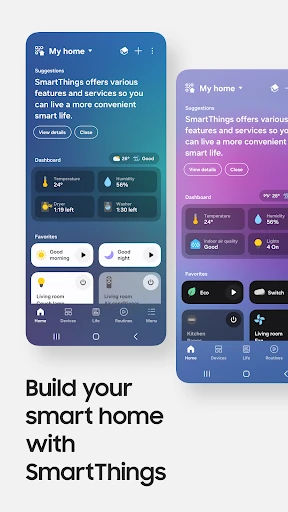
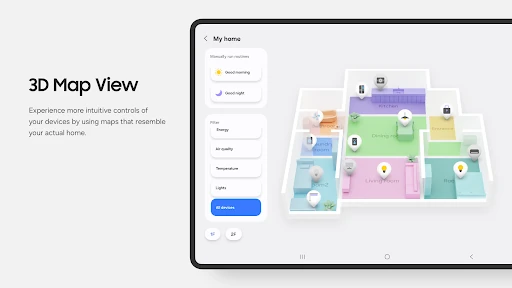
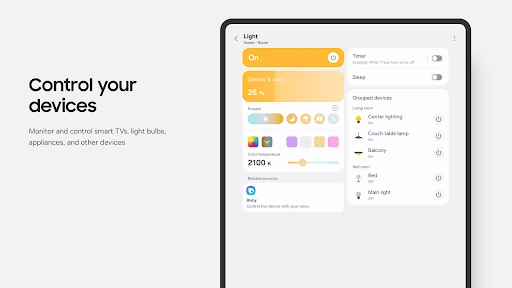
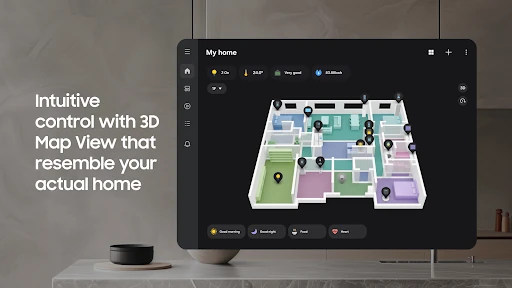
Analysis by Reviewed APKs
SmartThings brings compatible smart-home devices into one app, with a particular focus on Samsung TVs and appliances. I’d consider it for someone who wants to check on devices, control them remotely, and set up routines without juggling a separate app for every brand. Its appeal is practical rather than flashy: it can make a mixed-device home easier to manage, though compatibility and feature availability matter.
A Home Check-In
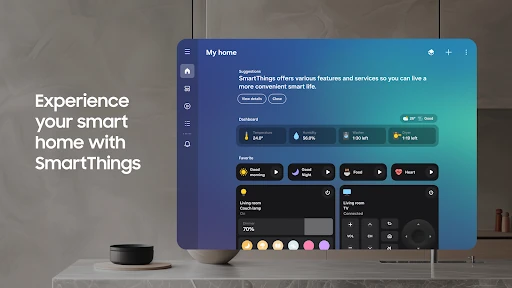
Picture leaving home and wondering whether a connected appliance or other device is still running as expected. SmartThings is designed to let you check device status and control compatible equipment from the app, even when you’re away. The basic idea is to bring those controls together rather than make you open a different app for each device. That can make a quick check feel more like one small task than a tour of your phone.
When I think about a useful everyday routine, it’s less about managing a futuristic house and more about removing tiny bits of friction. A person could check a Samsung TV, appliance, speaker, or compatible third-party device in one place, then use a routine tied to time, weather, or device status. Shared access and automated status notifications also suit a household where more than one person needs to keep track of connected gear.
A Hub, Not a Universal Fix
The obvious alternative is using each manufacturer’s own app. Those apps can make sense when you own just one or two devices from the same brand, while SmartThings is aimed at bringing compatible products from multiple brands together. The description names Samsung devices as well as brands such as Ring, Nest, and Philips Hue. That breadth is useful in principle, but it still depends on whether a specific device and feature are supported.
I wouldn’t treat SmartThings as a replacement for every device’s full companion app, or as a general-purpose home assistant that can control anything with a plug. Its job is to connect, monitor, and control compatible smart-home equipment, with routines and shared access layered on top. Samsung says the app is optimized for its phones, and some features may be limited on phones from other manufacturers or unavailable in some countries.
Small Habits That Help
A little organization can make a connected-home app more useful than a long list of devices. I’d start by adding the equipment I actually use, then check that its status and controls are easy to find. If other people at home need access, the shared-control option is worth considering. Notifications are most helpful when they communicate a change I care about, rather than becoming background noise that I dismiss without reading.
Routines are where a few deliberate choices can save repeated taps. SmartThings supports routines based on time, weather, and device status, so I’d begin with one straightforward situation and see whether it fits daily life. Location-based routines are also relevant if location access is enabled. I’d keep the setup simple at first, then adjust it as I learn which device updates and automations are genuinely useful in my household.
More From Our News Desk

Zoom Meetings, Google Meet, or Teams: Which Is Easiest to Join?

How I Build a Free Streaming Lineup With Tubi

Why Crunchyroll Is the Default Anime App for So Many Fans

YouTube TV: A Practical Guide to Cutting Cable

Rummikub and the Small Comfort of Phone Games

TeamViewer Remote Control or AnyDesk for Helping Family?
Who Gets the Most From It
I’d recommend SmartThings to people who already own Samsung smart TVs or appliances and want a single place to check and control them. It’s also worth a look for households with compatible devices from several brands, particularly if they would use routines, shared control, or automated status notifications. The app’s broad purpose is clear: connect the equipment, see what it’s doing, and handle everyday controls without hopping between as many apps.
It may be less appealing if you prefer to manage every product only through its maker’s app, or if your devices do not work with SmartThings. People using non-Samsung phones should also keep the stated feature limitations in mind. SmartThings can simplify a compatible setup, but it won’t make unsupported devices work or remove the need to check compatibility. A simple home with one device may not need a central control app at all.
SmartThings is a Lifestyle app from Samsung Electronics Co., Ltd. On Google Play it has over a billion installs and a 4.6-star rating from around 5.6 million ratings. It is free to download, with no in-app purchases or ads. Its content rating is Everyone, making the store’s age classification straightforward for a general audience.
The app was released on April 17, 2017, and its current version varies with the device. Google Play gives October 12, 2026 as the last update date. The minimum Android version is not specified in the provided app details, so check Google Play for the requirement that applies to your particular phone.
Making a Connected Home Easier to Manage
Getting Started
My first impression of SmartThings is that its value depends on the devices a person brings to it. The app is meant to connect compatible equipment, then provide a shared place to check and control it. That makes the initial task less about exploring every option and more about adding the devices that already matter in daily life. Samsung notes that some mobile devices may not be supported.
The setup requirements include at least 3 GB of memory, and the app is optimized for Samsung smartphones. It can also be installed on Wear OS watches, though the watch version works when the watch is connected to a mobile phone. A watch tile can provide quick access to routine runs and device control, while watch-face complications can open the SmartThings service directly.
Everyday Control
Once compatible devices are connected, the day-to-day appeal is having a place to check on them and issue controls. That can matter when I’m at home and want to manage more than one kind of device, or when I’m away and want to check in remotely. The description includes Samsung TVs, appliances, and speakers, along with compatible products from other smart-home brands.
Voice control is another route into the connected setup. SmartThings can work with Alexa, Bixby, and Google Assistant, according to its description. I see that as an option for people who already use one of those assistants, not a reason to expect every device or command to behave identically. The supported controls still depend on the equipment and the features available in the user’s country.
Routines and Shared Access
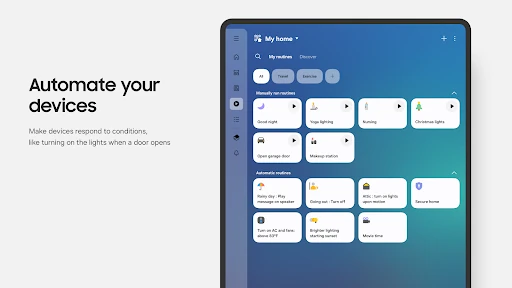
Routines stand out because they can be based on time, weather, or device status. That gives the app a role beyond being a remote control: a person can set up actions to happen in the background rather than repeating the same manual steps. I’d think of routines as practical shortcuts, starting with a situation that is easy to understand and checking whether the result makes the household’s routine simpler.
Shared control is useful in a different way. SmartThings allows access to be given to other users, which fits a home where one person shouldn’t be the only one able to manage connected devices. Automated notifications can also provide updates about devices and SmartThings features. Together, these tools address the ordinary coordination of a household, rather than simply adding more controls to an app.
A Practical Home Routine
For a simple use case, I’d imagine starting the day by checking a device’s status, then using a routine tied to a time or device condition to avoid repeating an action. Later, if something needs attention, an automated notification can provide an update. The exact routine depends on the devices in the home, but the app’s supported triggers give users a few clear ways to begin.
I’d build this gradually instead of connecting everything and creating a complicated set of automations in one sitting. Add the devices that matter most, decide which household members need shared access, and allow notifications that serve a purpose. If location-based routines are part of the plan, location permission is used for that function. This measured approach makes it easier to tell which parts of the setup are actually helping.
Compatibility Has Limits
The biggest caveat is that a large selection of compatible brands does not mean every product from those brands will work in every way. SmartThings says it supports hundreds of smart-home brands, but individual device support and feature availability still matter. Some features may not be available in every country, and the app warns that some functions can be limited on phones from manufacturers other than Samsung.
Permissions are another practical consideration. Optional access can support functions such as finding nearby devices, scanning QR codes, notifications, and playing media on SmartThings devices. The app can be used without optional permissions, though some functions may be limited. I’d review each request in context and enable access for features I plan to use, rather than assuming every permission is essential to basic control.
SmartThings makes the most sense as a shared control point for a compatible home, especially one already built around Samsung TVs or appliances. Routines, status updates, shared access, and voice-assistant support give it more to do than simple remote control, while compatibility remains the deciding factor.
I’d recommend trying it if you have several supported devices and want fewer separate controls to manage. If your setup is small or relies on products that don’t work with SmartThings, its central hub approach may offer less day-to-day value. Start with the devices and routines you genuinely need.
SmartThings Frequently Asked Questions
What is SmartThings used for?
SmartThings is used to connect, check, and control compatible smart-home devices from one app. Its described features include control of Samsung TVs and appliances, support for compatible devices from other brands, routines based on time, weather, or device status, shared access, and automated status notifications. Voice assistants including Alexa, Bixby, and Google Assistant are also supported.
Which phones and devices work with SmartThings?
SmartThings is an Android app on Google Play and is optimized for Samsung smartphones, though some features may be limited on phones from other vendors. Some mobile devices may not be supported. It can also be installed on Wear OS watches when connected to a mobile phone. Check the Google Play store information for requirements and compatibility that apply to your particular device.
What Android version does SmartThings require?
The Android version requirement may vary with the device and current app release. SmartThings also states that some mobile devices may not be supported and gives a minimum memory requirement of 3 GB. Check Google Play for the Android version requirement shown for your phone before installing or updating the app.
Is SmartThings free, and does it have purchases?
SmartThings is free to download on Google Play. The provided store details say it contains no ads and offers no in-app purchases. App availability and requirements can change over time, so it is sensible to check the current Google Play details for the version available to your device.
Is SmartThings a good fit for my home?
It is most suited to people with compatible Samsung or other smart-home devices who want centralized control, routines, shared access, or device updates. It may be less useful if your equipment is not compatible or you only need a separate manufacturer app. Feature availability can vary by device, phone, and country, so check the store and device compatibility information.
Pros
- Brings compatible Samsung and third-party smart-home devices together in one app.
- Supports routines based on time, weather, and device status.
- Offers shared control and automated device status notifications.
- Works with Alexa, Bixby, and Google Assistant.
Cons
- Some features may be limited on phones from manufacturers other than Samsung.
- Device and feature availability can vary by country and compatibility.
- Some mobile devices may not be supported.
- Category
- Lifestyle