Android Auto
- 6.32M
- 4.1
- Installs
- 10.00B
- Price
- Free
Screenshots
Analysis by Reviewed APKs
Android Auto brings selected phone apps onto a compatible car display, with navigation, calls, messages and audio in a simplified driving interface. I’d recommend it to Android users who want familiar tools within easier reach on the road, especially for regular commutes. After spending time with its mix of voice commands and large on-screen controls, I find it useful and focused, though your experience depends on having a compatible car and apps.
A smoother morning commute
When I picture Android Auto at its most useful, it’s a weekday morning when I’m already running late and need directions without juggling my phone. I connect the phone to the car display, choose a route in Google Maps or Waze, and get navigation and traffic updates where I can see them. Voice actions can also help with calls or messages, so I can keep the phone put away while I drive.
The appeal is how several ordinary driving tasks sit together: checking an ETA, choosing audio, answering a call, or asking for a route. I can also have Google Assistant check my calendar, set reminders, or share news and sports updates. Android Auto is not a replacement for planning a trip or watching the road; it’s a way to make supported phone apps easier to access in the car.
A car display, not a phone hub
Compared with using a phone mounted on the dashboard, Android Auto gives compatible apps a simplified interface on the car’s display. Large buttons and voice actions are intended to make common tasks easier to manage while driving. It can bring navigation, calling, messaging, and media into one in-car experience, rather than asking me to switch between phone apps in my hand.
It is not a general-purpose dashboard for every phone app, nor is it a standalone navigation device. The experience centers on compatible apps and a supported car display, with an active data connection needed for use. If I only need directions on foot, or my car cannot work with Android Auto, the app’s particular advantage is less relevant. It also does not remove the need to pay attention to driving.
Small habits that help
I get more out of Android Auto when I decide on the basics before setting off: where I’m going, what I want to listen to, and whether I’m expecting an important call. That reduces the number of choices I make once the car is moving. A custom do-not-disturb message while driving is another option for setting expectations when someone contacts me.
Voice requests are most useful for straightforward tasks, such as asking for a route, placing a call, or sending a message through a supported service. I’d keep requests short and avoid fiddling with menus in traffic. It also helps to use a good-quality USB cable when connecting by cable, as the setup instructions recommend. Checking compatibility before a trip can prevent an awkward first-time setup in the driveway.
More From Our News Desk

Zoom Meetings, Google Meet, or Teams: Which Is Easiest to Join?

How I Build a Free Streaming Lineup With Tubi

Why Crunchyroll Is the Default Anime App for So Many Fans

YouTube TV: A Practical Guide to Cutting Cable

Rummikub and the Small Comfort of Phone Games

TeamViewer Remote Control or AnyDesk for Helping Family?
Who will appreciate it
I’d suggest Android Auto to drivers who already use Google Maps or Waze, listen to phone-based audio, or handle calls and messages on the move. It is especially practical if the car has a compatible display and the apps you rely on are supported. The combination of navigation, media, and voice-controlled communication can make a familiar routine feel more organized without requiring a new set of services.
It may be a poor fit for someone without a compatible car display, someone who wants every phone app available on the dashboard, or someone who prefers not to connect a phone while driving. The app’s value also depends on an active data connection and compatible apps. I’d check the car’s manual and the store details before relying on it for a particular setup.
Android Auto is developed by Google LLC and is in the Auto & Vehicles category. On Google Play, it has over 10 billion installs and a 4.1-star rating from around 6.3 million ratings. The app is free, with no in-app purchases and no ads. Its content rating is Everyone.
The Google Play version is listed as varying by device. Android Auto was released on March 19, 2015, and its last update is dated November 3, 2026. The minimum Android version is not included in the available store facts, so I’ve left it out here.
How Android Auto Fits Into a Drive
Getting started
My first impression is that Android Auto is designed around the car screen rather than the phone. The simplified interface, larger controls, and voice actions make sense for short glances and quick requests. Before getting started, I’d check whether the car display supports it and read the owner’s manual or contact the manufacturer for setup guidance.
The setup described for Android Auto uses a phone running Android 6.0 or higher, an active data connection, and a compatible car display. For a wired connection, the instructions call for a high-quality USB cable. Once connected, launch Android Auto to begin. That makes checking the car and cable ahead of time a sensible first step, particularly if I’m preparing for a long drive.
The everyday experience
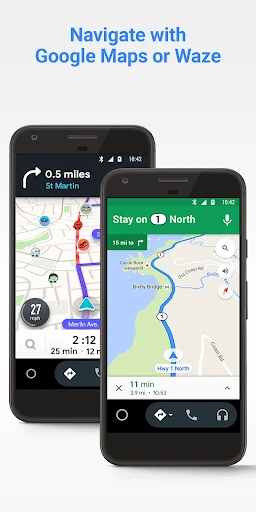
In daily use, the best part is having several familiar driving tasks available in one place. I can navigate with Google Maps or Waze, check route progress and estimated arrival time, and listen to supported media apps. The experience feels most useful when I already know what I want to do, rather than when I’m browsing around for something new.
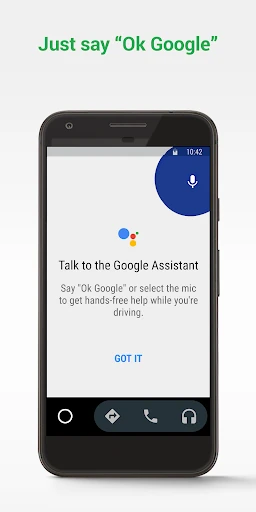
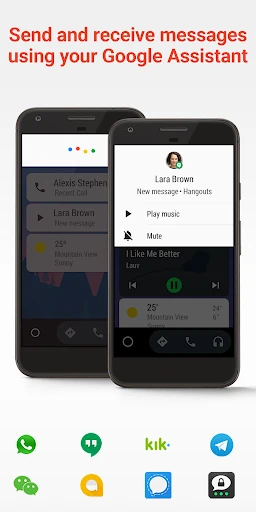
Voice actions help with common communication jobs. I can ask Google Assistant to make a call, and incoming calls can be answered with a tap. Messages can be sent and received through supported services, including SMS and apps such as WhatsApp, Skype, Telegram, and WeChat. The exact selection depends on compatible apps, but the core idea is to reduce phone handling.
Useful connected features
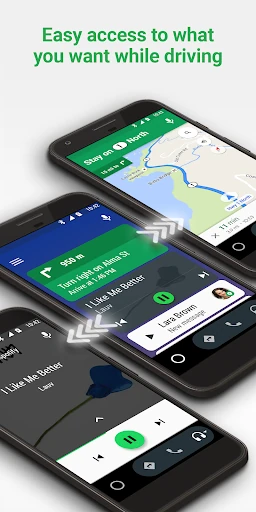
Navigation is a central strength. Google Maps and Waze can provide directions, traffic information, route updates, ETA details, and hazard alerts. I like that this puts useful trip information on the car display instead of requiring me to look down at a separate phone screen. It’s still a tool for following a route, not a reason to stop paying attention to the road.
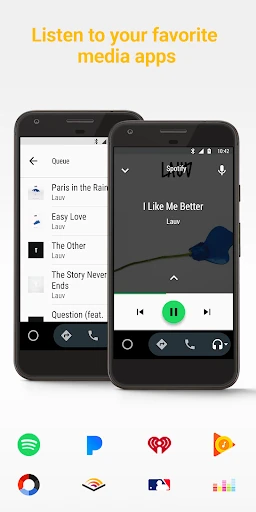
The media side covers more than music. Android Auto supports services including Spotify, Pandora, Amazon Music, SiriusXM, TIDAL, and Deezer, along with other music, radio, news, sports, audiobook, and podcast apps. That variety makes it easier to bring an existing listening routine along for the ride, provided the app is compatible.
There are a few quieter conveniences too. Google Assistant can check a calendar, set reminders, provide news updates, or report a sports score. A custom do-not-disturb message can tell people I’m driving. These features are practical additions rather than the main event, but they help Android Auto serve as a useful companion across a whole trip.
A practical trip routine
For a familiar commute, I’d connect the phone before pulling away, choose the destination, and start audio while parked. Once moving, I can rely on navigation updates and use voice actions for simple tasks instead of reaching for the phone. If I expect messages, a custom driving response can make it clear that I’m on the road.
For a less familiar trip, checking the route and ETA before leaving gives me a starting point, while traffic alerts and route updates can help during the journey. I might also ask for a calendar check or a reminder if I’m heading somewhere with a time-sensitive appointment. Keeping the routine simple is useful; Android Auto works best when I’m not trying to explore several apps at once.
Limits to keep in mind
Compatibility is the main practical limit. Android Auto needs a supported car display, and the instructions recommend checking the vehicle manual or contacting its manufacturer. It also requires an active data connection. That means I’d verify the setup before depending on it for a trip, rather than assuming that every car or phone arrangement will work the same way.
The app’s usefulness depends on compatible services, so a favorite messaging or audio app may not be available in the car interface. It also cannot make every driving task hands-free; some actions still involve a tap, and the driver needs to stay focused. Android Auto is a convenient interface for selected phone apps, not a substitute for good judgment or a reason to interact with a screen while driving.
Android Auto does a good job of bringing navigation, calls, messages, and audio into a driving-focused interface. I especially like the practical mix of voice actions and car-display controls for everyday trips. Its usefulness rests on compatible hardware, supported apps, and a working data connection, so setup deserves a little attention before the first drive.
I recommend it to Android users with a compatible car who want familiar phone services more accessible on the road. Drivers without the right display, or those hoping for unrestricted access to every app, should look elsewhere or check compatibility first. For the right setup, it can be a helpful addition to a daily commute.
Android Auto Frequently Asked Questions
What is Android Auto used for?
Android Auto brings selected phone apps to a compatible car display. It supports tasks such as navigation with Google Maps or Waze, calls, messages, and media playback. Google Assistant voice actions can also help with route requests, calendar checks, reminders, news, and other supported tasks while you drive.
Which phones and cars work with Android Auto?
The app is for Android phones, and the supplied instructions specify Android 6.0 or higher and an active data connection. The car display must also be compatible. Check your vehicle’s owner’s manual or contact its manufacturer to learn whether your car supports Android Auto and how to enable it.
How much does Android Auto cost?
Android Auto is free on Google Play, and the available store facts say it has no in-app purchases or ads. Some details can vary by device, so check the Google Play store page for the current information that applies to your phone.
Does Android Auto need an internet connection?
The supplied instructions say Android Auto needs an active data connection. Navigation, traffic information, and supported connected services may rely on connectivity during a trip. For the exact behavior of an individual app or service, check its details and the Google Play store information.
Is Android Auto a good fit for every driver?
It may suit Android users who have a compatible car display and want navigation, communication, or media apps available in the car. It may not suit drivers without compatible hardware or anyone looking for unrestricted access to every phone app. Check car compatibility and supported apps before relying on it.
Pros
- Combines navigation, calls, messages, and supported media on a compatible car display.
- Voice actions can handle common requests without reaching for the phone.
- Supports Google Maps and Waze, including traffic and route updates.
- Free to use, with no in-app purchases or ads.
Cons
- Requires a compatible car display and an active data connection.
- Only selected compatible phone apps are available through the interface.
- Setup and experience can depend on the car, phone, and connection.
- Category
- Auto & Vehicles