Google Maps
- 19.62M
- 3.3
- Installs
- 10.00B
- Price
- Free

Screenshots
Analysis by Reviewed APKs
Google Maps is a navigation and local-discovery app for getting around by car, on foot, by bike, or on public transport. I find it most useful when a trip involves more than simply following a route: I can check what a place is like, compare ways to get there, and save stops for later. It is a capable everyday tool, though its many options can take some getting used to.
A Trip With Fewer Guesswork Stops
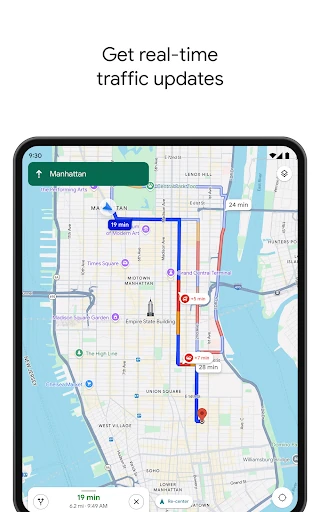
When I first opened Google Maps for an unfamiliar outing, the useful part was not just entering an address. I could look up the destination, check reviews and photos, and get a sense of the area before leaving. Once I started navigating, the app offered route guidance for the kind of trip I was taking, with live traffic information helping shape the drive.
That combination suits an ordinary day with a few moving parts. I might be heading across town, deciding whether to walk the last stretch, or trying to find a place to eat near the destination. Maps keeps navigation and local information close together, so I can go from planning to getting there without switching between separate map and directory apps.
More Than a Route Finder
Compared with a basic directions app, Google Maps also works as a place-finding and trip-planning tool. Business details, user reviews, photos, busy-time information, and custom saved lists can help when I have not settled on a destination yet. For a visitor, Street View can provide a preview of an area, while offline maps can help when a route passes through a patchy-signal zone.
That breadth is convenient, but it does not make Maps a dedicated travel-booking service or a substitute for personal judgment. It can help with reservations, hotels, delivery, and takeout, but its central job is still finding places and navigating between them. People who only want a simple compass or a quiet, stripped-down map may find the number of discovery options unnecessary.
Small Planning Habits
I get more out of Maps when I do a little planning before I set off. Saving places into custom lists gives me a way to collect restaurants, stops, or ideas for a future outing instead of trying to remember every name. Sharing a list can also make it easier to coordinate options with someone else, especially when the group has not decided where to go.
For a destination I have never visited, I like to preview the surroundings and check practical details such as entrances or parking where available. If I expect poor reception, downloading an offline map for the area ahead of time is a sensible step. I also check route choices before starting, since driving, walking, cycling, and transit each suit different parts of a day.
More From Our News Desk

Zoom Meetings, Google Meet, or Teams: Which Is Easiest to Join?

How I Build a Free Streaming Lineup With Tubi

Why Crunchyroll Is the Default Anime App for So Many Fans

YouTube TV: A Practical Guide to Cutting Cable

Rummikub and the Small Comfort of Phone Games

TeamViewer Remote Control or AnyDesk for Helping Family?
Who Gets the Most From It
I would recommend Google Maps to people who regularly travel around unfamiliar neighborhoods, commute using different transport options, or like to research a stop before visiting. It is especially handy when one errand turns into several: find a business, compare its information, save another nearby place, then navigate to the next stop. The mix of routes and local discovery makes it useful well beyond a once-in-a-while road trip.
It may be less appealing to someone who wants only the simplest possible directions screen or who prefers to plan every detail in a separate specialist app. Maps can also feel busy when all I need is a quick route, and the availability of some features varies by city or country. Still, for people comfortable with a feature-rich map, it earns a place in a regular travel routine.
Google Maps is developed by Google LLC and is available on Android through Google Play. The app has more than 10 billion installs there, with a 3.3-star rating from about 19.6 million ratings. It is free to download, and the provided app facts say it contains ads but does not offer in-app purchases. Its content rating is Everyone.
The current version is listed as varying with device, and the recorded last update is November 4, 2026. No minimum Android version or original release date is provided in the available facts. Google Maps includes navigation and local-search features, although the description notes that some features are not available in every country or city.
How Google Maps Fits Into My Day
A Busy First Look
When I first opened Google Maps, I noticed how quickly it invites me to do several things: find a destination, explore nearby places, or start a route. That flexibility is useful, but the interface can feel crowded if I arrive with one simple question. I found it easier to focus on the search or destination I needed rather than trying to inspect every option at once.
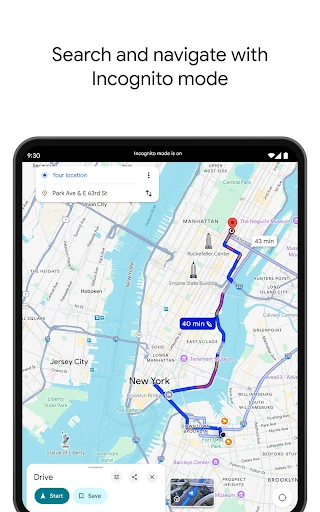
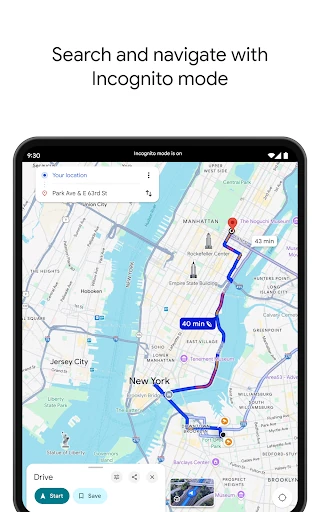
Getting started is straightforward in practical terms: search for a place or choose a destination, then look at the available routes. The app supports driving, walking, cycling, and public transport directions. For a new area, I would take a moment to review the destination and its surroundings before setting out, rather than treating the first route suggestion as the whole planning process.
Routes in Everyday Use
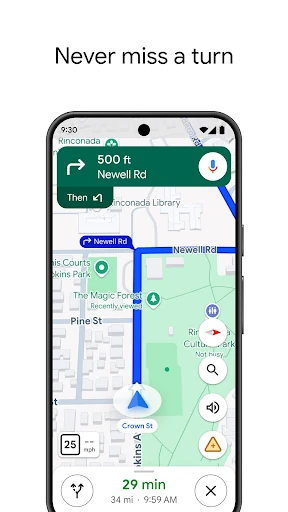
The core experience is live navigation, with turn-by-turn voice and on-screen guidance. For driving, Google Maps can reroute based on traffic, incidents, and road closures, which is useful when a familiar trip changes unexpectedly. I appreciate that the app is not limited to drivers: walking, cycling, and public transport directions make it relevant for trips where a car is not the sensible choice.
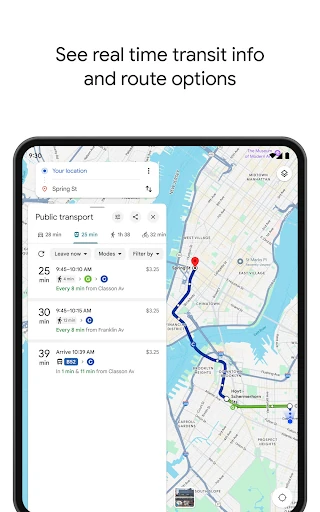
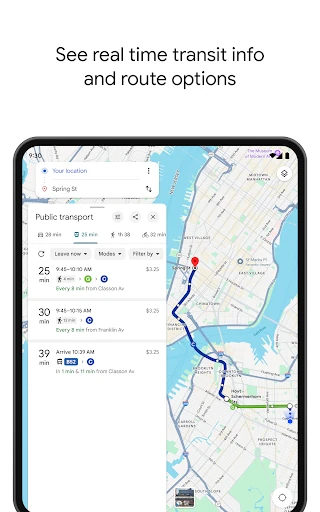
Transit information and real-time updates can help when I am trying to catch a bus or train, while bike and scooter rental information offers another way to cover a short distance. Fuel-efficient route options are available for driving, too. These choices make the app adaptable, though what appears depends in part on where I am and what services are available locally.
Useful Place Details
Local discovery is one of the features that gives Maps a broader role than navigation alone. Place pages can include photos, reviews, and helpful information about businesses and other destinations. When I am choosing somewhere to eat, filters such as cuisine, hours, price, and rating can narrow the search, rather than leaving me to scroll through every nearby option.
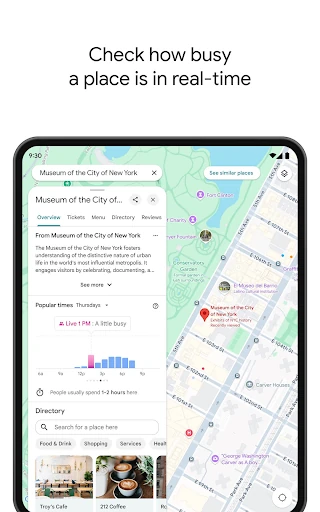
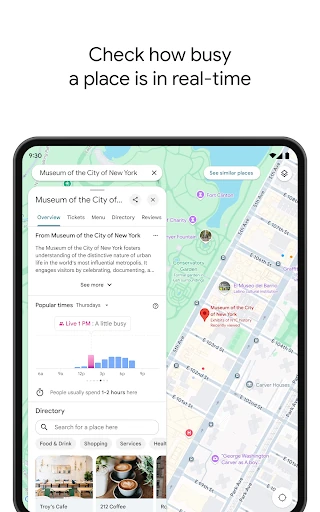
I also like having different ways to judge an unfamiliar stop. Busy-time information can give me a sense of how crowded a place may be, and questions about a business can surface practical answers such as details about dishes or parking. Street View can help me preview an area, while Immersive View offers another way to look at selected landmarks, parks, and routes.
Plan Before You Leave
A practical routine for a day out starts with collecting possible stops in a custom list. I can look up a few places, compare their photos and reviews, and share the list with other people involved in the plan. That is less fiddly than keeping a string of names in a notes app and then searching for every address again when it is time to go.
Before leaving, I would check the route and preview the destination if I have not been there before. For an area where I expect weak reception, I can use offline maps to prepare. Once the trip begins, navigation handles directions, while live information can help adjust the journey. It is a simple sequence, but it makes the app useful at several stages of an outing.
A Few Limits to Remember
Maps has a lot going on, and that breadth can be a drawback when I want a minimal screen with no extra decisions. Recommendations, business information, and route choices are helpful when I am exploring, but they can feel like clutter on a familiar commute. I also would not assume that every feature shown in the app works in every city or country.
Offline maps are useful preparation, but they do not replace checking a route before travel, especially when conditions can change. Google Maps itself cautions that navigation is not intended for oversized or emergency vehicles. For ordinary trips, the app covers a wide range of needs; for specialized vehicle requirements or a very simple map experience, its general-purpose design may not be the right fit.
Google Maps is at its best when I need both directions and context: not just how to reach a place, but what I might find when I arrive. Live routing, multiple travel modes, local information, and saved lists make it a versatile companion for errands and outings. The trade-off is a busy experience and features that can vary by location.
I recommend it to anyone who wants one familiar app for navigation and exploring nearby places. People who value a bare-bones map may prefer something simpler, but most everyday travelers will find plenty to use. A little preparation, especially saving destinations or offline maps, helps the app feel more focused when it matters.
Google Maps Frequently Asked Questions
What is Google Maps used for?
Google Maps helps users find places and navigate by car, walking, cycling, and public transport. It also provides local business information such as photos and reviews, supports custom saved-place lists, and offers tools for previewing destinations. Some features, including certain local services, are not available in every country or city.
Which devices can run Google Maps?
Google Maps is an Android app available through Google Play. The provided details also mention tiles and complications for Wear OS devices. The minimum Android version is worth checking on the Google Play page for the device you plan to use, since requirements can vary.
Does Google Maps cost money?
Google Maps is free to download on Google Play. The provided app facts say it contains ads and does not offer in-app purchases. Store details can change, so it is sensible to check the Google Play page for the latest information before installing.
What Android version does Google Maps require?
The minimum Android version can vary by device and is worth checking on the Google Play page before installation. The current version is described as varying with device. Google Maps offers navigation and local-search features, but the specific features available can also depend on the country or city.
Is Google Maps a good fit for everyday travel?
It is a strong fit for people who want directions alongside place information, reviews, and trip-planning tools. It may not suit someone looking for a very simple map without discovery features. Some options are location-dependent, so check the store page and local availability if a particular feature matters to your plans.
Pros
- Combines driving, walking, cycling, and public transport directions in one app.
- Live traffic, incidents, and road closures can trigger route changes.
- Place reviews, photos, filters, and saved lists support trip planning.
- Offline maps can help when a trip passes through poor-signal areas.
Cons
- The range of options can make the experience feel busy for simple trips.
- Some features are unavailable in certain countries or cities.
- The app is not intended for oversized or emergency vehicles.
- Category
- Travel & Local