Weight Watchers Program
- 603.99K
- 4.3
- Installs
- 10.00M
- Price
- Free

Screenshots
Analysis by Reviewed APKs
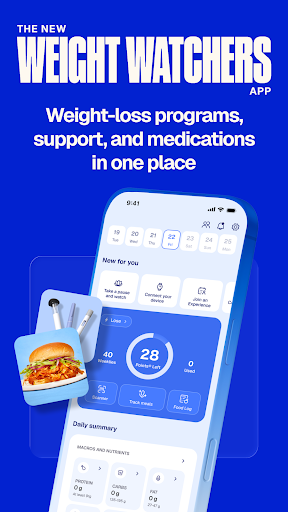
Weight Watchers Program is a weight-management app for people who want structure around food, activity, sleep, or weight-loss medication. It brings meal logging, the Points® approach, progress tools, coaching, and member community into one place. After looking through its mix of options, my overall take is that it suits people who like guided tracking and support, though its breadth may feel like more than a casual food diary needs.
A Day With Food Tracking
Picture a weekday when lunch is a quick stop at a restaurant and dinner is whatever is in the fridge. I’d use Weight Watchers to look up a meal or restaurant, log what I ate, and keep the day’s choices in view rather than trying to remember everything at bedtime. The app’s database includes recipes and restaurants, and a barcode scanner offers another way to log food when I’m shopping or checking a packaged item.
The appeal is having a repeatable check-in, not needing to make every meal a project. I could also track activity and sleep, then review those alongside nutrition through the app’s Weight Health Score. If I’m using a connected device or Health Connect, activity and sleep can sync automatically. That turns the app into a broader record of habits, although I’d still need to decide how much detail I actually want to enter.
More Than a Food Diary
Compared with a basic calorie counter, Weight Watchers puts its Points® program and ZeroPoint® foods at the center, while also offering macro tracking for protein, fiber, carbohydrates, and calories. It adds coaching, community, and options for members using GLP-1 medication. I see it as a guided program with tracking tools, rather than a simple notebook for recording meals or a stand-alone database for nutrition facts.
That broader approach will not suit everyone. Someone who only wants to jot down meals, or who dislikes structured programs, may find the extra choices distracting. The app also describes member services and clinical support, but it should not be treated as a substitute for personal medical care. Its medication-related features are specifically framed for members using weight-loss medication, and clinical access or prescriptions depend on eligibility.
Small Habits That Help
I’d get the most from the app by logging meals close to when I eat them, rather than relying on a fuzzy end-of-day memory. Searching for a familiar recipe or scanning a barcode can make that routine less tedious. If I care about more than food, I’d pair meal entries with activity and sleep tracking so the Weight Health Score has the kinds of inputs the app describes.
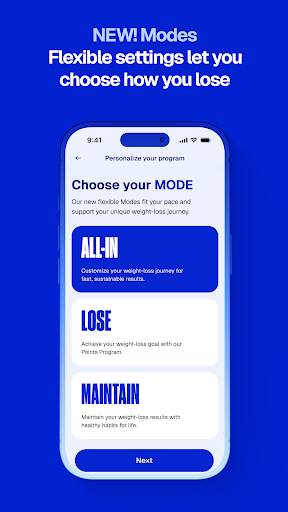
It also helps to choose a mode that matches the current goal instead of trying to use every tool at once. The app offers paths for losing weight, maintaining, going All-In, or pausing tracking with Vacation Mode. I’d treat those as ways to shape the experience around changing routines, then add virtual coach sessions or community support if accountability is what I’m missing.
More From Our News Desk

Zoom Meetings, Google Meet, or Teams: Which Is Easiest to Join?

How I Build a Free Streaming Lineup With Tubi

Why Crunchyroll Is the Default Anime App for So Many Fans

YouTube TV: A Practical Guide to Cutting Cable

Rummikub and the Small Comfort of Phone Games

TeamViewer Remote Control or AnyDesk for Helping Family?
Who Might Find It Useful
I’d recommend Weight Watchers to people who want a structured way to pay attention to meals and habits, especially those who value a defined food-tracking system over a blank diary. The mix of Points, macros, activity and sleep tracking, coaching, and community gives different kinds of users a few ways to stay engaged. Its tailored options may also appeal to people managing weight changes during menopause or using weight-loss medication.
It may be a poor fit for someone who wants the lightest possible tracker, prefers not to log meals, or does not want a program-oriented approach. The range of tools could also feel overwhelming if the only goal is to look up calories now and then. I’d suggest starting with the features tied to a real routine or goal, rather than feeling obliged to use every part of the app.
Weight Watchers Program is a Health & Fitness app from WW INTERNATIONAL, INC. On Google Play, it has more than 10 million installs and a 4.3-star rating from about 604,000 ratings. It is marked as free to download, with no in-app purchases or ads reported in the supplied app facts. The content rating is Everyone.
The supplied facts identify version 11.32.0, a release date of April 12, 2011, and a last update date of October 22, 2026. A minimum Android version was not included in the available app facts, so I would check Google Play for device compatibility. The app’s free download status is separate from any membership terms described for Weight Watchers services.
A Flexible Toolkit for Daily Habits
First Look and Setup
When I first opened the description of Weight Watchers, what stood out was how many different kinds of tracking it tries to bring together. Food logging is the obvious starting point, but the app also covers sleep, activity, progress, coaching, and support for particular weight-management situations. That range is promising if I want one place to check in, but it also means the experience is best approached with a clear first priority.
I’d begin by choosing the path that reflects what I’m trying to do: lose weight, maintain, go All-In, or take a tracking break with Vacation Mode. From there, I’d focus on a small number of useful habits, such as logging meals or connecting a supported activity source. The available description does not spell out every setup step, so I wouldn’t assume that every tool is equally relevant to every member.
The Everyday Experience
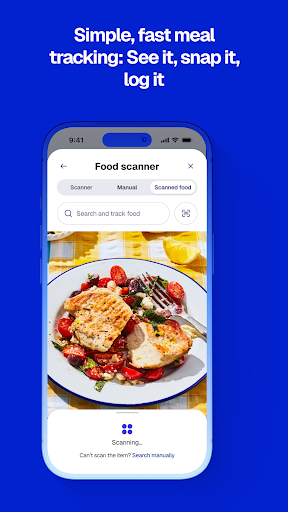
On an ordinary day, the food database and logging tools are the parts I’d expect to return to most. I can search for food, use the barcode scanner, or log a meal by snapping a photo. The app also offers more than 12,000 recipes and more than 450 restaurants in its search resources. Those options could help when dinner is homemade one day and grabbed on the way home the next.
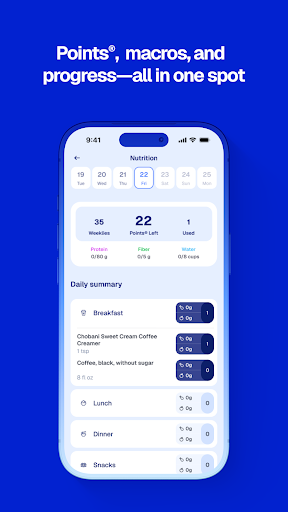
There’s a useful distinction between simply recording food and looking at a wider pattern. Weight Watchers can track macros alongside its Points system, while connected sources can bring in activity and sleep. I like that the description presents these as complementary pieces rather than making food the only measure. Still, tracking only helps if it fits a person’s routine; I’d rather log consistently in a simple way than turn every meal into homework.
Features With a Clear Purpose
The Points® program is the app’s signature approach, with ZeroPoint® foods and a barcode scanner intended to make food choices easier to track. For people who want more nutritional detail, macro tracking includes protein, fiber, carbs, and calories. That combination gives users a structured starting point while also letting them pay attention to specific nutrients. It is a more layered setup than a calorie-only counter.
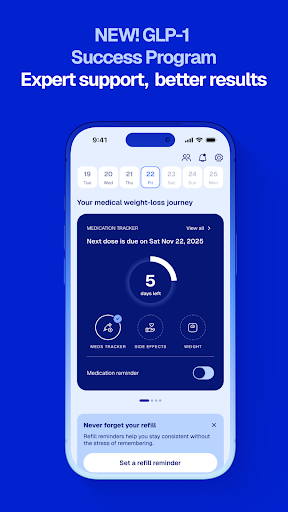
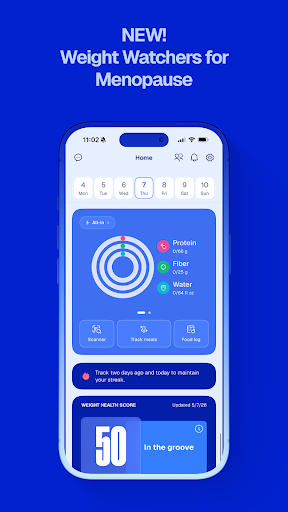
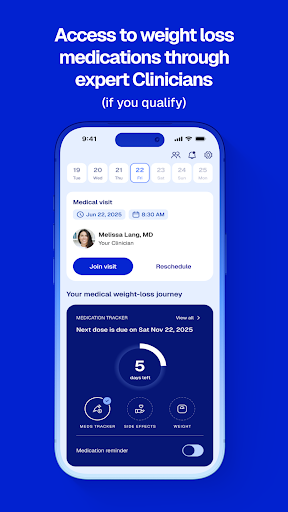
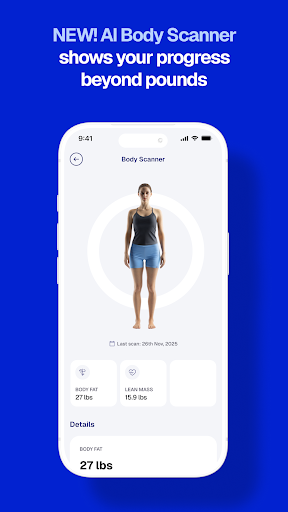
Some of the more distinctive features are aimed at particular needs. The GLP-1 Success Program includes nutrition guidance, dose tracking, and side-effect management for members using weight-loss medications. The app also describes an AI Body Scanner for viewing 3D progress, including muscle and body-fat changes, and a Weight Health Score that brings sleep, activity, and nutrition together.
Support is another notable strand. Members can join live virtual experiences led by Weight Loss Coaches, and the description offers one-to-one meal planning and nutrition support from registered dietitians. It also describes a member community and guidance tailored to menopause. Those features broaden the app beyond tracking, though access and eligibility may differ by service.
A Routine I’d Keep
A practical routine could start with a quick food log after breakfast, then a search or barcode scan for lunch. In the evening, I’d add dinner and take a glance at the day’s activity and sleep if those are part of my goals. If my devices are connected through Google Health Connect or Fitbit, the app can sync activity and sleep automatically, reducing some manual entry.
Once that basic habit feels natural, I’d use the progress tools that answer a specific question. Maybe I want to understand nutrition patterns, in which case macro tracking could be useful; maybe I want coaching or the motivation of other members. I wouldn’t try to use every feature daily. Picking one small review point each week seems more sustainable than turning the app into a constant scorecard.
Limits to Keep in Mind
The app’s broad scope can be a strength, but it can also create a lot to take in. A person who wants a fast, minimal food log may not need a community, live sessions, medication tracking, or multiple progress tools. The Points approach is central to the experience, so people who do not want a structured program may prefer a simpler tracker. The best fit depends on whether that framework feels helpful rather than burdensome.
Some services have conditions attached. The description says Weight Watchers Med+ offers clinical experts and prescriptions if eligible, and dietitian support may be available with qualified insurance coverage, with copays, coinsurance, or deductibles potentially applying. Those details matter when deciding what to rely on. I’d check the current store and membership information before expecting a particular service or cost.
Finally, a tracking app can organize information, but it cannot make choices or provide individualized care by itself. The app’s medication tools are framed for members using weight-loss medication, and its clinical offerings have eligibility limits. I’d use those tools as part of a broader plan, not as a replacement for appropriate professional guidance.
Weight Watchers Program brings together food logging, its recognizable Points system, broader habit tracking, and several kinds of member support. I like that users can focus on a particular path and add tools as needed. The trade-off is a busier experience than a basic meal diary, with some services tied to membership or eligibility.
I’d try it if I wanted a guided, flexible approach and expected to use more than one tracker or support feature. If I just need occasional calorie lookups or dislike structured logging, it may be more app than I need. For the right routine, though, it offers a substantial set of ways to stay engaged.
Weight Watchers Program Frequently Asked Questions
What is Weight Watchers Program used for?
Weight Watchers Program is a weight-management app for tracking meals, activity, sleep, and progress. It uses the Points® program and also offers macro tracking, recipes, coaching, community, and features for members using weight-loss medication. Which tools are most relevant depends on the person’s goals and the services available to them.
Can I use Weight Watchers Program on an iPhone?
The supplied app facts describe Weight Watchers Program on Google Play, so this review covers the Android app. For availability on another platform or device, check the relevant store or current service information. Features may differ by platform, device, or membership.
What Android version does Weight Watchers Program require?
The minimum Android version was not included in the supplied app facts. Check the Weight Watchers Program Google Play page for the current device requirements before installing, since compatibility details can vary as the app is updated.
Does Weight Watchers Program cost money?
The app is marked free to download, with no in-app purchases reported in the supplied facts. The description also refers to membership terms and services that can have eligibility or insurance conditions. Check the current Google Play information and membership terms for costs that may apply to specific services.
Who is Weight Watchers Program best suited to?
It may suit people who want a structured approach to food and habit tracking, along with options such as coaching or community support. People who prefer a very simple diary or do not want regular logging may find it less appealing. The app also describes features for members using weight-loss medication and menopause-related guidance.
Pros
- Combines Points, food search, barcode scanning, and macro tracking in one app.
- Can track sleep and activity alongside nutrition for a broader progress view.
- Offers coaching, community, and tailored tools for several member needs.
- Multiple modes let users choose a path that fits changing goals.
Cons
- The wide range of tools may overwhelm people who only want a basic food diary.
- Some clinical and dietitian services depend on eligibility or insurance coverage.
- A structured tracking approach may not suit people who dislike logging.
- Category
- Health & Fitness
- Version
- 11.32.0