Google Meet
- 12.01M
- 4.4
- Installs
- 10.00B
- Price
- Free

Screenshots





Analysis by Reviewed APKs
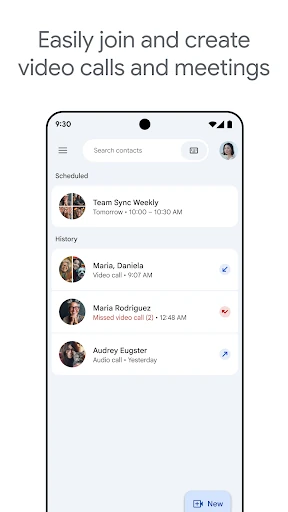
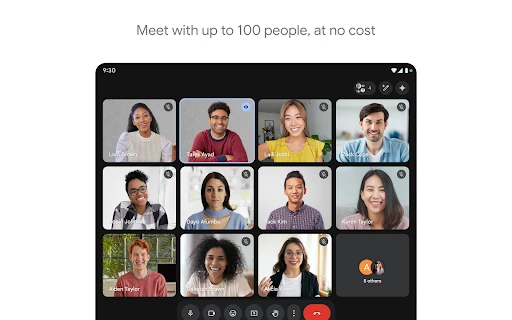
Google Meet is a video-calling app for keeping up with friends and family or talking with a team. I like that its practical tools focus on making conversations easier to follow, from automatic light adjustment to live captions. It suits people who want a familiar way to meet across phones, tablets, and the web, though some of its more advanced features come with a premium plan.
A Call That Feels Easier
When I first opened Meet, I thought about the small video-call problems that crop up during an ordinary day: a dim room, background noise, or someone struggling to catch what was said. Meet is built for those conversations, whether I’m catching up with family or joining a work discussion. Automatic light adjustment, noise cancellation, and real-time captions are intended to help people see and hear one another more clearly.
That focus makes Meet a practical choice for a quick call when a text thread is getting too complicated. I can picture using it to talk through a plan with relatives or have a face-to-face team conversation instead of sending a string of messages. Effects, filters, reactions, and backgrounds add some room for expression, but the central purpose remains straightforward: bring people together for a video conversation.
Calls, Not Every Conversation
Compared with messaging, Meet is for moments when seeing and hearing the other person is useful. A video call can make a family catch-up feel more personal, while captions can help people follow spoken conversation. Compared with a basic voice call, the visual element and background effects give the meeting a different feel. It is a useful option when a conversation deserves more than a few typed replies.
Meet is not a replacement for every way of communicating. If I only need to send a short update, a message is simpler; if I want to work quietly through a document on my own, a calling app is not the tool for that job. Its value is in live conversation. Some capabilities, including AI-powered note-taking and speech translation, are premium features, so the experience is not identical for every user.
Small Habits for Better Calls
A little preparation can make Meet more comfortable to use. I’d give myself a moment to find a spot where my face is visible and the conversation is easy to hear, then consider whether a background or effect suits the call. Automatic light adjustment and noise cancellation can help with common distractions, but they are not a reason to ignore the room entirely. A calmer setting still makes a difference to the overall experience.
For conversations where following every word matters, I’d consider whether live captions are useful and available in the language involved. Meet’s description notes that captions and speech translation do not cover every language, and feature availability can also depend on the device. I’d treat premium tools as optional extras rather than assume every call includes them. Keeping those limits in mind helps set expectations before a meeting starts.
Reads About Google Meet
More From Our News Desk

How I Build a Free Streaming Lineup With Tubi

Why Crunchyroll Is the Default Anime App for So Many Fans

YouTube TV: A Practical Guide to Cutting Cable

Rummikub and the Small Comfort of Phone Games

TeamViewer Remote Control or AnyDesk for Helping Family?

Gmail, Yahoo Mail and Outlook: A Calmer Phone Inbox
Who Will Feel at Home
I’d recommend Google Meet to people who regularly want face-to-face conversations from a phone, tablet, Google Nest device, or the web. It can suit family members who live apart, friends planning a catch-up, and teams that find a spoken discussion more useful than a long chain of messages. The mix of practical call aids and optional expressive effects gives it room for both casual conversations and more focused meetings.
It may be less appealing if you rarely make video calls or prefer to keep communication to short texts. People looking specifically for premium tools such as AI-powered note-taking or speech translation should check the plan details before counting on them. Language coverage and device capabilities also matter for certain features. For occasional calls, though, Meet’s basic purpose is easy to understand: connect with people and make it easier to follow the conversation.
Google Meet is developed by Google LLC and is a communication app. On Google Play it has over 10 billion installs and a 4.4-star rating from around 12 million ratings. The app is free, and the store information says it contains no ads and offers no in-app purchases. Its content rating is Everyone.
The app was released on August 16, 2016, and its listed last update is October 26, 2026. The version varies with device. A minimum Android version is not specified in the available app facts, so it is worth checking Google Play for requirements that apply to a particular device.
The Details That Shape a Meet Call
A Familiar First Impression
Meet’s purpose is clear from the outset: it is a place for video conversations, not a general-purpose productivity suite. I appreciate that the central idea is easy to grasp even before getting into its extra tools. Whether the occasion is a friendly catch-up or a team conversation, the app is designed to help participants see and hear one another.
The broader device picture is useful, too. Google describes Meet for Android and iOS phones, tablets, Google Nest devices, and the web. That gives people options for where to join, rather than tying the service only to a phone. The exact experience can depend on device specifications, so I would not assume every feature behaves the same way everywhere.
The Everyday Conversation
Day to day, the core experience is the call itself. Meet’s tools aim to reduce distractions that can make a conversation harder to follow: automatic light adjustment can help when the room is dim, and noise cancellation is intended to address unwanted sound. These are practical concerns rather than flashy extras. They matter most when a call happens in the middle of an ordinary, imperfect day.
Real-time captions are another useful option for following what is being said. I can see their value in a noisy environment or when listening closely takes extra effort, while remembering that captions are not available in every language. That limitation is worth bearing in mind for a multilingual group. The app’s emphasis is on helping people stay connected, not promising that every call will be effortless.
Useful Ways to Express Yourself
Meet also includes effects, filters, reactions, and backgrounds. These give a call a more personal or playful feel without changing its basic purpose. I like that the same app can accommodate a relaxed family chat and a more restrained team conversation; people can choose whether those expressive touches suit the moment rather than making them the whole point.
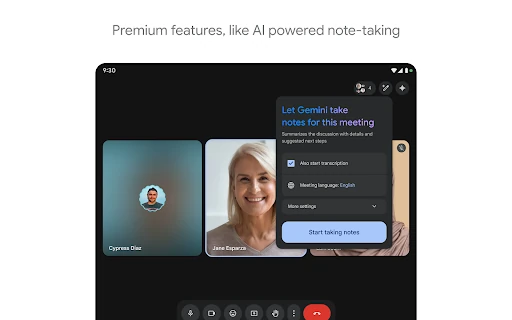
The more advanced additions include AI-powered note-taking and real-time speech-to-speech translation. Those can be meaningful in the right context, especially when people want help keeping track of a discussion or bridging a language gap. They are premium features, however, and speech translation is not available in every language. I’d check plan and language availability before relying on either one for an important conversation.
A Practical Calling Routine
For a routine family catch-up, I’d use Meet when a conversation would benefit from seeing everyone rather than relying on messages. Before joining, I’d think about lighting and background noise, and whether captions might make the conversation easier to follow. Those small considerations fit the app’s strengths without turning a casual call into a technical project.
For a team discussion, I’d keep the same basic approach but be more deliberate about the tools. Noise cancellation and captions may help people stay focused, while backgrounds can offer a little privacy or polish. If the group expects note-taking or translation, I’d first make sure those premium capabilities are available to the people and devices involved. That quick check can prevent awkward surprises once everyone is together.
Keep Expectations Grounded
Meet’s strongest features have practical limits. Captions and speech translation do not support every language, and certain features depend on device specifications. Noise cancellation and AI-powered note-taking are premium features. I would not plan an important meeting around an assumption that every participant has access to every tool; checking the relevant availability in advance is the sensible approach.
The app is most compelling when people actually want a live video conversation. It cannot make a poor connection or an unsuitable environment disappear, and its expressive effects may not be welcome in every setting. Nor does everyone need a dedicated video-calling app for occasional short updates. Those are not deal-breakers, but they help define the kind of user who will get the most from Meet.
Google Meet makes a solid case for itself with a clear job and thoughtful tools for common call frustrations. I especially like the combination of practical aids, such as captions and light adjustment, with optional effects that keep casual calls from feeling stiff. Its limits around premium features, language availability, and device support are worth understanding before depending on them.
I’d recommend Meet to anyone who often talks with family, friends, or coworkers by video and wants options for making calls easier to follow. If video conversations are rare or you mainly need quick text updates, it may be more app than you need. For regular callers, it is a capable, approachable way to bring people together.
Google Meet Frequently Asked Questions
What is Google Meet used for?
Google Meet is used for video conversations, including catching up with friends and family and collaborating with a team. It offers tools such as automatic light adjustment, noise cancellation, and real-time captions to help people see and hear one another. Effects, filters, reactions, and backgrounds provide additional ways to express yourself during a call.
Which devices can use Google Meet?
Google Meet is described for Android and iOS phones and tablets, Google Nest devices, and the web. The exact availability of particular features can depend on device specifications. If you are choosing a device for a specific feature, it is worth checking the current store information and feature details for that device.
What Android version does Google Meet require?
The Android version requirement can vary or may be updated over time, so check Google Play for the requirement that applies to your device. The app’s version itself is listed as varying with device. Feature availability can also depend on device specifications, which is worth considering if you need a particular calling tool.
Does Google Meet cost money?
Google Meet is free to download, and its app facts show no in-app purchases or ads. Some capabilities described by Google, including AI-powered note-taking, speech translation, meeting recording, and noise cancellation, are premium features. Check Google’s current plan information and the store details if you want to know whether a particular feature is included for you.
Is Google Meet suitable for family calls?
Yes. Google Meet is intended for calls with family and friends as well as team collaboration, so casual catch-ups are among its uses. Tools such as captions and automatic light adjustment can help with common conversation challenges, while effects and backgrounds add optional personality. Language support and feature availability vary, so check those details if a call depends on them.
Pros
- Practical call aids include automatic light adjustment, noise cancellation, and real-time captions.
- Works across phones, tablets, Google Nest devices, and the web.
- Effects, filters, reactions, and backgrounds let callers add personality.
- Free to use, with no ads or in-app purchases shown in the app facts.
Cons
- Some useful capabilities, including noise cancellation, are premium features.
- Captions and speech translation are not available in every language.
- Feature availability can depend on device specifications.
- Category
- Communication