Garmin Explore™
- 5.76K
- 3.5
- Installs
- 1.00M
- Price
- Free
Screenshots
Analysis by Reviewed APKs
Garmin Explore is a trip-planning and navigation companion for people who use compatible Garmin devices outdoors. It brings maps, saved locations, courses, and activity records together, with offline downloads for areas beyond cell coverage. I like its clear focus on preparing for a trip and keeping its details organized. It is most useful as part of a Garmin setup, rather than as a general-purpose map app for every outing.
Planning Beyond Cell Coverage
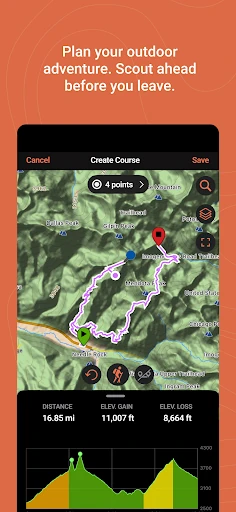
When I’m getting ready for a day on unfamiliar trails, I want more than a rough idea of where the route goes. Garmin Explore lets me look up places such as trailheads and summits, plan a course between start and finish points, and download maps while I still have Wi-Fi or cellular service. That preparation matters when the drive ends and the phone signal disappears. The app is built around taking useful trip information along, not hoping the network follows me.
Once a route is planned, I can keep its course and related locations together in the app’s saved data. Compatible Garmin devices can sync with the phone, and saved information can also sync to a Garmin Explore web account when the phone is connected. On an actual trip, that setup makes the app feel like a planning desk and field companion in one. I would sort out the route and downloads at home, then use the saved material when coverage gets patchy.
A Garmin Companion, Not Every Map
The obvious comparison is a general map app that can find businesses, give driving directions, and answer quick questions around town. Garmin Explore has a narrower outdoor focus: it is for planning trips, working with waypoints and tracks, downloading maps, and syncing information with compatible Garmin devices. That focus is useful if those are already part of your routine. The app’s value is less about replacing every map on your phone and more about keeping an outdoor trip’s data in one place.
I would not choose it as my only navigation app for errands or daily commuting. Its central features are organized around outdoor trips and compatible Garmin hardware, so someone without that setup may not get the same benefit. It also takes some preparation: maps for offline use need to be downloaded before heading out of coverage. If I only want quick directions to a nearby café, this would be more specialized than I need; for a planned route and saved locations, that specialization makes sense.
Small Habits That Help
The most useful habit is to prepare while I have a connection. I can stream maps during planning to save phone storage, then download the areas I expect to need offline. I’d also check that the course and important waypoints are saved before leaving. This simple routine avoids treating the trailhead as the place to discover that a map still needs downloading. It also makes the app’s offline purpose practical rather than something I remember only after service has vanished.
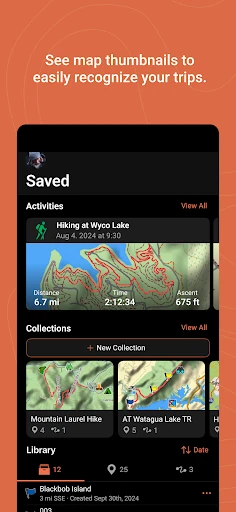
I’d use collections to keep each trip’s information together instead of letting every saved point become one long, hard-to-scan list. The activity library can be used to review and edit saved waypoints, tracks, courses, and activities, with map thumbnails to help recognize trips. After a connected outing, syncing can preserve created information in a Garmin Explore web account; cloud storage requires a Garmin account. These habits make it easier to find the relevant route again when planning the next trip.
More From Our News Desk

Zoom Meetings, Google Meet, or Teams: Which Is Easiest to Join?

How I Build a Free Streaming Lineup With Tubi

Why Crunchyroll Is the Default Anime App for So Many Fans

YouTube TV: A Practical Guide to Cutting Cable

Rummikub and the Small Comfort of Phone Games

TeamViewer Remote Control or AnyDesk for Helping Family?
Who Will Get the Most From It
I’d recommend Garmin Explore to hikers, campers, and other outdoor travelers who already use a compatible Garmin device and want a place to prepare routes and organize trip data. It is especially appealing to people who regularly leave cell coverage and are willing to download maps in advance. The combination of courses, waypoints, tracks, collections, and activity records gives a trip more structure than a single saved pin on a general-purpose map.
It may be a poor fit for someone who wants an all-purpose navigation app, rarely plans trips, or does not have compatible Garmin hardware. The app’s job is closely tied to that ecosystem, and its strongest use comes from syncing phone and device data. People who dislike planning ahead may also find offline map downloads an extra step. For me, it suits a deliberate outdoor routine better than spontaneous, everyday navigation.
Garmin Explore is developed by Garmin and is available on Google Play for Android. The store shows more than one million installs and a 3.5-star rating from about 5,800 ratings. The app is free to download, and the provided store details indicate that it contains no ads and offers no in-app purchases. Its content rating is Everyone.
The listed version is 4.16. Garmin Explore was released on October 11, 2018, and its last update is dated September 28, 2026. A minimum Android version is not included in the supplied app details, so I would check Google Play for the requirement that applies to a particular phone or tablet. A compatible Garmin device is needed for the device-pairing features described by Garmin.
A Closer Look at Trip Planning
A Purposeful First Look
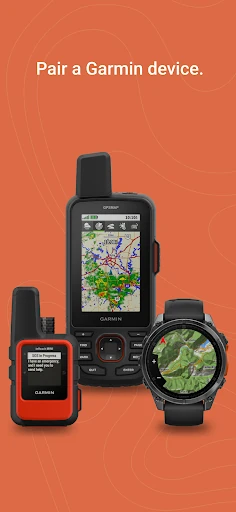
When I first opened Garmin Explore, its purpose was easy to understand: it is about outdoor trip data, not a broad directory of places to go. The app pairs a phone or tablet with a compatible Garmin device, then helps with maps, planning, and saved information. That clear role is reassuring if I know what I want from it. It also means the experience makes most sense after I have confirmed that my Garmin device is compatible.
I would begin by signing in or creating a Garmin account if I wanted cloud storage, then check the device connection and prepare a map area. The account is required to store data in the cloud, while maps can be streamed during pre-trip planning when a connection is available. Garmin also notes that GPS use in the background can substantially affect battery life. I’d keep that in mind before relying on a long tracking session.
Using It on a Trip
Day to day, the practical rhythm is plan first, then use the prepared information outdoors. I can search for geographic points, set a course’s start and finish, and download maps for offline use. When the phone is out of cellular range, those downloads help make the map available without a network connection. The app also supports outdoor navigation and trip planning with or without Wi-Fi or cellular service when used with a compatible Garmin device.
I like that the saved material is not limited to one route. Waypoints, tracks, courses, and activities can be reviewed and edited in the activity library, and trip-related data can be grouped in collections. After an outing, those records give me something more useful than trying to reconstruct the day from memory. When a connection returns, created waypoints, courses, and activities can sync to the Garmin Explore web account if I use cloud storage.
Maps and Saved Details
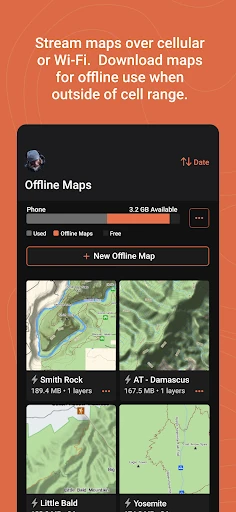
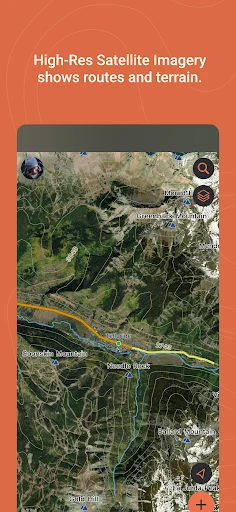
The map options are a strong part of the package. Garmin describes unlimited map downloads, including topographic maps and USGS quad sheets, as well as aerial imagery. Streaming maps while connected is useful for scouting without immediately using phone storage; downloading a chosen area is the better move for a trip outside coverage. That distinction gives me a sensible way to balance preparation and storage instead of downloading everything just in case.
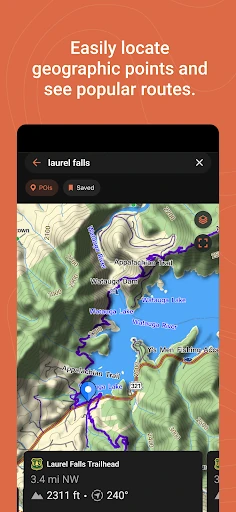
The search tool is aimed at useful geographic points, such as trailheads and mountain summits. For route preparation, I can create a course by choosing its start and finish, then sync it with a compatible Garmin device. The saved collections list can keep related trip data together, while map thumbnails in the activity library make past trips easier to recognize. These features work together: they help turn scattered coordinates and recordings into organized trip information.
A Pre-Trip Routine
For a weekend outing, I’d start by searching for the trailhead and any other locations I want to remember. I’d map out the course, check the start and finish, and save the relevant details in a collection for that trip. While still connected, I’d stream maps to inspect the area, then download the map coverage I expect to need. This is a calm, practical routine that moves the work to the sofa instead of the parking lot.
Before leaving, I’d make sure the phone and compatible Garmin device have synced the planned information. During the trip, the app can support navigation and location tracking; LiveTrack can let loved ones follow a location in real time when used with a compatible smartphone and inReach-enabled Garmin device. Afterward, I’d review the saved activity and let the data sync when I’m back online. The routine is simple, but it depends on preparation and compatible equipment.
Limits to Keep in Mind
The biggest limitation is also the app’s defining choice: Garmin Explore is designed around compatible Garmin devices. If I do not own one, pairing and syncing are not part of my experience, and the app may feel like more setup than I need for casual map browsing. It is best judged as a companion for outdoor planning, not as a direct replacement for every navigation tool or for a device-independent map app.
Offline use also asks me to prepare maps before I lose service. GPS running in the background can have a noticeable effect on battery life, which matters on a long day away from a charger. Cloud storage requires a Garmin account, and LiveTrack has its own compatible-device requirements. None of that makes the app hard to understand, but it does mean I should check my setup and power needs before depending on it outdoors.
Garmin Explore makes the most sense when I treat it as a connected part of an outdoor routine: plan a course, save useful places, download maps, and keep trip records organized. Its offline preparation and Garmin-device syncing give it a clear purpose. I appreciate that focus, even though it is more specialized than the map app most people open for everyday directions.
I’d recommend it to Garmin users who like to plan ahead and want routes and activity data organized across trips. If you mainly need casual navigation or do not have compatible Garmin hardware, I’d look elsewhere first. For the right outdoor setup, Garmin Explore is a practical companion, provided you prepare downloads and keep battery use in mind.
Garmin Explore Frequently Asked Questions
What is Garmin Explore used for?
Garmin Explore is for outdoor trip planning, mapping, and navigation with compatible Garmin devices. It can help you find places such as trailheads, create courses, save waypoints and tracks, and download maps for use beyond cellular coverage. It also organizes activities and can sync created trip data to a Garmin Explore web account when you have a connection and a Garmin account.
Which phones and devices work with Garmin Explore?
Garmin Explore is an Android app for smartphones and tablets, and its device-pairing features require a compatible Garmin device. Compatibility depends on the Garmin model, so check the compatibility information in the Google Play store or Garmin’s device resources before relying on a particular setup. The app’s LiveTrack feature also has requirements involving a compatible smartphone and inReach-enabled Garmin device.
What Android version does Garmin Explore require?
The minimum Android version can vary by app update and device, so check the current Google Play store details for the requirement that applies to your phone or tablet. Garmin Explore is intended for Android smartphones and tablets, and using its pairing features also depends on having compatible Garmin hardware. Checking both before a trip is a sensible way to avoid setup surprises.
Does Garmin Explore cost money?
Garmin Explore is free to download on Google Play. The supplied store details show no in-app purchases and no ads. Some features still depend on a compatible Garmin device, and cloud storage requires a Garmin account. Store information can change, so it is worth checking Google Play for the current app details before installing or planning around a specific feature.
Is Garmin Explore a good fit for casual users?
It can suit casual outdoor users who own compatible Garmin hardware and want to plan a route or save trip locations. It is less compelling if you only need everyday directions or do not want to prepare maps before going offline. Its strongest benefits are organized outdoor data, offline map downloads, and syncing with compatible Garmin devices, rather than general-purpose navigation.
Pros
- Offline map downloads support outdoor navigation beyond cellular coverage.
- Courses, waypoints, tracks, and activities stay organized in one place.
- Collections and map thumbnails make saved trips easier to find.
- Free to download, with no ads or in-app purchases in the provided store details.
Cons
- The most complete experience depends on owning compatible Garmin hardware.
- Offline maps require advance downloads, and background GPS can drain battery.
- Cloud storage requires a Garmin account.
- Category
- Maps & Navigation
- Version
- 4.16