Moovit: Your Transit Tracker
- 1.50M
- 3.9
- Installs
- 100.00M
- Price
- Free

Screenshots
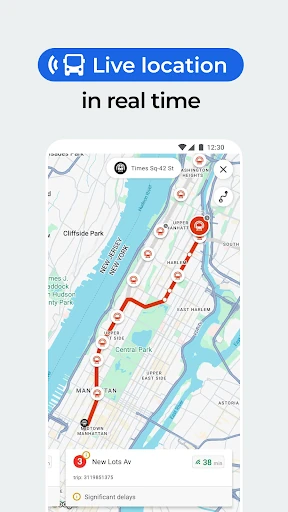
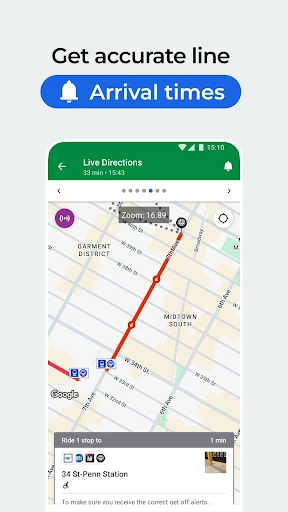
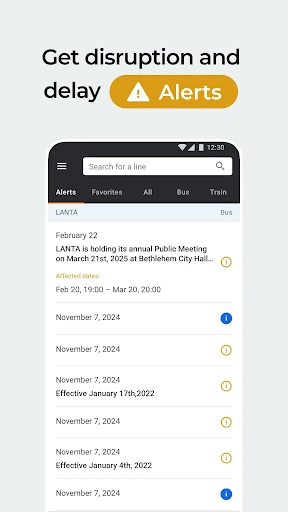
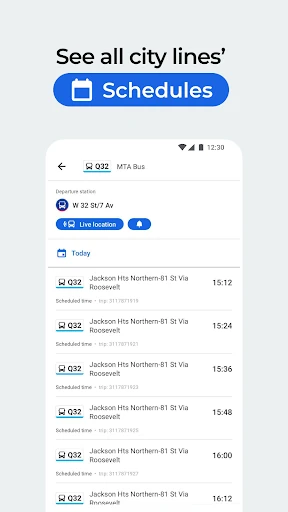
Analysis by Reviewed APKs
Moovit: Your Transit Tracker is for planning and following trips on city buses, trains, subways and other transit options. I’d point regular commuters, occasional city visitors and anyone combining walking or biking with public transport toward it. After spending time with its route guidance, arrival information and saved favorites, my take is that it can make an unfamiliar or changeable trip easier to manage, though its usefulness depends on local coverage.
A trip with fewer guesses
When I first tried to picture Moovit in an everyday routine, the useful moment was leaving for an appointment across town without knowing the area well. I could plan a transit journey, check arrival information for buses or trains, and follow directions between stops and the destination. Instead of juggling a map and a timetable, I could keep the journey’s main steps together and see when it was time to move on.
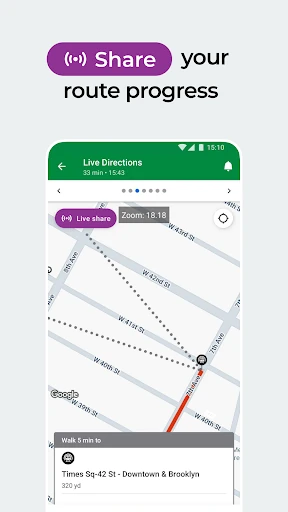
The live guidance is especially relevant when a connection has a short window or I’m walking toward a stop I haven’t used before. Moovit can provide notifications as I approach my destination, while service alerts can flag reported delays or changes that may affect the plan. I wouldn’t treat any live estimate as a promise, but having a current reference makes waiting and adapting feel less like guesswork.
Transit first, not everything
Moovit’s clearest role is as a public-transit companion. It brings bus, subway and train information into route planning, with bike routes and dockless scooter travel also part of the broader mix described for the app. That makes it a more natural fit for a journey with several legs than a tool focused only on driving directions. In select cities, ticket purchasing and validation are available too, although that depends on local support.
I wouldn’t choose Moovit as a general-purpose travel planner for every kind of trip. Its focus is getting around with urban transit, rather than replacing a dedicated car-navigation app or handling every booking task everywhere. The recent addition of intercity bus, train and ferry ticket booking applies to journeys across more than 40 European countries, so it is a useful extra for some travelers, not a universal substitute for checking options in a destination.
Small habits that help
I’d save the lines, stations and places I use often rather than searching from scratch each morning. Moovit’s personalized favorites are meant to make those regular checks quicker and can surface updates affecting familiar routes. A quick look before leaving gives me a chance to notice a reported disruption and consider another route, instead of discovering a problem only after reaching the stop.
For an unfamiliar trip, I’d check the route before setting out and keep the live directions handy as I walk between stops. Downloaded or offline transit maps can be useful when reception is weak or I’m underground, while alerts and community-reported information add context when service conditions change. Those features work best as practical aids: I’d still check signs and local instructions, especially when an itinerary depends on a tight connection.
More From Our News Desk

Zoom Meetings, Google Meet, or Teams: Which Is Easiest to Join?

How I Build a Free Streaming Lineup With Tubi

Why Crunchyroll Is the Default Anime App for So Many Fans

YouTube TV: A Practical Guide to Cutting Cable

Rummikub and the Small Comfort of Phone Games

TeamViewer Remote Control or AnyDesk for Helping Family?
Who may find it useful
I’d recommend Moovit to people who regularly ride buses or trains and want arrival information, route directions and service updates in one place. It also makes sense for occasional riders navigating an unfamiliar city, especially when a trip includes walking between transit legs. The ability to save favorite lines and stations suits a commute, while offline maps and live guidance can help when a route is less familiar.
It may be less useful if the transit options in your area are limited or the information you need is not covered locally. Some features, including digital ticketing, depend on the city, and the app’s main purpose is urban mobility rather than general driving navigation. I’d also consider whether ads and optional in-app purchases fit your preferences. For a traveler heading to Europe, the intercity booking addition may be relevant; elsewhere, the core transit tools are the main draw.
Moovit is the developer, and the app is categorized under Maps & Navigation. It is free to download on Google Play, where it has more than 100 million installs and a 3.9-star rating from around 1.5 million ratings. The content rating is Everyone. The app was released on March 28, 2012, and its most recent update in the supplied store information was February 2, 2026.
The app contains ads and offers in-app purchases, with listed items ranging from $0.99 to $19.99. The Android requirement and current version can vary, so I’d check the Google Play page for the version available to a particular device. Ticket purchases and validation are supported only in select cities; the newer intercity ticket booking feature covers journeys in more than 40 European countries.
Following a route from start to finish
Getting oriented
My first impression of Moovit is that it has a clear, practical job: help me work out how to get somewhere by transit and keep track of the trip. Rather than thinking only in terms of departure times, I’m looking at a route that can include walking to a stop, riding, and continuing toward the destination. That framing is helpful when I’m new to a neighborhood or piecing together an unfamiliar journey.
I’d begin by checking the route options for a destination and then look over the steps before setting off. The live directions and arrival updates are most useful once a trip is underway, while saved favorites make repeated journeys easier to revisit. The app’s tools vary by location, so the first route search is also a practical way to see which transit information is available where I am.
The daily ride
On a normal commute, the appeal is having a place to check transit arrivals and follow a route without relying only on memory. Moovit describes real-time arrival information drawn from GPS on buses and trains, alongside alerts about service changes, delays and traffic issues. That combination can help me decide whether to keep waiting or adjust my plans, particularly when the usual service is disrupted.
The step-by-step live navigation is a useful companion for the parts between rides. It can tell me how far to walk, provide arrival updates and notify me as I near my destination. I like that this treats a transit trip as a chain of small decisions rather than a single route line. I would still allow time for delays and check local signs when the situation on the ground calls for it.
More than arrival times
A few features broaden Moovit beyond checking when the next bus might arrive. Personalized favorites let me keep regular lines, stations and places close at hand, with updates for those familiar routes. Community-powered reports add information about station conditions, disruptions and schedules. Together, those tools can give a regular rider both a quick daily reference and a heads-up when the trip they know has changed.
The app also describes bike-friendly routing and updated bike docking station information, which can help when cycling is one leg of a wider journey. Offline transit maps are another practical addition for underground travel or moments without a signal. Ticket purchase and validation are available in select cities, while its newer intercity tickets cover bus, train and ferry journeys across more than 40 European countries.
A practical trip routine
For a morning appointment in a part of town I rarely visit, I’d search the destination before leaving and compare the transit route options. I’d save a route or station if it became part of my routine, then check its arrival information before heading out. If a service alert appeared, I could review the guidance and decide whether I needed to change my timing or route.
Once walking, I’d keep the live navigation available for stop-to-stop directions and watch for notifications as I approached the destination. If I expected to lose reception underground, I’d make use of the offline map option. This isn’t a complicated ritual; it’s a quick check before leaving and a reference during the trip. The biggest benefit is having fewer separate details to remember while moving through an unfamiliar route.
Keep local limits in mind
Transit information and certain functions depend on the city. Digital ticketing is only available in select places, and a route planner is only as useful as the local coverage it can draw on. I’d test the routes I actually need before depending on the app for a daily commute. Live arrival estimates and user reports are helpful context, but I wouldn’t assume they remove every uncertainty from a changing service.
Moovit is free to download, but it contains ads and offers optional in-app purchases. The listed purchase prices range from $0.99 to $19.99 per item, so anyone who prefers an entirely ad-free or purchase-free experience should keep that in mind. The Android requirement and current version can vary. Its focus is urban transit, so it is not the right single tool for every travel mode or every kind of trip.
Moovit is a useful transit-focused app when I want to plan a city journey, check arrivals and follow the route as it unfolds. Favorites, service alerts and offline maps give it value beyond a one-time route search, while ticketing and intercity booking add options in supported places.
I’d recommend it to regular transit riders and travelers who want help navigating buses, trains and connected walking or biking legs. I’d be more cautious if local coverage is uncertain or if ads are a deal-breaker. Check the routes and features available in your area before making it part of every commute.
Moovit Frequently Asked Questions
What is Moovit: Your Transit Tracker used for?
Moovit is used to plan and follow urban transit journeys. It provides route guidance for public transport, arrival information for buses and trains, and alerts about service changes, delays and traffic issues. It also offers favorites, offline transit maps, bike-route information and, in some places, digital ticketing. The exact options can depend on the city.
Which devices can run Moovit: Your Transit Tracker?
Moovit: Your Transit Tracker is available for Android through Google Play. The Android version requirement can vary, so check the app’s Google Play page for the requirement that applies to your device. The current version can vary as well. The supplied app information describes its Android availability.
Does Moovit: Your Transit Tracker cost money?
Moovit is free to download on Google Play. It contains ads and offers in-app purchases, with listed items priced from $0.99 to $19.99 each. Ticket purchases within the app are available only in select cities, and the intercity ticket booking feature is for supported journeys in more than 40 European countries.
Does Moovit: Your Transit Tracker work in my city?
Moovit provides transit information and route planning, but the available services and features depend on location. Ticketing, in particular, is available only in select cities. I’d search for a route you regularly use and check the Google Play page for current details before relying on it for a specific commute.
Who should use Moovit: Your Transit Tracker?
It is a good fit for people who use buses or trains and want route directions, arrival information and service updates together. It can also help visitors navigate unfamiliar transit systems. It may be less suitable for someone seeking a general driving-navigation app, or for a rider whose local transit information is not covered well.
Pros
- Combines transit route guidance, arrival information and service alerts for everyday city journeys.
- Favorites can make repeated checks for regular lines and stations quicker.
- Offline transit maps and bike-route information broaden its usefulness beyond a single ride.
- Ticketing and intercity bookings add options in supported locations.
Cons
- Transit coverage and features depend on the city, with ticketing limited to select places.
- The free app contains ads and offers in-app purchases.
- Live arrival estimates and community reports are useful aids, not guarantees.
- Category
- Maps & Navigation
- Version
- VARY