Transit - Subway & Bus Times
- 346.90K
- 4.6
- Installs
- 10.00M
- Price
- Free

Screenshots
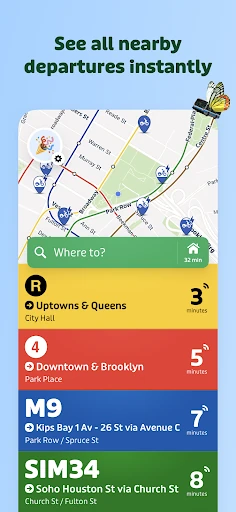
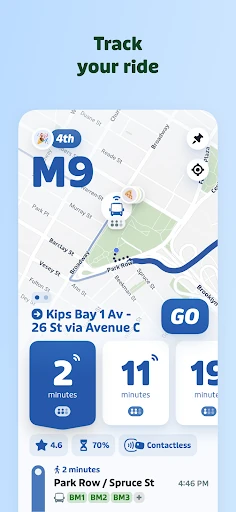
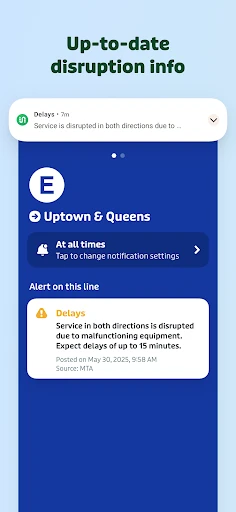

Analysis by Reviewed APKs
Transit - Subway & Bus Times is a public-transit planner for people who want to know which bus or train to take and when it is coming. It covers routes in more than 1,000 cities, with live departure information, vehicle tracking and options for combining travel modes. I like its focus on practical decisions during a trip, not just drawing a route on a map, though its usefulness depends on local coverage.
From the stop to your destination
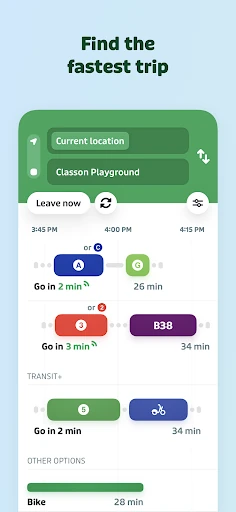
Picture leaving work with a grocery bag in one hand and a meeting across town in an hour. Instead of guessing whether the bus is close or walking to a station that may not help, I can use Transit to plan from A to B, check departure times and compare public-transit routes. If a bus plus subway connection looks faster than staying on the bus, the app can put that option in view too.
The live information changes how I think about the wait. A scheduled arrival is useful, but a vehicle’s real-time position and an updated estimate are more useful when I am deciding whether to hurry to the stop or take a calmer route. Transit also offers alerts for delays and disruptions. That makes it a handy companion for an ordinary commute, when a small change in timing can affect the rest of the trip.
A transit tool, not a car map
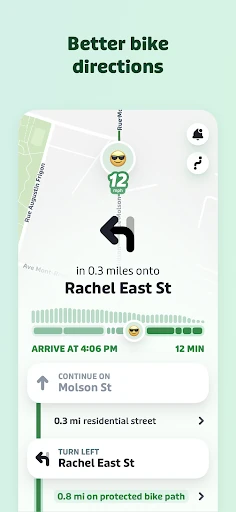
Transit sits closest to the route-planning and arrival-time tools that riders use for individual bus and rail systems. Its appeal is bringing many agencies and modes into one place, rather than making me switch between separate local apps to compare a bus, train or subway trip. In supported areas, it can also include ferries, rideshare, bikeshare and scooters, which gives the route planner more combinations to consider.
That focus is also a boundary. This is for getting around by transit and related shared or two-wheeled options, not a general-purpose car-navigation app. I would not choose it simply to find driving directions. Nor does a broad city count mean every service is equally useful everywhere; the available information depends on the city and its transit systems. Checking local coverage before relying on it is sensible.
Make repeat trips quicker
A little setup can make the app more useful on a regular commute. Transit lets riders save favorite destinations and lines, so a familiar trip can be planned with a tap rather than rebuilt from scratch. I would save home, work and a frequently visited station, then use those shortcuts when I am checking the next departure on the way out the door.
It is also worth adjusting the trip planner to match how you actually travel. The description says riders can ask it to avoid modes they would rather skip or long walks they do not want. Before a busy day, I would check the route options and disruption alerts, then use GO navigation for departure, transfer or get-off prompts when needed. Just remember that using GPS in the background can reduce battery life.
More From Our News Desk

Zoom Meetings, Google Meet, or Teams: Which Is Easiest to Join?

How I Build a Free Streaming Lineup With Tubi

Why Crunchyroll Is the Default Anime App for So Many Fans

YouTube TV: A Practical Guide to Cutting Cable

Rummikub and the Small Comfort of Phone Games

TeamViewer Remote Control or AnyDesk for Helping Family?
Who will get the most from it
I would recommend Transit to regular bus, subway and train riders who want arrival estimates and route choices together. It is especially appealing if your trips involve a transfer or you sometimes combine public transit with a bike or scooter. The supported-city footprint is broad, and the ability to save destinations and lines makes it a practical fit for people who repeat the same journeys each week.
It may be less useful for someone who rarely uses transit, lives somewhere with limited supported service, or mainly needs driving directions. Riders who prefer a very simple timetable may find the range of modes and trip options more than they need. I would also keep battery use in mind if using GPS-based GO navigation for a long stretch. The best test is whether the routes and live data work well for your local journeys.
Transit - Subway & Bus Times is developed by Transit, Inc. On Google Play, it has over 10 million installs and a 4.6-star rating from about 347,000 ratings. The app is free to download and contains in-app purchases, with items priced from $2.99 to $50.00. Google Play gives it an Everyone content rating, and the listed minimum Android requirement is Android 7.0.
The listed version is 6.1.0. The app was released on July 29, 2013, and its listed last update is January 25, 2026. Google Play indicates that it contains no ads. Those details describe the Android app; availability and purchase details can change over time, so it is worth checking the store page before installing or buying anything.
How Transit Fits Into a Real Commute
A clear first step
When I first open a transit planner, what I want is a quick path from where I am to where I need to go. Transit’s central job is straightforward: plan a public-transit trip, see route alternatives and check when a vehicle is expected. The supported network spans more than 1,000 cities, though the exact services available are tied to the city you are travelling in.
The experience is geared toward making a decision, not only reading a timetable. A route can involve more than one kind of transport, and the app can compare combinations such as bus and rail or scooter and metro. I would start by entering a destination and looking at the choices before leaving, especially if I am unfamiliar with the area or have a connection to make.
The everyday trip
For the daily routine, live departure times and real-time vehicle tracking are the features I would check most often. They turn the app into something I can consult at home, on the walk to a stop or while waiting on a platform. An updated estimate is particularly helpful when the printed schedule does not tell me whether the next bus is already nearby.
Transit also provides alerts about delays and disruptions, which can make a familiar trip easier to adapt. Rather than assuming the usual line is running normally, I can look for a change and compare the alternatives. The benefit is practical rather than dramatic: better information can help me decide whether to wait, change routes or leave a little earlier.
More than a route line
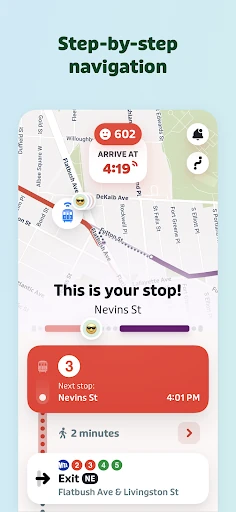
GO navigation is one of the more distinctive parts of the app. It can provide departure alarms and alerts for when it is time to get off or transfer. That is useful when I am focused on a conversation, reading or keeping an eye on a child instead of watching every stop. The feature is also described as contributing rider information that can improve estimates for other passengers.
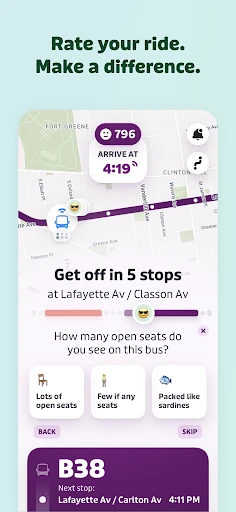
Another useful addition is crowdsourced information from riders. The app can show reports about crowding, on-time performance and station exits, details that a basic route map may not convey. In supported cities, Transit also offers direct fare payment and bikeshare pass purchases. These extras make the app more than an arrival board, but availability varies by local system and supported service.
A simple trip routine
For a weekday commute, I would save my regular line and destination first. Before leaving, I would check the next departure and look at any alerts affecting that route. If the normal option is delayed, I could compare alternatives instead of opening several separate agency tools and trying to work out the timing by hand.
On the way, GO can provide reminders for departures, transfers and getting off. For a new weekend destination, I would use the planner to compare a direct route with a combination of bus and rail, or another supported mode. When travelling through an area with unreliable service, offline schedules, stop locations, subway maps and trip planning may also be useful to have available.
Keep local limits in mind
The biggest practical caveat is local coverage. Transit supports a wide range of cities and agencies, but the app’s usefulness for a specific trip depends on what information and services are available there. A traveller should check their own city rather than assume that every feature described will apply to every route. Real-time estimates are helpful, but they are still estimates, not a promise that a vehicle will arrive exactly on time.
There is also a trade-off with GO navigation: the description warns that continued background GPS use can reduce battery life. That may matter on a long outing or a day away from a charger. And although the app is free to download, it offers in-app purchases. I would look at the store details if the purchase options matter to my decision.
Transit - Subway & Bus Times brings route planning, live arrivals and practical trip alerts into one transit-focused app. I especially like the idea of checking a real-time estimate, comparing a transfer and then relying on GO prompts while travelling. Saved destinations and offline transit information can make repeat trips and unfamiliar journeys easier to manage.
I would try it if I regularly use buses or trains and want a single place to compare supported options. It is not a replacement for car navigation, and local coverage is worth checking first. For riders in a supported area, it looks like a useful everyday tool, with the sensible caveat that GPS navigation can use extra battery.
Transit Frequently Asked Questions
What is Transit - Subway & Bus Times used for?
Transit - Subway & Bus Times helps people plan trips on public transportation and check live departure times and vehicle tracking. It can compare routes that combine modes, provide alerts about delays and disruptions, and offer GO navigation prompts for departures, transfers and getting off. It also includes offline transit information and some rider-reported details, with features depending on the supported city.
Which devices can run Transit - Subway & Bus Times?
The facts here describe the Android app on Google Play, which requires Android 7.0 or later. The app’s city coverage includes many transit systems, but that does not mean every route or feature is available in every place. Check the Google Play store page for current device compatibility and the app’s supported service details.
What Android version does Transit require?
The listed minimum requirement for Transit - Subway & Bus Times is Android 7.0. Device compatibility can also depend on current store requirements, so it is worth checking Google Play on the device you plan to use before installing. The listed app version is 6.1.0.
Does Transit cost money or include purchases?
Transit - Subway & Bus Times is free to download and contains in-app purchases. Google Play lists purchase items priced from $2.99 to $50.00, and indicates that the app contains no ads. Purchase availability and pricing may change, so check the current Google Play store page for the details that apply to you.
Is Transit suitable for my commute?
It may suit you if you regularly travel by bus, subway, train or another supported transit mode and want route choices alongside arrival information. Its usefulness depends on coverage for your city and lines. It is not aimed at people who mainly need driving directions. Check local support in the store or app details, and keep battery use in mind if using background GPS navigation.
Pros
- Combines live arrivals, route planning and disruption alerts for supported transit systems.
- Can compare trips that mix public transit with bikes, scooters or other modes.
- Saved destinations, offline information and GO prompts support practical everyday journeys.
- Rider reports add context about crowding, station exits and on-time performance.
Cons
- The available routes and features depend on coverage in your city.
- Continued background GPS use with GO navigation can reduce battery life.
- The app is focused on transit rather than general driving directions.
- Category
- Maps & Navigation
- Version
- 6.1.0