Lyft
- 536.84K
- 4.2
- Installs
- 50.00M
- Price
- Free

Screenshots

Analysis by Reviewed APKs
Lyft is a ride-booking and local transportation app for getting across town, reaching an airport, or handling errands when driving yourself is inconvenient. I found its appeal in the choice it puts in one place: rides, bikes and scooters, transit routes, and rentals, depending on what is available nearby. It suits people who want to compare practical ways to travel, though prices and ride choices can vary by city.
A Ride for the Day Ahead
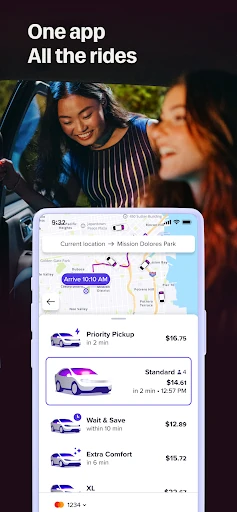
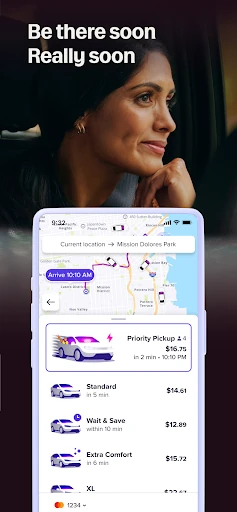
When I picture using Lyft on an ordinary weekday, it is the rushed trip across town with a destination already in mind but no time to sort out transport on the way. I enter the destination and can review the route and ride cost before choosing. If getting picked up quickly matters more than waiting for a lower-cost option, Priority Pickup is one of the choices described in the app.
That upfront look helps make the decision feel more practical than simply tapping for the first available ride. I might be heading to the office, carrying something home from an errand, or trying to reach a flight. The app presents several ways to travel, but what is offered depends on location. I would check the available options and price for the specific trip rather than assume every ride type is nearby.
More Than a Car Request
Lyft is best understood as a local transportation option, not a general-purpose map or a trip-planning tool for every kind of journey. Its mix of ride choices, bikes and scooters, transit routes, and rentals can make it useful when I am deciding how to cover a particular trip. For a simple point-to-point ride, requesting a driver is the obvious use; for some journeys, a transit route or another option may fit better.
Compared with relying on a personal car or choosing public transit alone, Lyft gives me several alternatives in one app, including Wait & Save and Priority Pickup. That does not make it a universal replacement: ride types vary by region, and prices can change with market conditions. I would not treat it as a fixed-price commute planner or assume every city has the same selection. Its strongest fit is flexible local travel.
Small Choices, Better Trips
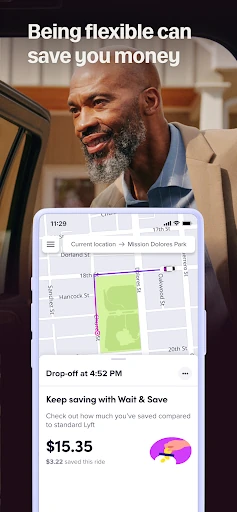
A useful habit is to enter the destination and pause over the route and cost before settling on a ride. If I have some flexibility, Wait & Save may be worth comparing with a quicker pickup option. When time is tighter, Priority Pickup is the choice described for getting going quickly. These are simple decisions, but making them before confirming a trip can help match the ride to the day’s priorities.
I would also check whether the app offers another mode that suits the journey, rather than defaulting to a car every time. Bikes and scooters, transit, and rentals are among the listed choices, though availability depends on the region. For a regular errand or commute, that quick comparison can become a small routine: set the destination, review what is available, and choose based on timing, cost, and the kind of trip.
More From Our News Desk

Zoom Meetings, Google Meet, or Teams: Which Is Easiest to Join?

How I Build a Free Streaming Lineup With Tubi

Why Crunchyroll Is the Default Anime App for So Many Fans

YouTube TV: A Practical Guide to Cutting Cable

Rummikub and the Small Comfort of Phone Games

TeamViewer Remote Control or AnyDesk for Helping Family?
Who Might Find It Useful
I would recommend Lyft to people who occasionally need a ride across town, want to compare pickup choices, or would like transit and other local travel options alongside car rides. It can also suit someone handling varied trips, from a commute to an airport run or a last-minute errand. The ability to see a route and ride cost before choosing makes it easier to consider the trip in context.
It may be less useful if you expect the same menu of services everywhere or need a price that never changes. Lyft says ride types vary by region and prices depend on market conditions, so each trip can require a fresh check. People who prefer to plan a journey entirely around fixed public transit may mainly use its transit-route option. For anyone else, it is a convenient set of local choices, not a promise that every mode will be available.
Lyft is developed by Lyft, Inc. On Google Play, it has over 50 million installs and a 4.2-star rating from about 537,000 ratings. The app is free to download, and the provided store facts indicate no in-app purchases. It is marked as containing ads and has an Everyone content rating. Those figures give a quick sense of its broad reach without saying how well a particular trip will work in your area.
The provided Android requirement is Android 9. The current version in the supplied facts is 2026.3.3.1769585085, with a last update date of January 30, 2026. Lyft was released on August 28, 2012. The description says ride types and prices vary by region and market conditions, so current availability and trip costs are best checked in the app when planning a journey.
How Lyft Fits Into Everyday Travel
A Straightforward First Look
When I first opened Lyft, the basic task was easy to understand: enter where I want to go, then look at the available route and ride cost. That sequence keeps the app focused on a real decision instead of burying the main purpose beneath a long explanation. For someone opening it in a hurry, the destination-first approach is a sensible starting point.
The range of choices is more notable than a single pickup button. Lyft describes Wait & Save, Priority Pickup, several ride categories, bikes and scooters, transit, and rentals. Not every choice will appear in every region, so the first useful step is simply to see what is offered for the trip at hand. The app’s recent update also brought a refreshed look and feel.
The Day-to-Day Decision
In everyday use, the most helpful part is comparing the route and cost before choosing how to travel. That gives me a chance to weigh a lower-cost wait against a faster pickup, or to consider a different mode if one is available. I can imagine using that pause before a morning commute, especially when I have enough time to choose rather than rushing into the first option.
The process is also relevant when plans change. If I need to run an errand or get across town without driving, I can use the same destination-and-options approach rather than figuring out a new routine for every trip. Still, the app’s usefulness depends on what is available in the local area and what the ride costs at that moment. I would treat each trip as its own comparison.
Choices Beyond Standard Rides
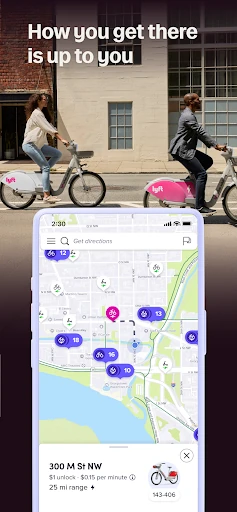
Lyft’s range of transportation options is its clearest point of difference. Wait & Save and Priority Pickup offer different approaches to getting a ride, while Lyft XL and Lyft Lux provide other ride categories. The description also includes bikes and scooters, transit, and rentals. That gives the app more than one possible role in a day, even though the actual menu depends on the city.
I also like that public transit is not presented only as an afterthought: Lyft says it can show the fastest public transit routes. For a trip where a car is unnecessary, that may make it worth checking the app before deciding. These options do not mean every journey can be completed in one mode or that every service is present locally. The practical value is having choices to compare when they are available.
A Practical Trip Routine
For a typical trip, I would start by entering the destination and checking the route and cost. Next, I would decide whether timing or saving matters more. Wait & Save is the lower-cost choice described, while Priority Pickup is aimed at getting moving quickly. If neither seems right, I would look at the other available ride types or see whether a transit route, bike, scooter, or rental appears for that location.
This routine makes sense for errands as much as for a commute. A short journey with flexible timing may lead me to compare different choices than a time-sensitive trip to the airport. I would make the decision based on the options shown for that particular destination, rather than relying on an assumption from a previous ride. A quick check before confirming is a modest habit that keeps the app’s choices useful.
Limits to Keep in Mind
The main limitation is that availability and price are not uniform. Lyft says ride types vary by region, and prices vary with market conditions. A familiar option may not be available in another city, and a past fare is not a reliable guide to a future one. That makes checking the app for each trip important, especially when comparing cost or choosing between a ride and transit.
The app also cannot make a transport option fit every situation. A person who needs a fixed fare, a particular ride category, or a consistent set of local services should check what is available before depending on it. Lyft’s description is centered on getting where you are going through local choices. It is most useful when you are open to comparing those choices, rather than expecting the same setup in every place.
Lyft makes the everyday task of choosing local transport feel manageable: set a destination, review the route and cost, then compare the options available. I like that its scope includes more than standard rides, while still keeping the central job clear. Its changing prices and regional availability are worth factoring into any plan.
I would try Lyft if I wanted a convenient way to compare rides and other local travel choices from one app. It is a sensible option for commutes, errands, and occasional trips, especially when flexibility matters. If you need the same services or price in every location, check the choices for your specific trip before relying on it.
Lyft Frequently Asked Questions
What is the Lyft app used for?
Lyft is used to find ways to get to a destination, including requesting rides and checking other available local options. The app can show a route and ride cost up front, and its described choices include different ride types, bikes and scooters, transit routes, and rentals. Availability varies by region, so the options shown for your trip may differ from those elsewhere.
Can I use Lyft on Android or other devices?
The facts provided here describe Lyft as an Android app available on Google Play, with Android 9 as the stated requirement. The supplied information does not establish availability on other platforms or provide a device-specific compatibility list. For current device support and requirements, check the Google Play page for Lyft on the device you plan to use.
How much does Lyft cost, and does it have purchases?
Lyft is free to download, and the provided facts say it does not offer in-app purchases. That does not mean rides themselves are free: the description says prices vary with market conditions. Check the app for the cost of a particular ride before choosing. Store details and trip prices can change, so the Google Play page and the app are the best places to verify current information.
Does Lyft offer the same rides everywhere?
No. Lyft says its ride types may vary by region, and the choices can include options such as Wait & Save, Priority Pickup, Lyft XL, Lyft Lux, bikes and scooters, transit, or rentals. The app may show a different selection depending on your city and trip. Check the available choices in the app for your location rather than assuming a service is offered everywhere.
Who is the Lyft app best suited for?
Lyft may suit people who want to compare local ride choices for commutes, airport trips, nights out, or errands. It is especially practical for someone open to checking alternatives such as transit or bikes when they are available. It may be less suited to people who need identical options or predictable prices everywhere, since availability and fares can vary by region and market conditions.
Pros
- Shows the route and ride cost before you choose an option.
- Offers several ride and transportation categories, depending on location.
- Includes Wait & Save and Priority Pickup for different trip priorities.
- Can show public transit routes alongside ride choices.
Cons
- Ride types and local availability vary by region.
- Prices change with market conditions, so fares can vary between trips.
- The best option may require comparing choices for each destination.
- Category
- Maps & Navigation
- Version
- 2026.3.3.1769585085