ColorNote Notepad Notes
- 3.97M
- 4.9
- Installs
- 100.00M
- Price
- Free

Screenshots
Analysis by Reviewed APKs
ColorNote Notepad Notes is a straightforward Android app for jotting down thoughts, keeping shopping lists and managing small to-dos. I see its appeal in the ordinary moments when a full project-management system would be overkill: remembering a few groceries, saving a quick idea or keeping a short task list handy. Its color-coded notes, checklists and reminders make it more capable than a bare notepad, while keeping the basic job simple.
A Note Between Errands
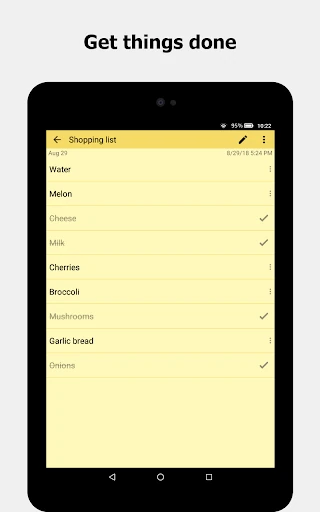
When I need to remember a few things on the way home, a checklist is easier than trying to keep them in my head. ColorNote lets me make a checklist note, add the items and tap each line as I pick things up. The completed lines get crossed out, so a quick glance tells me what is left. It is a small, practical job, and the app keeps that job front and center.
I can also picture using it during a busy workday: write down a thought before a call, save a short message draft or leave myself a reminder to follow up. A plain text note suits those quick captures, while colors help distinguish one kind of note from another. When I reopen the app, my notes are presented as a master list, rather than being buried inside a larger planning system.
A Notepad, Not a Project Hub
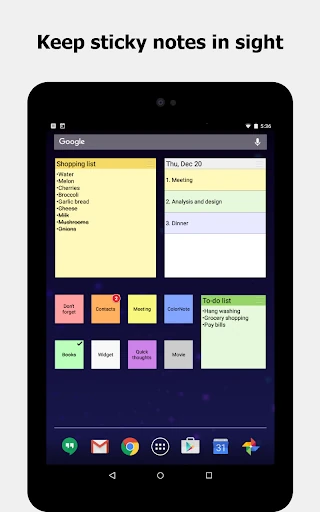
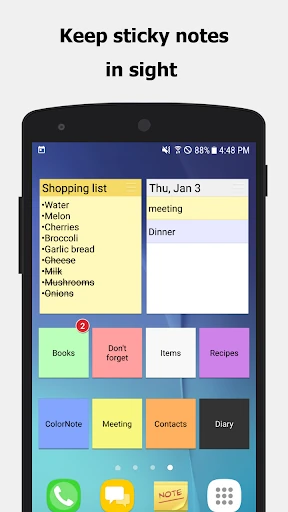
ColorNote sits closer to a digital memo pad than to a full task manager or a document editor. That is useful when I want a note I can make, revisit and check off without first building a project, assigning a workflow or sorting through elaborate controls. Its checklist and text formats cover everyday reminders and lists, and the home-screen widget can keep a note visible without opening the app.
I would not choose it as my main tool for coordinating a complicated team project or laying out a long report. The description focuses on individual notes, lists, reminders and organization, not shared workspaces or elaborate project plans. For someone who wants a quick personal notebook, that narrow focus is a strength. For someone expecting an all-in-one organizer, the simple approach may feel limited.
Small Habits That Help
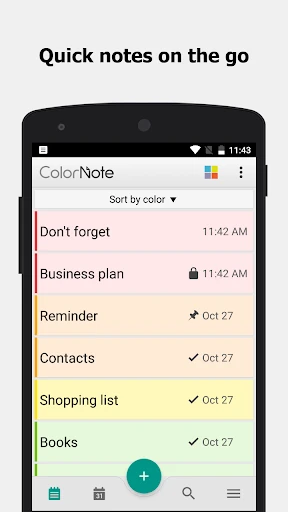
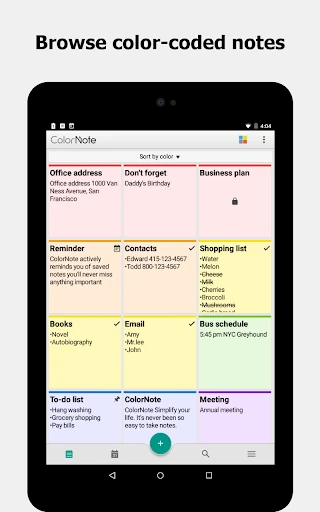
A useful habit is to give notes a simple color purpose, such as one color for errands and another for ideas. ColorNote supports organizing notes by color, and the master list can be viewed in ascending order, as a grid or by color. A consistent pattern makes it easier to scan a growing collection, especially when I have several small reminders rather than one big list.
For checklists, I would put the next action at the top and reorder items when priorities change; the app supports arranging checklist lines in edit mode. I would also use reminders for notes that need attention at a particular time, and search when I cannot remember where I put something. These are modest habits, but they make a lightweight notepad more dependable in a daily routine.
Reads About ColorNote Notepad Notes
More From Our News Desk

Zoom Meetings, Google Meet, or Teams: Which Is Easiest to Join?

How I Build a Free Streaming Lineup With Tubi

Why Crunchyroll Is the Default Anime App for So Many Fans

YouTube TV: A Practical Guide to Cutting Cable

Rummikub and the Small Comfort of Phone Games

TeamViewer Remote Control or AnyDesk for Helping Family?
Who will appreciate it
I would recommend ColorNote to people who want a quick place for everyday notes and to-do lists on an Android device. It suits students keeping short reminders, busy households tracking shopping and anyone who likes a simple written prompt more than a complicated planning setup. The choice of text or checklist notes, colors, reminders and a home-screen widget gives it several useful ways to keep small bits of information close at hand.
It may not suit someone who needs a feature-rich workspace for coordinating a group, or who expects extensive document formatting and project planning. The app’s appeal is its compact, personal style, not a deep system for managing every part of work and life. If all I need is a reliable place for short notes, that restraint is welcome; if I want a broad productivity suite, I would look elsewhere.
ColorNote Notepad Notes is a productivity app from Notes. Google Play shows over 100 million installs and a 4.9-star rating from around 4 million ratings. The app is free to download, contains no ads and offers in-app purchases, with listed item prices ranging from $1.99 to $15.99. Its content rating is Everyone.
The current version shown is 4.8.8, and the last update date is October 27, 2026. ColorNote is an Android app. The minimum Android version and original release date are not included in the available app details, so it is sensible to check Google Play for current device requirements.
How ColorNote Fits Into My Day
A Very Quick Start
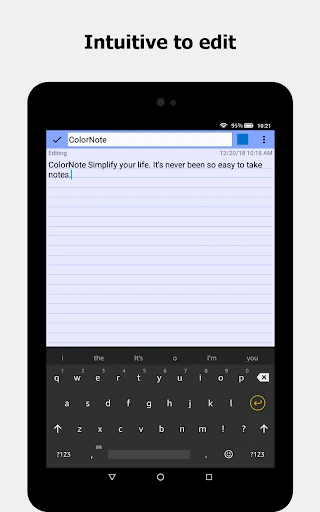
When I first open an app like this, I want to get a thought down before I forget it. ColorNote’s basic choices are easy to understand: make a text note or make a checklist. The description says finished notes are automatically saved, which is reassuring when I am entering a reminder in a hurry and do not want to stop to manage a separate save step.
The main screen is designed around a master list of notes, with options to view it in ascending order, as a grid or organized by color. That gives me a few ways to look through the same collection without changing what the notes are for. I would start with a couple of colors and a handful of notes rather than trying to impose a complex filing system.
The Everyday Note Loop
The routine is simple: capture a thought, return to it later, then edit, share, set a reminder or delete it as needed. A text note can hold anything from a short memo to a message draft. The checklist format works differently: tap a line to mark it complete, and the crossed-out text makes progress visible without requiring a separate task dashboard.
I like that checklist items can be rearranged in edit mode. A shopping list often changes as I think of things, and it is handy to adjust the order instead of rewriting everything. If the list is complete, its title is crossed out too. That small visual cue helps when I am scanning the main list and want to tell finished tasks from active ones.
Useful Extras, Kept Simple
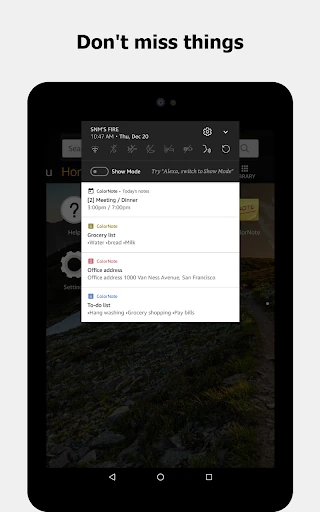
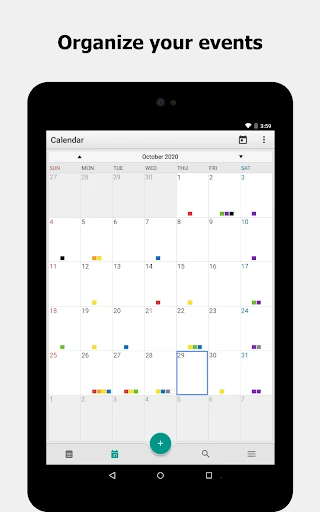
ColorNote goes beyond basic typing with reminders, a sticky-note widget and calendar organization. The widget can put a note on the home screen, while reminders can bring attention to a note through the status bar. The app describes alarm, all-day and repeating reminder options, making it possible to use notes for things that need a prompt rather than relying only on memory.
There are also search, list and grid views, and the option to share notes through SMS, email or Twitter. Calendar notes can be used for organizing a schedule or keeping a diary or journal. These additions broaden the app’s everyday uses without changing its central idea: individual notes and lists that are easy to revisit.
A Low-Fuss Daily Routine
A practical way to use ColorNote is to capture small tasks as they appear, then sort them into a few color groups when I have a spare minute. I might keep a checklist for errands, a text note for an idea and a reminder for something time-sensitive. The widget is another option when one particular note deserves a place on the home screen.
At the end of the day, I can review the list, cross off completed checklist items and revise anything still pending. Search offers a way back to a note when its title or color does not come to mind. For people who use both a phone and tablet, the app also describes online backup and syncing between devices, subject to signing in.
Limits to Keep in Mind
The main limitation is also the app’s defining choice: it is built around straightforward notes, not a large planning system. If my work depends on coordinating multiple people or organizing a complicated project, a collection of personal notes may not be enough. Color and checklists help with quick organization, but they do not turn a notepad into a full project-management tool.
Some of its extras need a little attention to setup. The description notes that widgets and reminders may not work properly if the app is installed on an SD card, because Android does not support those functions there. Online backup and sync require signing in, and the app says notes are not sent to its server before sign-in. Those details are worth considering if you plan to rely on those features.
ColorNote is a capable everyday notepad that keeps its focus on quick notes, checklists and reminders. I like that it can handle both a passing thought and a practical shopping list, then offer colors, search and a widget to make those notes easier to find. Its strongest quality is that it does not ask me to turn a small task into a big system.
I would recommend it to Android users who want an uncomplicated personal notebook with useful extras. If you need advanced project coordination or a more expansive planning workspace, its simplicity may not stretch far enough. For ordinary lists and reminders, though, ColorNote is a sensible app to try.
ColorNote Notepad Notes Frequently Asked Questions
What is ColorNote Notepad Notes used for?
ColorNote is used to write and organize notes, memos and lists, including to-do and shopping checklists. It also supports reminders, color organization, search, calendar notes and a sticky-note widget. Its focus is quick personal note-taking and everyday lists rather than complex project management.
Which devices can run ColorNote Notepad Notes?
ColorNote is an Android app. The minimum Android version is not included in the available details, and requirements can vary as the app changes. Check the Google Play store page to see whether your device and Android version are currently supported.
Does ColorNote Notepad Notes cost money?
ColorNote is free to download and contains no ads. It offers in-app purchases, with item prices shown from $1.99 to $15.99. Prices and purchase options can change, so check Google Play for the current details before buying anything.
Does ColorNote Notepad Notes sync across devices?
The app describes online backup and syncing between a phone and tablet. It says you need to sign in with Google or Facebook, and that notes are not sent to its server before sign-in. You can check the app’s current store details for information that may have changed.
Is ColorNote Notepad Notes a good fit for me?
It is a good fit if you want a simple Android notepad for short notes, reminders and checklists, with options such as colors and a home-screen widget. It may be less suitable if you need a full project-management system or extensive document tools. The content rating is Everyone.
Pros
- Offers both free-form text notes and tap-to-check lists for everyday tasks.
- Color organization, search and multiple list views help keep notes findable.
- Reminders and a home-screen widget make selected notes easier to notice.
- Free to download and contains no ads.
Cons
- Its simple personal-notepad approach may not suit complex project planning.
- Widgets and reminders may not work properly when installed on an SD card.
- Online backup and syncing require signing in.
- Category
- Productivity
- Version
- 4.8.8











