Xfinity
- 354.89K
- 3.8
- Installs
- 10.00M
- Price
- Free

Screenshots
Analysis by Reviewed APKs
Xfinity brings account and home internet tools together for people who already use Xfinity services. I found its appeal in the practical jobs it can handle from a phone: checking a bill, looking at plan details, testing a connection, or getting help. It is less of a general-purpose internet utility than a companion to an Xfinity account, but for customers, having those tasks in one place is useful.
A Quick Home Check-In
When I think about a typical use for Xfinity, it is the small interruption in an ordinary day: the connection feels sluggish just before a video call, or I want to check when a bill is due without opening a laptop. The app puts account management and internet tools within reach. I can check plan details, pay a bill, and use a speed test, rather than hunting through separate support pages.
For a connection question, the distinction between a general speed test and the Gateway Speed Test is handy. The latter checks the speed delivered directly to an Xfinity WiFi Gateway, which can help me understand the service reaching the equipment. The app also offers tools to activate equipment and test internet speed. I would use those options as a first step, then turn to support if the issue needs more attention.
A Companion, Not a Router
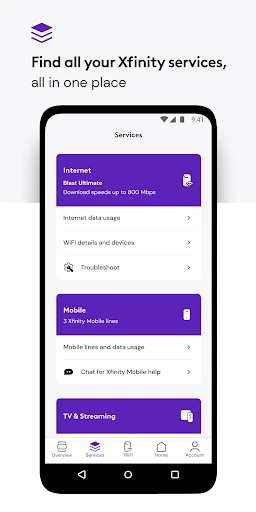
Compared with checking an account in a browser or contacting support for every small question, Xfinity keeps several customer tasks together on a phone. It covers service details, billing, equipment activation, support, rewards, and— for customers renting Xfinity equipment—home WiFi controls. That makes it a useful companion to the service itself, especially when I want to handle a quick check between other errands.
It is not a standalone internet provider, a general network monitor for any household, or a replacement for the service and equipment it helps manage. The listed tools are tied to Xfinity customers, and some WiFi features are specifically for customers who rent Xfinity equipment. If someone wants a broad utility that works independently of an Xfinity account, this is not the app I would choose.
Small Habits That Help
I would make the app more useful by checking it when I already have a reason to think about the account: after setting up equipment, when reviewing a plan, or when a connection seems off. Having an Xfinity ID and password ready is the simple starting point. From there, the app can bring together account information, help, and tools for testing the connection without making every check a separate task.
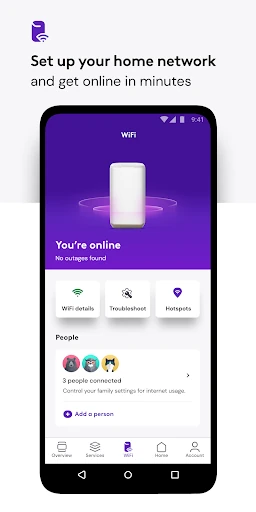
For renters of Xfinity equipment, it is worth exploring the WiFi options with a specific household need in mind. Family Settings can pause WiFi for a connected device and provide family-safe browsing controls, while user profiles and device tools offer more ways to manage the home network. I would also use the personalized tips when troubleshooting, rather than assuming every slowdown has the same cause.
More From Our News Desk

Zoom Meetings, Google Meet, or Teams: Which Is Easiest to Join?

How I Build a Free Streaming Lineup With Tubi

Why Crunchyroll Is the Default Anime App for So Many Fans

YouTube TV: A Practical Guide to Cutting Cable

Rummikub and the Small Comfort of Phone Games

TeamViewer Remote Control or AnyDesk for Helping Family?
Who Gets the Most From It
I would recommend Xfinity to people who already have Xfinity service and want routine account tasks within easy reach. It is a natural fit for someone who pays bills from a phone, occasionally checks plan details, or wants to try an equipment or speed tool before asking for help. The 24/7 real-time support option and Xfinity Rewards add useful reasons to keep it around beyond a single troubleshooting moment.
It may be less appealing to people who do not use Xfinity, or to customers who want a general-purpose app for managing unrelated internet equipment. Some of the deeper WiFi controls are described for customers who rent Xfinity equipment, so the experience depends on the services and equipment involved. If all I needed were occasional bill payments, I might use only a small portion of what the app offers.
Xfinity is a free Android app from Comcast. Google Play shows more than 10 million installs and a 3.8-star rating from about 355,000 ratings. It is rated Everyone. The app is listed as version 6.13.0-2, and its release date is April 18, 2017.
The app is free, with no in-app purchases or ads indicated in the provided store facts. Its last update is dated October 22, 2026. The minimum Android version is not included in the available facts, so check the Google Play entry for device compatibility before installing.
A Closer Look at Everyday Control
Starting With the Account
When I first opened an account-focused app like this, the first practical question was what I needed to sign in. Xfinity says getting started requires an Xfinity ID and the password set up when signing up for service. That makes the app feel aimed at existing customers from the start, rather than at someone browsing internet tools with no account.
Once signed in, the central promise is convenience: service management and support gathered in one place. The setup story also includes help for people who need to create an ID, look up an existing one, or reset a password. Those account-recovery options matter because a forgotten login can otherwise stop a quick bill check before it begins.
The Day-to-Day Jobs
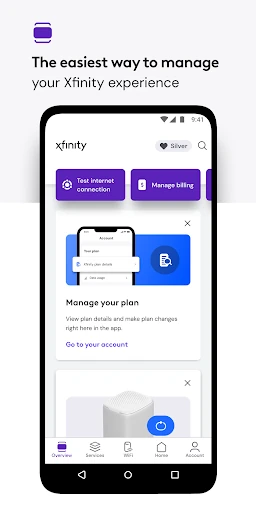
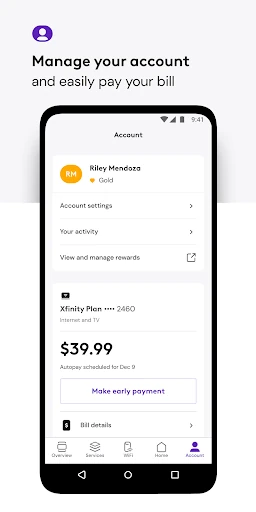
The most straightforward everyday uses are account maintenance and quick connection checks. Xfinity customers can pay a bill, view plan details, and change or upgrade services. If equipment is new or needs attention, the app includes tools to help activate it. I like that these are practical, occasional jobs rather than features that require a separate learning routine.
When the internet seems inconsistent, I would start with a test or the available troubleshooting tips, then use support if I still need help. The app describes 24/7 real-time support, which gives the quick tools a sensible next step. A speed result can inform what I do next, but it is only one part of understanding a home connection.
More Than Billing
The standout difference is how many parts of the Xfinity customer relationship sit beside one another. Along with account controls, customers get Xfinity Rewards, described as special perks, experiences, and product benefits. For someone who usually opens an account app only when a bill is due, rewards give it another occasional reason to check in.
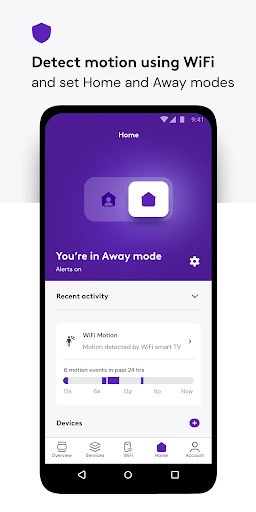
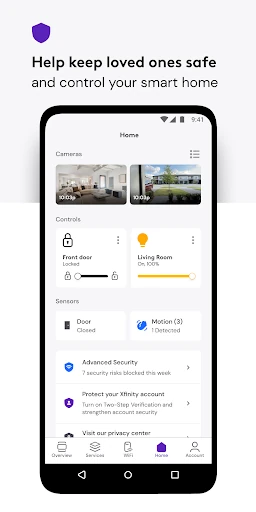
There are also home-network features for customers who rent Xfinity equipment. These include WiFi setup tools, user profiles, device-level controls, personalized performance tips, and the Gateway Speed Test. Family Settings can pause WiFi for a connected device and offer family-safe browsing controls. That is a broader toolset than a basic bill-payment app, though access to these controls depends on the equipment arrangement described.
A Practical Weekly Routine
I would keep a simple routine rather than checking the app every day. When a bill is due, I could review the account and pay it; when service changes, I could revisit plan details. If I have just set up equipment, I could use the activation tools. This keeps the app tied to real tasks instead of turning account management into another daily notification habit.
For a household using rented Xfinity equipment, a useful occasional check might include looking at device profiles or family controls and running the Gateway Speed Test if the connection has felt different. I would keep the test focused on the gateway and use the app’s support tools when I need assistance. The point is to make a small, informed check before spending time on a bigger troubleshooting session.
Keep the Boundaries in Mind
The main limitation is that Xfinity’s usefulness is tied to its service. People without an Xfinity account will not get the account-management experience described, and customers without rented equipment may not have the same WiFi management tools. That makes the app less universal than an independent network utility, even though it gathers a useful range of tasks for its intended audience.
The privacy and permissions detail is worth noticing if using CyberSecure on-the-go. The description says that, when enabled, the feature can occasionally run a VPN service and will ask for additional runtime permissions. I would read those prompts and consider whether the feature suits my needs before enabling it. The app’s broad toolset is helpful, but not every customer will need every option.
Xfinity makes the most sense as a practical companion for customers who want billing, plan information, support, and connection tools on their phone. I found the combination more useful than a billing-only app, particularly for people who rent Xfinity equipment and can use the home WiFi controls.
I would recommend it to Xfinity customers who like handling routine service tasks themselves and having support close by. If you want an internet app that works across providers, or do not use Xfinity, this is not the right fit. For its intended audience, it brings a lot of everyday account chores together.
Xfinity My Account Frequently Asked Questions
What is the Xfinity app used for?
Xfinity helps customers manage services and accounts, including paying bills and viewing plan details. It also offers equipment activation and internet speed tools, real-time support, and Xfinity Rewards. Customers who rent Xfinity equipment get additional WiFi management options, such as Family Settings and tools for profiles and connected devices.
Which devices can I use the Xfinity app on?
The provided app facts identify Xfinity as an Android app, available through Google Play. The minimum Android version is worth checking in the Google Play entry because device requirements can vary. The app description focuses on using an Xfinity ID and password to access customer and service tools.
What Android version does Xfinity require?
The minimum Android version is not included in the available app facts. Check the Google Play entry for the current device requirement before installing, since compatibility details can vary. The app is listed as version 6.13.0-2, but that version number does not by itself establish which Android releases are supported.
Does the Xfinity app cost money?
The Xfinity app is free to install, and the provided store facts show no in-app purchases or ads. Xfinity services themselves are separate from the app, so service pricing is not the same as the app’s download cost. Check Google Play and Xfinity’s service information for current details that may vary.
Is the Xfinity app useful if I rent my equipment?
Yes. The description says customers who rent Xfinity equipment get additional account and WiFi tools, including performance tips, Family Settings, profiles, device controls, and the Gateway Speed Test. It is best suited to people already using Xfinity services; people seeking a provider-independent network app may find it too specific.
Pros
- Combines account tasks, support, rewards, and internet tools in one customer app.
- Includes a Gateway Speed Test focused on speed delivered to Xfinity WiFi equipment.
- Renters of Xfinity equipment get useful WiFi and family controls.
- Free to install, with no ads or in-app purchases in the provided facts.
Cons
- Its account tools are primarily useful to existing Xfinity customers.
- Some WiFi management features are for customers renting Xfinity equipment.
- The minimum Android requirement should be checked in Google Play.
- Category
- Productivity
- Version
- 6.13.0-2