VooV Meeting
- 8.60K
- 2.8
- Installs
- 1.00M
- Price
- Free

Screenshots


Analysis by Reviewed APKs
VooV Meeting is a mobile video-conferencing app for people who need to join, host, or schedule meetings across teams and borders. It combines video and audio calls with screen, file, and message sharing, plus controls for meeting hosts. I found its appeal strongest for work or group conversations that need more than a basic call, though its modest Google Play rating makes it worth trying with realistic expectations.
A Call Between Busy Days
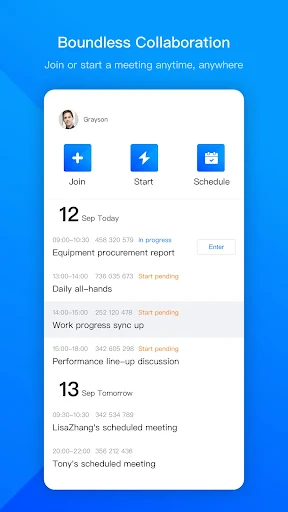
When I first opened VooV Meeting, I pictured the familiar scramble before a remote check-in: someone is joining from a phone, another person has a document to show, and the conversation needs to get underway without much fuss. The app is built around starting, scheduling, or joining a meeting, with audio and HD video as the main event. Its promise of supporting up to 300 attendees also makes it relevant beyond a small one-to-one call.
During a meeting, I would keep the useful extras close at hand rather than treating VooV as a camera-only app. Screen and document sharing can help when the group needs to look at the same material, while messaging gives participants another way to exchange information. Host management controls are aimed at the person running the session. That mix suits a team update, a remote presentation, or a group discussion where the host needs some structure.
More Than a Simple Video Call
VooV Meeting sits in the same broad category as other video-conferencing tools, but its described feature set makes it more than a quick call button. Scheduling, screen and file sharing, meeting messages, and host controls are part of the package. That gives it a clearer role when a conversation needs coordination or shared material, rather than just a quick face-to-face chat with one person.
I would not choose it as a general-purpose social network, a document editor, or a replacement for a dedicated messaging service. The app is centered on live meetings and the collaboration that happens around them. Its cloud-based approach and cross-border positioning may be useful for distributed groups, but the best fit is still people who regularly need to meet and share information, not someone looking only for casual calls.
Small Habits That Help
A little preparation can make a meeting app feel less hurried. I would schedule a session when the time needs to be clear to a group, then open the meeting with the material ready to share. Keeping the purpose of the call in mind also helps: if it is a discussion, messaging may be enough for a quick note; if people need to follow a document, screen or file sharing is the more relevant tool.
For hosts, it makes sense to learn the available management controls before a larger session rather than searching for them while everyone waits. VooV also describes background blur, beauty filters, and reductions for ambient noise and keyboard clicks. Those options are worth considering when the room is busy or the camera background is distracting, while a quieter spot and a quick audio check remain sensible basics.
More From Our News Desk

Zoom Meetings, Google Meet, or Teams: Which Is Easiest to Join?

How I Build a Free Streaming Lineup With Tubi

Why Crunchyroll Is the Default Anime App for So Many Fans

YouTube TV: A Practical Guide to Cutting Cable

Rummikub and the Small Comfort of Phone Games

TeamViewer Remote Control or AnyDesk for Helping Family?
Who Might Find It Useful
I would recommend VooV Meeting to people who already take part in remote work, study, or group coordination and want video, sharing, messaging, and host controls in one meeting-focused app. It is especially plausible for teams with participants in different countries, since the service describes cross-border conferencing across more than 100 countries. People who host larger calls may also appreciate its stated support for meetings with up to 300 attendees.
It may be less appealing if you only need the occasional informal video chat or prefer a tool whose reputation on Google Play is stronger. The store rating is 2.8 from around 8,600 ratings, so I would not assume every experience is equally smooth. Someone choosing a meeting platform for a whole group should test the features that matter to that group, including joining, sharing, and host controls, before relying on it for an important session.
VooV Meeting is a Productivity app from Tencent Mobility Limited. On Google Play it has over one million installs and a 2.8-star rating from 8,604 ratings. The app is free to download, contains no ads, and offers in-app purchases. Google Play gives the in-app purchase range as $14.99 to $149.00 per item.
The app has an Everyone content rating. Its listed version is 3.43.0.510; it was released on March 19, 2020, and was last updated on July 17, 2026. The Android version requirement is not included in the available app facts, so check Google Play for the current device requirement before installing.
How VooV Fits Into Real Meetings
Getting Started
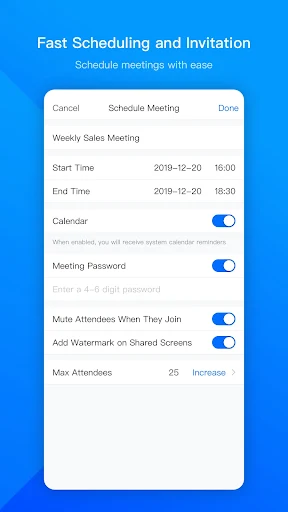
My first impression of VooV Meeting is that it wants to get people into a meeting quickly, without burying its main purpose under unrelated tools. The central actions described are to join, start, or schedule a meeting. That focus is useful on a phone, where a long setup process can be frustrating when a call is already beginning and people are waiting.
The app is designed to work across devices, and its cloud-based service is presented for cross-border meetings. I would begin by trying the basic meeting flow with a colleague or small group, then check that the sharing and host options suit the way the group actually works. A simple trial is more informative than assuming every listed feature will matter in daily use.
The Everyday Meeting
Once a meeting is underway, audio and video are the center of the experience. VooV describes HD video and clear audio, along with tools intended to reduce ambient noise and keyboard clicks. I can see why those details matter in everyday calls: a fan, typing, or a less-than-ideal room can distract from what someone is saying, even when the meeting itself is straightforward.
The practical value depends on the conversation. For a quick update, video and audio may be all the group needs. For a walkthrough or discussion of shared material, screen or document sharing gives participants something concrete to follow. Messaging adds another channel during the session. Rather than turning every call into a presentation, I would use these tools when they support the work at hand.
Tools Beyond Video
The most distinctive part of the feature mix is how it combines meeting basics with collaboration tools. Participants can share screens, files, and messages, while hosts have management controls. That means the app is intended to support both the conversation and the practical coordination around it. For a remote group, having those options in the meeting environment can be more convenient than relying on a camera call alone.
VooV also offers AI-powered beauty filters and background blur. These are optional presentation aids, not the reason I would choose a conferencing app, but they can be handy when someone wants a less distracting camera view. The described sound reductions target ambient noise and keyboard clicks, with the aim of making voices easier to hear. In a real routine, I would treat them as helpful adjustments, not a substitute for a workable space.
A Simple Team Routine
For a recurring team conversation, I would use scheduling to establish the meeting, then join with the document or file the group expects to discuss close at hand. Once everyone is present, the host can use the management controls as needed. If a point is easier to show than explain, screen sharing is the obvious next step; if it is a brief note, the messaging feature may be enough.
This kind of routine keeps the app in its proper role: a place to meet and collaborate, rather than a complicated workspace that needs constant attention. For a larger group, it would be sensible to test the meeting flow and host controls before an important session. VooV states support for up to 300 attendees, but a small practice call can still reveal whether the setup fits a particular team's habits.
Limits to Keep in Mind
The clearest caution is the Google Play rating: 2.8 stars from 8,604 ratings is a mixed signal, not a reason to assume the app will suit everyone. I would try it with a low-stakes meeting before making it the default for a team. The store figures do not tell me which specific experience each person had, so the rating is best treated as a prompt to evaluate it firsthand.
VooV's feature list is centered on meetings, and that focus may feel narrow if what you really want is a general chat app or a tool for editing documents. In-app purchases are available even though the app is free to download, and the listed purchase range is broad. I would check the current Google Play details if cost matters to your use case, then decide whether the meeting tools justify adopting it.
VooV Meeting brings together video calls, scheduling, sharing, messaging, and host controls in a focused conferencing app. I like that its described tools cover both a basic check-in and a more structured group session, with audio and visual adjustments for everyday distractions. Its low store rating is the main reason I would test it before depending on it.
If you regularly join remote meetings or need to coordinate a distributed group, VooV Meeting is worth a cautious trial. It is a less obvious recommendation for casual callers or anyone who wants a broader collaboration workspace. Start with a small, nonessential meeting, explore the sharing tools, and see whether the experience suits your group.
VooV Meeting Frequently Asked Questions
What is VooV Meeting used for?
VooV Meeting is used to start, schedule, or join video conferences. It also supports screen, file, and message sharing, plus host management controls. The app describes use across more than 100 countries and says meetings can support up to 300 attendees, making it aimed at both small conversations and larger group sessions.
What devices can run VooV Meeting?
The app is available on Android through Google Play, and its description says meetings can be joined, started, and scheduled across devices. The specific supported device and Android-version requirements can vary, so check the Google Play page for the current requirements that apply to your phone or tablet.
What Android version does VooV Meeting require?
The Android version requirement is not included in the app details used for this review. Requirements can change as the app is updated and may depend on the device, so check the Google Play page before installing VooV Meeting to see whether your Android device is supported.
Does VooV Meeting cost money?
VooV Meeting is free to download and contains no ads, but it offers in-app purchases. Google Play gives a listed range of $14.99 to $149.00 per item. Prices and purchase details can vary, so check the store page for current information before deciding whether any paid option is relevant to you.
Is VooV Meeting a good fit for everyone?
It may suit people who regularly attend or host remote meetings and want video, sharing, messaging, and host controls together. Someone who only needs occasional casual calls may not need its collaboration tools. Its Google Play rating is 2.8 stars, so I would try it with a low-stakes meeting before choosing it for a group.
Pros
- Combines video meetings with screen, file, and message sharing.
- Includes host management controls for more structured group sessions.
- Offers background blur and audio-noise reduction features.
- Free to download and contains no ads.
Cons
- Its 2.8-star Google Play rating suggests a mixed user reception.
- In-app purchases are available, with a wide listed price range.
- The meeting-focused feature set may be more than casual callers need.
- Category
- Productivity
- Version
- 3.43.0.510











