TQL Carrier Dashboard
- 19.95K
- 4.8
- Installs
- 500.00K
- Price
- Free
Screenshots
Analysis by Reviewed APKs
TQL Carrier Dashboard is a load-booking and shipment-management app for carriers working with TQL. It brings load searches, quotes, booking, shipment updates, and paperwork into a phone-based workflow. I see its appeal for drivers and carrier teams who already do business with TQL and want fewer tasks handled by phone. It is focused rather than universal, but that focus makes its everyday purpose clear.
From Search to Paperwork
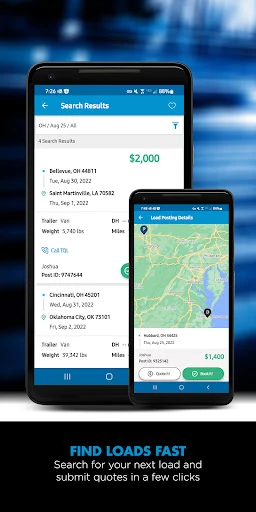
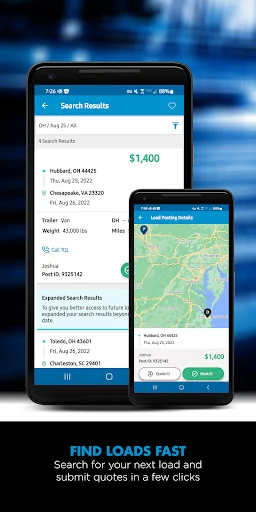
Picture finishing a delivery and needing to line up the next haul before deciding where to head. With TQL Carrier Dashboard, a carrier can search TQL’s load board, apply custom filters, and submit a quote from the app. Some postings can be booked instantly with Book it Now. That makes the basic flow easy to understand: find a suitable load, act on it, then keep the related work together on the phone.
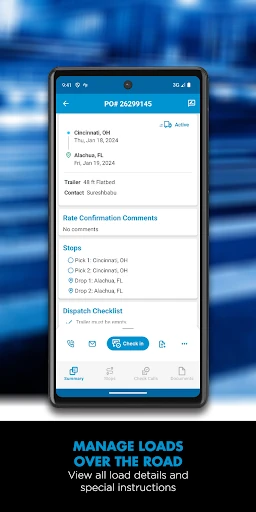
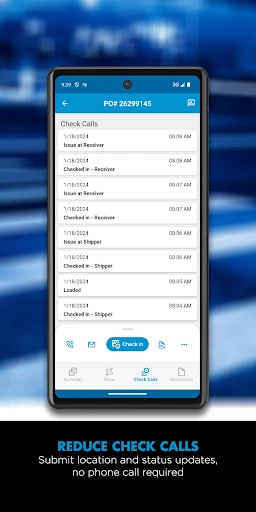
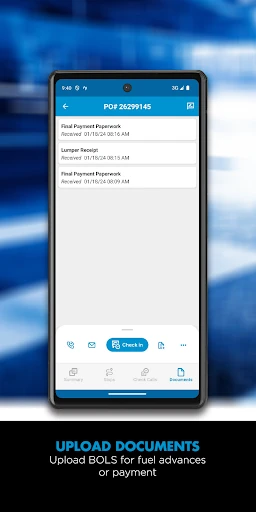
Once a load is booked, the app can show shipment details such as addresses, directions, and load numbers. During the job, carriers can send check calls as location and status updates, then use the phone camera to upload paperwork. I like that this covers more than the initial search. A driver can move from finding work to handling routine shipment communication and documents without treating each step as a separate app.
A TQL-Specific Tool
The obvious alternative is a broader load board or a carrier’s existing mix of calls, messages, and document handling. TQL Carrier Dashboard is narrower: its load access and booking workflow are built around TQL, and the app is for TQL-approved contract carriers. For someone already working with TQL, that direct connection is the point. It brings relevant loads and shipment tasks into one place rather than trying to serve every broker relationship.
That focus also sets a clear boundary. This is not a general-purpose route planner, a marketplace spanning multiple brokers, or a standalone business accounting system. Its directions relate to booked shipment details, while payment history covers completed loads. If a carrier does not work with TQL or wants one board for many providers, this app alone is unlikely to replace the tools they already use.
Small Habits, Less Friction
I would start by setting custom load and lane preferences, so a search is shaped around the work a carrier wants rather than repeated from scratch. The option to look for loads back home from a current location can also make the search feel more practical at the end of a run. These are small setup choices, but they help turn a load board into a repeatable daily tool.
For a booked load, it makes sense to use the app as a running checklist: review the shipment details, send location or status updates when needed, and upload paperwork with the camera once documents are ready. Checking payment history for completed loads gives the workflow a useful endpoint. The app also offers live support from TQL and bilingual customer service, which may help when a question interrupts the routine.
More From Our News Desk

Zoom Meetings, Google Meet, or Teams: Which Is Easiest to Join?

How I Build a Free Streaming Lineup With Tubi

Why Crunchyroll Is the Default Anime App for So Many Fans

YouTube TV: A Practical Guide to Cutting Cable

Rummikub and the Small Comfort of Phone Games

TeamViewer Remote Control or AnyDesk for Helping Family?
Who Will Find It Useful
I’d recommend TQL Carrier Dashboard to independent drivers and carrier teams that already work with TQL and want load search, quotes, booking, shipment updates, and document submission together on a phone. The combination is especially relevant for people who regularly handle TQL loads while on the road. It gives them a practical way to manage several parts of that relationship without making the app sound like a replacement for every business tool.
It may not suit carriers who are not approved to work with TQL, or drivers looking for a load board that combines multiple brokers. It is also a specialized work app, not something most casual users would have a reason to install. If your daily routine already depends on TQL, its focused tools could be convenient; if your work spans other providers, expect to keep using those providers’ systems too.
TQL Carrier Dashboard is developed by Total Quality Logistics, LLC. On Google Play, it has over 500,000 installs and a 4.8-star rating from about 20,000 ratings. The app is free to download, has no in-app purchases, and contains ads. Its content rating is Everyone. Those figures give a useful sense of its store presence, while the app’s main audience remains TQL-approved contract carriers.
The current version is 10.0.5, and the minimum requirement is Android 10. Google Play gives its original release date as February 27, 2012, and its last update as January 27, 2026. The latest update adds digital drop-trailer check-in and inspection photo uploads, along with a redesigned home screen intended to make areas such as check-in, load details, and help easier to reach.
A Closer Look at the Carrier Workflow
A Work-Focused First Look
When I first consider the app, what stands out is how specific its purpose is. It is built to help carriers handle TQL-related work, not to be a general phone dashboard. The home screen update points toward that practical approach, with check-in, load details, and help called out as things users may need to reach. That kind of emphasis matters when a driver is trying to get to a task quickly.
Getting started depends on the relationship with TQL: the app is available to TQL-approved contract carriers, and new users can begin the carrier registration process through TQL. Once eligible, a driver can use the load board and shipment tools from the phone. I would treat the first setup as the start of a work routine, rather than expecting a broad consumer app with features unrelated to hauling.
The Daily Load Cycle
The day-to-day experience described here follows the actual life of a load. Search the board, narrow results with preferences, quote on a load, and book instantly when a posting supports Book it Now. The app also lets carriers dispatch themselves without a phone call. That can make the booking stage more direct, while still leaving the carrier to choose which loads fit their plans.
After booking, the value shifts from finding work to keeping the shipment moving. Details include addresses, directions, and load numbers; check calls can be reduced by sending location and status updates through the app. I appreciate that these features connect naturally. Instead of treating the load board as the whole product, the app stays useful after a carrier has accepted a job.
Tools Beyond Load Search
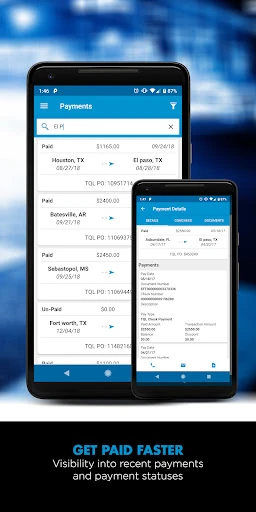
Document handling is one of the more useful extensions of the load workflow. Carriers can photograph paperwork with the phone camera and submit it, supporting faster payment processing. The app also provides payment history for completed loads. Those functions give the product a practical administrative role alongside search and booking, especially for someone who wants shipment documents and completed-load records accessible from the same place.
The newer drop-trailer tools add another concrete task to that picture: digital check-in and inspection photo uploads. There is also an option to post a truck so the right load can find the carrier, plus custom preferences for load and lane searches. These features are not just alternate ways to browse; they address different moments in a carrier’s work, from looking for a job to documenting equipment.
A Routine That Holds Together
I can see a simple routine working well here. At the start of a search, set or review preferences and look for loads that match the carrier’s lanes. When a suitable posting appears, submit a quote or use instant booking if available. Once the job is booked, keep the load details handy and send the appropriate status or location updates as the trip progresses.
At the end of the job, the same routine can continue with document upload and a check of payment history for completed loads. For a drop trailer, digital check-in and inspection photos are part of the newer workflow. The benefit is not that every task disappears, but that several TQL-specific steps can be handled in one app rather than remembered as separate follow-ups.
Limits to Keep in View
The biggest limitation is also the app’s defining choice: it is centered on TQL. Its load board, booking, support, and shipment features are useful in that relationship, but they do not make it a cross-broker hub. Carriers who work with several providers should expect this to sit alongside other tools, rather than assuming it will consolidate their entire operation.
Some booking convenience depends on the individual posting, since instant booking is available on select loads. The app is also aimed at working carriers, so its usefulness depends on eligibility and having TQL-related tasks to manage. Google Play reports ads, even though the app is free and has no in-app purchases. For the right carrier, those boundaries are straightforward; for everyone else, they may be reason to look elsewhere.
TQL Carrier Dashboard makes the most sense as a focused work companion for carriers already doing business with TQL. Its load search, quoting, select instant booking, shipment updates, paperwork uploads, and payment history form a coherent chain from finding work to wrapping it up. I value that practical scope, even if it is not intended to cover every broker or business need.
If you are a TQL-approved carrier and want more of your routine available on your phone, I’d give it a look. The features cover meaningful tasks rather than dressing up a generic dashboard. If you need one app for multiple load providers, or do not work with TQL, this is unlikely to be the right fit.
TQL Carrier Dashboard Frequently Asked Questions
What is TQL Carrier Dashboard used for?
TQL Carrier Dashboard helps TQL-approved contract carriers search loads, submit quotes, and book eligible postings. It also supports shipment details, location and status updates, paperwork uploads, and payment history for completed loads. Carriers can use custom search preferences and post a truck to help find a load. Its purpose is managing TQL-related hauling work, not general phone or business administration.
Which phones can run TQL Carrier Dashboard?
TQL Carrier Dashboard is an Android app, and the stated minimum requirement is Android 10. The app uses a phone’s camera for paperwork uploads and inspection photos, so those tasks are designed around a device with a camera. For current device compatibility or any changes in requirements, check the Google Play store page before installing.
Does TQL Carrier Dashboard cost anything?
The app is free to download on Google Play and does not offer in-app purchases. Google Play indicates that it contains ads. Store details can change, so it is worth checking the app’s current page for the latest information about cost and advertising before installing.
Do I need TQL approval to use TQL Carrier Dashboard?
The app’s load and shipment tools are intended for TQL-approved contract carriers. If you are new to TQL, the app description directs you to begin the carrier registration process. The app is therefore most useful for carriers who have, or are seeking, that working relationship; it is not presented as a general load board for every driver.
Is TQL Carrier Dashboard useful for carriers using other brokers?
It can help with TQL loads and related tasks, but its features are specific to TQL rather than a combined board for multiple brokers. A carrier who works with other providers may still find it useful for the TQL portion of the job, while continuing to use other tools for those relationships. Whether that arrangement suits you depends on your work.
Pros
- Connects TQL load search, quotes, booking, shipment updates, and paperwork in one app.
- Custom search preferences and homeward load searches support a more targeted routine.
- Camera uploads, payment history, and digital drop-trailer check-in cover practical follow-up tasks.
- Live TQL support and bilingual customer service are available to carriers.
Cons
- Its load board and workflow are focused on TQL rather than multiple brokers.
- Instant booking is available only on select load postings.
- The app is intended for TQL-approved contract carriers, limiting its general usefulness.
- Category
- Maps & Navigation
- Version
- 10.0.5











