Storage Analyzer: Disk Cleaner
- 117.55K
- 4.2
- Installs
- 10.00M
- Price
- Free
Screenshots
Analysis by Reviewed APKs
Storage Analyzer: Disk Cleaner helps me figure out what is filling a phone, then choose files and apps to remove or move. It suits anyone who prefers seeing the space hogs before making changes, rather than relying on a one-tap cleaner. After spending time with its storage maps and cleanup tools, I find it practical and unusually hands-on, though its many options may be more than a casual user needs.
When Storage Runs Low
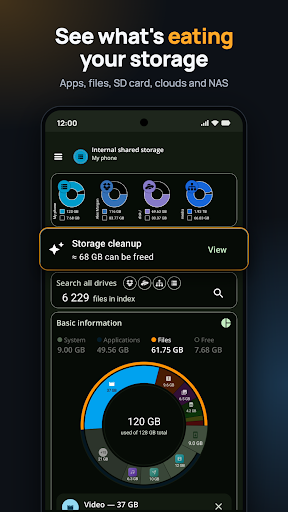
When I first opened Storage Analyzer: Disk Cleaner, I pictured the familiar low-storage scramble: a camera roll that will not save another photo and a Downloads folder I have not checked in months. The app gives that problem a more useful starting point. It shows how space is divided among files, apps and other storage, then points me toward large old files, hidden folders and apps I rarely open.
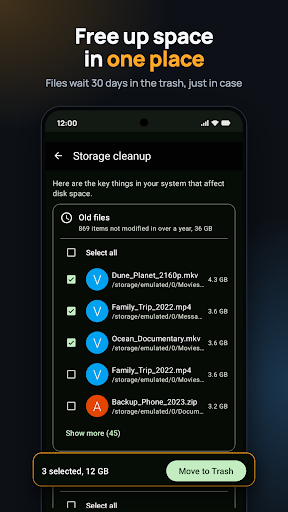
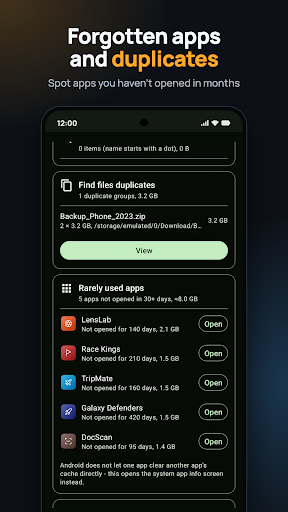
I spent an evening looking through the cleanup screen instead of deleting things at random. It groups potential targets, including files unchanged for over a year and apps not opened in more than 30 days. I can inspect each item and choose what to remove. Deleted files go to a trash area for 30 days, which gives me a chance to restore something if I change my mind.
More Than a One-Tap Cleaner
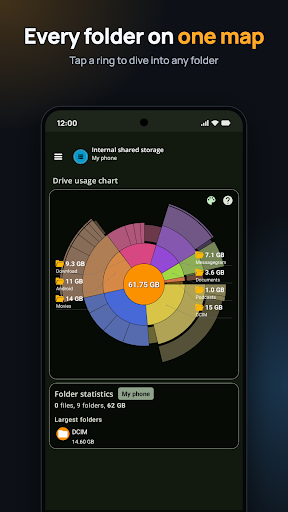
Compared with a basic file manager, this app puts storage size front and center. Its sunburst chart makes large folders easy to spot, while the app list can be sorted by size, data or cache. It also finds duplicate files by matching names and sizes, and it can examine connected storage. That makes it useful for investigating where space went, not just browsing folders one at a time.
It is not a magic button that decides what is safe to erase. I appreciate that distinction: a large download might be disposable, or it might be a map, a work file or music I keep offline. The app presents candidates and leaves the selection to me. If all I want is an automatic cleanup with no inspection, this deliberate approach may feel slower than expected.
Small Checks, Better Results
A useful habit is to open the large-files view before a trip or after a week of taking photos and videos. Sorting by size helps me find a few unusually heavy items without scrolling through every folder. I can also check the duplicate finder, review the full paths, and decide which copy to keep rather than treating every match as disposable.
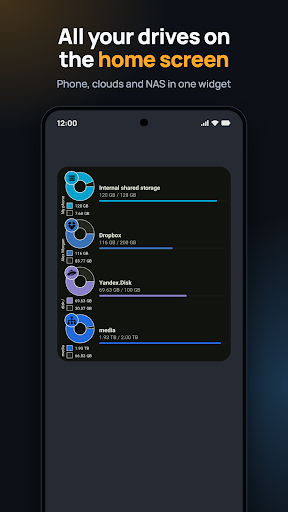
The app manager is handy for a less frequent sweep. I can sort apps by size or identify ones I have not opened for weeks, then open the system storage screen or uninstall from the list. For ongoing awareness, the drive widgets show used and total space for storage locations. These small check-ins are more useful to me than waiting until the phone is nearly full.
More From Our News Desk

Zoom Meetings, Google Meet, or Teams: Which Is Easiest to Join?

How I Build a Free Streaming Lineup With Tubi

Why Crunchyroll Is the Default Anime App for So Many Fans

YouTube TV: A Practical Guide to Cutting Cable

Rummikub and the Small Comfort of Phone Games

TeamViewer Remote Control or AnyDesk for Helping Family?
Who Will Get the Most From It
I would recommend Storage Analyzer to people who like knowing what a cleanup will change. It is especially useful if your phone holds lots of photos, downloads or apps, or if you move files among internal storage, an SD card and supported cloud or network drives. The chart, duplicate finder and review-before-delete approach make it easier to investigate a storage problem at your own pace.
It may not suit someone who wants a completely automatic cleaner or who rarely needs to inspect files. There are several views and sorting choices, so the first session takes a little attention. I would also be cautious about deleting unfamiliar items simply because they are large or old. The app helps surface candidates; deciding whether a file still matters remains a personal task.
Storage Analyzer: Disk Cleaner is a free Android productivity app from Mobile Infographics Tools. Google Play shows over 10 million installs and a 4.2-star rating from about 118,000 ratings. The app contains ads, and its listed content rating is Everyone. The current version in the provided app information is 6.0.0.4.free.release.
The app was released on January 15, 2013, and its listed last update is October 23, 2026. It is free to download, with no in-app purchases shown in the provided facts. The minimum Android version is not included in those facts, so check the Google Play page for device compatibility before installing.
A Closer Look at Everyday Storage
A Clear First Look
My first impression is that the app is built around inspection rather than spectacle. The home screen gives storage use a visual form, and the cleanup area collects common space-saving targets in one place. I can move from a broad view of a drive to individual folders and files, which feels more grounded than seeing a single number and being told to clean.
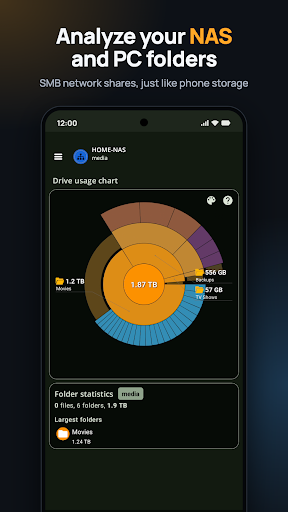
Setup can stay simple if I only want to inspect phone storage. For other locations, the app supports SD cards, USB drives, Dropbox, Yandex Disk and SMB network folders. Those extra sources widen the app's reach, but they also mean the experience can be as simple or as involved as my storage habits require.
Everyday Storage Checks
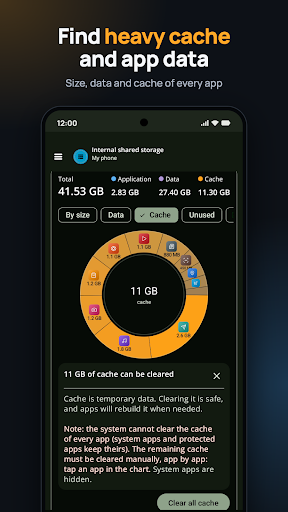
The day-to-day experience works best when I have a specific question: which files are taking up the most room, whether a folder is unusually large, or which apps carry the biggest cache or data. The app can show folder size and file counts, and its chart lets me tap into a section to see what is inside. That makes a vague storage warning easier to investigate.
I also like that the app separates checking from acting. When an app has a large cache, it opens the system screen where I can clear it or uninstall the app. For files, I choose what to remove. The result is a more deliberate process than a general cleanup command, with less chance of treating every old or large item as clutter.
Tools That Stand Out
The sunburst disk map is the most distinctive way to explore storage. Each folder and file gets a section sized to reflect its space, and I can zoom into a folder by tapping it. I can color the map by file type or folder, then compare categories such as photos, videos, music and documents on a chart.
The duplicate finder is another practical tool. It searches for files with the same name and size across connected storage, including the phone, SD card and cloud locations. It shows paths for the copies, and it does not select anything automatically. I can sort results by drive, date or size, then decide which copy, if any, I want to remove.
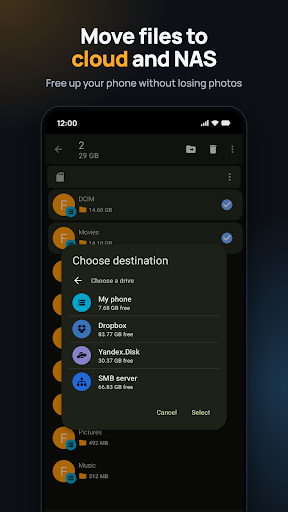
For people who move files around, the app can copy or move between phone storage, SD cards, Dropbox, Yandex Disk and network folders. Transfers can run in the background with progress and can be canceled. If names conflict, I can choose whether to overwrite, skip or keep both.
A Routine That Works
A practical routine for me would be a quick large-file check when storage starts getting tight, followed by a look at old files and rarely used apps. I would review the full path and contents before removing anything, then check the trash afterward in case I need to restore a file. The app reports how much space was freed after cleanup actions.
For a household or workspace with files spread across several places, I could use the app to inspect a network folder or cloud drive as well as the phone. The widget can summarize one drive or show several, with used and total space in a compact view. That makes storage awareness part of an ordinary check rather than a separate project.
Limits to Keep in Mind
The app offers many ways to sort, scan and inspect, and that can be a lot if I only want to reclaim a little space quickly. It is not an automatic clean-everything tool; its value depends on taking a moment to understand what I am selecting. That is a useful safeguard, but it also means the app cannot make every cleanup decision for me.
Some actions lead into Android's own storage settings, especially when clearing an app cache. That keeps the app from pretending every task works the same way, though it can interrupt the flow. Ads are present in the free version, and people who want an ad-free experience would need to consider the app's Pro option described by the developer.
Finally, a duplicate match is based on name and size, so I would still inspect the paths and contents before deleting a copy. The same common sense applies to old files and hidden folders. Storage Analyzer can make those items easier to find, but it cannot know which personal files I still need.
Storage Analyzer: Disk Cleaner is a capable choice for people who want a clear view of storage before changing anything. I especially value its visual map, selective cleanup, duplicate search and 30-day trash. It is more of a hands-on storage toolkit than a quick fix, and that careful approach is its main strength.
I would try it if I regularly run short on space or manage files across several drives. If I want a cleaner that makes decisions for me, I would look elsewhere. For everyone in between, the app offers useful detail without forcing me to delete anything blindly.
Storage Analyzer Frequently Asked Questions
What is Storage Analyzer: Disk Cleaner used for?
Storage Analyzer: Disk Cleaner helps identify which files, folders and apps use storage, then lets you choose items to remove or move. It includes a visual disk map, large-file and duplicate finders, an app manager, and tools for supported cloud and network storage. Deleted files stay in its trash for 30 days before they are permanently removed.
Is Storage Analyzer: Disk Cleaner available on iPhone?
The app information provided describes an Android app and Google Play availability. It does not establish availability for iPhone or other platforms. Check the relevant store for current platform options and compatibility. The description says it supports phones and tablets.
What Android version does Storage Analyzer require?
The minimum Android version is not included in the provided app information. Requirements can vary as app versions change, so check the Google Play page for the current compatibility details for your device before installing.
Does Storage Analyzer: Disk Cleaner cost money?
The Android app is free to download and the provided facts show no in-app purchases. It contains ads. The description also mentions a Pro version without ads and a one-time purchase, but prices can vary and are worth checking on Google Play.
Is Storage Analyzer suitable for beginners?
It can suit beginners who are comfortable reviewing files before deleting them. The app does not automatically select files for removal, and deleted items go to trash for 30 days. Its many storage views and sorting choices may feel like extra work if you only want a one-tap cleanup.
Pros
- Shows storage use visually and lets me drill down into large folders.
- Keeps file deletion under my control and holds deleted files for 30 days.
- Finds duplicate files across connected storage and shows their paths.
- Can inspect and move files among phone, cloud and network storage.
Cons
- The range of tools can feel busy for a quick, occasional cleanup.
- Ads appear in the free version.
- Some cache actions open Android system settings instead of staying in the app.
- Category
- Productivity
- Version
- 6.0.0.4.free.release











