Stagecoach Bus
- 69.52K
- 4
- Installs
- 1.00M
- Price
- Free

Screenshots

Analysis by Reviewed APKs
Stagecoach Bus is a travel companion for checking bus times, planning journeys and buying mobile tickets for Stagecoach services. I found its mix of a route planner, live bus information and saved favourites useful for the small decisions that make a bus trip easier, from choosing a stop to checking whether a service is approaching. It suits regular riders and occasional travellers in areas Stagecoach serves, though it is not a general guide to every bus operator.
Planning a bus journey
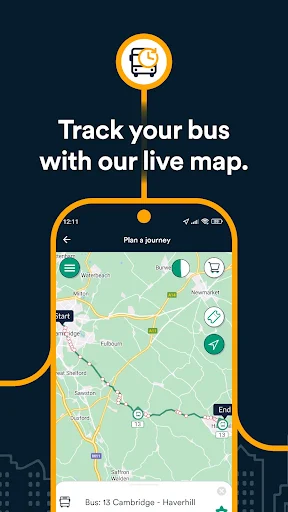
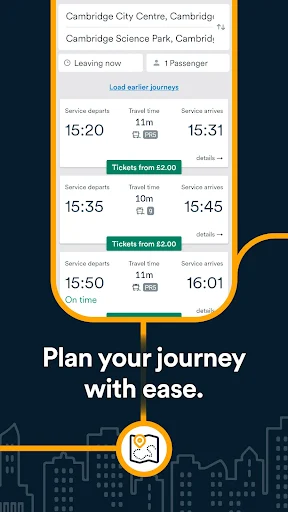
When I first opened Stagecoach Bus, I pictured using it for the ordinary trip that can still involve a bit of guesswork: getting from home to an appointment without arriving too early or missing the bus. I could search for a location, stop or bus, then use the journey planner to work out a route. The map gives another way to explore nearby services, which is handy when I know the area roughly but not the exact stop.
On the way out, I would check the expected arrival time and how far away the bus is, then use the stop information to see which services call there and where their routes go. That is more useful than a timetable alone when I am deciding whether to leave now or finish one small task first. The app brings planning, arrival information and ticket access together instead of making me switch between separate tools.
A Stagecoach-focused tool
The obvious alternative is a general maps or transit app, especially for someone piecing together a journey across different operators. Stagecoach Bus has a narrower job: it focuses on Stagecoach services, with information about its buses and stops, a service map, journey planning and tickets. If I regularly ride Stagecoach, having these details in one place feels practical. It is less compelling as my only travel app when a journey depends on other operators.
I would not treat it as a general-purpose navigation tool for walking, driving or every public transport network. Its usefulness depends on travelling in an area Stagecoach serves, and the app is built around that operator's routes and mobile tickets. For a quick ride on a Stagecoach bus, the focused approach makes sense; for comparing a wider mix of transport choices, a broader travel app may be a better companion.
Make repeat trips quicker
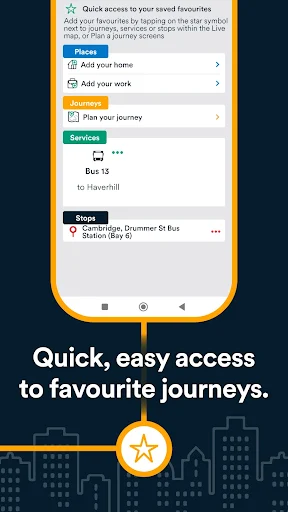
The simplest habit I would build is saving the stops, services and journeys I use most. Instead of searching from scratch on a familiar commute, I can return to a saved favourite and check the details I need. That is a small convenience, but it matters when I am standing outside with a bag in one hand and would rather not type a destination again.
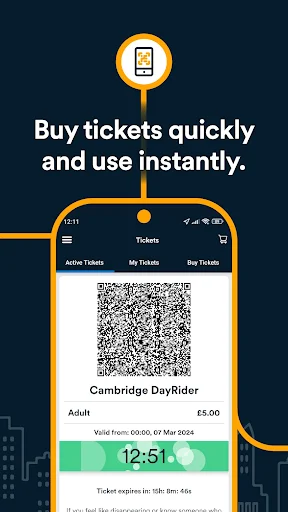
I would also make ticket checking part of the trip routine. Find the relevant mobile ticket, buy it in the app and activate it when ready to board; the ticket then appears on the phone to show the driver. Pairing that with a quick arrival check keeps the key steps close together. Favourites help with repeat travel, while the interactive map is useful when I need to choose a stop or inspect a route.
More From Our News Desk

Zoom Meetings, Google Meet, or Teams: Which Is Easiest to Join?

How I Build a Free Streaming Lineup With Tubi

Why Crunchyroll Is the Default Anime App for So Many Fans

YouTube TV: A Practical Guide to Cutting Cable

Rummikub and the Small Comfort of Phone Games

TeamViewer Remote Control or AnyDesk for Helping Family?
Who will get the most from it
I would recommend Stagecoach Bus to people who regularly take Stagecoach services and want one place to check routes, expected bus arrivals and ticket options. It is also a sensible option for occasional riders who want to look up a stop or plan a specific trip before leaving. The saved favourites are especially useful if the same few journeys come up each week, rather than being a feature I would need to set up for every ride.
It may not suit someone whose usual travel depends on other bus companies or whose main need is comparing transport across a whole region. The app's focus is a strength for Stagecoach riders, but it also defines its limits. If you only travel by bus now and then, it can still help with a particular Stagecoach journey; if you rarely use those services, there may be little reason to keep it at hand.
Stagecoach Bus is developed by Stagecoach Services Limited and is available on Google Play. The app has over one million installs and a 4.0-star rating from around 69,500 ratings. It is free to download, and the supplied store details show no in-app purchases or ads. Its content rating is Everyone.
The supplied app version is 4.48.0.777. It was released on November 21, 2022, and was last updated on November 2, 2026. The minimum Android version is not included in the available details, so check Google Play for the requirement for your device.
A closer look at everyday bus travel
A practical first impression
My first impression is that Stagecoach Bus is designed around the questions a rider asks just before leaving: which stop, which service and when the bus might arrive. The menu and map give different ways into that information. Searching for a place, bus or stop is straightforward in concept, while the map offers a more visual starting point when I am still deciding where to begin.
I would start by looking up one journey I already know, then compare the route and nearby stops shown in the app with my usual routine. That gives me a feel for how it handles the trips I actually take, rather than asking me to learn every feature at once. The ticket area is also easy to understand as part of the same travel task: find a suitable mobile ticket and keep it on the phone.
Checking trips day to day
For regular travel, the expected bus times and distance information are the details I would check most often. A timetable tells me when a service is scheduled; seeing the expected time and how far away the bus is adds useful context while I wait. It helps me decide when to walk to the stop or whether I have a moment to finish what I am doing.
The app also gives stop-level information, including which buses use a stop and the routes they take. I like having that available when I am somewhere unfamiliar or when I need to choose between nearby stops. It keeps the practical question in focus: which Stagecoach service can take me where I need to go? The information is useful without turning the app into a broad travel guide.
Map, favourites and tickets
The interactive map is one of the more distinctive parts of the app. It shows Stagecoach services and stops, and tapping a bus or stop brings up journey information. I find that approach useful when a list of place names does not immediately tell me which stop is in the right direction. It gives a quick visual overview, then lets me move into the details I need.
Favourites make repeat use less fiddly. I can save journeys, services and stops, then return to them when planning another trip. Mobile tickets add another part of the journey to the same app: I can buy a ticket, have it appear on my phone, activate it when ready to board and show it to the driver. Those features support a focused routine rather than a sprawling collection of travel tools.
A simple travel routine
A useful routine would start at home, with a journey search and a look at the suggested Stagecoach route. If it is a trip I make often, I would save it as a favourite so it is easier to find next time. Before setting off, I would check the expected arrival time and the distance of the bus, then confirm that I am heading to the right stop.
When I need a mobile ticket, I would choose and buy it in the app, then activate it when I am ready to board. Once at the stop, the bus and stop information can help me follow the service I am waiting for. This is not complicated, but bringing these steps together can save a few searches and make a familiar trip feel more organised.
Keep its scope in mind
The biggest limitation is also clear from the app's purpose: it is for Stagecoach bus travel. That focus is useful if those are the services I take, but it does not make the app a single source for every operator or every kind of journey. I would keep another travel tool in mind if my route involves services outside the Stagecoach network.
Arrival information is helpful for making a plan, but I would still treat it as an estimate rather than a reason to cut every departure close. The app provides expected times and bus-distance information; it does not change the fact that a bus trip depends on the service and stop I choose. For a straightforward Stagecoach journey, the tools are relevant. For wider travel planning, the narrow focus is worth remembering.
Stagecoach Bus does a useful job for the trips it is built around. Journey planning, expected bus arrivals, stop and route details, favourites and mobile tickets cover the main tasks I want to handle before and during a Stagecoach ride. The interactive map gives the app a practical way to browse services when I am not sure which stop to use.
I would try it if Stagecoach is part of my regular routine or I have a specific trip with one of its services coming up. It is less likely to replace a broader travel app for someone mixing operators. For the right rider, though, keeping route details and tickets together makes this a practical companion rather than an app I would open only to read a timetable.
Stagecoach Bus Frequently Asked Questions
What is Stagecoach Bus used for?
Stagecoach Bus helps people plan journeys on Stagecoach services, check expected bus arrivals, find stops and routes, and buy mobile tickets. It also includes an interactive map and lets you save favourite journeys, services and stops. It is designed around Stagecoach bus travel rather than being a general guide to every transport operator.
Which phones and platforms support Stagecoach Bus?
The supplied details describe Stagecoach Bus as an Android app available through Google Play. The minimum Android version can vary by release and device, so check the Google Play store page for the current requirement. The available information does not establish support for other platforms.
What Android version does Stagecoach Bus require?
The minimum Android version is not included in the app details provided here. Requirements can vary as an app is updated, so check Stagecoach Bus on Google Play before installing it to see whether your phone is supported.
Does Stagecoach Bus cost money?
The app is free to download, and the supplied store information indicates no in-app purchases or ads. It includes the option to buy mobile tickets for Stagecoach services. Ticket options and their details may vary, so check the app or its Google Play store page for current information.
Is Stagecoach Bus useful for occasional riders?
It can be useful if your occasional journey uses a Stagecoach service: you can look up stops, routes and expected arrivals, plan the trip and access mobile tickets. It may be less useful if you mostly travel with other operators or need a single app for a wider mix of transport.
Pros
- Combines Stagecoach journey planning, expected arrivals and mobile ticket access.
- Interactive map lets riders explore services and stops visually.
- Saved favourites make regular journeys and stops quicker to revisit.
- Stop details show services and routes serving that location.
Cons
- Its focus on Stagecoach services limits usefulness for other operators.
- Some riders may prefer a broader app for mixed-mode travel planning.
- Arrival estimates still require sensible time when heading to a stop.
- Category
- Maps & Navigation
- Version
- 4.48.0.777











