Spike: AI Email & Team Chat
- 19.30K
- 4.1
- Installs
- 1.00M
- Price
- Free

Screenshots


Analysis by Reviewed APKs
Spike: AI Email & Team Chat brings email, team conversations, and collaboration tools into one Android app. It is aimed at people who handle a lot of work messages and would rather not bounce between separate inbox and chat apps. After looking at how its features fit together, my take is that Spike’s conversational inbox and built-in team tools make it appealing, though its broader workspace may be more than a solo email user needs.
A Busy Inbox, Made Conversational
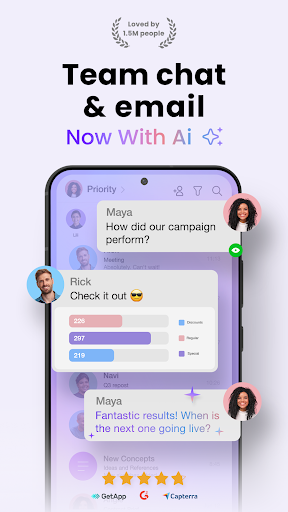
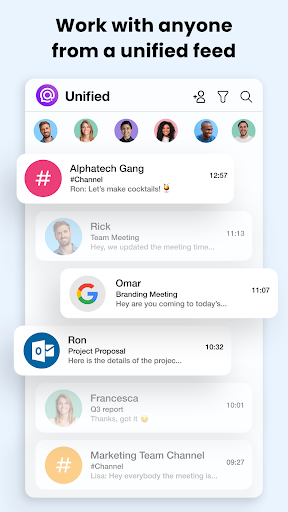
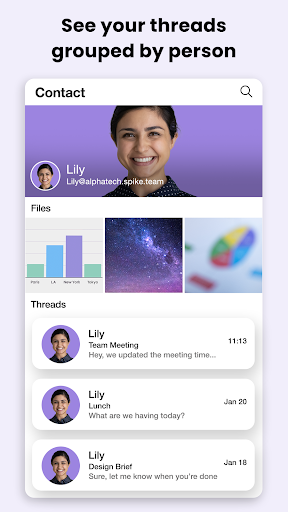
Picture starting a workday with messages from a client, a teammate, and a shared support address all needing attention. Spike brings multiple email accounts into a unified inbox and groups messages by person, presenting conversations in a chat-like format rather than a conventional stack of email threads. That can make it easier to see the flow of a conversation while moving through messages on a phone between meetings or during a commute.
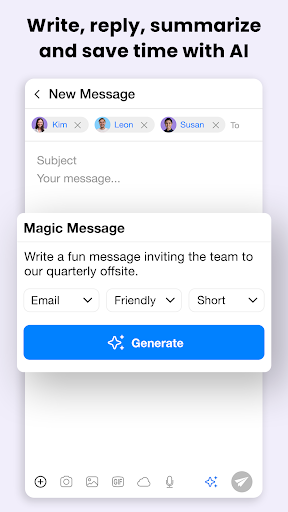
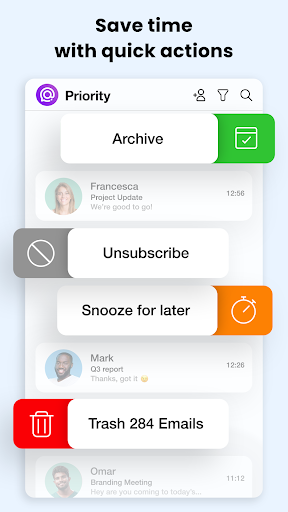
When I first considered the everyday rhythm Spike is built for, the useful part was not simply having email on a phone; it was having several ways to act on it without leaving the inbox. You can snooze a message for later, schedule a send, translate email, or use swipe actions to triage. AI tools can also summarize long threads and attachments or help draft a reply, which may save time when the inbox is already demanding your attention.
More Than an Email Replacement
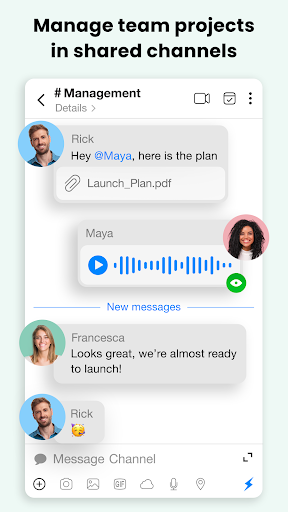
The obvious comparison is a standard email app, but Spike tries to cover more ground. Alongside a unified inbox for services such as Gmail, Outlook, iCloud, and Yahoo, it offers team chat, shared inboxes, notes, docs, tasks, and voice or video calls from the inbox. For a small team that wants everyday communication in fewer places, that combination could feel more cohesive than switching between several separate tools.
That wider scope is also a reason to be selective. Spike is not just a stripped-down mail reader, and someone who only wants to check a personal inbox may have little use for its team features. It is also not described as a general project-management suite; its collaboration tools sit alongside email and team communication. I would look at it as a communication hub, not assume it replaces every work app a team already uses.
Small Habits That Help
Spike’s sorting and triage options make more sense when used as small daily habits than as a one-time inbox overhaul. I would start by checking the unified inbox, clearing quick replies with swipe actions, and snoozing messages that need a more considered answer. Priority sorting and smart filters can help bring important mail forward, while send-later gives you a way to prepare a message now without sending it immediately.
For teams, the best workflow depends on what they actually share. A support group might use a shared inbox for customer conversations, while colleagues can keep team discussions, notes, and docs in the same broader workspace. AI summaries are most useful when a long conversation or attachment needs a quick scan before a reply. These tools work best as optional shortcuts; I would still review a drafted response before sending it.
More From Our News Desk

Zoom Meetings, Google Meet, or Teams: Which Is Easiest to Join?

How I Build a Free Streaming Lineup With Tubi

Why Crunchyroll Is the Default Anime App for So Many Fans

YouTube TV: A Practical Guide to Cutting Cable

Rummikub and the Small Comfort of Phone Games

TeamViewer Remote Control or AnyDesk for Helping Family?
Who Should Try Spike
I’d recommend giving Spike a look if work email is a daily part of your routine and you regularly switch between several accounts or team conversations. Its conversational presentation may suit people who prefer seeing messages in a more chat-like flow, and the built-in collaboration options are relevant to teams that want shared inboxes and communication tools close to their email. The AI summaries, reply drafting, translation, and scheduling also offer practical ways to handle a busy inbox.
It may be less attractive if you want a bare-bones personal email app or have no interest in team chat, shared inboxes, or workspace tools. The range of features means there is more to explore than in a simple mail client, and AI-generated drafts still call for your own judgment. I would also compare its paid in-app options with your needs before settling in, especially if you plan to use it across a team.
Spike: AI Email & Team Chat is a Productivity app from Spike Email - Your Inbox reinvented. On Google Play, it has over one million installs and a 4.1-star rating from around 19,000 ratings. The app is free to install, contains no ads, and offers in-app purchases. Google Play shows in-app item prices ranging from $7.99 to $144.99.
Google Play gives the app an Everyone content rating. The supplied version is 6.1.5.1; its release date is February 24, 2015, and its most recent update date is June 7, 2026. Spike is available on Android, desktop, and web according to its description. The Android version requirement can vary by device and release, so check the Google Play page for the requirement that applies to your phone.
A Closer Look at Spike’s Workday Flow
A Friendly First Impression
When I first opened the idea of Spike, the clearest difference from traditional email was its conversational approach. Messages are grouped by person instead of being presented as familiar, sometimes confusing, email threads. That change is easy to understand if you already use chat apps, though it does make Spike feel like a distinct way of handling email rather than a simple reskin of a standard inbox.
Getting started can be as straightforward as bringing multiple email accounts together in the unified inbox. The listed services include Gmail, Outlook, iCloud, and Yahoo, among others. From there, the app’s purpose is to keep email and team communication close at hand. I would take time to decide which of its collaboration features matter to my work instead of trying to adopt every option at once.
The Daily Inbox Rhythm
The core experience is built around keeping messages moving. You can use smart sorting and filters to focus the inbox, then handle routine decisions with swipe actions, snooze, or mass delete. Read indicators and online presence add a more immediate feel to conversations. Together, these details make the app look suited to people who check messages throughout the day, rather than only opening email once in the morning.
The chat-like layout may make ongoing exchanges feel easier to follow, especially when a conversation has several replies. It does not change the fact that Spike messages remain email for people on the other end: the description says they see regular email. That makes the conversational design a choice about how you manage your inbox, rather than a requirement that every contact use the same app.
Tools Beyond the Inbox
The AI features are among Spike’s more noticeable extras. It can summarize long email threads and attachments, help draft replies with context, and translate emails. Those options could be handy when a conversation is lengthy or when you need to prepare an answer quickly. I see them as ways to get a first pass or an overview, not a reason to send a response without checking that it says what you mean.
There is a substantial team side, too: Teamspace, shared inboxes, team chat, tasks, notes, and docs are all part of the described toolkit. The app also supports starting voice or video calls from the inbox. That breadth can matter when a team wants communication and collaboration in one place, but the value depends on whether people will actually use those tools together.
A Practical Workday Routine
For a simple morning routine, I would begin by scanning the unified inbox and using priority sorting to decide what needs attention first. Quick messages can be answered as they come up, while emails that need more thought can be snoozed. If a reply is ready but should go out later, send-later helps separate writing time from sending time.
Later in the day, I would use a thread summary to catch up on a long exchange before replying, or translate a message when needed. A team that handles incoming customer messages could bring a shared inbox into its routine, while using chat, notes, or docs for related collaboration. The point is to choose a few useful habits; turning on every workflow at once could make an already busy day feel busier.
Keep the Trade-Offs in Mind
Spike’s main trade-off is its breadth. The app combines email with a conversational interface and a collection of team tools, which may be a genuine convenience for some people and unnecessary complexity for others. If you simply want a familiar, minimal inbox, the chat-like organization and collaboration options may not be a clear improvement over the email app you already use.
AI can speed up reading and drafting, but it does not remove the need to check details or tone. Team features are most useful when colleagues share the same workflow, and a personal user may not need them at all. The free app also offers in-app purchases, so anyone considering paid capabilities should check the current Google Play details and decide whether the added tools fit their use.
Spike makes a clear case for treating email as part of a broader communication routine. Its unified inbox, chat-style conversations, triage options, AI assistance, and team features give busy professionals several ways to cut down on app switching. The strongest reason to try it is the combination, not any single feature.
I’d recommend it to people juggling work accounts and team conversations who are open to a different inbox style. For a person who only wants basic personal email, Spike may feel like more workspace than necessary. If the mix suits you, it is worth trying the free app and checking which in-app options match your needs.
Spike Email Frequently Asked Questions
What is Spike: AI Email & Team Chat used for?
Spike brings email accounts into a unified inbox with a conversational message layout. It also offers tools such as AI thread summaries and reply drafting, translation, snoozing, scheduled sending, team chat, shared inboxes, tasks, notes, and docs. It is designed for handling email and team communication together, rather than only reading basic messages.
Which devices can run Spike: AI Email & Team Chat?
The app is available for Android, and its description also says Spike works across desktop and web. The exact Android version requirement can vary with the device and app release. Check the Google Play page for the current requirement for your phone; desktop and web availability may depend on the options Spike currently provides.
What Android version does Spike: AI Email & Team Chat require?
The Android version requirement can vary by device or release, so check the Google Play page before installing to confirm compatibility with your phone. Spike is an Android app, and the description also mentions desktop and web access. Those other ways to use it do not change the requirement for the Android app.
Does Spike: AI Email & Team Chat cost money?
Spike is free to install on Google Play and contains no ads. It offers in-app purchases, with listed item prices ranging from $7.99 to $144.99. The exact purchase and price that may suit you can vary, so check the store page for current details before paying.
Is Spike: AI Email & Team Chat a good fit for personal use?
It can suit someone who wants a unified inbox for multiple accounts and likes a conversational way to follow email. Its team chat, shared inboxes, and collaboration tools may be less useful if you only need a simple personal mail reader. I would compare the extra features with your routine and check the store page for current app details.
Pros
- Combines multiple email accounts in a unified inbox with a conversational layout.
- Includes practical triage options such as snoozing, send-later, and swipe actions.
- AI tools can summarize threads, assist with replies, and translate email.
- Team chat, shared inboxes, notes, docs, and tasks sit alongside email.
Cons
- The wide range of team tools may feel unnecessary for basic personal email.
- AI-generated summaries and drafts still need a careful human review.
- In-app purchases range considerably in price, so check current options first.
- Category
- Productivity
- Version
- 6.1.5.1











