Voice Recorder
- 295.32K
- 4
- Installs
- 1.00B
- Price
- Free
Screenshots
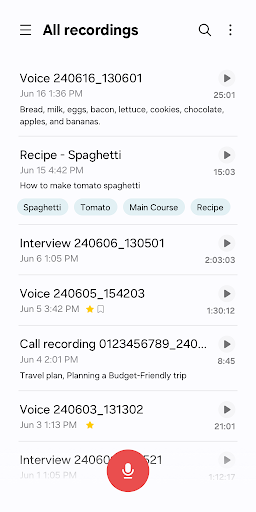
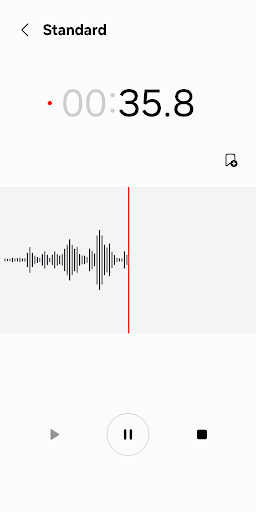
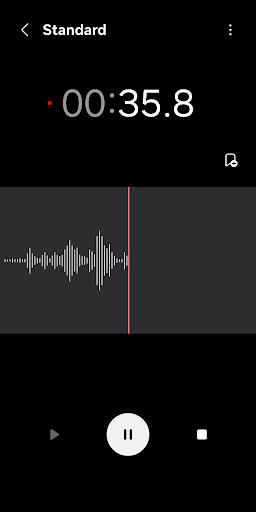
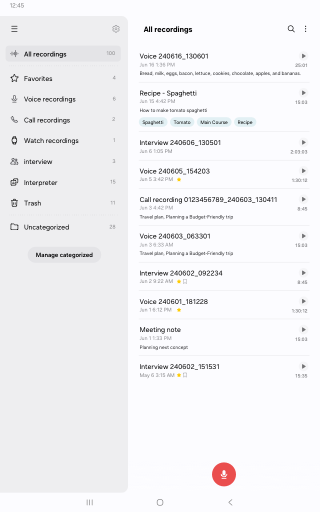
Analysis by Reviewed APKs
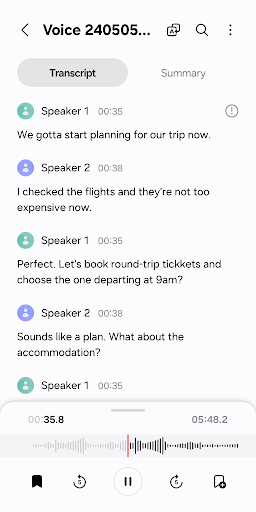
Voice Recorder is Samsung’s straightforward app for capturing spoken notes, conversations, and other sounds on compatible Galaxy devices. I see it as a practical choice for people who want to record without turning a quick thought into a complicated project. Its interview mode and bookmarks give it more purpose than a bare-bones recorder, though the features available can depend on the device.
Capture a Passing Thought
When I want to save an idea before it slips away, a voice recording is often quicker than typing a note. Voice Recorder is built for that kind of moment: start a recording, speak, and come back to the audio later. The waveform gives a visual sense of the sound as it is captured, which is useful when I want to check that the phone is picking something up.
I can also imagine using it for a short interview or a conversation where I need to listen carefully instead of taking notes. Interview mode records voices through the phone’s top and bottom microphones and displays a waveform for each. Being able to play those voices separately can help when I want to focus on one speaker, rather than listen to the whole exchange as a single track.
A Recorder, Not a Studio
Compared with writing a note or sending myself a quick message, Voice Recorder is better when tone, exact wording, or the sound of a conversation matters. It can also be more convenient than reaching for a dedicated recorder when my compatible Galaxy phone is already with me. Bookmarks make longer recordings easier to revisit, and the app can share audio or transcribed text through other apps.
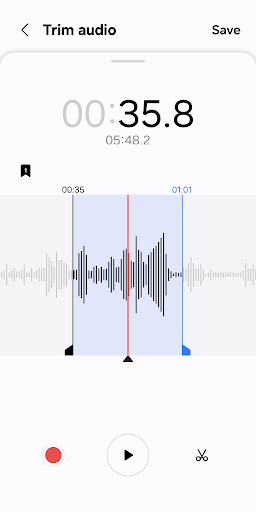
I would not treat it as a full audio-editing studio or a general-purpose transcription service. Its appeal is the everyday recording workflow, with a few practical ways to review and share what I captured. The description does not promise advanced sound production tools, and supported features can vary by device. If I need a specific capability, I would check what my Galaxy model supports before relying on it.
Small Habits That Help
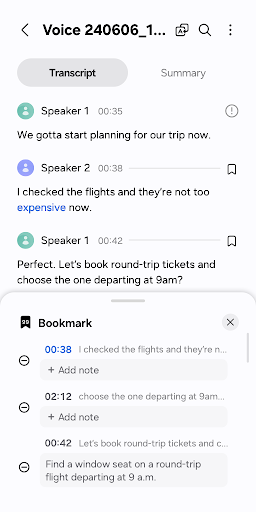
For a longer recording, I would add bookmarks when a key point comes up instead of expecting myself to remember where it was later. The app can collect bookmarked snippets or play them directly, making those markers useful for review. That habit suits lectures, interviews, or planning sessions where I may only need a few moments from the complete recording.
I would also decide before recording whether I need the audio, transcribed text, or both, then share only the material I actually want to pass along. Voice Recorder supports sharing selected audio or transcribed text through other apps. If I plan to use a Bluetooth headset or compatible external microphone, I would check the device setup first, since those recording options depend on supported hardware.
More From Our News Desk

Zoom Meetings, Google Meet, or Teams: Which Is Easiest to Join?

How I Build a Free Streaming Lineup With Tubi

Why Crunchyroll Is the Default Anime App for So Many Fans

YouTube TV: A Practical Guide to Cutting Cable

Rummikub and the Small Comfort of Phone Games

TeamViewer Remote Control or AnyDesk for Helping Family?
Who Will Find It Useful
I would recommend Voice Recorder to Galaxy users who regularly capture spoken reminders, interviews, or meeting notes and want a simple place to record them. Interview mode is a particularly useful extra for conversations, while bookmarks give longer clips some structure. The app also makes sense for anyone who prefers speaking a thought aloud and reviewing it later rather than composing everything on a small screen.
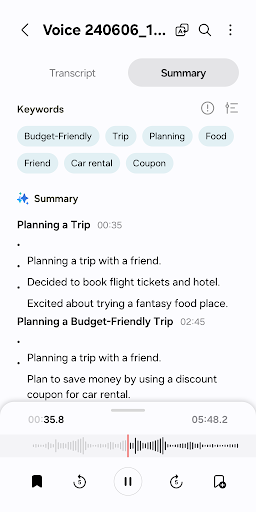
It may be less compelling if you want a complex audio-editing workflow or need the same feature set across different devices. The app is described for Samsung Galaxy phones, tablets, and watches, but its supported features can vary by device. I would also look elsewhere if your main goal is a broad transcription or production toolkit; Voice Recorder’s focus is capturing, managing, editing transcribed text, and sharing recordings.
Voice Recorder is published by Samsung Electronics Co., Ltd. On Google Play, it has over a billion installs and a 4.0-star rating from about 295,000 ratings. It is free to download, with no in-app purchases or ads. The content rating is Everyone, making the store’s age classification straightforward for a general-purpose recording tool.
The current version is listed as varying by device, and the app was last updated on August 27, 2025. Its release date is March 24, 2016. A minimum Android version is not provided in the supplied app details, so I would check Google Play on the device where I plan to install it for compatibility information.
A Closer Look at Everyday Recording
A Direct First Impression
When I first opened the idea of using Voice Recorder, what stood out was its narrow, useful purpose: capture sound, then make the recording easier to revisit or share. That is a welcome distinction from apps that try to turn every quick task into a larger workspace. The general recording mode is aimed at straightforward capture, with a waveform to show the audio as it comes in.
The app is designed for Samsung Galaxy phones, tablets, and watches, and recordings can use the built-in microphone. The description also names Bluetooth headsets and compatible external microphones as options. Since supported features vary by device, I would treat the exact setup as model-dependent rather than assume every Galaxy device offers every recording method.
The Day-to-Day Flow
The everyday appeal is that recording can start quickly and does not require much planning. I can picture using it to remember a spoken reminder during a walk, capture a thought between errands, or save an explanation I want to revisit. The waveform offers a quick visual check during capture, while saved recordings can be managed and played back later.
A small but practical detail is that the app can continue recording when a call comes in, allowing me to keep recording without answering. That can matter if I am documenting something time-sensitive. Call-related behavior depends on optional permissions and device support, so I would review the app’s permission prompts and settings rather than assume the same behavior on every phone.
Interview Mode and Bookmarks
Interview mode is the standout feature for me because it is tailored to two voices instead of treating a conversation like an undifferentiated sound file. It uses microphones at the top and bottom of the phone and shows a waveform for each voice. The app says those voices can be played separately, which can make a recorded exchange easier to review.
Bookmarks are another useful touch for recordings with distinct sections. I can mark important moments and later jump to them, or collect only bookmarked snippets for playback. That is more helpful than scrubbing through a long recording from the beginning whenever I need a particular point. These features do not turn the app into a full editing suite, but they give review a little more structure.
A Simple Review Routine
For an interview or meeting, I would start with a clear purpose for the recording, use interview mode when it suits the conversation, and add bookmarks at the points I know I will need again. Afterward, I would listen to the marked sections first, then return to the full audio if a detail needs context. This is a modest workflow, but it keeps a long recording from becoming a forgotten file.
When I need to pass information along, I would choose whether the recipient needs the sound itself or the transcribed text. Voice Recorder lets me share selected audio or transcribed text through various apps. The ability to choose what to share is useful for keeping a handoff focused, especially when only one part of a recording is relevant.
Keep Device Limits in Mind
The main limitation is that Voice Recorder is tied to Samsung Galaxy devices, and the app’s supported features can vary with the device. A Bluetooth microphone, external microphone, interview recording, or other option may not work identically across the range. I would confirm compatibility on my own hardware before making it part of a regular workflow.
I would also keep expectations grounded: this is a recorder with tools for managing recordings, editing transcribed text, bookmarking moments, and sharing selected material. The supplied description does not position it as a professional audio-production package. People who want extensive sound manipulation or a broader feature set may find its focused approach too limited.
Voice Recorder does the everyday job well: it gives Galaxy users a way to capture sound, revisit important moments, and share selected audio or text. Interview mode and bookmarks make it more considered than a basic record-and-forget tool, without changing its simple focus.
I would recommend it to Samsung users who want an accessible recorder for spoken notes and conversations. If you need advanced editing or depend on a particular microphone or device feature, check compatibility first. For routine voice capture, it is a practical app with a few genuinely useful ways to review what you recorded.
Samsung Voice Recorder Frequently Asked Questions
What is Samsung Voice Recorder used for?
Voice Recorder captures voices and other sounds on compatible Samsung Galaxy devices. It offers general and interview recording modes, bookmarks for important moments, and ways to manage, review, and share recordings. You can also share transcribed text. Which features are available can vary depending on the device.
Which devices can run Voice Recorder?
The app is described for Samsung Galaxy smartphones, tablets, and watches. Recording options can include the built-in microphone, a Bluetooth headset, or a compatible external microphone, depending on the device. Check the Google Play details and your device’s compatibility before relying on a particular feature.
What Android version does Voice Recorder require?
The supplied app details do not give a minimum Android version. Requirements may vary with the device and current release, so check the Google Play store page from the Galaxy device where you plan to use Voice Recorder for the latest compatibility information.
Does Voice Recorder cost money?
Voice Recorder is free to download on Google Play. The supplied store facts say it has no in-app purchases and contains no ads. Store details can change over time, so it is worth checking the current Google Play page before installing.
Is Voice Recorder a good fit for interviews?
It can suit simple interviews, especially on a compatible device: interview mode records voices using microphones at the top and bottom of the phone, with separate waveforms and playback. Bookmarks can help you return to key moments. It is focused on recording and review, rather than advanced audio production.
Pros
- Interview mode separates the two voices for focused playback on supported devices.
- Bookmarks help locate important moments in longer recordings.
- Lets users share selected audio or transcribed text through other apps.
- Free on Google Play, with no ads or in-app purchases.
Cons
- Features and microphone support vary depending on the Galaxy device.
- Its focused recording tools are not a substitute for advanced audio production software.
- The minimum Android version is not specified in the supplied store details.
- Category
- Tools