Facebook Lite
- 39.42M
- 4.5
- Installs
- 1.00B
- Price
- Free

Screenshots
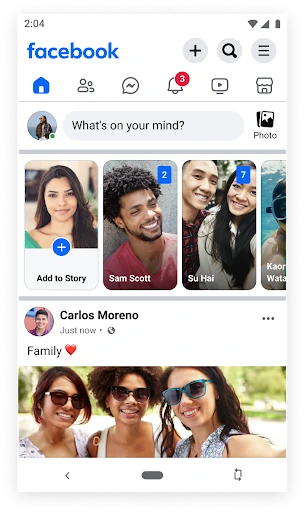
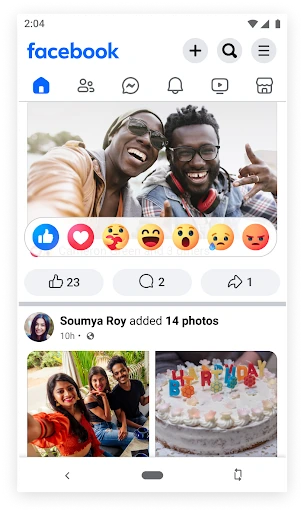
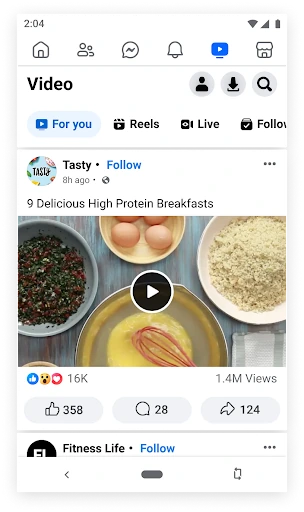
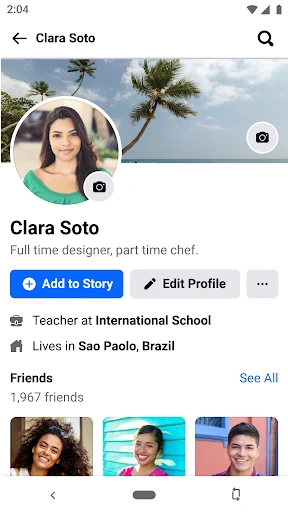
Analysis by Reviewed APKs
Facebook Lite is a smaller Android version of Facebook for keeping up with friends, sharing photos and updates, and finding local activity. I see it as a practical fit for people who want familiar social features while using less data or dealing with slower connections. It covers plenty of everyday Facebook tasks, though it is still a busy social network rather than a minimalist way to browse.
A quick check-in
On a commute or during a short break, I might open Facebook Lite to see what friends have posted, react to a photo, and leave a comment before getting on with my day. The app supports those familiar social tasks, along with status updates and notifications when people like or comment on my posts. Its focus on using less data makes this kind of brief check-in especially relevant when a connection is slow or a data plan is tight.
A more deliberate visit could mean sharing a few camera photos, saving them into an album, or checking a local event and responding to the invitation. I can also follow people or pages to see their updates, look up nearby businesses, and browse Marketplace. These are different reasons to open the same app, but they all sit around Facebook’s core idea: keeping social connections, local information, and shared posts together.
A lighter Facebook, not a new network
The obvious comparison is the regular Facebook app. Lite keeps many classic Facebook activities, including posting to a Timeline, finding people, editing a profile, interacting with posts, and using groups. Its distinguishing purpose is a smaller app that uses less data and can work in 2G conditions. That makes it worth considering when phone space or network quality matters more than having every part of the fuller experience.
It is still Facebook, not a separate messaging service, a dedicated photo editor, or a simple chronological news reader. The app brings together posts, groups, people, events, businesses, and local buying and selling, so there is plenty to explore. If I only want to manage pictures or make plans, the relevant tools are here, but they are part of a broader social feed rather than standalone apps.
Small habits that help
I find it useful to open with a purpose: check a friend’s update, respond to a notification, or look up an event. That gives a visit a natural endpoint in an app with several kinds of content competing for attention. Following people, brands, or teams I care about can also make the feed more personally relevant, while commenting or reacting lets me keep in touch without writing a full update every time.
For photo sharing, I would decide which pictures belong in an album and review the available privacy settings before posting. Facebook Lite supports sharing from an Android camera and gives users control over who can see photos, including the option of a private album. For local errands, I can use Marketplace or check a business’s hours and pictures. These small, task-based visits make the app easier to fit into a routine.
More From Our News Desk

Zoom Meetings, Google Meet, or Teams: Which Is Easiest to Join?

How I Build a Free Streaming Lineup With Tubi

Why Crunchyroll Is the Default Anime App for So Many Fans

YouTube TV: A Practical Guide to Cutting Cable

Rummikub and the Small Comfort of Phone Games

TeamViewer Remote Control or AnyDesk for Helping Family?
Who might like Lite
I’d recommend Facebook Lite to Android users who already rely on Facebook and want to use less data, save phone space, or keep checking in when their connection is limited. It suits people who move between quick social updates and practical tasks such as finding an event, checking a local business, or browsing Marketplace. The familiar Facebook activities are the appeal; this is not a different social network to learn.
It may be a weaker match for someone who wants a very quiet feed, a single-purpose photo app, or a dedicated tool for every kind of communication. Lite still puts Facebook’s varied social content in one place, and that can mean more to browse than some people want. I’d also suggest checking the current Play Store details for device compatibility and purchase information before installing.
Facebook Lite is published by Meta Platforms, Inc. On Google Play, it has over a billion installs and a 4.5-star rating from around 39.4 million ratings. The app is free to download, contains ads, and offers in-app purchases. The displayed in-app purchase range is $0.29 to $179.99 per item.
Google Play gives Facebook Lite a Teen content rating. Its version is listed as varying with the device, and the recorded release date is March 15, 2018. The listed last update is November 4, 2026. The Android version requirement can depend on the device, so it is worth checking the current Google Play details for compatibility.
Making Everyday Facebook Feel Lighter
A familiar first impression
When I first open Facebook Lite, the main draw is not a new way to use social media; it is access to familiar Facebook activities in a smaller app. The setup can lead into the usual reasons people visit Facebook: finding friends, checking updates, and managing a profile. For someone who already knows the service, that familiarity helps the app feel approachable rather than like a separate network.
The useful framing is to think of Lite as a way to reach Facebook when data use or phone storage matters. The supplied details describe it as able to work in 2G conditions, which is a meaningful consideration for weaker connections. I would still check that the app is compatible with my particular Android device before relying on it, since the version requirement can vary.
The daily social loop
The core experience revolves around keeping up with people and responding in small ways. I can read friends’ posts, like photos, add comments or reactions, and publish a status update of my own. Notifications about likes and comments make it easier to notice activity around something I shared, rather than having to remember to revisit every post.
That everyday loop can widen into groups, followed accounts, and local events. I might look for a friend’s update one moment and then see what a followed sports team or brand has posted. This range is useful when Facebook already serves as a regular social hub, though it also means the app is not limited to a tidy list of direct conversations.
More than posts and photos
Photo sharing is one of the more practical parts of the feature set. Facebook Lite lets users share photos, save them in albums, and edit profile information. The description also says people can share images from an Android camera and choose privacy settings for individual photos, including creating a private album. That combination makes the app useful for sharing pictures while keeping audience choices in mind.
The local tools add another dimension. I can find social events, RSVP, and make plans with friends, or look up businesses to see reviews, hours, and photos. Marketplace provides a place to buy and sell locally. These are concrete reasons someone might open Lite beyond scrolling a feed, while still keeping all of those activities within Facebook.
A practical weekly routine
A simple routine could be to check the app during a break, respond to a couple of comments, and then close it. When planning a weekend, I could return to look at local events and RSVP. If I need a nearby shop or service, the business information can be handy for checking hours and pictures before deciding whether to go.
For a batch of photos, I would share only the images I intend to post, place them in an album when that makes sense, and check the privacy choice. Following a manageable set of people or interests can give the feed a clearer purpose. None of these habits requires treating Facebook Lite as an all-day destination; it can work as a set of quick social and local-information check-ins.
Limits to keep in mind
The app’s breadth is both its strength and its main trade-off. Friends’ updates, groups, followed accounts, events, business information, and Marketplace all share the same social setting. Someone seeking a single-purpose tool may find that too much, and anyone who wants to avoid advertising should note that Facebook Lite contains ads.
Lite is still dependent on the Facebook experience and the connection available to the phone. Its stated ability to use 2G conditions and less data is relevant, but it does not mean every network situation will feel identical. The version also varies by device, so compatibility details are worth checking in Google Play. In-app purchases are offered, with prices that can vary by item.
Facebook Lite makes the most sense when I want familiar Facebook features while keeping data use and app size in mind. Its mix of posts, photos, groups, events, business details, and Marketplace gives it everyday usefulness beyond checking a feed. The experience remains broad and ad-supported, so it is not automatically the right fit for someone seeking a quieter or more focused app.
For Android users who already use Facebook and sometimes have limited connectivity, I’d give Lite a try after checking device compatibility. It keeps many of the activities that make Facebook useful without asking users to switch social networks. If your priority is a narrow tool or an ad-free experience, I would look elsewhere.
Facebook Lite Frequently Asked Questions
What is Facebook Lite used for?
Facebook Lite is used to keep up with friends and other followed accounts, share status updates and photos, and interact with posts. It also supports groups, local events, business lookups, and Marketplace. Its focus is a smaller Facebook app that uses less data and can work in 2G conditions.
Which devices can run Facebook Lite?
Facebook Lite is an Android app. The version can vary by device, and the Android version requirement may also depend on compatibility details for your phone. Check the current Google Play information for your device before downloading, especially if you use an older Android phone.
Does Facebook Lite cost money?
Facebook Lite is free to download and contains ads. It also offers in-app purchases, with listed prices ranging from $0.29 to $179.99 per item. The specific items and their prices can vary, so check the Google Play details before making a purchase.
Does Facebook Lite work on slow connections?
Facebook Lite is described as using less data and working in 2G conditions, making it relevant for people with slower or limited connections. Actual performance can depend on the network and device. It is intended for Android, so check Google Play for compatibility with your phone.
Who is Facebook Lite best suited to?
It may suit Android users who want familiar Facebook features while saving phone space or using less data. It includes social posts, photos, groups, events, local business information, and Marketplace. People who want a focused app or prefer not to see ads may find it less suitable.
Pros
- Uses less data and is designed to work in 2G conditions.
- Combines posts, photos, groups, events, business lookups, and Marketplace.
- Supports photo albums and privacy choices for shared pictures.
- Free to download and familiar to existing Facebook users.
Cons
- Contains ads and offers in-app purchases.
- Its mix of social and local features may feel busy to some users.
- Android compatibility and app version can vary by device.
- Category
- Social