Samsung Calculator
- 990.23K
- 4.5
- Installs
- 1.00B
- Price
- Free
Screenshots
Analysis by Reviewed APKs
Samsung Calculator is a straightforward tool for everyday arithmetic, with engineering calculations, a calculation history, and unit conversions for jobs that need more than a quick total. I found it best suited to people who want familiar calculations close at hand without opening a separate specialist app. Its strongest point is the practical mix: it stays focused on calculating, while still making earlier formulas and common conversions easy to reach.
A quick calculation in context
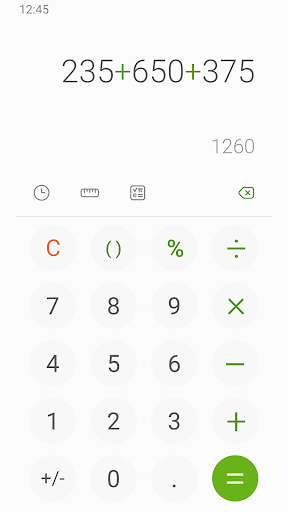
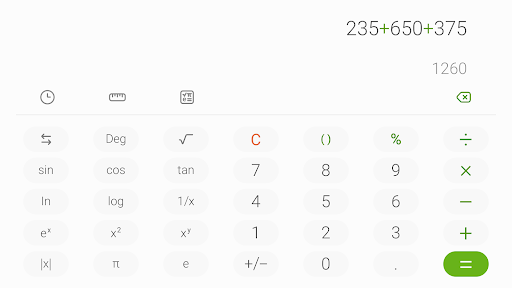
When I first opened Samsung Calculator, I pictured the sort of small task that comes up while planning the day: adding a few expenses, checking a measurement, or working out a quantity before heading to the store. The four basic operations cover those quick needs without ceremony. When a calculation needs more than simple arithmetic, the engineering calculator is available from its icon, so I can move into a more involved calculation rather than switching apps.
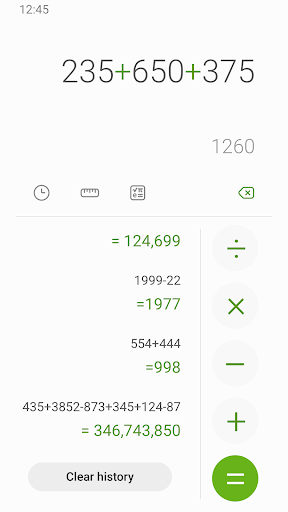
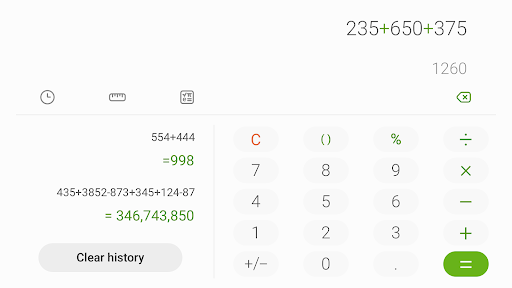
The history is useful when a calculation is part of a short chain of decisions. I can look back at earlier calculations and tap a formula to use it again, which saves re-entering something I have just worked out. I also like that the history panel has a clear way back to the keypad. It makes the app feel like a practical everyday tool, not just a blank screen for one-off sums.
A focused alternative
Samsung Calculator occupies a useful middle ground between a basic calculator and a dedicated engineering or conversion tool. The essentials are there for quick arithmetic, while engineering calculations, reusable history, and unit conversion add room for more involved tasks. I would reach for it when I want those capabilities together in a familiar calculator, rather than opening separate apps for a formula and a measurement conversion.
It is not presented as a graphing tool, a currency converter, or a place to organize a whole project, so I would not choose it for those jobs based on the available features. Its unit conversions cover types such as area, length, and temperature, which is handy for practical measurement work. For users who need an especially specialized workflow, a dedicated app may still be a better fit.
Small habits that help
I get more from the app when I treat history as a working aid rather than a place to revisit only after a mistake. For a task involving several calculations, I can check the recent entries and tap a formula I need again. That is particularly helpful when I am comparing quantities or carrying a calculation through a couple of steps, because it reduces the chance of typing the same expression from scratch.
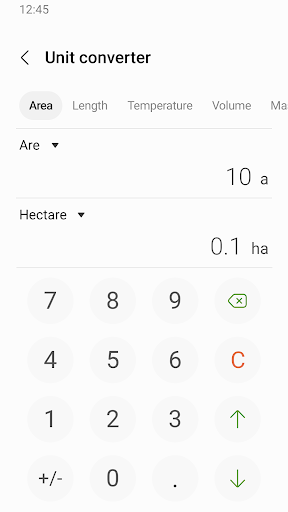
For unit changes, I would switch to the unit calculator as soon as the task changes from arithmetic to measurement. Converting length, area, or temperature in the same app is more convenient than pausing to look up a conversion elsewhere. My simple routine is to use basic operations for the quick estimate, open engineering calculations when needed, and return to history if I want to reuse a previous formula.
More From Our News Desk

Zoom Meetings, Google Meet, or Teams: Which Is Easiest to Join?

How I Build a Free Streaming Lineup With Tubi

Why Crunchyroll Is the Default Anime App for So Many Fans

YouTube TV: A Practical Guide to Cutting Cable

Rummikub and the Small Comfort of Phone Games

TeamViewer Remote Control or AnyDesk for Helping Family?
Who will find it useful
I would recommend Samsung Calculator to anyone who wants a dependable-feeling everyday calculator with a few useful extras close by. Students, home cooks, shoppers, and people doing practical measurement checks can all make use of its combination of basic arithmetic, engineering calculations, history, and unit conversions. The best fit is someone who values quick access and a focused interface more than a long list of specialized tools.
It may not suit someone who needs graphing, currency conversion, or a broader workspace for saving and organizing calculations; those are not among the described features. Likewise, users who only ever need the four basic operations may find the extra options unnecessary. I see it as a convenient all-round calculator for common tasks, rather than a replacement for every specialist calculation app.
Samsung Calculator is developed by Samsung Electronics Co., Ltd. On Google Play, it has over a billion installs and a 4.5-star rating from around 990,000 ratings. The app is free to download, has no in-app purchases, and contains no ads. Its content rating is Everyone, making the store’s audience label suitable for general use.
The app was released on February 8, 2017, and was last updated on March 31, 2025. Google Play describes its version as varying with the device, rather than giving one version number for every user. These details give a practical snapshot of its availability; the current store page is the place to check for changes to version information.
A Handy Calculator for Everyday Tasks
A simple first impression
When I first opened Samsung Calculator, the appeal was its directness: it is centered on calculations, not setup or account management. I could start with a basic operation, then use the relevant icon to reach the engineering calculator or history. That straightforward structure suits a tool I might open for only a few seconds between other tasks.
The extra options do not need to be part of every calculation. I can keep to the fundamental operations when all I need is a quick total, and move to another function only when the task calls for it. That makes the app approachable for casual use while still offering a step up from a bare-bones calculator.
The everyday calculation flow
Most of my imagined day-to-day use is intentionally ordinary: adding prices, checking a difference, or working through a quick figure while doing something else. The four fundamental operations are the core of that experience. When the numbers get more involved, the engineering calculator provides another mode without requiring me to leave the app and find a separate tool.
The calculation history adds continuity to what could otherwise be a series of disposable entries. If I need a formula again, I can open the history and select it instead of retyping it. I appreciate that kind of convenience most when I am comparing several amounts or repeating part of a calculation, rather than when I am making a single quick estimate.
Useful extras, not clutter
The two extras I find most practical are history and unit conversion. History gives me a way to revisit earlier formulas, and the unit calculator handles conversions across types such as area, length, and temperature. Those are distinct needs, but both fit naturally beside the app’s main job of calculating rather than turning it into a general productivity suite.
Engineering calculations are another useful option for work that goes beyond basic arithmetic. The app’s instructions make the route clear: tap the engineering calculator icon to start. I like that this is presented as a separate choice, since not every user needs it for every task. Together, these features give Samsung Calculator some flexibility while keeping its purpose easy to understand.
A practical daily routine
For a routine involving shopping or household measurements, I would start with simple arithmetic to estimate a total, then use the unit calculator if I needed to compare measurements. If I had a formula from an earlier step, I could check the calculation history and tap it to reuse it. That sequence keeps small calculations together instead of scattering them across separate tools.
I would use the same approach for study or work that involves repeated calculations: choose the engineering calculator when the formula calls for it, and rely on history to revisit earlier inputs. It is a modest workflow, but it can cut down on repetitive entry. The app is most helpful when I treat it as a quick calculation companion, not as a place to manage a larger task.
Keep its scope in mind
Samsung Calculator’s strengths are tied to its focused feature set. It handles four basic operations, engineering calculations, calculation history, and several kinds of unit conversion. That covers a broad range of everyday needs, but it does not make the app a graphing calculator or a currency-conversion tool. Anyone whose routine depends on those capabilities will need a different option for that part of the job.
The version varies with the device, so the precise experience may depend on the device using it. I would also keep expectations grounded: history lets me reuse previously entered formulas, but it is not described as a full system for organizing projects or notes. For quick calculations and practical conversions, that is enough; for more specialized work, I would choose a tool built around that work.
Samsung Calculator is a useful choice for people who want basic arithmetic backed by engineering calculations, reusable history, and unit conversions. I like that the extras support real, small tasks without changing the app’s central purpose. It is easy to imagine keeping it close for quick sums, measurement checks, and formulas I may need to enter again.
I would recommend it to users who want a focused calculator with a few practical extensions. If you need graphing, currency conversion, or a specialized workspace, look elsewhere for those needs. For everyday calculations and common unit changes, Samsung Calculator keeps the useful tools together and avoids making a simple job feel complicated.
Samsung Calculator Frequently Asked Questions
What is Samsung Calculator used for?
Samsung Calculator is used for the four fundamental arithmetic operations and engineering calculations. It also includes a calculation history where you can revisit and reuse previously entered formulas, plus a unit calculator for conversions such as area, length, and temperature. It is aimed at quick calculations and practical measurement changes rather than broader project organization.
Which devices can run Samsung Calculator?
Samsung Calculator is available on Google Play for Android. The version is described as varying with the device, so the exact version can differ between users. Check the Google Play store page on your device for current availability and compatibility details. The app information here does not establish availability on other platforms.
What Android version does Samsung Calculator require?
The minimum Android version can vary by device and current app availability. Check Samsung Calculator’s Google Play store page from the device you plan to use for the latest compatibility requirements. Its version is listed as varying with the device, so checking the store is the most practical way to see whether it is offered for your setup.
Does Samsung Calculator cost money?
Samsung Calculator is free to download on Google Play. It has no in-app purchases and contains no ads. Store details can change over time, so it is worth checking the current Google Play page before installing if you want to confirm the latest cost and app information.
Is Samsung Calculator suitable for everyday use?
Yes, it suits people who want basic arithmetic, engineering calculations, formula history, and common unit conversions in one calculator app. It may be less suitable if you specifically need graphing, currency conversion, or a tool for organizing a larger project. Its content rating is Everyone, and the features are centered on practical calculations.
Pros
- Combines basic arithmetic with engineering calculations for more involved everyday tasks.
- Calculation history lets you revisit and reuse formulas without typing them again.
- Unit conversions cover practical categories such as area, length, and temperature.
- Free to download, with no in-app purchases or ads.
Cons
- Does not include graphing or currency conversion among its described features.
- Its focused calculator design may not suit users seeking project organization tools.
- Version details vary by device, so the experience may not be identical everywhere.
- Category
- Tools