Perplexity - Ask Anything
- 2.22M
- 4.6
- Installs
- 100.00M
- Price
- Free

Screenshots

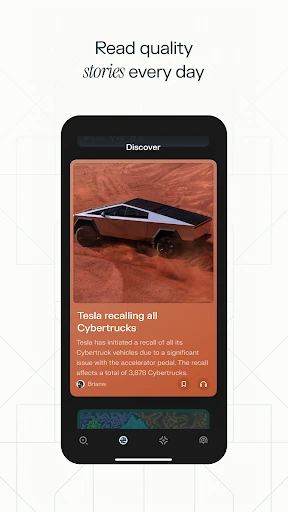

Analysis by Reviewed APKs
Perplexity - Ask Anything is an AI-powered search and question-answering app for people who want a direct explanation rather than a page of links to sort through. I found its mix of cited answers and conversational follow-ups useful for everyday curiosity and early research. It suits students, busy readers, and anyone who likes to ask a question in plain language, though it works best as a starting point for learning.
From Quick Question to Context
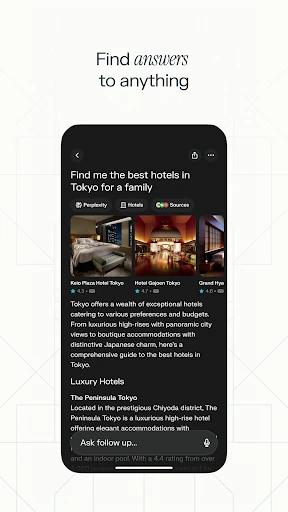
When I have a small gap in the day, I often want to settle one question without opening a dozen tabs. Perplexity gives me a place to ask in ordinary language and get an answer with cited sources. I can follow up in the same thread when the first response leaves out a detail, which makes the exchange feel more like exploring a topic than repeating separate searches.
That flow is especially handy when a question grows as I read. I might start by asking for a plain explanation of an unfamiliar subject, then ask for a closer look at one point. The app keeps the conversation going, so I can build some context without needing to restate everything. I still check the cited material when accuracy matters, but the answer gives me a useful direction for that next step.
A Search Companion, Not a Textbook
Compared with a conventional search session, Perplexity puts an AI-generated answer up front and includes sources to explore. That can save time when I want a quick overview or a starting explanation. Its follow-up conversation is a better fit for narrowing a question than opening a fresh search each time. Pro Search is described as guided AI search for deeper exploration, which gives curious users another way to investigate a subject.
I would not treat it as a replacement for reading original sources, a dedicated reference book, or specialist research. A concise response can make complicated material feel settled before I have checked the details. The cited sources are useful precisely because they give me somewhere to verify and continue reading. For a simple question, the direct answer is convenient; for a consequential or nuanced one, I regard it as a first stop rather than the final word.
Small Habits That Help
I get more from the app when I make the first question specific enough to set a direction, then use follow-ups to fill in the gaps. If an explanation is too broad, I can ask for more depth instead of starting over. Voice input is another option when typing is awkward, and the app describes its voice answers as up to date. I still make a point of checking sources rather than relying on a polished summary alone.
The Library is useful for treating discoveries as more than a trail of past searches. I can use it to curate things I may want to revisit, while Discover offers a way to learn from the community. Those features make the app more appealing for ongoing curiosity than for one-off lookup alone. A practical routine is to ask, follow the thread, inspect the citations, and save useful discoveries for later.
More From Our News Desk

Zoom Meetings, Google Meet, or Teams: Which Is Easiest to Join?

How I Build a Free Streaming Lineup With Tubi

Why Crunchyroll Is the Default Anime App for So Many Fans

YouTube TV: A Practical Guide to Cutting Cable

Rummikub and the Small Comfort of Phone Games

TeamViewer Remote Control or AnyDesk for Helping Family?
Who May Find It Useful
I would recommend Perplexity to people who regularly find themselves asking follow-up questions: students looking for an initial explanation, readers exploring a new topic, or busy users who want a concise answer before deciding what to read next. The cited sources give the experience a useful research-oriented angle, and the conversation format makes it easy to refine a question. Voice input and a place to curate discoveries add flexibility to those everyday sessions.
It may be less satisfying for someone who wants only traditional search results, prefers to assess sources before seeing a generated summary, or needs a definitive expert answer. The app can help organize an exploration, but I would not use a short response as a substitute for checking source material. It is also not simply a static encyclopedia: its central experience is asking questions and continuing the conversation, so its value depends on whether that style suits you.
Perplexity - Ask Anything is a productivity app from PerplexityAI. On Google Play, it has over 100 million installs and a 4.6-star rating from about 2.2 million ratings. The app is free to download and contains in-app purchases; listed item prices range from $4.99 to $1,999.99. It is rated Teen, and the current version shown in the supplied app information is 2.103.0.
The app’s release date is May 24, 2023, and its last update date is October 30, 2026. It contains no ads according to the supplied app information. Perplexity describes syncing across devices and says its answers can draw on AI models from OpenAI, Anthropic, Meta, and others. The minimum Android version is worth checking on Google Play, since that requirement can depend on the device and current app release.
A Closer Look at Asking and Exploring
A Direct First Impression
When I first opened Perplexity, the premise was easy to grasp: ask a question, get an answer, and continue if I want more context. That clarity matters in a tool I might reach for between other tasks. There is no need to think in keywords before asking; the app is built around typed or spoken questions and follow-up conversation.
The setup is less about configuring a complicated workflow and more about deciding what I want to know. I can begin with a quick question, or use Pro Search when I want guided exploration. Because the app syncs across devices, it is also positioned for picking up discoveries elsewhere. I liked that the basic interaction feels approachable even when the subject I want to explore is unfamiliar.
The Everyday Answer Loop
The core experience is a back-and-forth rather than a list of links. I ask something, read the response, and then use a follow-up to clarify or deepen the explanation. That small change in rhythm is useful when my first wording is imperfect or when the answer brings up a question I had not thought to ask. It makes an idle moment feel productive without requiring a formal research session.
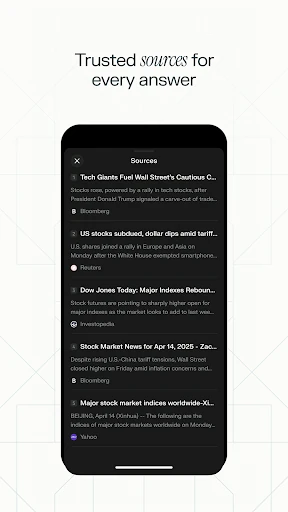
Citations are an important part of that loop. Perplexity describes its answers as having cited sources, which gives me a route to inspect the material behind a response. I appreciate that the app makes source-checking part of the experience instead of presenting the summary in isolation. The citations do not remove the need for judgment, though; I still decide whether a source addresses my question and whether I need to read beyond the answer.
Tools for Going Further
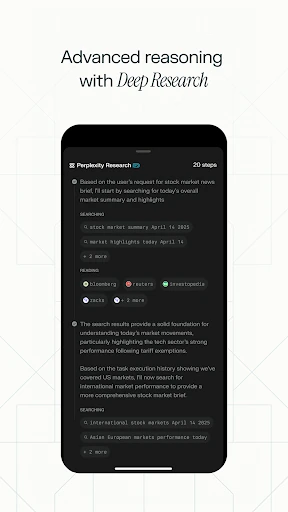
Pro Search is the most clearly defined option for a deeper session. It is described as guided AI search, so it fits when a broad subject needs more exploration than a quick answer can provide. I can use it after noticing that a simple question has several angles, rather than treating every small lookup as a research project.
Thread follow-ups, voice, Discover, and the Library each support a different part of the experience. Follow-ups keep one investigation together; voice lets me ask without typing; Discover is for learning from the community; and the Library is framed as a curated home for discoveries rather than just search history. The app also says it draws on leading AI models from several providers. These are distinct reasons to return, not just different labels for the same search.
A Useful Research Routine
A routine I can imagine using is to start with a question that has come up during reading or conversation, then ask one follow-up that exposes what I still do not understand. If the subject warrants it, Pro Search offers a guided route into deeper exploration. I can then open the cited sources and decide which are worth reading in full, rather than treating the app’s summary as the entire investigation.
For a topic I expect to revisit, the Library gives me a way to curate discoveries. Discover can also provide a route into new things to learn from the community. This setup works for a short break or a longer session: one quick answer need not become a project, while a more involved question can develop gradually. The useful habit is to let the answer guide the next question, not dictate the conclusion.
Keep Its Limits in View
The app’s directness is also a reason to stay thoughtful. A clear answer can sound complete even when I have only seen a summary, so I treat citations as an invitation to verify details. For topics where precision matters, I would read the source material and consider whether the answer has addressed the full question. The app supports exploration; it does not make every response a final authority.
Perplexity will also be a narrower fit for people who simply want conventional search results or who dislike conversational tools. Its central strengths are asking in natural language, following up, and exploring cited answers. The free download includes in-app purchases, with item prices spanning a broad range, so anyone considering paid options should check current details in Google Play. Those caveats do not undermine the basic idea, but they help set realistic expectations.
Perplexity - Ask Anything makes a convincing everyday companion for turning a passing question into a more focused exploration. I like the conversational follow-ups, the cited sources, and the option to keep discoveries in a Library. Its best role is as a starting point that helps me understand what to investigate next, not as a substitute for checking the underlying material.
I would try it if I often search by asking full questions and appreciate a guided path from quick answers to deeper reading. Students, curious readers, and people with busy routines may find that approach especially practical. If I wanted only a traditional results page or expected every answer to be conclusive, I would look elsewhere or use it more cautiously.
Perplexity Frequently Asked Questions
What is Perplexity - Ask Anything used for?
Perplexity - Ask Anything is a productivity app for asking questions and receiving AI-generated answers with cited sources. You can continue with follow-up questions, use Pro Search for guided exploration, ask by voice, explore Discover, and curate discoveries in the Library. It can be useful for quick explanations and early research, while source material remains worth checking.
Which devices can I use Perplexity - Ask Anything on?
The supplied app information describes Perplexity - Ask Anything as syncing across devices. The app is available on Google Play for Android. Compatibility and the Android version required can vary with the device and current release, so check the Google Play store details for the device you plan to use.
What Android version does Perplexity - Ask Anything require?
The minimum Android version can vary by release and device. Check the current Google Play store details for the requirement that applies to your phone or tablet before installing. The app’s listed version is 2.103.0 in the supplied information, but that does not by itself establish which Android versions are compatible.
Is Perplexity - Ask Anything free?
Perplexity - Ask Anything is free to download and has in-app purchases. The supplied Google Play information gives a broad listed item-price range of $4.99 to $1,999.99. Current purchase options and prices may vary, so check the store before buying. The app is listed as containing no ads.
Who is Perplexity - Ask Anything best suited for?
It may suit students, curious readers, and busy people who want to ask questions in plain language, follow up, and inspect cited sources. It is less suited to someone who wants only conventional search results or expects a generated answer to replace reading original material. Whether its conversational approach fits is a matter of preference.
Pros
- Cited answers give curious readers a path to check and explore source material.
- Follow-up questions keep a topic together instead of restarting each search.
- Voice, Pro Search, Discover, and the Library support different ways to explore.
- The app is free to download and contains no ads.
Cons
- A concise AI answer still needs checking against its cited sources.
- The wide in-app purchase price range makes store details worth reviewing.
- Its conversational answer format may not suit people who prefer traditional search results.
- Category
- Productivity
- Version
- 2.103.0











