NWS Mobile
- 361
- 4.7
- Installs
- 50.00K
- Price
- Free

Screenshots
Analysis by Reviewed APKs
NWS Mobile is a congregation scheduling and organization app for Jehovah’s Witnesses, with tools for meeting assignments, duties, territory management, and selected data sharing. I see it as a practical companion for appointed brothers who handle those responsibilities, especially when they need to check or update information away from a desktop. Its focus is narrow, but that focus gives it a useful role in congregation administration.
A Week of Congregation Planning
Picture preparing for the next Christian Life & Ministry meeting while also checking who is assigned to sound and platform duties. NWS Mobile brings those scheduling jobs into one place, including meeting parts, auxiliary classes, Local Needs, assignments, and duties. I can imagine opening it between errands to review the week, spot an assignment that needs attention, and make an update without waiting until I am back at a computer.
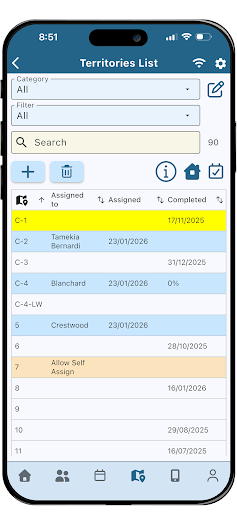
The app also covers congregation events and reports, person information, and territory records, so the work is not limited to the meeting schedule. For example, a brother organizing territories can review territory information, assign territories, or keep track of campaigns alongside other congregation tasks. The point is to support a set of recurring responsibilities, not to turn a phone into a general-purpose planner for every part of personal life.
A Companion to Desktop Tools
NWS Mobile is described as the mobile version of New World Scheduler, with many features also found in NWS Desktop. That makes its role fairly clear: it extends congregation organization to a mobile device, rather than replacing the broader desktop product or serving as a general calendar. The ability to share data with other elders in the congregation also makes it part of a coordinated workflow, not just a private collection of notes.
It is also distinct from NW Publisher, which appears in the workflow for exchanging selected information with publishers. NWS Mobile can share selected data with that app and receive items such as publisher reports and away periods. I would not choose it for ordinary household scheduling, broad task management, or weather updates. Its features are specifically shaped around congregation administration and the people assigned to handle it.
Keep Information Current
A useful habit with an app like this is to review schedules before the week gets busy, rather than waiting until the day of a meeting. NWS Mobile supports scheduling the different parts of Christian Life & Ministry meetings, public talks, assignments, and duties, so a regular check-in can help keep those responsibilities organized. I would treat that review as a quick administrative routine, not as a reason to constantly revisit every record.
Another sensible workflow is to keep related details together and share only the selected data needed by others using NWS or NW Publisher. The app includes congregation and person information, reports, emergency contacts, and territory tools, alongside scheduling. Using the relevant sections as part of a planned review can make updates easier to follow. The emphasis is on maintaining useful congregation information, rather than adding extra steps for its own sake.
More From Our News Desk

Zoom Meetings, Google Meet, or Teams: Which Is Easiest to Join?

How I Build a Free Streaming Lineup With Tubi

Why Crunchyroll Is the Default Anime App for So Many Fans

YouTube TV: A Practical Guide to Cutting Cable

Rummikub and the Small Comfort of Phone Games

TeamViewer Remote Control or AnyDesk for Helping Family?
Who May Find It Useful
I would recommend NWS Mobile to appointed brothers who help schedule congregation meetings, public talks, assignments, duties, or territory work. It is particularly relevant if those responsibilities regularly take them away from a desktop and they need a mobile way to view or manage the same kinds of information. The range of congregation and person records also gives it a role beyond simply checking who has a part next week.
It may not suit someone looking for a general planner, a personal productivity system, or a tool for unrelated community groups. The app’s purpose is explicitly tied to organizing a Jehovah’s Witness congregation, and its features reflect that context throughout. If you do not handle those responsibilities, much of the app’s specialized scheduling and territory management will likely be beside the point. For its intended audience, though, that focused design is also its main advantage.
NWS Mobile is a free Android app from New World Publisher. Google Play shows 50,000+ installs and a 4.7-star rating from 361 ratings. The app has an Everyone content rating. Those figures give a basic sense of its store presence, while the relatively specialized purpose makes the intended audience more specific than the install count alone might suggest.
The current version provided is 8.2.037, with a release date of December 28, 2025, and a last update date of November 3, 2026. The app is marked as free, with no in-app purchases and no ads. An Android minimum version is not included in the available app facts, so it is worth checking Google Play for device compatibility before installing.
A Mobile Desk for Congregation Work
Getting Oriented
When I first opened the description of NWS Mobile, what stood out was how clearly it is aimed at a particular job. This is not a broad productivity app that asks you to adapt generic lists to congregation work. It is built around congregation records, schedules, reports, people, and territories. That directness should help the intended users understand why each area exists, even if the number of responsibilities covered takes a little time to absorb.
The app is described as a mobile version of New World Scheduler and includes many features found in NWS Desktop. That framing matters when deciding how to approach it: think of it as a way to carry congregation organization into mobile use, rather than as a separate replacement for every part of a desktop workflow. Its data-sharing connection with other elders is another sign that it belongs within a wider coordination process.
The Daily Scheduling Work
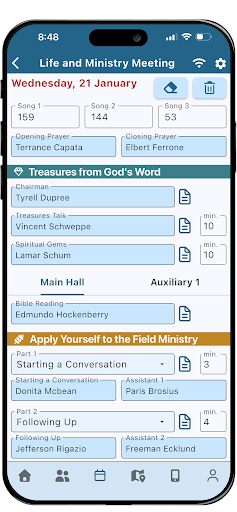
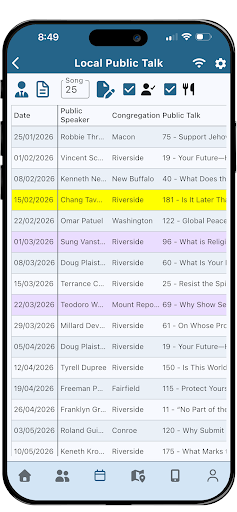
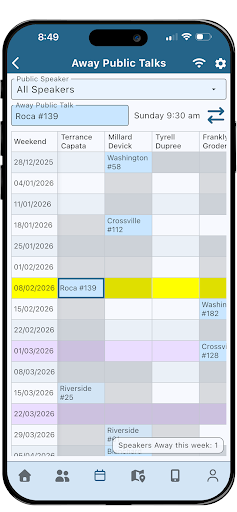
Scheduling is the center of the experience. NWS Mobile can organize Christian Life & Ministry meeting parts, including main and auxiliary classes and Local Needs. It also covers local and away public talks, with visiting speakers and hospitality, plus assignments such as chairman, reading, hospitality, and prayers. That breadth makes it relevant to several recurring planning jobs, rather than just one meeting slot or one type of assignment.
Duties are another substantial part of the scheduling tools. The app supports roles including attendants, security, sound, video, microphones, and platform, as well as custom duties. In everyday use, that range could help keep different responsibilities in view within the same congregation-focused tool. I would expect the most value for people who coordinate several of these areas, rather than someone who only needs to check one occasional assignment.
People and Territories
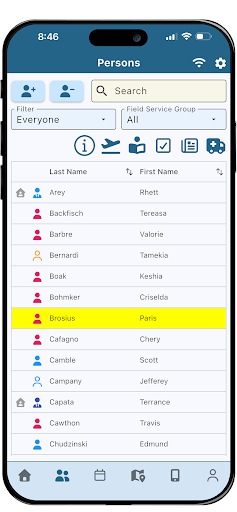
The person and congregation sections add useful context to the schedule. NWS Mobile can show or edit congregation information and events, and person details that include away periods, spiritual information, privileges, assignments, publisher reports, and emergency contacts. This is a broad set of records, so it is clearly intended for users with congregation responsibilities. I appreciate that the app’s described scope connects people and assignments instead of treating scheduling as an isolated list.
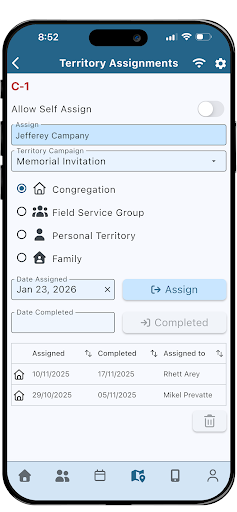
Territory management gives the app a second distinct work area. Users can manage territory information and addresses, assign territories, and handle territory campaigns. The description also says selected data can be shared with publishers using NW Publisher, and that information such as publisher reports and away periods can be received from publishers. Together, those tools make NWS Mobile a coordination app as much as a schedule viewer.
A Practical Weekly Routine
A realistic routine would be to review upcoming meeting parts and duties at a regular point in the week, then make any necessary scheduling changes while the details are fresh. If public talks or hospitality are part of the work being coordinated, those can be considered in the same planning pass. Keeping the review focused on the next set of responsibilities sounds more manageable than trying to revisit every congregation record each time the app is opened.
A separate check-in could be useful for territories and incoming publisher information. The app supports territory assignments and campaigns, and can receive selected data from NW Publisher, including publisher reports and away periods. I would keep those tasks in their own routine so that schedule updates do not get mixed up with territory administration. The app supplies the relevant tools; the benefit comes from using them consistently and sharing only the information needed.
Keep the Scope in Mind
The biggest limitation is also the app’s defining choice: NWS Mobile is for congregation organization, specifically for Jehovah’s Witnesses. Its specialized terms and responsibilities will not translate into a useful everyday planner for most people outside that setting. Even within its intended audience, someone who does not schedule or manage congregation work may have little reason to use the more extensive tools for persons, territories, or assignments.
There is also a practical distinction between having mobile access and replacing a desktop workflow. The app is described as a mobile version with many features found in NWS Desktop, not as a statement that every desktop task is identical on a phone. For users who share data with other elders or NW Publisher, the app’s value depends on that larger workflow. It is best judged as a focused mobile companion for those responsibilities.
NWS Mobile makes sense as a focused tool for congregation scheduling and organization. Its meeting, duty, territory, person, and data-sharing features address a wide range of recurring responsibilities without pretending to be a general productivity suite. I like that the intended use is clear, and that it can support work beyond simply checking a schedule.
I would recommend it to appointed brothers who manage these tasks and want a mobile companion to New World Scheduler. If you need a standard calendar or personal task list, this is not the right fit. For its specific audience, though, NWS Mobile brings several useful parts of congregation administration into one dedicated app.
NWS Mobile Frequently Asked Questions
What is NWS Mobile used for?
NWS Mobile helps Jehovah’s Witnesses organize congregation responsibilities. Its tools include scheduling Christian Life & Ministry meetings, public talks, assignments, and duties, along with congregation and person information, reports, and territory management. It can also share selected data with other elders using NWS and exchange selected information with the NW Publisher app.
Can I use NWS Mobile on iPhone or a computer?
NWS Mobile is an Android app. It is described as the mobile version of New World Scheduler, which also has a desktop version, but the app itself is intended for mobile use. For current device availability or compatibility details, check the Google Play store page and the information provided for New World Scheduler.
What Android version does NWS Mobile require?
The Android minimum requirement can vary with the app’s current release and device compatibility. Check the Google Play store page for the requirement shown for version 8.2.037 and your device before installing. NWS Mobile is an Android app, and its described features are intended for congregation scheduling and organization.
Is NWS Mobile free, and does it have purchases?
NWS Mobile is free on Google Play. The provided app facts say it has no in-app purchases and contains no ads. Store details can change over time, so it is still sensible to check the Google Play page for the current price and app information before downloading.
Who should use NWS Mobile?
The app is designed for Jehovah’s Witnesses, particularly appointed brothers who organize congregation schedules, assignments, duties, or territories. It may be useful when those responsibilities need attention away from a desktop. It is not a general calendar or all-purpose task manager, so its specialized congregation tools may not suit people without those responsibilities.
Pros
- Covers meeting parts, public talks, assignments, duties, and territory management.
- Includes congregation and person information alongside scheduling tools.
- Supports selected data sharing with other elders and NW Publisher.
- Free to use, with no ads or in-app purchases.
Cons
- Its congregation-specific purpose makes it unsuitable as a general planner.
- The broad range of records may be more than occasional users need.
- Some workflows depend on coordination with NWS Desktop or NW Publisher.
- Category
- Productivity
- Version
- 8.2.037











