MyHyundai with Bluelink
- 112.49K
- 4.6
- Installs
- 1.00M
- Price
- Free

Screenshots

Analysis by Reviewed APKs
MyHyundai with Bluelink brings Hyundai owner tools and connected-vehicle controls to a phone. It suits drivers who want to check on a compatible car, handle a few remote tasks, or arrange service without digging through separate resources. My overall take is that it can make ownership more convenient, especially for Bluelink users, but what it can do depends on the vehicle and an active subscription.
A quicker check before leaving
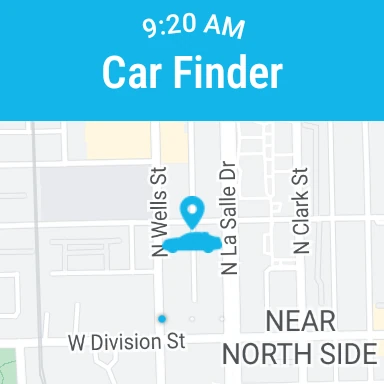
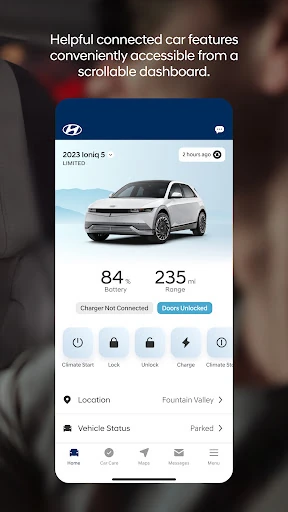
Picture the small scramble before leaving work: I want to know whether my Hyundai is locked, or I need to start it before walking out to the parking lot. With a compatible vehicle and active Bluelink service, MyHyundai puts remote controls and vehicle information on the phone. I can also use it to find the car, which is handy when I have forgotten which row I parked in.
That kind of task is the app’s clearest everyday role. I would open it for a quick vehicle check, a remote command, or a service appointment rather than treating it as something to browse for fun. Remote start, door locking and unlocking, and horn and light controls are among the supported options. The available commands depend on the model, so the app is most useful when its features match the Hyundai I actually drive.
An owner tool, not a car replacement
Compared with a paper owner’s guide or a phone call to arrange routine maintenance, MyHyundai gathers several ownership tasks in one place. It offers owner resources and tutorials, maintenance information, service scheduling, and access to Bluelink customer care. For drivers with an eligible connected vehicle, it adds remote features and, on supported vehicles, status information. That combination makes it more of a practical companion than a general-purpose navigation or travel app.
It is not a substitute for the car itself, and it is not a universal remote for every Hyundai. Bluelink functions require an active subscription, while feature support varies by vehicle. The app also does not turn every owner task into a remote command; the listed capabilities center on selected controls, information, and service access. If I only want directions or a standalone parking reminder, a dedicated map or reminder app may be simpler.
Small habits that help
I’d get more from the app by setting up access before I’m in a hurry. MyHyundai uses a MyHyundai.com ID, password, and PIN for Bluelink remote features, and it supports fingerprint or face authentication. Once those details are ready, checking a status or sending a command becomes a more natural part of leaving home or heading back to the car, rather than a password-recovery exercise in a parking lot.
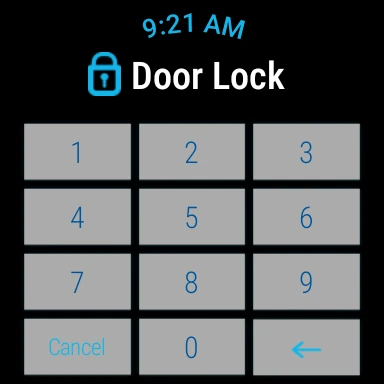
It also makes sense to use the tools that fit the way I drive. An EV or plug-in hybrid owner can check charging status and manage charging schedules and settings where supported. A driver who regularly looks up destinations can use POI search and send a point of interest to the vehicle with the Guidance package. Phone widgets and Wear OS access can put selected tasks closer at hand, though support still depends on the vehicle and subscription.
More From Our News Desk

Zoom Meetings, Google Meet, or Teams: Which Is Easiest to Join?

How I Build a Free Streaming Lineup With Tubi

Why Crunchyroll Is the Default Anime App for So Many Fans

YouTube TV: A Practical Guide to Cutting Cable

Rummikub and the Small Comfort of Phone Games

TeamViewer Remote Control or AnyDesk for Helping Family?
Who will get the most from it
I’d recommend MyHyundai to Hyundai owners who already use, or are considering, Bluelink and want a phone-based way to reach supported vehicle controls. It makes particular sense for people who value remote start, lock and unlock, finding a parked car, or checking charging details on an eligible EV or plug-in hybrid. Owners who book maintenance or look up vehicle information may also appreciate having those tasks alongside connected-car tools.
It may be a less compelling download for someone whose vehicle lacks compatible features, or for an owner who does not want an active Bluelink subscription for remote functions. Drivers expecting every Hyundai to expose the same controls could also find the experience uneven. I would first check what the specific vehicle supports and then decide whether those capabilities fit my routine; the app’s usefulness is closely tied to that match.
MyHyundai with Bluelink is developed by Hyundai Motor America for Android. On Google Play, it has over one million installs and a 4.6-star rating from about 112,000 ratings. The app is free to download, and the provided store facts report no in-app purchases or ads. Its content rating is Everyone.
The current version in the provided facts is 5.3.7, with a last update dated January 17, 2026. The app was first released on July 28, 2014. Android requirements can vary, so it is worth checking the Google Play listing for compatibility with a particular phone. Bluelink remote features also require an active subscription, separate from downloading the app.
How MyHyundai Fits Into Ownership
First look and setup
When I first open an ownership app, I want to know quickly whether it is built around my car or just generic vehicle tips. MyHyundai has a clear connection to Hyundai ownership: its tools include owner resources, service scheduling, and access to a Bluelink-equipped vehicle. Getting into the remote side involves a MyHyundai.com account, password, and PIN, so it is worth having those ready before trying a command.
The app supports fingerprint or face recognition for authentication, a useful option when I would rather not repeatedly type credentials. It may ask for permissions as particular functions need them: location for map features, notifications for app messages, and biometrics for that sign-in option, among others. I’d allow only what makes sense for the tasks I plan to use, then explore the vehicle features available to my account.
The everyday experience
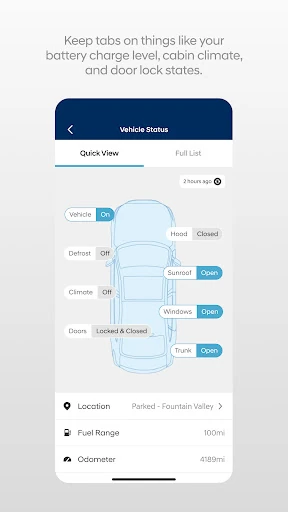
The core experience is about moving a few vehicle tasks from the car or a phone call onto the phone. I can use supported remote commands, look for my parked car, review vehicle status on eligible models, and reach maintenance information. In ordinary use, that makes the app most appealing in short bursts: before leaving, after parking, or when I remember that service needs booking.
The remote start and door controls are straightforward ideas, but their usefulness depends on compatibility and an active Bluelink subscription. I would treat the app as a convenient way to issue supported actions, not as a replacement for checking the vehicle directly when something needs attention. Its role is practical and specific: handle a supported request, get information, or find the right owner resource.
Features beyond remote controls
Remote start and lock or unlock are the headline functions, but there are other useful details around them. The app can activate the horn and lights and help locate the car. It also provides access to user tutorials, vehicle maintenance information, service appointments, and Bluelink customer care. Those features give it a broader owner-support role than a simple remote key app.
For supported EV and plug-in hybrid vehicles, the app can show charging status and provide charging schedule and setting controls. Drivers with the Guidance package can search for points of interest, send them to the vehicle, and revisit saved POI history. Four phone widgets cover selected tasks, including remote features, parking meter, POI search, and Ioniq EV functions; availability depends on the vehicle.
A useful daily routine
A reasonable routine might start at home: I check the vehicle information I need, use a supported remote feature if the car and subscription allow it, then head out. After an errand, the find-my-car feature can help when the parking lot looks less familiar than I expected. These are small moments, but having a single place for them can be more convenient than remembering separate routes to each task.
For an EV or plug-in hybrid driver, charging information gives the app another reason to be part of a regular check-in. I could review charging status and adjust a schedule or setting when needed, assuming the vehicle supports it. On a day when I’m planning a drive, POI search can send a destination to the car with the required Guidance package. It is a collection of practical touchpoints, not a workflow everyone will use in full.
Limits to keep in mind
The biggest limitation is that vehicle support varies. Some status information is for select 2015 model-year and newer vehicles, and the app’s remote, charging, and destination features each have their own compatibility conditions. An active Bluelink subscription is required for Bluelink features, with Remote or Guidance packages needed for select functions. I would check the support for my exact vehicle before relying on a particular command.
The app also asks for account credentials and, depending on what I use, permissions such as location or notifications. That is understandable for the functions described, but it can feel like extra setup if I only need one occasional task. Wear OS features cover selected remote controls and finding the car, rather than every phone feature. The practical value is therefore strongest for owners who have compatible hardware and will use these tools regularly.
MyHyundai with Bluelink is a useful ownership companion when its connected features line up with the car and the driver’s routine. Remote controls, vehicle information, charging tools for supported electrified models, and service access give it several practical jobs without making it a general-purpose driving app.
I’d recommend giving it a try if I owned a compatible Hyundai and expected to use Bluelink or the service resources. If remote access is the main reason to install it, I’d first confirm the vehicle’s supported features and subscription needs. Without that match, much of its appeal may not apply.
MyHyundai with Bluelink Frequently Asked Questions
What is MyHyundai with Bluelink used for?
MyHyundai provides Hyundai owner resources, service scheduling, maintenance information, tutorials, and access to Bluelink features for compatible vehicles. Depending on the vehicle and subscription, those features can include remote start, locking and unlocking, finding the car, charging controls, or sending points of interest. The exact functions available vary by vehicle.
What phones and devices support MyHyundai with Bluelink?
The app is available for Android, and it also supports selected Wear OS smartwatch functions. Phone features include remote controls, POI search, and other tools, while the watch offers selected remote commands and finding the car. A compatible Bluelink-equipped Hyundai and an active subscription are needed for Bluelink functions.
What Android version does MyHyundai with Bluelink require?
Android compatibility can vary. Check the Google Play listing for the current requirement and whether it works with your phone. Vehicle compatibility matters too: support differs by Hyundai model, and some vehicle-status features are limited to select 2015 model-year and newer vehicles.
Does MyHyundai with Bluelink cost money?
The app is free to download, and the provided store facts show no in-app purchases or ads. Bluelink features are a separate matter: an active subscription is required, and select features require the Remote or Guidance package. Subscription availability and details may vary, so check Hyundai’s current information before relying on those functions.
Is MyHyundai with Bluelink useful for every Hyundai owner?
It is most useful to owners with a Bluelink-equipped vehicle whose supported features fit their needs. Remote functions require an active subscription, and feature support varies by model. Owners who mainly want service scheduling or owner resources may still find useful tools, but someone without compatible connected features may get less from the app.
Pros
- Combines vehicle controls, owner resources, maintenance information, and service scheduling.
- Supports useful remote tasks, including starting, locking, unlocking, and locating compatible vehicles.
- Offers charging information and schedule controls for supported EV and plug-in hybrid models.
- Phone widgets and selected Wear OS controls can make frequent tasks easier to reach.
Cons
- Bluelink features require an active subscription, with some functions tied to specific packages.
- Available features vary by vehicle, so not every Hyundai owner gets the same tools.
- Account credentials and feature-related permissions add setup before the app fits into a routine.
- Category
- Productivity
- Version
- 5.3.7











