My Consumer Cellular
- 10.32K
- 3.6
- Installs
- 5.00M
- Price
- Free

Screenshots
Analysis by Reviewed APKs
My Consumer Cellular is an account-management app for people who use Consumer Cellular wireless service. It puts practical tasks like checking usage, paying a bill and adjusting a plan on a phone, with customer support close at hand. I found its purpose refreshingly straightforward: it is a companion to your service, not a general phone utility. It should suit customers who prefer handling routine account chores themselves.
A Bill-Checking Moment
Picture the end of a busy month: you want to check how much service you have used, make sure the bill is handled and get on with your evening. My Consumer Cellular brings those account tasks together in one place on your smartphone. Rather than treating it as something to browse for fun, I would reach for it when a specific question comes up about my wireless account.
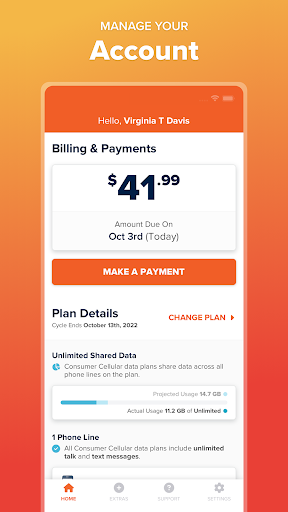
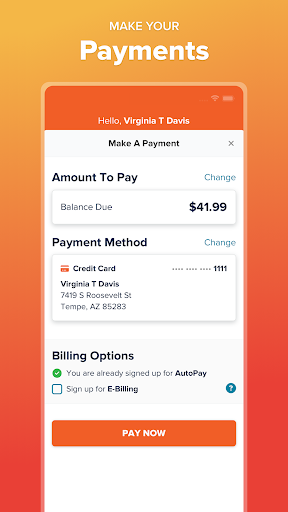
The useful part is that the app covers more than one step in that small routine. You can check usage, pay a bill, change or manage a monthly plan, and enable or disable select service functions. If something needs a human answer, customer support is accessible from the app, too. That makes it a practical starting point for ordinary account upkeep, though it still serves Consumer Cellular customers specifically.
An Account Tool, Not a Carrier Finder
Compared with visiting an account website or calling support for every routine task, a phone app offers a convenient place to check usage and manage service while you are already using your smartphone. My Consumer Cellular is focused on those account interactions. Its value depends on being a Consumer Cellular customer; it is not a way to compare wireless providers or manage an account with another carrier.
I would not mistake it for a general device-control or budgeting app, either. The described tools concern your Consumer Cellular account: usage, bills, plan changes, select service functions and support. That narrow focus is helpful if you want to get a carrier task done without extra distractions. If you rarely need to check your service or prefer handling everything with a person, the app may have less to offer.
Make Small Checks Routine
A simple habit is to open the app when you have a concrete account question, rather than waiting until several chores have piled up. Checking usage when you are thinking about your plan can help you decide whether to manage or upgrade it. If a bill needs attention, you can use the app to pay it. These are straightforward uses, not a complicated system that calls for daily tracking.
I would also keep the support option in mind for questions that cannot be answered by a quick account check. The app is meant to offer access to Consumer Cellular support, so it can be a useful first stop before switching to another route for help. For best results, use it as a companion to your service: check usage, handle a bill or plan task, and move on with your day.
More From Our News Desk

Zoom Meetings, Google Meet, or Teams: Which Is Easiest to Join?

How I Build a Free Streaming Lineup With Tubi

Why Crunchyroll Is the Default Anime App for So Many Fans

YouTube TV: A Practical Guide to Cutting Cable

Rummikub and the Small Comfort of Phone Games

TeamViewer Remote Control or AnyDesk for Helping Family?
Who May Find It Useful
I would recommend My Consumer Cellular to current Consumer Cellular customers who like having account tasks available on their phones. It makes sense if you sometimes check usage, pay bills, adjust a monthly plan or want customer support within reach. People who already use their phone to handle everyday errands may appreciate being able to fit wireless account upkeep into the same routine.
It may not suit someone who is not a Consumer Cellular customer, since the app is built around that provider's account and service. It is also not essential for people who prefer calling or otherwise handling every account task outside an app. The description points to useful core account functions, but not a broad set of extras, so its appeal is mainly about convenient access to those specific chores.
On Google Play, My Consumer Cellular is published by Consumer Cellular Inc and has more than five million installs. It has a 3.6-star rating from about 10,300 ratings. The app is listed as free to download, with no in-app purchases and no ads. Its content rating is Everyone, making the store’s age classification suitable for a general audience.
The listed version is 9.8.0. Google Play gives May 27, 2011 as the release date and October 1, 2026 as the last update date. An Android minimum-version requirement is not included in the supplied app details, so check the Google Play page on your device for compatibility information.
A Closer Look at Everyday Account Tasks
A Focused First Impression
When I first opened the idea of My Consumer Cellular, its job was easy to understand: take care of wireless account needs from a smartphone. There is no need to learn a separate system for an unrelated purpose. The described options—usage, bills, plans, service functions and support—are all tied to managing Consumer Cellular service.
That focus sets a useful expectation from the start. I would come to the app with a task in mind, such as checking usage or paying a bill, rather than expecting a wide dashboard of phone tools. The description presents the app as a convenient account companion, so its appeal is practical access to service management on the go.
The Everyday Account Loop
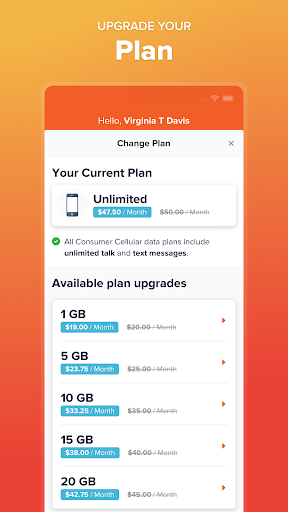
The core experience is a set of common account actions. You can track usage, pay a bill and manage monthly plans, including upgrading a plan. When a service setting needs attention, the app also lets you enable or disable select functions. These capabilities address the small but recurring questions that come with keeping a mobile account in order.
I can imagine opening it during a quiet moment to check usage, then returning later when a bill is due or a plan decision comes up. Keeping those tasks in one app is the main convenience here. It is not necessary to turn account management into a daily ritual; the app is most useful when a particular service question or payment task gives you a reason to open it.
Support Within Reach
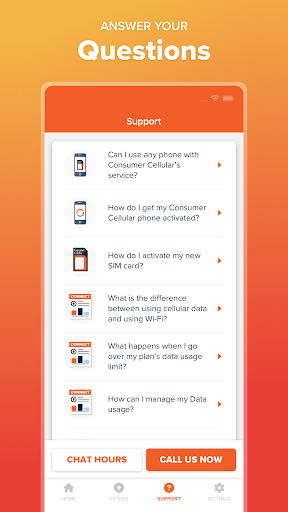
One feature that stands out is access to customer support from the app. That matters because account management does not always end with a quick check. If you have a billing or service question, having a support route close to the account tools can make the app a sensible place to start.
The other notable strength is the range of basic account tasks described together. Usage tracking, bill payment, plan management and select service controls cover several different reasons a customer might need to visit an account. I would value that combination most when I want to handle a quick task without first deciding which separate channel to use.
A Practical Monthly Routine
A low-effort routine could be to check usage when you are reviewing your monthly service, then make a plan change if you decide one is needed. When it is time to pay, the app can handle that task too. This keeps the app tied to actual needs instead of encouraging you to check it without a reason.
For an issue that is not resolved by looking at usage or managing a plan, support is available through the app. I would treat that as a convenient next step rather than assume every question can be settled by a self-service feature. The practical rhythm is simple: check the account, take care of the task the app supports, and turn to support when you need more help.
Keep Its Scope in Mind
My Consumer Cellular is purpose-built for one provider's customers, so its usefulness is tied to having a Consumer Cellular account. That is a natural limitation for a carrier companion, but worth remembering if you are looking for an app that handles service across multiple providers. The listed feature set is focused on account management rather than broad phone customization.
The Google Play rating is 3.6 stars from around 10,300 ratings, which gives prospective users a useful bit of context alongside the app's stated functions. Individual experiences can differ, and a rating alone does not explain why people rated it as they did. I would judge it against the concrete jobs it is meant to handle: checking usage, bills, plans and access to support.
My Consumer Cellular makes the most sense as a practical companion for customers who want to check usage, pay a bill or manage a plan from their phones. I like that support access sits alongside those routine account tasks. Its narrow focus is also clear: this is for managing Consumer Cellular service, not for general phone management.
If you use Consumer Cellular and prefer self-service for everyday account chores, it is worth trying. If you do not have that service or would rather handle every question outside an app, there is less reason to install it. The core idea is simple and useful when the need arises.
My Consumer Cellular Frequently Asked Questions
What is My Consumer Cellular used for?
My Consumer Cellular is for managing a Consumer Cellular wireless account from a smartphone. The described functions include checking usage, paying a bill, upgrading or managing a monthly plan, enabling or disabling select service functions, and accessing customer support. It is an account companion for the provider's customers rather than a general-purpose phone management app.
Which phones can run My Consumer Cellular?
The app is described as available for Android devices, and Google Play is the relevant store. The supplied app details do not give a minimum Android version, so compatibility can vary by device and software version. Check the Google Play page from your phone for the current requirements before installing.
Does My Consumer Cellular cost money?
The app is listed as free to download, with no in-app purchases and no ads in the supplied Google Play details. That covers the app itself; wireless service and account charges are separate matters. Store details can change, so check Google Play for current app information.
Does My Consumer Cellular have a minimum Android requirement?
A minimum Android version is not provided in the app details used for this review. Requirements can vary as an app is updated, so the Google Play page is the best place to check whether My Consumer Cellular supports your particular phone and Android version.
Who should use My Consumer Cellular?
It is intended for Consumer Cellular customers who want to handle account tasks on a phone, such as checking usage, paying bills or managing plans. People who are not Consumer Cellular customers are unlikely to benefit from its provider-specific tools. If you prefer handling account questions outside an app, its convenience may matter less.
Pros
- Brings usage checks, bill payment and plan management together in a phone app.
- Provides access to Consumer Cellular customer support from the app.
- Free to download, with no ads or in-app purchases listed.
Cons
- Its account-management tools are intended for Consumer Cellular customers.
- The Google Play rating is 3.6 stars, so experiences may vary.
- The supplied details do not state a minimum Android version.
- Category
- Productivity
- Version
- 9.8.0











