MBTA mTicket
- 1.59K
- 3
- Installs
- 500.00K
- Price
- Free

Screenshots
Analysis by Reviewed APKs
MBTA mTicket is a mobile ticketing app for people who ride the MBTA Commuter Rail or ferry. It lets you buy eligible tickets, keep them on your phone, and check schedules, maps, and service alerts in the same app. I like the practical focus: it can make a regular commute or occasional ferry trip easier to prepare for, though it is not a ticket shop for every kind of MBTA travel.
Before the train arrives
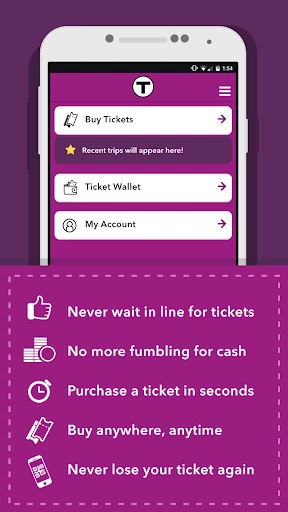
When I picture using MBTA mTicket, it is on a morning when I know my Commuter Rail origin and destination but do not want ticket buying to become one more station task. I can select the trip and ticket type, pay by card, and keep the ticket in My Tickets. The phone becomes the ticket, so the useful part is having the purchase ready before I get to the platform.
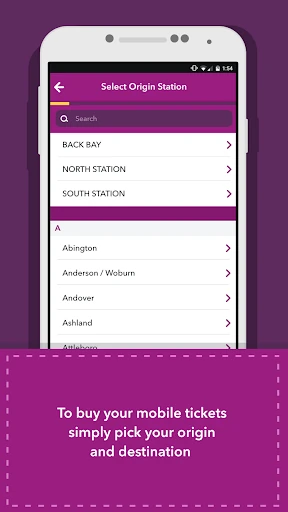
That same preparation works for a ferry ride or a trip I do not make every day. The app supports single-ride, round-trip, 10-ride, and monthly tickets for Commuter Rail and ferry. I would check the schedule or service alerts while planning, then buy the appropriate ticket rather than trying to sort out zones myself. Selecting an origin and destination is meant to handle that choice.
A ticket tool, not everything
Compared with buying a paper ticket at a station, the app shifts the purchase onto the phone and stores the result in My Tickets. That is especially handy when I already know where I am going or want to arrange a ticket before leaving home. Schedules, maps, and T-Alerts also give it a little more planning value than a bare digital wallet for train and ferry tickets.
Its scope is still specific. The described ticket options are for Commuter Rail and ferry, so I would not treat mTicket as a universal pass for every MBTA service or as a general-purpose route-planning app. If my main need is finding a route across the entire transit network, this may not be the only tool I want. Its core job is buying and holding the supported tickets.
Small habits that help
A useful habit is to check the origin, destination, and ticket type before paying, especially when a trip is occasional and I am choosing between a single, round-trip, or 10-ride option. The app lets riders select an origin and destination instead of having to work out zones. I would still take a moment to make sure the trip details match my plans before completing the purchase.
I would also make a quick schedule and alert check part of leaving-home routine. Purchased tickets stay in My Tickets, so opening that section before heading out is a simple way to make sure I can find what I bought. If I replace my phone, the app says purchased tickets can be transferred. Keeping that in mind makes the digital-ticket workflow feel less dependent on one handset lasting forever.
More From Our News Desk

Zoom Meetings, Google Meet, or Teams: Which Is Easiest to Join?

How I Build a Free Streaming Lineup With Tubi

Why Crunchyroll Is the Default Anime App for So Many Fans

YouTube TV: A Practical Guide to Cutting Cable

Rummikub and the Small Comfort of Phone Games

TeamViewer Remote Control or AnyDesk for Helping Family?
Who will find it useful
I would recommend MBTA mTicket to Commuter Rail riders and ferry passengers who prefer to buy tickets on a phone and want schedules or service alerts close at hand. It can suit both a predictable commute and a less frequent journey, since the available ticket types include single rides, round trips, 10 rides, and monthly tickets. The biggest benefit is convenience: purchase and ticket storage live together.
It may be a less natural fit for someone who mainly needs information or ticketing for other MBTA services, since the app’s stated ticketing focus is Commuter Rail and ferry. Riders who prefer not to use a phone for tickets may also prefer another way to buy. I would think of this as a focused companion for particular MBTA trips, not a replacement for every travel tool.
MBTA mTicket is developed by MBTA and is listed in the Google Play Maps & Navigation category. It has over 500,000 installs and a 3.0-star rating from 1,591 ratings. The app is free to download. The store details say it contains no ads and offers no in-app purchases, so the app itself does not add a listed purchase charge.
The app is rated Everyone and requires Android 7.0 or later. The current listed version is 7.9.0. It was released on November 8, 2012, and was last updated on September 11, 2025. The recent update describes faster loading, a modernized appearance, bug fixes, and accessibility improvements that include greater screen-reader support.
A closer look at ticketing on the go
A focused first impression
The first thing I appreciate about the idea behind mTicket is that it has a clear job. It is for buying and managing Commuter Rail and ferry tickets, rather than trying to be a catch-all transit app. The purchase flow described is straightforward in concept: choose a trip and ticket type, enter card information, and keep the phone as the ticket.
I would start by checking that my phone meets the Android 7.0 requirement and that I have a payment card ready. From there, the app’s stated options give me a practical sense of what I can buy. There is no need to plan around a ticket balance, since the described process is purchasing individual ticket products directly.
The everyday ticket routine
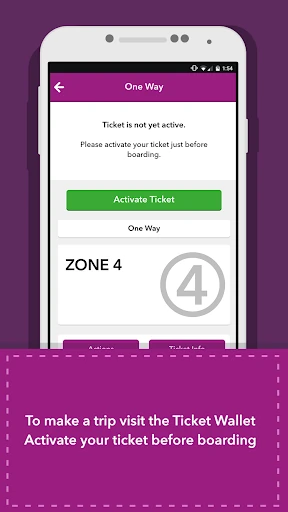
For day-to-day use, the strongest part is having a purchased ticket saved in My Tickets rather than needing to keep track of a paper slip. On a regular route, that reduces one small errand from the morning. For an occasional ride, I can make the purchase as part of planning instead of waiting until I reach a station or boarding point.
The app covers both sides of that routine: ticket purchase and quick access to travel information. Schedules and service alerts are available inside it, with maps also mentioned for Commuter Rail. I would check these before leaving, then open My Tickets when I need the purchase. It is a modest workflow, but the pieces are sensibly grouped around a trip.
Ticket choices and trip details
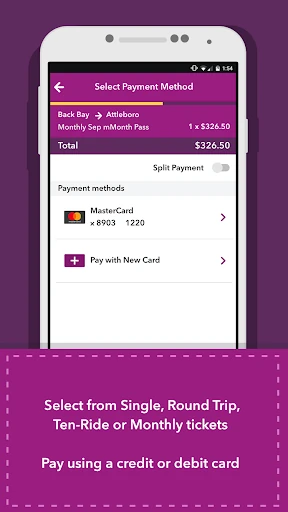
The selection of ticket types is one of the app’s more useful specifics. Commuter Rail and ferry riders can buy single-ride, round-trip, 10-ride, and monthly tickets. That range means the app can support a one-off outing as well as a repeated journey, without making every trip follow the same purchase pattern.
I also like that ticket selection is based on origin and destination rather than asking riders to figure out zones themselves. That can make the buying step easier to approach, particularly if I do not ride often. The available choices still depend on the service and trip, so I would check the options shown for my journey rather than assume every ticket type applies everywhere.
Plan, buy, then check
A practical routine would be to look at the schedule and T-Alerts while deciding when to travel, then select the origin, destination, and ticket type. Once the purchase is complete, I would make sure the ticket is visible in My Tickets before setting off. That sequence keeps planning and ticket access in one place without turning the app into a complicated travel checklist.
For someone who takes the same service repeatedly, a quick check before leaving can become a useful habit: confirm the schedule, look for an alert, and open the saved ticket. For a less frequent ferry or rail trip, the same steps help avoid last-minute uncertainty about what ticket to buy. The app’s stated tools support that routine, while leaving the actual travel choices to the rider.
Keep its limits in view
The main limitation is the narrow ticketing scope. The app describes purchases for Commuter Rail and ferry, not every MBTA mode. That distinction matters if I am looking for one app to cover all the parts of a broader trip. Its maps and schedule tools are specifically associated with Commuter Rail, so I would not assume they replace wider trip-planning needs.
Digital tickets also make the phone part of the travel routine. The app says purchased tickets can be transferred if a phone is lost or stolen, which is reassuring, but I would still want to be able to access my device when traveling. The app notes that Android beta versions and experimental features are not guaranteed to be supported, so standard device software is the safer expectation.
MBTA mTicket is a practical, tightly scoped tool for buying Commuter Rail and ferry tickets and keeping them on a phone. Having schedules, maps, and service alerts nearby adds useful context, while ticket transfer helps address a common worry about digital purchases. It does not try to cover every transit need, and that focus is both its strength and its main boundary.
I would try it if I regularly ride the supported services or want a simpler way to prepare for an occasional trip. Riders who need tickets or planning for a broader range of MBTA travel should keep its scope in mind. For the right commute, it puts the essential ticketing steps in a convenient place.
MBTA mTicket Frequently Asked Questions
What is MBTA mTicket used for?
MBTA mTicket is used to buy and store Commuter Rail and ferry tickets on a smartphone. Its ticket options include single rides, round trips, 10 rides, and monthly tickets. The app also provides access to Commuter Rail schedules, maps, and service alerts, so it can help with basic trip preparation as well as ticket purchase.
Which phones and devices support MBTA mTicket?
MBTA mTicket is an Android app that requires Android 7.0 or later. Its description says support for Android beta versions or experimental features is not guaranteed. If you are considering a device or software setup outside the stated requirement, check the Google Play store details for the latest compatibility information.
Does MBTA mTicket cost money?
The app is free to download, and its store details say it has no in-app purchases and contains no ads. Tickets themselves are purchased through the app using a credit or debit card, so the cost of travel depends on the ticket you choose. Check the app or Google Play details for current information.
Can I use MBTA mTicket for every MBTA service?
The stated mobile ticket options cover MBTA Commuter Rail and ferry, including single-ride, round-trip, 10-ride, and monthly tickets. The description does not present it as ticketing for every MBTA service. If your trip includes other services, check the relevant MBTA information to see what ticketing options apply.
Is MBTA mTicket a good fit for occasional riders?
It can suit occasional Commuter Rail or ferry riders because it supports single and round-trip tickets, as well as other options for more frequent travel. Schedules, maps, and service alerts are also available in the app. It may be less useful if you need ticketing across a wider range of MBTA services.
Pros
- Buy and store Commuter Rail and ferry tickets directly on a phone.
- Offers several ticket types, from single rides to monthly tickets.
- Includes schedules, maps, and service alerts for trip preparation.
- Purchased tickets can be transferred if a phone is lost or replaced.
Cons
- Ticketing is focused on Commuter Rail and ferry rather than all MBTA services.
- Using a digital ticket means having access to your phone when traveling.
- Android beta versions and experimental features may not be supported.
- Category
- Maps & Navigation
- Version
- 7.9.0











