Jarvis - Voice AI Assistant
- 212
- 4.9
- Installs
- —
- Price
- Free

Screenshots
Analysis by Reviewed APKs
Jarvis - Voice AI Assistant is a voice-first conversational assistant for people who would rather talk through a question than type it. I like the appeal of asking about a project, a decision, or the day ahead and hearing a spoken reply. Its persistent memory and practical phone integrations make it more than a basic voice chat, though you’ll need your own Google Gemini API key to get started.
Talk Through the Day
When I picture using Jarvis on an ordinary weekday, it’s between tasks: I tap to speak, ask what I should prioritize, or talk through a choice I haven’t quite settled. The voice-first approach suits those moments when opening a keyboard feels like extra work. Jarvis responds aloud, so the exchange can feel more like talking something through than filling in a search box.
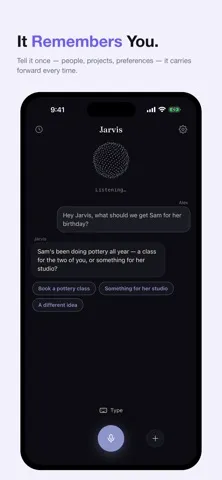
The useful part is continuity. I could mention a project or personal preference in one conversation and have Jarvis carry that detail into later chats, rather than starting from scratch every time. That makes follow-up questions feel more natural. It’s a different rhythm from asking a one-off question in a search app, although the quality of the experience depends on setting up the required Gemini API key first.
A Different Kind of Assistant
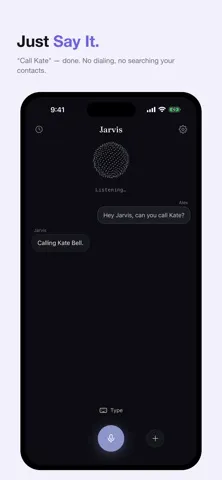
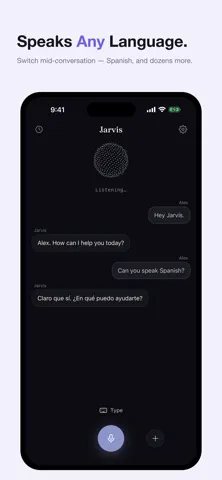
Jarvis sits between a voice chatbot and a phone assistant. Its main draw is an open-ended spoken conversation powered by Gemini Live, with the ability to interrupt or change topics. It can also work with selected phone information and actions, including calendar questions, looking up contacts, calling or texting people, and checking the weather. Those practical touches give the conversation somewhere to go beyond general chat.
I wouldn’t treat it as a replacement for every productivity tool, a dedicated calendar app, or a messaging app. Its description focuses on talking with an AI and asking it to help with certain tasks, not managing a full project or inbox. If you prefer typing, don’t want to supply an API key, or need an assistant that works without spoken conversation, Jarvis may not fit your routine.
Make Memory Work
A small habit that should help is telling Jarvis the context you want it to remember: your name, an ongoing project, or a preference that affects future conversations. Then bring that context back up naturally when you return to the topic. The app is designed to carry remembered details into later chats, which can save the repeated introductions that make other assistants feel forgetful.
I’d also keep requests focused when moving from conversation to a phone task. Ask about the calendar when planning, or ask it to find a contact when you’re ready to call or text. Jarvis requests the relevant permission when it needs it, rather than asking for every permission at the outset. That timing makes it easier to understand why a particular access request has appeared.
More From Our News Desk

Zoom Meetings, Google Meet, or Teams: Which Is Easiest to Join?

How I Build a Free Streaming Lineup With Tubi

Why Crunchyroll Is the Default Anime App for So Many Fans

YouTube TV: A Practical Guide to Cutting Cable

Rummikub and the Small Comfort of Phone Games

TeamViewer Remote Control or AnyDesk for Helping Family?
Who May Enjoy Jarvis
I’d recommend Jarvis to iPhone users who like speaking naturally to an AI and want a conversation that can remember useful personal context. It seems especially appealing if you often think aloud, revisit the same projects, or want to ask about your calendar, contacts, or local weather without switching straight to a separate app. The spoken replies and ability to interrupt should suit people who prefer an active back-and-forth over typing prompts.
It may be a poor match if you want a completely ready-to-use assistant with no setup, since Jarvis requires a Google Gemini API key. It also won’t appeal to everyone who prefers text-only tools or wants a dedicated organizer rather than a conversational helper. I’d suggest checking the App Store details before installing if device compatibility or the exact costs associated with using a personal API key matter to you.
Jarvis - Voice AI Assistant is a productivity app by Himanshi Kapoor, available for iOS. The App Store shows a 4.9-star rating from 212 ratings. It is free to download, and the description says there is no Jarvis subscription or account requirement. To use it, you need to provide your own free Google Gemini API key.
The app has a 4+ age rating and requires iOS 16.4 or later. The current version shown is 0.4.3. Its release date is August 3, 2026, and the most recent update shown is October 28, 2026. Jarvis’s description says voice goes directly from the phone to Google and that remembered information is stored on the phone.
A Voice Assistant Built for Conversation
Getting Started
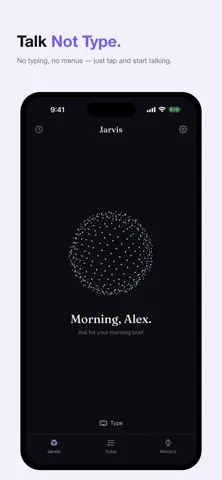
My first impression is that Jarvis is built around one simple action: tap and speak. That focus gives the app a clear identity right away. Instead of treating voice as a small add-on to a text chat, it makes spoken conversation the main event. If you’re comfortable talking to your phone, that can feel refreshingly direct.
The setup has one important extra step: you need a Google Gemini API key. Jarvis says there’s no account or subscription to its own service, but it is not ready to use without that key. I’d take a moment to arrange it before expecting an immediate conversation. That requirement is the main trade-off for a product that puts its own access setup in your hands.
Conversation in Practice
Day to day, Jarvis is intended to listen, respond out loud, and keep a conversation moving. The description says you can interrupt it or change the subject while it talks, which is a useful detail for anyone who finds rigid voice commands frustrating. A natural exchange lets me steer as I think, rather than planning a perfect request before I start.
That conversational format is best for questions, reflection, and follow-ups. I can imagine using it to talk through a decision while walking around the house, then asking a related question without repeating the whole backstory. It won’t make every exchange more convenient than typing, especially when a request needs a precise written answer, but spoken interaction is a sensible fit for hands-busy moments.
Memory and Phone Tasks
The memory feature is one of Jarvis’s clearest distinctions. It is designed to retain details such as your name, preferences, projects, and important people, then use them in future conversations. That can make repeat discussions less repetitive. I’d still be intentional about what I share and remember that the description says those details stay stored on the phone.
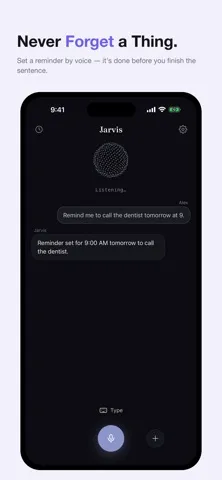
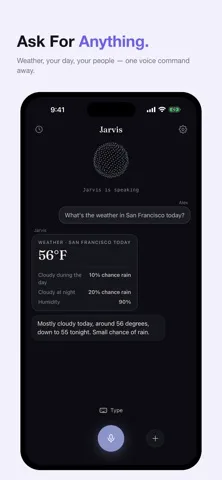
Jarvis also reaches into a few everyday phone tasks. It can answer questions about your calendar, look someone up in your contacts, help call or text them, and check the weather wherever you are. These integrations give the assistant practical uses beyond chatting. The app says it asks for the relevant permission only when a task needs it, rather than requesting everything at first launch.
A Simple Daily Routine
A good way to try Jarvis is to start with one recurring topic. For example, I’d introduce an ongoing project and a preference that shapes how I want to discuss it. Later, I’d return to that project and see whether the remembered context makes the follow-up easier. This gives the memory feature a clear everyday purpose instead of treating it as a novelty.
Then I’d use the phone integrations when a conversation naturally calls for them. While planning the day, ask about the calendar; when a person comes up, ask Jarvis to find them in contacts and help with a call or text. Since permissions are requested at the point of need, the routine can grow gradually. There’s no need to grant every possible access before knowing which tasks you’ll use.
Things to Keep in Mind
The biggest practical limitation is the API key requirement. Jarvis itself is free and says it has no subscription, but you still need to bring a Google Gemini API key. Anyone who wants to download an app and start chatting with no preparation may find that hurdle unwelcome. If you are unsure about any costs related to using the key, check the relevant store and Google details before relying on the app.
Jarvis is also specifically a voice-first experience, so it may not suit people who prefer typing or want a conventional task manager. Its supported phone actions are useful but focused: calendar questions, contacts and calls or texts, and weather. I’d think of it as a conversational layer for selected needs, not a complete replacement for the apps and routines already handling everything else.
Jarvis - Voice AI Assistant has a clear idea behind it: make AI feel like a continuing spoken conversation, with memory and a handful of useful phone tasks. I like that the design aims to remember context and asks for permissions when they become relevant. The required Gemini API key is a real setup consideration, but the no-subscription approach may suit people who value bringing their own access.
I’d try Jarvis if you enjoy talking through questions and want an assistant that can carry context between chats. If you mainly want a typed chatbot, a full organizer, or an app that needs no setup, I’d look elsewhere. For the right voice-first user, its combination of conversation, memory, and selected integrations is a thoughtful fit.
Jarvis Frequently Asked Questions
What is Jarvis - Voice AI Assistant used for?
Jarvis is a voice-first AI assistant for spoken conversations and follow-up questions. Its description says it can remember details such as preferences and projects, answer calendar questions, look up contacts and help call or text them, and check the weather. It is aimed at conversational help and selected phone tasks rather than serving as a full project or calendar manager.
Which devices can run Jarvis - Voice AI Assistant?
Jarvis is an iOS app and requires iOS 16.4 or later. The supplied app information does not identify other supported platforms. If you need to check compatibility with a particular iPhone or confirm current device requirements, it is worth checking the App Store page before downloading.
Does Jarvis - Voice AI Assistant require Android?
No Android version is specified because Jarvis is listed as an iOS app. It requires iOS 16.4 or later. The description also says you need a Google Gemini API key to use it. Check the App Store details for current compatibility information for your device.
Is Jarvis - Voice AI Assistant free?
Jarvis is free to download, and its description says there is no subscription to Jarvis and no account to create. It requires your own Google Gemini API key. The app details provided do not specify other charges related to API use, so check the App Store and Google’s key information if costs are important to you.
Who is Jarvis - Voice AI Assistant best for?
Jarvis may suit iPhone users who like talking to an AI, want it to retain conversational context, and would use its calendar, contact, calling or texting, and weather functions. It may be less suitable if you prefer typing, want a dedicated organizer, or do not want to set up a Gemini API key. Check the App Store page for details that may vary.
Pros
- Voice-first conversations can be interrupted or redirected as the discussion changes.
- Persistent memory is designed to carry personal context into future conversations.
- Calendar, contacts, calling or texting, and weather add practical uses.
- The app says it requests permissions only when a relevant task needs them.
Cons
- You need to provide your own Google Gemini API key before using the assistant.
- A voice-first format may not suit people who prefer typing their requests.
- Its phone integrations cover selected tasks, not a complete productivity workflow.
- Category
- Productivity
- Version
- 0.4.3











