Google Camera
Listed on Google Play as “Pixel Camera”
- 514.91K
- 2.9
- Installs
- 1
- Price
- Free
Screenshots
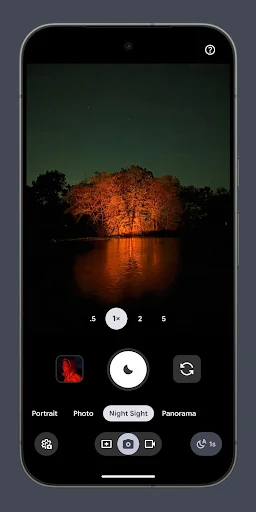
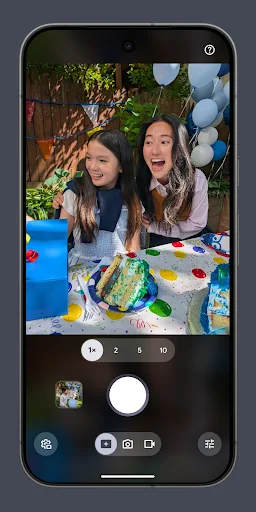
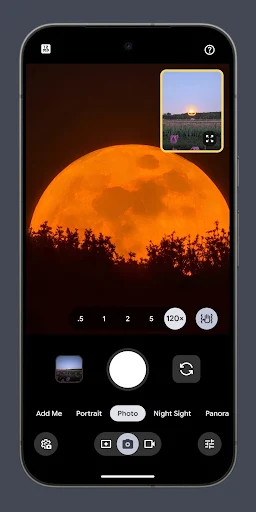
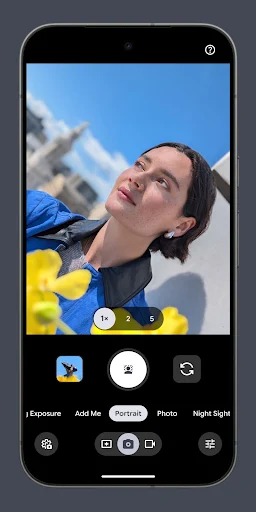
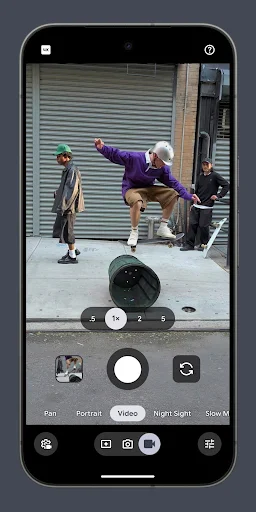
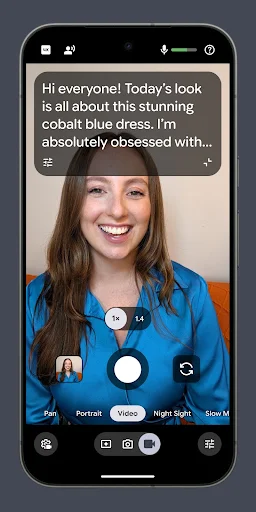
Analysis by Reviewed APKs
Pixel Camera is Google’s photography app for taking photos and videos on Pixel phones, with tools for low light, portraits, zoom, and creative effects. I like the range: it can handle a quick family snapshot and offer more deliberate controls when I want them. It suits Pixel owners who want their phone camera’s features in one place, though device requirements and feature availability deserve a close look.
From quick snap to night shot
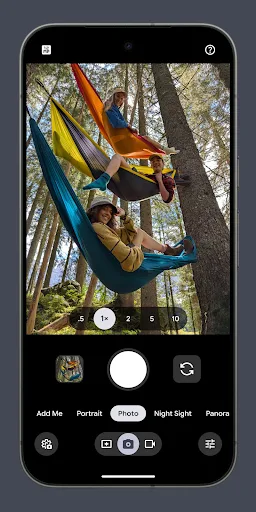
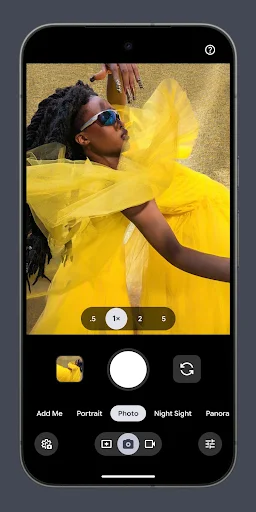
Picture an evening walk that runs past sunset. I might start with a quick photo of a street musician, then reach for Night Sight when the light drops and the scene gets harder to capture. Pixel Camera puts standard shooting alongside options such as Portrait and Night Sight, so the basic job remains familiar while there are more specialized modes to try when the moment calls for them.
A group photo brings a different kind of problem: someone has to hold the phone. Add Me is designed to include the person taking the picture, while Auto Best Take aims to capture a moment when everyone looks their best. Those tools speak to the small hassles of taking pictures with friends. I would still check the result before sharing, but they give the camera more to work with than a plain shutter press.
A camera, not a full editor
Compared with a basic camera app, Pixel Camera offers more ways to shape a shot before or during capture. Night Sight, Long Exposure, Action Pan, and Pro Controls point toward different kinds of photography, while video options include Cinematic Pan and Portrait effects. The appeal is having several capture styles close at hand rather than relying only on the default photo and video modes.
It is still primarily a camera app, not a general-purpose photo editor or a social network. Its tools focus on taking photos and videos, with creative effects and guidance built around capture. If my goal is to organize a large library, make detailed edits afterward, or share directly with a community, those are different jobs. Pixel Camera makes most sense when I want to use a Pixel phone’s camera capabilities.
Build a simple shooting habit
A useful habit is to pause for a second before taking a difficult shot and pick a mode that fits the scene. Night Sight is the obvious choice in dim conditions; Portrait suits a person-focused image, while Macro Focus is aimed at small subjects. That small decision can make the camera feel less like a pile of options and more like a practical set of tools for everyday moments.
For video, I would decide what the clip needs before pressing record. A quick clip can be captured with Long Shot by holding the shutter in photo mode, while Cinematic Pan is meant to slow phone panning movements. People making videos can also look to Creator Suite, which includes a teleprompter, project folders, and an audio visualizer for microphone checks. I would try one feature at a time rather than learning everything at once.
More From Our News Desk

Zoom Meetings, Google Meet, or Teams: Which Is Easiest to Join?

How I Build a Free Streaming Lineup With Tubi

Why Crunchyroll Is the Default Anime App for So Many Fans

YouTube TV: A Practical Guide to Cutting Cable

Rummikub and the Small Comfort of Phone Games

TeamViewer Remote Control or AnyDesk for Helping Family?
Who will enjoy Pixel Camera
I’d recommend Pixel Camera to Pixel owners who take pictures regularly and want more than a single automatic shooting mode. The range covers everyday portraits, low-light scenes, close-up subjects, and video, with Pro Controls for people who want to adjust settings such as shutter speed and ISO. Camera Coach can offer suggestions, too, for anyone who likes a little guidance while learning how to frame a shot.
It may not suit someone without a compatible Pixel device, or someone looking for an all-in-one editing and photo-library app. The latest version requires a Pixel running Android 17 or later, and some features depend on the device. Wear OS support is for compatible watches connected to Pixel phones. If I were choosing a phone camera app, I’d first check that my device supports the version and features I actually want.
Pixel Camera is made by Google LLC and is listed in the Photography category on Google Play. The app is free, with no in-app purchases or ads. Its content rating is Everyone. Google Play shows a 2.9-star rating from about 515,000 ratings. The install figure shown is 1+, which is not a useful measure of broad adoption, so I’d put more weight on whether the app works with a particular Pixel device.
The current version varies by device. The latest version requires a Pixel phone running Android 17 or later; the Wear OS version requires Wear OS 5.1 or later and a connection to a Pixel phone. Pixel Camera was released on April 16, 2014, and its latest update is dated October 12, 2026. Some features are not available on every device, so compatibility is worth checking before relying on a particular tool.
A closer look at Pixel Camera
A familiar starting point
The first impression is of a camera app built around taking pictures and videos, with a broader set of styles than a basic point-and-shoot experience. The named modes make its range easy to understand: Portrait for people, Night Sight for dark scenes, and Time Lapse for a different kind of video. I’d begin with the everyday photo and video options, then explore specialized tools when I had a reason.
There is an important setup detail before getting invested: the latest version only works on Pixel devices running Android 17 and above. The Wear OS version has its own requirements and works with watches connected to Pixel phones. That makes device compatibility part of the first impression, not an afterthought. Even on a supported phone, some features may not be available, so the experience can differ across devices.
The everyday camera rhythm
Day to day, the main appeal is being able to move between ordinary moments and more demanding shots without changing the purpose of the app. A backlit subject or a scene after dark gives HDR+ or Night Sight a clear role. For a short clip, the camera includes video tools such as Long Shot, which lets me record by pressing and holding the shutter while in default photo mode.
The app also offers exposure and white balance controls alongside HDR+, plus Real Tone. That gives the camera’s everyday job a little more flexibility than simply pointing and tapping. I would not treat every control as something to adjust for every shot. Most casual photos call for a quick capture; the extra choices matter when lighting or the look of the image makes me want to intervene.
Tools with a clear purpose
Some of the standout features are aimed at common photographic challenges. Night Sight is intended to bring out detail and color in dark scenes, and its Astrophotography option is designed for photographing the night sky. Super Zoom is intended to sharpen zoomed-in pictures, while Pro Zoom can reach up to 120x and uses a generative imaging model. Those are ambitious tools, but their usefulness will depend on the subject and device.
For creative movement, Long Exposure blurs moving subjects, while Action Pan blurs the background and keeps the subject in focus. Macro Focus is aimed at small subjects, and Add Me helps include the person taking a group photo. Auto Best Take is another group-photo aid, intended to capture a moment when everyone looks their best. These features make the app feel more considered than a camera with only standard modes.
Video creators get a separate set of options. Video Boost is intended to improve lighting, colors, and detail, while Night Sight Video is for recording after dark. Portrait video blurs the background, and Cinematic Pan slows the phone’s panning movements. Creator Suite adds a teleprompter, project folders, and an audio visualizer for microphone checks, which are practical additions for people who record more than occasional clips.
A practical photo routine
For a weekend outing, I’d keep the routine uncomplicated. Take regular photos as moments happen, switch to Portrait for a person-focused shot, and try Night Sight if the light falls away. If a friend is taking a group picture, Add Me is worth considering. This approach gives each feature a purpose without turning a casual day out into a technical exercise.
For a short video project, I’d make a quick plan first: use the teleprompter if I need to speak to camera, check the microphone with the audio visualizer, and keep related work in a project folder. Then I could choose a video style such as Portrait or Cinematic Pan when it fits. These tools are especially relevant to creators; someone filming an occasional birthday clip may never need the full routine.
Keep compatibility in view
The biggest limit is that Pixel Camera is for Pixel devices, and the latest release has a stated Android 17 requirement. That rules it out as a general camera upgrade for people using other Android phones. Wear OS support is narrower still: it requires Wear OS 5.1 or later and a connection to a Pixel phone. Compatibility should come before enthusiasm about any particular mode.
Feature availability also varies by device, so a long list of tools does not mean every Pixel owner will get every option. The app’s 2.9-star Google Play rating, based on about 515,000 ratings, is another reason to consider the fit for a specific phone rather than assume one universal experience. If a particular feature matters to me, I’d check the current store information and device support before counting on it.
Pixel Camera is a capable, feature-rich camera app with useful options for low light, portraits, movement, zoom, and video. I like that it includes both casual capture tools and more involved controls, plus a few thoughtful aids for group photos and creators. The trade-off is clear: its newest version is tied to recent Pixel and Android requirements, and feature availability varies.
I’d recommend it to Pixel owners who enjoy taking photos and want to explore the camera tools their device supports. It is less compelling as a general app recommendation for people using other phones, or for anyone mainly seeking an editor or organizer. Check compatibility first, then start with the modes that solve a real problem in your routine.
Google Camera Frequently Asked Questions
What is Pixel Camera used for?
Pixel Camera is Google’s photography app for taking photos and videos on Pixel devices. It includes options such as Portrait, Night Sight, Time Lapse, and Cinematic Blur, along with tools for zoom, close-up shots, creative motion effects, and video. Some features vary by device, so check Google Play for current compatibility details.
Which phones and devices support Pixel Camera?
The latest version works on Pixel devices running Android 17 or later. The Wear OS version requires a watch running Wear OS 5.1 or later that is connected to a Pixel phone. Not every feature is available on every device, so it is worth checking the Google Play store information for your specific device.
Does Pixel Camera cost anything?
Pixel Camera is free on Google Play and does not contain in-app purchases or ads. Store details can change, so check Google Play for the current information before installing. Device compatibility may also affect whether you can use the latest version and its full set of features.
What Android version does Pixel Camera need?
The latest Pixel Camera version requires Android 17 or later on a Pixel device. The Wear OS version requires Wear OS 5.1 or later and a connection to a Pixel phone. Requirements can vary with the version and device, so Google Play is the best place to check current compatibility.
Is Pixel Camera a good choice for everyone?
It is best suited to Pixel owners who want a camera app with multiple photo and video tools. It may not suit people using other phones, and some features are limited to particular devices. If you mainly want a photo editor or organizer, Pixel Camera is focused on capture rather than those jobs.
Pros
- Offers dedicated options for low light, portraits, close-ups, motion effects, and video.
- Includes exposure and white balance controls alongside automatic shooting tools.
- Creator Suite provides a teleprompter, project folders, and an audio visualizer.
- Designed for both quick snapshots and more deliberate camera use.
Cons
- The latest version requires a Pixel device running Android 17 or later.
- Some features are not available on every device.
- The 2.9-star Google Play rating suggests the experience may not suit everyone.
- Category
- Photography