Open Camera
- 288.10K
- 4
- Installs
- 100.00M
- Price
- Free

Screenshots
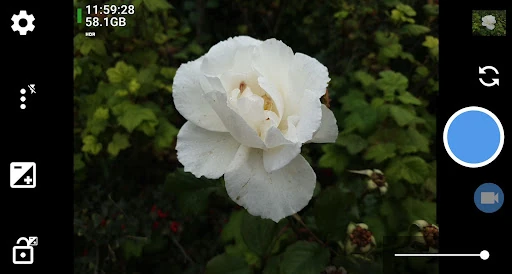
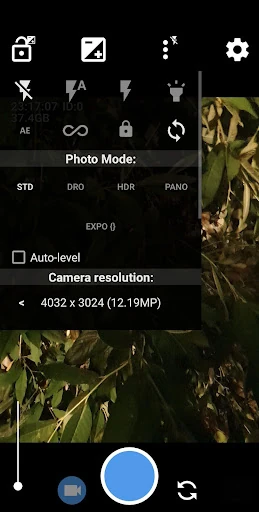
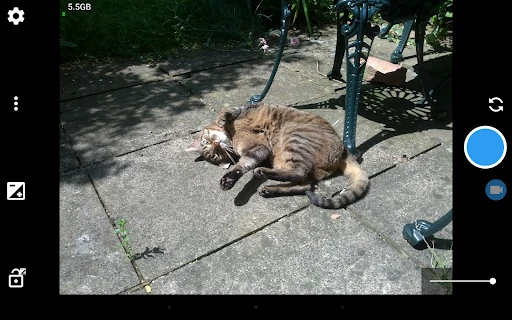
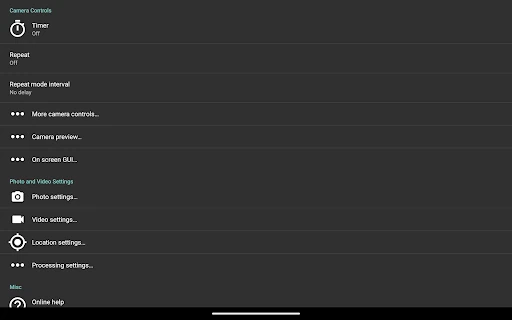
Analysis by Reviewed APKs
Open Camera is a camera app for Android that gives you more control over photos and video than a basic point-and-shoot interface. I see it suiting people who enjoy adjusting a shot, using a tripod or remote trigger, or getting a level frame without extra editing. Its broad set of options is appealing, though the experience is more hands-on than a camera app built around automatic simplicity.
A More Deliberate Snapshot
When I want a quick photo of dinner, I can leave the camera on automatic and take the shot. But for a shelf I am listing, or a room I want to document, I appreciate being able to turn on a grid and auto-leveling before pressing the shutter. Those small aids make it easier to frame a straight, useful picture without taking several nearly identical shots and choosing later.
For a group photo, I can set a timer rather than rush into place, and the optional voice countdown gives me a cue without having to watch the screen. If the phone is positioned where I cannot easily reach it, Open Camera can also take a photo when it hears a noise. These are practical touches for everyday situations, not just controls for people who want to tinker.
A Camera, Not an Editor
Compared with a simple built-in camera, Open Camera puts more photographic controls within reach. It supports options such as white balance, ISO, exposure compensation and lock, scene modes, and color effects. Depending on the phone and its camera support, it can also offer manual controls, RAW files, burst mode, and other advanced capabilities. That makes it a useful alternative when the default camera feels limiting.
The trade-off is that this is primarily for capturing photos and video, not polishing them afterward. Its feature list is about framing, exposure, capture modes, and information attached to the files, rather than a set of editing tools. Someone who wants one big shutter button and no decisions may prefer a simpler camera. Open Camera is most rewarding when you are willing to choose a setting or two.
Small Habits, Better Frames
I would start by choosing one or two aids that solve a recurring problem. A grid can help with composition, while auto-leveling is handy for landscapes, room photos, or any shot where a tilted horizon stands out. Configurable volume keys and interface options can also make the camera feel more comfortable to use. There is no need to explore every control before getting a good everyday picture.
For a self-timer routine, I would set the phone in position first, choose the timer, and then step into the frame. If I am documenting a place, optional GPS tagging can attach location information to photos and videos; date, coordinates, or custom text can also be applied to photos. I would check those choices before a shoot, especially when I want to keep location details private.
More From Our News Desk

Zoom Meetings, Google Meet, or Teams: Which Is Easiest to Join?

How I Build a Free Streaming Lineup With Tubi

Why Crunchyroll Is the Default Anime App for So Many Fans

YouTube TV: A Practical Guide to Cutting Cable

Rummikub and the Small Comfort of Phone Games

TeamViewer Remote Control or AnyDesk for Helping Family?
Who Will Appreciate It
I would recommend Open Camera to Android users who want more say in how a photo or video is captured. It has useful everyday aids alongside its more technical options: timer and auto-repeat controls, grids, auto-leveling, panorama, HDR, and exposure adjustments. People who enjoy experimenting with camera settings can dig further into supported features such as RAW capture, focus peaking, or slow-motion video.
It may be less suitable for someone who wants a camera app to make every decision and keep the interface as spare as possible. Open Camera’s breadth can take a little attention, and some advanced options depend on the phone’s hardware, camera features, or Android version. If you mainly want to apply filters or retouch images, this is not the right kind of app; its strength is the act of taking the picture.
Open Camera is developed by Mark Harman and is listed in the Photography category on Google Play. It has over 100 million installs and a 4.0-star rating from around 288,000 ratings. The app is free to install, and the provided store facts say it contains ads. Its content rating is Everyone.
The current version in the provided facts is 1.56.2. Open Camera was released on October 17, 2013, and its last update is dated May 27, 2026. The app description notes that particular features can depend on device hardware, camera capabilities, and Android version, so the options available may differ between phones.
A Flexible Camera for Real Life
A Straightforward Start
When I first opened Open Camera, what stood out was the contrast between its familiar job and its long list of possible adjustments. It is still a camera app: you compose a shot and capture it. Around that basic action are controls that let you tune the experience, from the interface and volume keys to guides over the preview.
I would resist the temptation to configure everything at once. A first outing can be as simple as checking the framing guides and trying auto-leveling, then returning to the other controls when a particular photo calls for them. This gradual approach keeps the app approachable while leaving room to explore more advanced capture options later.
Day-to-Day Capture
For routine snapshots, Open Camera can stay simple: point, frame, and take the picture. When a shot needs more care, there are controls for exposure compensation and lock, white balance, ISO, scene modes, and color effects. That range is useful when lighting or composition makes an automatic result less predictable, without requiring a separate app just to adjust the capture.
Video is part of the same camera toolkit, with HD video support and options that can include slow motion or log profile video on supported devices. I like that the app covers both stills and moving images, though I would treat the advanced video choices as device-dependent rather than assume every phone exposes them.
Tools Beyond the Shutter
The standout feature is how many different capture aids sit beside the ordinary camera controls. Open Camera offers timer and auto-repeat modes, including a configurable delay, plus a noise-triggered remote photo option. A Bluetooth LE remote is supported for specifically compatible smartphone housings. Those tools make hands-free shots more practical, whether the phone is on a stand or simply out of arm’s reach.
There is also a thoughtful set of framing and exposure aids. Users can choose grids and crop guides, and the app offers an on-screen histogram, zebra stripes, and focus peaking. HDR includes auto-alignment and ghost removal, while exposure bracketing and focus bracketing provide additional ways to capture a range of shots. Which choices are available depends in part on the device.
A Simple Photo Routine
For a family group shot, I would set the phone where everyone fits, enable a grid if I need help balancing the frame, and use the timer to get into position. A voice countdown can make the wait easier to follow. If I am taking several frames, auto-repeat with a chosen delay is another option. The routine is not complicated, but it avoids asking someone else to keep stepping in as photographer.
For travel or a record of a project, I might use optional GPS tagging or add a date, coordinates, or custom text to photos. Open Camera can also store date, time, and location information for video as subtitles in an SRT file. Those details are useful in the right context, but I would make a habit of checking them before sharing images if I do not want identifying information included.
Keep Device Limits in Mind
The main limitation is that a long feature list does not mean every phone can use every option. Open Camera’s description explicitly notes that hardware, camera features, and Android version can affect availability. This matters most for advanced options such as Camera2 manual controls, RAW capture, slow motion, log profile video, and focus bracketing. I would check what works on my own device before planning an important shoot around a specific mode.
There is also a learning curve if you want to make use of the app’s full range. Settings such as exposure lock, geotagging, metadata removal, and overlays are useful because they give you choices, but those choices ask for a little attention. For casual photos, leaving most controls alone is perfectly reasonable. Open Camera works best when its flexibility feels like an option rather than a checklist.
Open Camera is a capable choice for Android users who want a practical everyday camera with room to adjust how images and videos are captured. I especially like its combination of straightforward aids, such as timers and leveling, with deeper exposure and focus tools. Its breadth is a strength, though not everyone will want to spend time exploring settings.
I would try it if the standard camera feels restrictive, or if hands-free shots and framing guides would help in your routine. If you prefer a minimal interface or expect every advanced option to work on every phone, keep those limits in mind. For a free camera app with substantial flexibility, Open Camera is worth a look.
Open Camera Frequently Asked Questions
What is Open Camera used for?
Open Camera is an Android photography app for taking photos and video with additional capture controls. It includes options such as grids, auto-leveling, timers, exposure adjustments, panorama, HDR, and video features. Some advanced capabilities depend on the device. It is focused on capturing images rather than serving as a general photo-retouching app.
Which phones and platforms support Open Camera?
Open Camera is an Android app. Its description says that feature availability can depend on a phone’s hardware, camera features, and Android version, so particular controls may differ from one device to another. For the Android version requirement and compatibility details for a specific phone, check the Google Play store listing.
Does Open Camera cost money?
The provided Google Play facts describe Open Camera as free to install and say that it contains ads. They indicate that it does not offer in-app purchases. Store details can change, so it is worth checking the Google Play listing for the current information before installing.
Does Open Camera include manual camera controls?
It offers controls including ISO, white balance, and exposure compensation or lock, and its description also names Camera2 manual controls and RAW capture. Availability depends on the phone’s camera support and Android version. Check the app on your device to see which options are available to you.
Is Open Camera suitable for beginners?
It can suit beginners who want helpful basics such as a timer, grid, or auto-leveling, and those features can be used without exploring everything else. The broader selection of controls may feel like too much for someone who wants a very simple camera. You can start with the basic capture experience and add settings as needed.
Pros
- Useful framing aids include auto-leveling, grids, and crop guides.
- Offers timer, auto-repeat, and noise-triggered remote photo options.
- Combines everyday capture with a wide range of advanced camera controls.
- Supports photo and video options, including panorama and HDR.
Cons
- Some features depend on the phone’s hardware and camera support.
- The number of settings may feel overwhelming to users seeking simplicity.
- Advanced controls can require time to understand and configure.
- Category
- Photography
- Version
- 1.56.2