FreeStyle LibreLink - US
- 5.41K
- 2.5
- Installs
- 500.00K
- Price
- Free

Screenshots
Analysis by Reviewed APKs
FreeStyle LibreLink - US is a companion app for checking glucose readings from a compatible FreeStyle Libre sensor. It suits people who use that sensor and want readings, trends, notes, and reports together on a phone. My overall take is that it has a focused, practical role in an existing glucose-monitoring routine, but it depends on compatible hardware and should not be treated as a standalone measuring tool.
A quick check in context
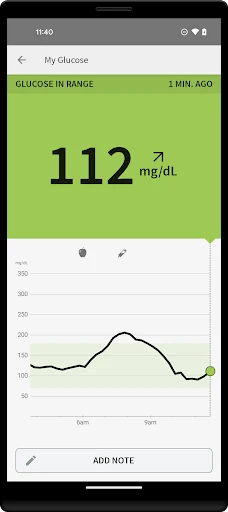
Picture a normal morning: before breakfast, you want to check a reading without reaching for a routine fingerstick. With a compatible FreeStyle Libre sensor in place, the basic task is to hold your phone near the sensor and scan. The app can then show a current glucose reading, a trend arrow, and glucose history. That makes the phone useful as a reader in an everyday routine, rather than just a place to store occasional notes.
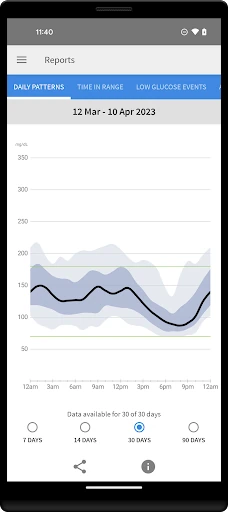
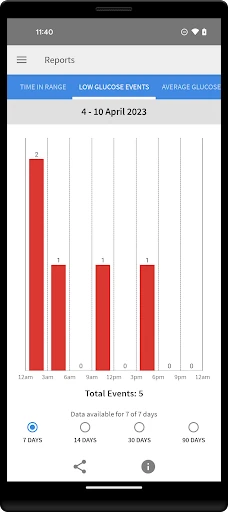
When I first considered the app's core job, the appeal was its narrow focus. A scan gives you a reading and some context, while notes can record food, insulin use, or exercise. Later, reports give those details a broader view, including an Ambulatory Glucose Profile. This is not a promise that every check will answer a question on its own; it is a way to bring readings and selected context into one place.
A companion, not a complete system
The obvious comparison is a blood glucose meter or the FreeStyle Libre Reader. LibreLink has a different role: it uses a phone to scan a compatible sensor, while the app itself does not provide a blood glucose monitoring system. If you already use the sensor and prefer carrying your phone, that can make it a convenient companion. The app is designed to work with both 10-day and 14-day sensors.
It is not a general health tracker, a replacement for a sensor, or a substitute for following the product instructions. There are important limits to keep in view: the phone and sensor must be compatible, and the app requires LibreView registration. If you use the app and Reader with the same sensor, their data do not sync directly with one another. A standalone meter remains relevant for situations the product labeling identifies.
Make notes part of the habit
The most useful routine is likely a small, repeatable one: scan when you want a check, then add a note when food, insulin use, or exercise gives that reading helpful context. Those notes can make a history easier to interpret later than a string of numbers alone. I would keep the habit simple enough to maintain; a few meaningful entries are more practical than turning every scan into a long journaling session.
Reports can add another layer when you want to look beyond the latest reading. If you use more than one device with the same sensor, the instructions say to scan with each device at least every eight hours for complete reports from that device. Data from devices can be uploaded and viewed through LibreView. Those details matter most when setting up a routine, so it is worth reading the manual rather than assuming every device shares a complete history automatically.
More From Our News Desk

Zoom Meetings, Google Meet, or Teams: Which Is Easiest to Join?

How I Build a Free Streaming Lineup With Tubi

Why Crunchyroll Is the Default Anime App for So Many Fans

YouTube TV: A Practical Guide to Cutting Cable

Rummikub and the Small Comfort of Phone Games

TeamViewer Remote Control or AnyDesk for Helping Family?
Who may find it useful
I would recommend FreeStyle LibreLink - US to someone who already uses a compatible FreeStyle Libre sensor and wants to check readings with a smartphone. Its combination of current readings, trend arrows, history, notes, and reports gives the app a clear place in a sensor-based routine. It may also suit people who want to share data with healthcare professionals through LibreView, provided they register and follow the service's setup requirements.
It may not suit someone looking for a glucose reading without a sensor, or someone whose phone is incompatible. It is also not the right choice for a person who expects the app and a Reader to automatically share their data. Because this is a medical tool, I would not treat a reading as a substitute for product guidance or a blood glucose monitoring system when one is required. Check the instructions and compatibility information before relying on it.
FreeStyle LibreLink - US is developed by Abbott Diabetes Care Inc. On Google Play, it has over 500,000 installs and a 2.5-star rating from 5,412 ratings. The app is free to download, with no in-app purchases or ads reported. Its content rating is Everyone. The current version in the supplied app details is 2.13.1.
The app was released on June 6, 2019, and its listed last update date is March 23, 2026. A minimum Android version is not provided in the supplied details, so check Google Play for device requirements before installing. Phone and operating-system compatibility can vary; Abbott's compatibility information is the sensible place to check whether a particular smartphone works with the sensor.
A focused phone-based sensor companion
First steps and setup
The first thing to understand is that LibreLink is not a sensor in software form. You need access to a compatible FreeStyle Libre sensor, and the app works by scanning it with a phone. The product information also directs users to review labeling and an interactive tutorial before use. That is a sensible starting point for an app connected to glucose readings, rather than something to rush through while setting up.
Smartphone compatibility depends on the phone and operating system, so checking that before building a routine around the app is important. LibreView registration is required to use LibreLink. The user manual is accessible through the app, according to the product information, and Abbott customer support can be contacted for a printed copy. These are practical setup considerations, not optional extras if you need clear guidance.
The daily scanning experience
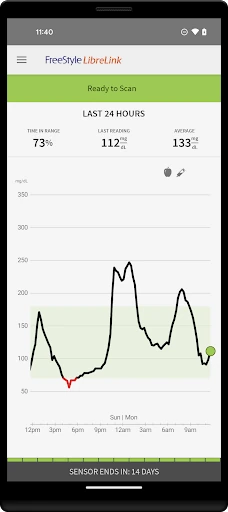
The central interaction is refreshingly direct: hold the phone near the sensor to scan, then view the reading, trend arrow, and history. That gives the app an easy-to-understand job during an ordinary day, whether you are checking around a meal or looking back at recent readings. Its value comes from putting those pieces together, not from adding a complicated layer of general wellness features.
A useful point to remember is that the app is a reader for the sensor, not the monitoring system itself. The product information says users must also have access to a blood glucose monitoring system. It also calls for fingersticks in specified circumstances, including when the app shows the Check Blood Glucose symbol, symptoms do not match readings, or a reading seems inaccurate. The manual and labeling explain the boundaries.
Notes and reports add context
Notes are a small feature with a practical purpose. You can record food, insulin use, and exercise alongside your glucose information, which can help make a history more meaningful when reviewing it later. I like that this keeps the app's scope grounded: it offers a place to capture relevant context without pretending that a note alone explains a reading or tells you what to do.
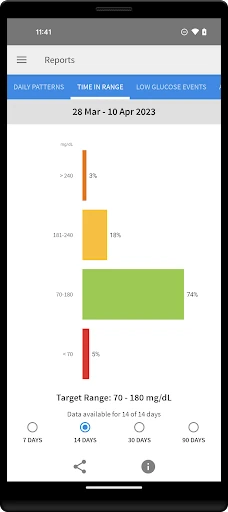
The app also provides glucose reports, including an Ambulatory Glucose Profile. That makes it more than a succession of individual scans for users who want to review information over time. LibreView adds a route to connect with healthcare professionals, and the product information says registration is required. These reporting and sharing options are particularly relevant for people who already include data review in their care routine.
A routine that stays manageable
A workable daily pattern could be to scan when you need a check, note a relevant meal, insulin use, or exercise, and review reports at a suitable time. That keeps the app tied to actual events instead of turning it into a second full-time task. I would also keep the manual close at hand during setup, since the product guidance explains both how to use the app and when additional checks are needed.
If you use a Reader and the app with one sensor, the order matters: start the sensor with the Reader first, then scan it with the phone. Their data do not share directly. The product instructions say to scan every eight hours with each device if you want complete reports from that device, and data from devices can be uploaded and viewed on LibreView.com. Knowing this ahead of time can prevent confusing gaps.
Limits to keep in view
This app depends on a compatible sensor and smartphone, so it cannot serve as a standalone option for someone without that equipment. Compatibility may vary across phones and operating systems. It also has a specific medical purpose: measuring glucose levels in people with diabetes when used with a sensor. That narrow scope is a strength for the right user, but a poor fit for someone expecting a broad health dashboard.
The store rating is 2.5 stars from 5,412 ratings, so the overall response on Google Play is mixed. I would weigh that alongside the app's specific role and check the current compatibility details for a phone before relying on it. More importantly, follow the product labeling: the app does not provide a monitoring system, and some situations call for a fingerstick or other checks described in the instructions.
FreeStyle LibreLink - US makes sense as a practical phone companion for people already using a compatible FreeStyle Libre sensor. Scanning, viewing trends and history, adding notes, and reviewing reports form a focused toolkit. The setup and device-sharing details deserve attention, but the app's purpose is easy to understand once those boundaries are clear.
I would recommend it to compatible sensor users who want their phone involved in routine checks and data review. I would not recommend treating it as a sensor replacement or as the only glucose-monitoring option. Check phone compatibility, read the user manual and labeling, and follow the guidance for situations that require additional testing.
FreeStyle LibreLink Frequently Asked Questions
What is FreeStyle LibreLink - US used for?
FreeStyle LibreLink - US lets people with diabetes check glucose readings by scanning a compatible FreeStyle Libre sensor with a phone. It can show a current reading, trend arrow, and glucose history, and it supports notes about food, insulin use, and exercise. It also provides glucose reports, including an Ambulatory Glucose Profile.
Which phones and devices work with FreeStyle LibreLink - US?
The app is for smartphones and works with compatible FreeStyle Libre sensors, including 10-day and 14-day sensors. Phone and operating-system compatibility can vary, so check Abbott's compatibility information and the Google Play details for your device. The app and a Reader do not share data directly when used with the same sensor.
What Android version does FreeStyle LibreLink - US require?
The minimum Android version may vary by device and app release. Check the current Google Play information before installing, and verify that your phone is compatible with the sensor. The product information specifically notes that compatibility can vary between phones and operating systems.
Does FreeStyle LibreLink - US cost money?
The app is free to download on Google Play. The supplied app details report no in-app purchases and no ads. Using the app requires access to a compatible FreeStyle Libre sensor and registration with LibreView. Sensor and service arrangements may vary, so check the store and product information for current details.
Is FreeStyle LibreLink - US suitable for everyone with diabetes?
It is intended for measuring glucose levels in people with diabetes when used with a compatible sensor, so it is most suitable for people whose phone and sensor work together. It does not provide a blood glucose monitoring system. Product labeling describes circumstances when fingersticks are required; review the manual and follow its guidance.
Pros
- Shows a current glucose reading, trend arrow, and history after scanning a compatible sensor.
- Notes can capture food, insulin use, and exercise for later context.
- Includes glucose reports and a LibreView connection for sharing data with healthcare professionals.
- Works with both 10-day and 14-day FreeStyle Libre sensors.
Cons
- Requires a compatible sensor and smartphone; the app is not a standalone monitoring system.
- Phone and operating-system compatibility can vary and should be checked before use.
- Data from the app and Reader do not sync directly when both use the same sensor.
- Category
- Medical
- Version
- 2.13.1