FreeStyle Libre 3 – US
- 13.52K
- 3
- Installs
- 1.00M
- Price
- Free
Screenshots
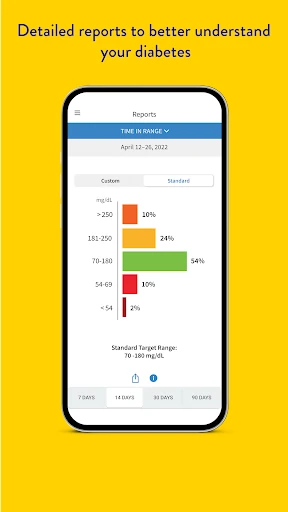
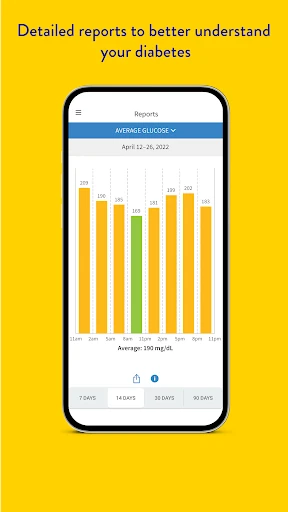
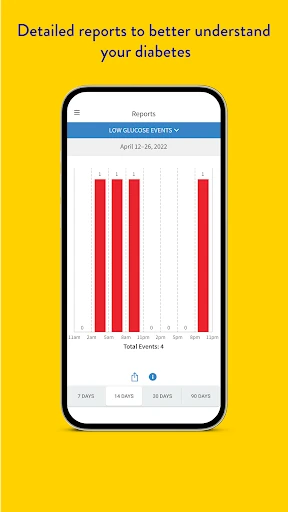
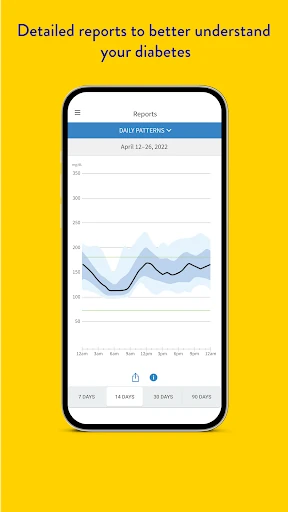
Analysis by Reviewed APKs
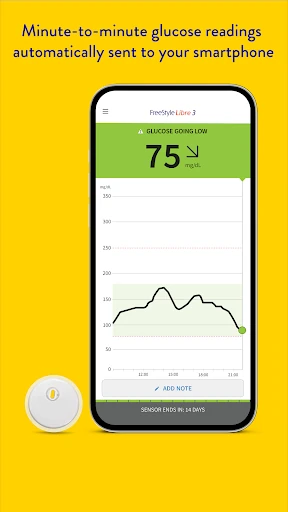
FreeStyle Libre 3 – US is a companion app for people using compatible FreeStyle Libre 3 or FreeStyle Libre Select sensors to measure glucose levels. It shows glucose readings in real time, with optional alarms and reports. I see its appeal in making regular glucose checks easier to fit into an ordinary day, though its usefulness depends on having the right sensor and a compatible phone.
A check-in during the day
When I picture using FreeStyle Libre 3 – US in a normal routine, the draw is having a glucose reading available on my phone rather than making a separate check each time I want an update. A quick look between errands or during a pause at work can make the app feel like a practical companion to the sensor. It is designed to show readings in real time, not to replace the sensor itself.
Getting started has an important step that affects the first day: a newly applied sensor needs a 60-minute warm-up. Once it is ready, the app’s central purpose is straightforward: check the reading, then return to whatever I was doing. Optional glucose alarms can provide another kind of check-in, while reports offer a way to look beyond a single moment. This is a focused tool for ongoing glucose monitoring.
A sensor companion, not a general tracker
The obvious alternative is checking glucose through another compatible monitoring setup, but this app is specifically intended to work with FreeStyle Libre 3 system sensors and FreeStyle Libre Select sensors. That focus is useful if those are already part of someone’s routine. It is not a universal glucose diary, a general health dashboard, or an app that works with every sensor in the Libre family.
Compatibility is the main dividing line. FreeStyle Libre 3 – US does not work with FreeStyle Libre or FreeStyle Libre 2 system sensors, and phone compatibility can vary by smartphone and operating system. I would treat it as the phone-side interface for a specific sensor system, rather than as a standalone solution. It also is not a substitute for guidance from a healthcare professional about using readings in treatment decisions.
Small habits that help
The simplest habit is to make a quick check part of moments that already have a natural pause: before leaving home, during a break, or after getting settled for the evening. Because the app presents readings in real time, those brief visits are more practical than treating it like a place to spend a long session. The app’s job is to make the information accessible, not to turn every check into a complicated task.
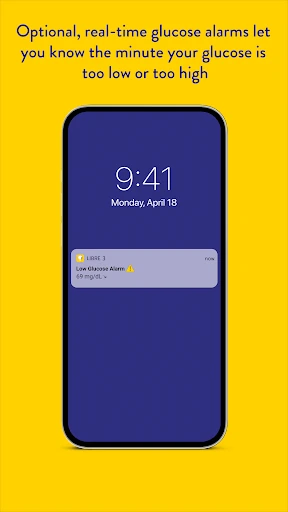
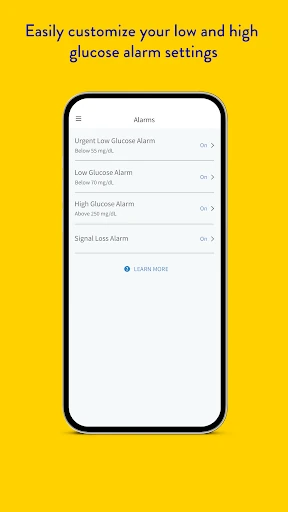
I would also give alarms a deliberate setup rather than assuming they will work in every situation. They are optional, and notifications require alarms to be on and the sensor to be within 33 feet, or 10 meters, unobstructed from the reading device. Reports can serve a different routine: reviewing information over time instead of only looking at the latest reading. Those two features suit different kinds of check-ins.
More From Our News Desk

Zoom Meetings, Google Meet, or Teams: Which Is Easiest to Join?

How I Build a Free Streaming Lineup With Tubi

Why Crunchyroll Is the Default Anime App for So Many Fans

YouTube TV: A Practical Guide to Cutting Cable

Rummikub and the Small Comfort of Phone Games

TeamViewer Remote Control or AnyDesk for Helping Family?
Who may find it useful
I would recommend FreeStyle Libre 3 – US to someone who already uses a compatible FreeStyle Libre 3 or FreeStyle Libre Select sensor and wants readings, optional alarms, and reports in an app. Its focused purpose should make sense to people who want to check glucose during the day without turning every check into a separate project. The Google Play rating is 3.0 from 13,519 ratings, so the response from users is mixed.
It may not suit someone using Libre or Libre 2 sensors, since those systems are not compatible, or someone whose smartphone does not meet the app’s compatibility requirements. It is also not intended as a general tracking app for people without the specified sensor system. Anyone unsure whether the product or its use fits their needs should consult a healthcare professional, as Abbott advises.
FreeStyle Libre 3 – US is made by Abbott Diabetes Care Inc. On Google Play it has over 1 million installs and a 3.0-star rating from 13,519 ratings. The app is free to download, with no in-app purchases and no ads. Its content rating is Everyone. Those figures offer a useful snapshot, but the app’s practical value depends most on having a compatible sensor and phone.
The current version is 3.6.10. It was released on May 27, 2022, and its last update was October 21, 2026. The app is intended for Android, and phone and operating-system compatibility can vary. Check the Google Play store information for the current device requirements before installing, and consult Abbott’s product materials for details about using the app with a sensor.
A Closer Look at Daily Glucose Checks
A focused first impression
When I first opened the idea of this app, what stood out was how clearly its role is tied to the sensor. This is not an app with a broad set of unrelated health tools. It is intended to measure glucose levels in people with diabetes when used with the FreeStyle Libre 3 system sensors, including FreeStyle Libre Select sensors. That narrow purpose makes it easier to understand what the app is for.
The first practical question is whether the phone and sensor combination is compatible. Abbott notes that compatibility can vary between smartphones and operating systems, so I would check that before relying on the app as part of a daily routine. There is also a 60-minute sensor warm-up after application. That detail matters when planning a first use: the app is not a way to skip the sensor’s setup time.
The everyday experience
Day to day, the core experience is checking glucose readings in real time. I like that this gives the app a clear, repeatable role: open it for a current reading, then get back to the day. The product description does not position it as a full medical record or a general wellness destination, and that focused scope seems appropriate for a sensor companion.
The experience also depends on keeping the reading device near the sensor if alarms matter to you. Notifications arrive only when alarms are turned on and the sensor is within 33 feet, or 10 meters, unobstructed from the device. That is a specific boundary worth remembering around the house or while moving between rooms. The alarm feature is optional, so the app can still be approached as a place to check readings manually.
Readings, alarms, reports
Three capabilities define the app: real-time glucose readings, optional glucose alarms, and glucose reports. The first supports quick check-ins; the second can provide notifications when enabled and within range; the third makes the app more than a display for a single reading. Together, these features cover immediate awareness and a broader look at glucose information without suggesting that the app makes treatment decisions for the user.
What surprised me is how much of the practical experience depends on understanding the conditions around those features. An alarm is not simply a notification that works regardless of distance, and readings require the compatible sensor system. These are not reasons to dismiss the app, but they are useful expectations to set before building a routine around it. Abbott directs users to the manual and interactive tutorial for instructions.
A routine that stays simple
A sensible use pattern might be a brief morning check, a look during a work break, and a glance at a report when there is time to review more than the latest reading. That is a routine built around the app’s stated features rather than one that asks it to do something outside its purpose. I would keep the sensor and phone within range when relying on alarms, especially during ordinary movement around the home.
I would also make time to review the user manual and interactive tutorial before using the app. The product information specifically points users toward those materials, and they are a better place to learn how to use this sensor-linked tool than trial and error. If questions come up about making treatment decisions, Abbott recommends consulting a healthcare professional. That keeps the app in its proper role as a monitoring companion.
Limits worth keeping in view
The biggest limitation is compatibility: this app is not designed for FreeStyle Libre or FreeStyle Libre 2 system sensors. It is for FreeStyle Libre 3 system sensors and FreeStyle Libre Select sensors. Smartphone and operating-system compatibility can vary as well, so a suitable sensor alone does not guarantee that every phone will work. These boundaries make checking the current store and product information a practical first step.
There are also limits to what the app should be expected to do. Its stated features are readings, alarms, and reports; it is not presented as a replacement for professional guidance or a universal tool for glucose management. The 3.0-star Google Play rating suggests users have mixed views, though a rating by itself cannot explain individual experiences. I would judge it by whether its specific sensor support fits my needs.
Finally, the app’s alarms have a stated range condition, and new sensor use includes a one-hour warm-up. Both details can affect how dependable the app feels in a particular moment. Neither changes the app’s core purpose, but they are easy to overlook if someone expects an instant, always-connected experience. Keeping those constraints in mind makes for a more realistic picture of daily use.
FreeStyle Libre 3 – US has a clear job: bring readings, optional alarms, and reports together for people using compatible sensors. I appreciate that focused approach, but compatibility and the alarm range are real considerations, not fine print to ignore. The mixed Google Play rating is another reason to check whether its specific setup suits your routine.
I would try it if I used a supported sensor and confirmed my phone was compatible. I would not choose it for a different Libre sensor or expect it to replace professional guidance. For the right sensor user, it may make routine glucose checks more accessible; for everyone else, its narrow compatibility is a firm boundary.
FreeStyle Libre 3 Frequently Asked Questions
What is FreeStyle Libre 3 – US used for?
FreeStyle Libre 3 – US is intended to measure glucose levels in people with diabetes when used with FreeStyle Libre 3 system sensors. It provides real-time glucose readings, optional glucose alarms, and glucose reports. Abbott advises reviewing the user manual and interactive tutorial, and consulting a healthcare professional with questions about using the product to make treatment decisions.
Which phones and sensors work with FreeStyle Libre 3 – US?
The app is for Android and is compatible with FreeStyle Libre 3 system sensors and FreeStyle Libre Select sensors. It is not compatible with FreeStyle Libre or FreeStyle Libre 2 system sensors. Compatibility can vary between smartphones and operating systems, so check the Google Play store and Abbott’s product information for details about a particular device.
What Android version does FreeStyle Libre 3 – US require?
Phone and operating-system compatibility can vary for FreeStyle Libre 3 – US, and the requirement may change. Check the app’s Google Play store information for current device requirements before installing. Abbott also provides smartphone compatibility information for the sensor system. A compatible sensor is not the only consideration; the phone itself needs to work with the app.
Does FreeStyle Libre 3 – US cost money?
The app is free to download on Google Play, with no in-app purchases and no ads. That describes the app’s store pricing; the app is designed to be used with compatible FreeStyle Libre sensors. Check the store information for current details, since app availability or pricing can vary over time.
Who should use FreeStyle Libre 3 – US?
It is intended for people with diabetes using FreeStyle Libre 3 system sensors or FreeStyle Libre Select sensors, provided their smartphone is compatible. It will not work with Libre or Libre 2 system sensors. If you are unsure whether the product is right for you or how to use readings in treatment decisions, Abbott recommends speaking with a healthcare professional.
Pros
- Real-time readings make quick glucose check-ins part of an ordinary phone routine.
- Optional alarms and glucose reports add more than a single current reading.
- Free to download, with no in-app purchases or advertising.
Cons
- Works only with FreeStyle Libre 3 and FreeStyle Libre Select sensors.
- Alarm notifications require the sensor to remain within 33 feet unobstructed.
- A 60-minute warm-up is required when applying a sensor.
- Category
- Medical
- Version
- 3.6.10