CVS Health
- 511.42K
- 4.5
- Installs
- 10.00M
- Price
- Free

Screenshots

Analysis by Reviewed APKs
CVS Health brings pharmacy tasks, ExtraCare savings, clinic scheduling and photo orders into one Android app. I see it suiting people who already use CVS for prescriptions or shopping and want fewer separate errands to manage. After looking through its range of everyday tools, my overall take is that it is most useful as a practical companion to CVS services, rather than a general health or shopping app.
A Pharmacy Errand, Simplified
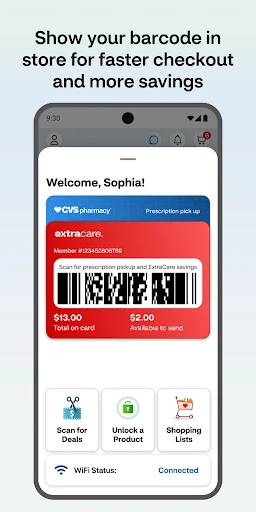
When I’m heading to a CVS to pick up a prescription, the app’s barcode pickup option is the feature I’d reach for first. The description says that scanning the barcode can speed pickup once payment and a signature are attached. That turns a routine stop into a more focused errand: I can check prescription status beforehand, then use the scan at the pharmacy instead of treating the app as a separate destination.
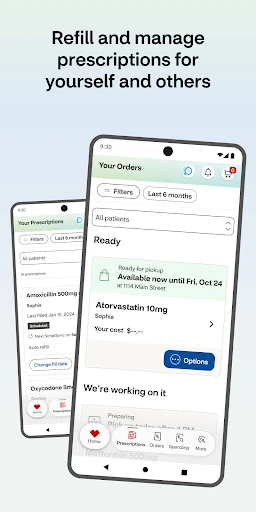
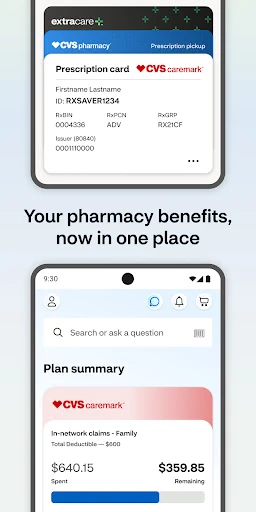
The same prescription area can handle refills, show prescription history and provide medication information, including interaction checks. I can also pay for medications and have them delivered. Those options make the app relevant between pharmacy visits, not just at the counter. For someone managing prescriptions for family members, having multiple pharmacy needs in one place may be especially useful, though the app is still centered on CVS services.
More Than a Coupon Wallet
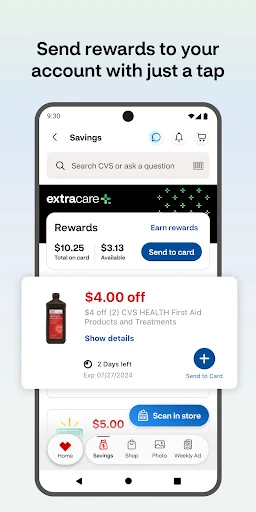
A basic coupon app might help me find a discount, but CVS Health connects savings with pharmacy and care tasks. Linking an ExtraCare card brings offers, coupons and rewards together, while the local weekly ad helps me plan a store trip. I can also use the app to schedule vaccines or care at a nearby CVS Pharmacy or MinuteClinic, check clinic wait times, and find available services.
That breadth is useful if CVS is already part of my routine, but it also defines what the app is not: a general-purpose health record, a broad store comparison tool or a replacement for every in-person conversation. Its medical information and care options relate to CVS services, and the shopping savings relate to ExtraCare. If I rarely use CVS, many of its most practical features may simply have fewer occasions to shine.
Small Habits That Help
I’d start by linking an ExtraCare card so that offers, coupons and rewards are available together when I’m planning a visit. Checking the weekly ad before going to the store gives that setup a practical payoff: I can see local deals in advance rather than trying to remember them at checkout. The in-store ExtraCare scan is another handy step to keep in mind when I’m already at the register.
For pharmacy use, I’d make a habit of checking refill status before a medication is nearly out, and of reviewing prescription history when I need to keep track of what has been handled. Notifications can help surface prescription and order updates, but they’re optional. If I’m booking clinic care, checking nearby locations and wait times first can help me choose a visit that fits my day.
More From Our News Desk

Zoom Meetings, Google Meet, or Teams: Which Is Easiest to Join?

How I Build a Free Streaming Lineup With Tubi

Why Crunchyroll Is the Default Anime App for So Many Fans

YouTube TV: A Practical Guide to Cutting Cable

Rummikub and the Small Comfort of Phone Games

TeamViewer Remote Control or AnyDesk for Helping Family?
Who May Find It Useful
I’d recommend CVS Health to regular CVS customers who want prescription tasks, ExtraCare offers and local clinic options in one place. It has a particularly clear role for someone who often picks up medication, shops at CVS, or helps coordinate pharmacy needs for family members. The ability to check refill status, use a pickup barcode, and view store or clinic information gives it several reasons to stay useful beyond a single shopping trip.
It may be less compelling for people who don’t use CVS or who only want a general coupon browser or broad health reference. Some features depend on a CVS store, pharmacy or MinuteClinic nearby, and the app’s purpose is closely tied to that network. People who prefer handling every task in person may also have less reason to use it. I’d treat it as a convenience layer for CVS services, not a requirement for care.
CVS Pharmacy develops CVS Health, a free Android app in the Medical category. Google Play shows over 10 million installs and a 4.5-star rating from about 511,000 ratings. The app is rated Everyone. It supports Android 10.0 and higher, according to the app description, which also recommends keeping the device’s operating system up to date.
The listed version is 26.10.50. CVS Health was released on June 15, 2011, and its listed last update is October 29, 2026. The app costs nothing to download, and the provided store facts indicate no in-app purchases or ads. The description notes that ongoing background GPS use can reduce battery life, a practical point for anyone using location-related features.
How CVS Health Fits Everyday Routines
A Busy First Look
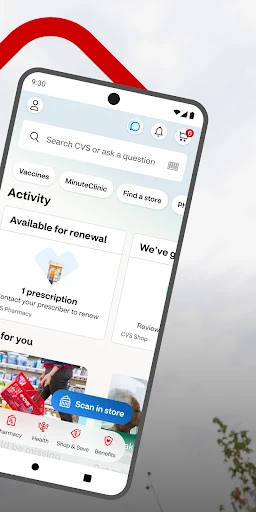
When I first opened the feature set, what stood out was how many different CVS errands the app tries to bring together. Prescription pickup and refills sit alongside ExtraCare savings, clinic scheduling and photo orders. That range is convenient in principle, but it also means the app is best approached with a particular task in mind. I’d begin with the feature I actually need, rather than expecting to explore every section in one sitting.
The description encourages using the latest operating system and specifies Android 10.0 or higher. That gives me a clear starting point before installing. After that, the most useful setup is likely to be linking an ExtraCare card if I want access to offers and rewards, and attaching payment and a signature if I plan to use barcode prescription pickup. Those steps connect directly to the features the app describes.
The Everyday Experience
Day to day, CVS Health is less about one long session and more about checking in when a small task comes up. I might look at refill status before a pharmacy visit, pull up a barcode for pickup, or check a prescription update. On a shopping day, the weekly ad and linked ExtraCare offers give me a reason to open it before leaving home rather than only at checkout.
I also like that its scope includes care appointments, not just retail. The app can schedule vaccines and medical care at nearby CVS Pharmacy or MinuteClinic locations, and it offers video chats with a health care provider around the clock. Clinic wait times and available services can help with planning, though restrictions apply to some visit options. The app’s usefulness therefore depends partly on which services are available near me.
Features With a Clear Purpose
Prescription management is the strongest practical thread. Refills, status checks, history, medication information and interaction checks give the pharmacy section more substance than a simple pickup reminder. The description also says medication payment and delivery are available. For a household with several pharmacy needs, the ability to manage family prescriptions in one place could reduce the number of separate checks required.
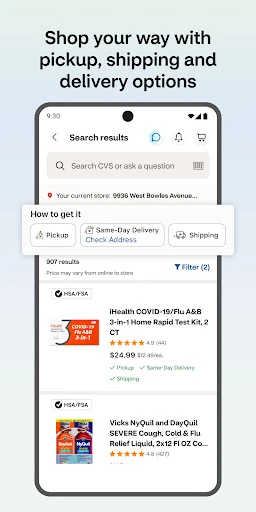
The savings tools are straightforward in concept: link ExtraCare, view offers and rewards, and check the weekly ad for a local store. Notifications are available for deals as well as prescription and order updates. Elsewhere, I can find nearby MinuteClinic locations, review services and insurance coverage, and book care. Photo prints and other products can also be ordered for same-day pickup at select stores, adding another occasional errand to the mix.
These features work best when they connect to something I already plan to do. A prescription status check answers a specific question; a weekly ad helps with a store trip; clinic information supports appointment planning. That task-oriented design is more useful than a collection of features I’d need to remember to browse without a reason.
A Simple Weekly Routine
A practical routine might start once a week with a quick look at the local ad and any linked ExtraCare offers. If I’m already planning a CVS visit, that check can help me decide what to pick up. Before heading out, I can check whether a prescription refill is ready or in progress. This keeps shopping and pharmacy planning in the same pass without turning the app into a daily chore.
For care needs, I’d use the app when I’m considering a vaccine or clinic visit: find a nearby location, review available services and insurance coverage, then check wait times or schedule where that option is offered. If I’m handling a family member’s pharmacy needs, prescription history and status checks provide a place to review what is happening. I’d enable notifications only if timely deal or order updates would be useful to me.
Where It Has Limits
The main limitation is also the source of its convenience: CVS Health is built around CVS. Its savings features depend on ExtraCare, and its pharmacy and clinic tools are tied to CVS Pharmacy and MinuteClinic services. A person who shops elsewhere or has no convenient CVS location may find that the app’s most distinctive options don’t fit their routine. It doesn’t present itself as a general alternative to every pharmacy or care provider.
Some services have conditions, and the description specifically notes restrictions for clinic visits and limited availability for same-day photo pickup. Location use also deserves a little attention: continued GPS use in the background can reduce battery life. I’d keep those practical details in mind and use location-related features when they help with a nearby store or clinic, rather than assuming every service is available everywhere.
The app covers many categories, so it may take a moment to identify the part that matters to me. That is not a reason to dismiss it, but it does favor occasional, task-focused use over browsing for its own sake. If my needs are limited to one simple errand, the relevant tool is there; the broader collection matters most when I use several CVS services.
CVS Health earns its place for people who regularly use CVS for prescriptions, savings or clinic services. I especially like the practical connection between refill checks, barcode pickup and pharmacy updates, with ExtraCare and local care options adding useful extras. It is a broad app, but its value comes from putting familiar CVS errands in one place.
I’d recommend trying it if CVS is already part of your routine or you help manage family pharmacy needs. If you rarely visit CVS, it may be more app than you need. For regular customers, though, a quick check before a store or pharmacy trip can make the app a genuinely convenient companion.
CVS Frequently Asked Questions
What is CVS Health used for?
CVS Health combines several CVS tasks: checking prescription status, ordering refills, viewing prescription history and medication information, and using a barcode for faster pickup. It also connects ExtraCare offers and the local weekly ad with care scheduling, clinic information and photo orders. Its main purpose is to help people manage CVS pharmacy, shopping and care errands through one app.
What devices and platforms support CVS Health?
CVS Health is an Android app, and its description says it supports Android 10.0 and higher. It recommends keeping the device’s operating system up to date. The provided information describes the Android version; availability and requirements can vary over time, so it’s worth checking the Google Play store listing for the current details before installing.
Does CVS Health cost money or include purchases?
CVS Health is free to download. The provided store facts indicate that it has no in-app purchases and contains no ads. That covers the app’s listed download and purchase details; individual pharmacy, care or other services may have their own terms. For current details about a specific service, check the app or its Google Play store listing.
Can CVS Health help with prescriptions and clinic visits?
Yes. The app describes prescription refills, status checks, prescription history, medication information and barcode pickup. It can also help schedule vaccines and medical care at nearby CVS Pharmacy or MinuteClinic locations, show clinic wait times and provide access to video chats with a health care provider. Some clinic options have restrictions, and available services depend on the location.
Who is CVS Health best suited for?
I’d suggest CVS Health to people who regularly use CVS for pharmacy visits, ExtraCare savings or MinuteClinic services, including those coordinating family pharmacy needs. It may be less useful if you rarely use CVS or don’t have a convenient location, since many features are tied to its stores and services. The app’s role is CVS convenience, not general health management.
Pros
- Prescription refills, status checks, history and pickup barcode tools are gathered in one app.
- ExtraCare offers and a local weekly ad make store savings easier to plan.
- Clinic scheduling, wait times and video care extend beyond pharmacy and shopping errands.
- Family pharmacy needs can be managed together, according to the app description.
Cons
- Most useful features depend on already using CVS Pharmacy, ExtraCare or MinuteClinic.
- Some clinic services and same-day photo options have availability limits.
- Background GPS use can reduce battery life.
- Category
- Medical
- Version
- 26.10.50