WebMD: Symptom Checker
- 64.86K
- 4.1
- Installs
- 10.00M
- Price
- Free

Screenshots
Analysis by Reviewed APKs
WebMD: Symptom Checker is a health-information app for looking up symptoms, learning about conditions and medications, finding nearby doctors, and keeping practical health details together. I see it as a useful starting point for curious patients and caregivers who want organized information before or after a conversation with a clinician. Its range is appealing, though I would use it to prepare questions, not to diagnose myself.
A Quick Symptom Check
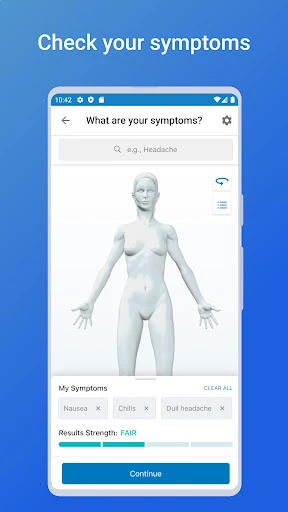
Imagine noticing a new ache after a long day and wanting to understand what questions to ask next. In WebMD, I can select symptoms in the Symptom Checker and review potential conditions or issues, along with treatment and care options. That gives me a structured way to explore what I am feeling instead of jumping between scattered search results, while keeping the app’s role firmly in the realm of information.
I would treat the results as a prompt for further reading or a conversation with a health professional, not as a verdict. The app itself says it does not provide medical advice, diagnosis, or treatment, and that professional advice should not be delayed because of something read in the app. That reminder matters: symptom searches can raise possibilities, but they cannot replace an individualized assessment.
More Than Symptom Search
Compared with a basic web search, WebMD brings several health-related tasks into one app: symptom lookup, condition and drug information, doctor finding, medication reminders, symptom tracking, and a drug interaction checker. I like the breadth for everyday reference. If I am trying to connect a condition page with a medication schedule or save a doctor for later, I can keep those details in the same place rather than starting over in separate searches.
That breadth does not make it a replacement for an appointment, a clinician’s advice, or emergency care. It is also not a general wellness coach or a way to receive a personalized diagnosis. The useful distinction is that WebMD helps me research and organize; decisions about my health still belong in a conversation with a qualified provider who knows my circumstances.
Small Habits That Help
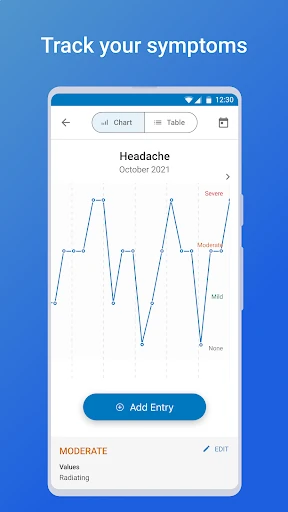
I get more value from a reference app when I use it calmly and with a clear question. For example, I can look up a condition after a visit, save relevant information for easy reference, and note symptoms over time with the tracker. That makes the app more useful as a place to collect context than as something I open repeatedly to check every passing sensation.
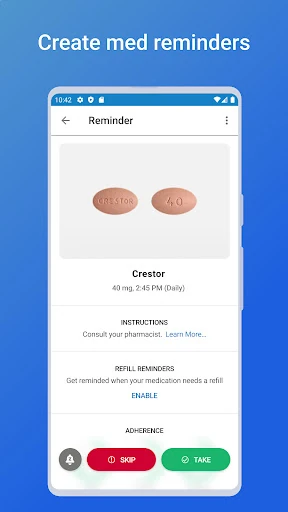
For medication routines, the reminders can be paired with the daily prescription schedule and instructions described in the app. I would review the drug details and timing information carefully, and use the interaction checker when I want to look into combinations of two or more medications. These tools can help me prepare and stay organized, but I would confirm medication questions with a pharmacist or clinician.
More From Our News Desk

Zoom Meetings, Google Meet, or Teams: Which Is Easiest to Join?

How I Build a Free Streaming Lineup With Tubi

Why Crunchyroll Is the Default Anime App for So Many Fans

YouTube TV: A Practical Guide to Cutting Cable

Rummikub and the Small Comfort of Phone Games

TeamViewer Remote Control or AnyDesk for Helping Family?
Who May Find It Useful
I would recommend WebMD to people who want a familiar place to research health topics, keep track of symptoms, or remember medication schedules. Caregivers may also appreciate being able to save conditions, drugs, doctors, hospitals, pharmacies, and articles for reference. Its mix of information and organizing tools makes the most sense for someone who wants to prepare for a healthcare conversation or revisit information afterward.
It may not suit someone looking for a definitive diagnosis, direct medical care, or a substitute for speaking with a professional. The range of information can also feel like more than a person needs if all they want is a simple reminder or one quick fact. I would approach symptom searches with perspective and stop browsing if they are making me more worried rather than better prepared.
WebMD: Symptom Checker is made by WebMD, LLC and is available on Google Play for Android. It has over 10 million installs and a 4.1-star rating from about 65,000 ratings. The app is free to download, contains ads, and has no in-app purchases. Its content rating is Everyone.
The minimum Android requirement is Android 9. The current version is 11.30.0.12625096, and the app was last updated on January 21, 2026. Its release date is May 6, 2011. Those details make it a long-running app, while the Android requirement is worth checking against an older phone before installing.
A Practical Health Reference, With Boundaries
Opening and Getting Oriented
When I first opened WebMD, the most noticeable thing was how many different health tasks it aims to cover. Symptom checking is the central draw, but the app also describes condition and drug information, doctor searches, reminders, tracking, and prescription savings. That mix can be reassuring for someone who wants a single reference point, though it also means the app is broader than its name might initially suggest.
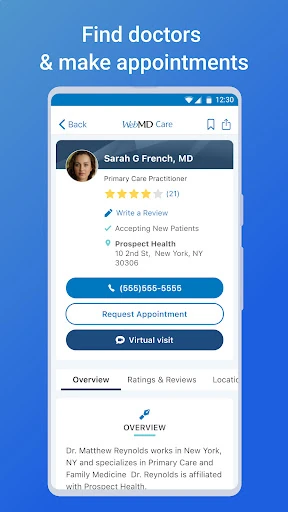
I would start with the specific task I came for rather than trying to explore every tool at once. If I am researching a symptom, I can begin there; if I need to locate a specialist, Doctor Finder supports searches using current location or a city, state, or ZIP code. A focused first visit keeps the experience manageable and makes the different parts easier to understand.
The Everyday Experience
The core experience is built around looking up information and returning to it when useful. The Symptom Checker lets me choose symptoms and see potential conditions or issues, while condition pages cover topics such as causes, treatments, and related symptoms. I like that this can turn a vague question into a more organized reading session, especially when I want to bring a few specific questions to an appointment.
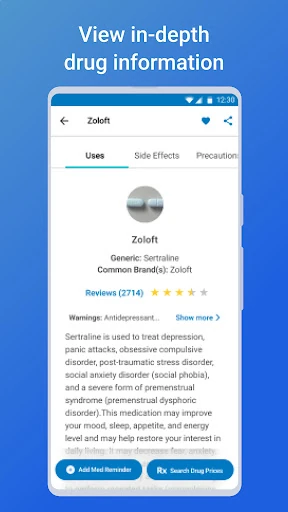
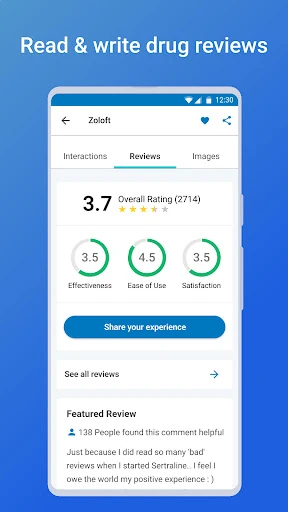
The drug and condition information is best used as a reference, not as instructions tailored to me. A general page cannot account for every detail of an individual’s health, and WebMD explicitly directs users to qualified health providers for medical questions. Keeping that limitation in mind helps me use the app as a supplement without treating a search result as a personal recommendation.
Tools Beyond Symptoms
The medication features give the app a practical role after the research is done. Medication Reminders can alert me when it is time to take medications, and the app describes daily prescription schedules and instructions, plus pill images with dosage and timing information for each drug. That is a useful combination for keeping routine details visible, particularly when several prescriptions are part of a daily schedule.
Other tools extend the reference side of the app. The Symptom Tracker is meant to record ongoing symptoms and conditions over time, and the Drug Interaction Checker lets users enter two or more drugs to identify potentially unsafe combinations. Doctor Finder can search nearby professionals or use a location entered by city, state, or ZIP code. These features cover distinct needs without turning the app into a healthcare provider.
A Routine I Could Keep
A practical routine might begin after a medical visit: I could look up a condition or medication mentioned during the appointment, save relevant information, and add a symptom to the tracker if it is ongoing. Before a later conversation, those saved references and notes could help me remember what I wanted to ask. The point is not to manage care independently, but to arrive with a clearer account of what I have noticed.
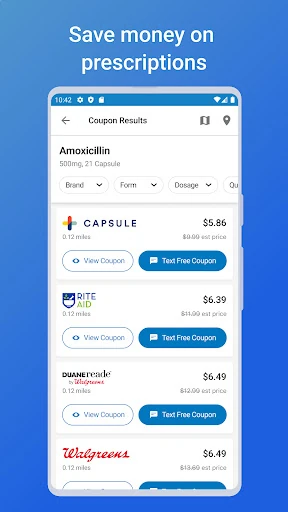
For a regular prescription schedule, I could set reminders and review the listed timing information when organizing the day. If a medication question comes up, the interaction checker may help me identify a topic to raise with a pharmacist or clinician. WebMD Rx also offers a way to look for prescription drug savings at local pharmacies. I would confirm any medication or price details directly before acting on them.
Limits to Keep in Mind
The biggest limit is the one that comes with any general health-information app: it cannot evaluate me in person or know the full context of my health. Potential conditions from a symptom search are not a diagnosis, and information about treatments is not a personal care plan. WebMD’s own caution is clear about seeking professional advice and not delaying it because of material in the app.
The breadth may also be a mixed blessing. People who only want a basic symptom lookup may find the medication, doctor, tracking, and savings tools unnecessary, while people seeking direct clinical support will need a different kind of service. I would keep searches purposeful and use saved information as a reference, rather than treating more browsing as a substitute for getting appropriate care.
WebMD: Symptom Checker works best as a broad health reference with useful organizing tools around the edges. I appreciate the combination of symptom and condition information, medication reminders, doctor searches, tracking, and saved references. The app is most valuable when it helps me prepare, remember, and ask better questions—not when I expect it to settle a health concern on its own.
I would recommend it to Android users who want those resources together and are comfortable keeping a clear boundary between general information and professional care. If you want a diagnosis or personal treatment plan, this is not the right substitute. For research, reminders, and appointment preparation, it is a capable option worth considering.
WebMD Frequently Asked Questions
What is WebMD: Symptom Checker used for?
WebMD: Symptom Checker is used to explore symptoms and health conditions, read about drugs and treatments, find doctors, set medication reminders, track ongoing symptoms, and check potential drug interactions. It is a health-information and organization tool, not a way to obtain a medical diagnosis or treatment. WebMD advises users to seek help from a qualified health provider for medical questions.
Which devices can run WebMD: Symptom Checker?
The app is available for Android through Google Play. The minimum requirement is Android 9, so check your device’s Android version if you are unsure whether it will run. Store availability and device compatibility can vary, so the Google Play page is the best place to check the current details for your particular phone or tablet.
Does WebMD: Symptom Checker cost money?
WebMD: Symptom Checker is free to download and has no in-app purchases. It contains ads. The app also includes WebMD Rx, described as a way to look for prescription drug savings at local pharmacies. Details about availability or other store terms can vary, so check the Google Play page for the current information.
What Android version does WebMD: Symptom Checker need?
The app requires Android 9 or later. Its current version is 11.30.0.12625096, and its latest update was January 21, 2026. If you have an older device or are unsure which Android version it uses, check your device settings and the Google Play page before installing.
Is WebMD: Symptom Checker right for me?
It may suit you if you want a place to research health topics, organize medication reminders, track symptoms, or prepare questions for a healthcare visit. It may not suit you if you expect a definitive diagnosis or personalized medical advice. The app is for general information, and WebMD says it should not replace advice from a qualified health provider.
Pros
- Combines symptom and condition information with medication and doctor-finding tools.
- Medication reminders include schedules and timing details for prescriptions.
- Lets users save health references and track ongoing symptoms.
- Free to download, with no in-app purchases.
Cons
- Symptom results are general information, not a diagnosis or personal care plan.
- The range of tools may feel excessive for someone seeking only a quick lookup.
- Contains ads.
- Category
- Medical
- Version
- 11.30.0.12625096