NHS App
- 50.88K
- 3.4
- Installs
- 10.00M
- Price
- Free

Screenshots
Analysis by Reviewed APKs
The NHS App brings a range of NHS services to a smartphone or tablet, from requesting repeat prescriptions to viewing test results and receiving messages. I see it as a useful place to handle routine healthcare admin, especially for people registered with a GP surgery in England or the Isle of Man. It is practical rather than flashy, and its usefulness depends partly on which services your surgery offers.
A calmer prescription routine
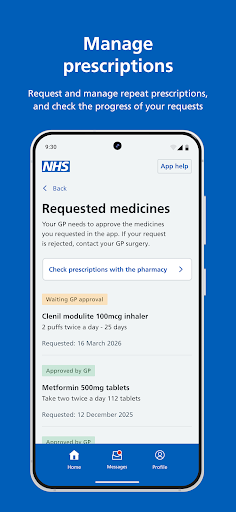
When I think about the NHS App at its most useful, it is on an ordinary weekday when I remember a repeat prescription just before the day gets busy. Instead of leaving that request to a later phone call, I can use the app to request it and keep an eye on the request. It gives routine admin a clear place to live, though the app is not a replacement for clinical care.
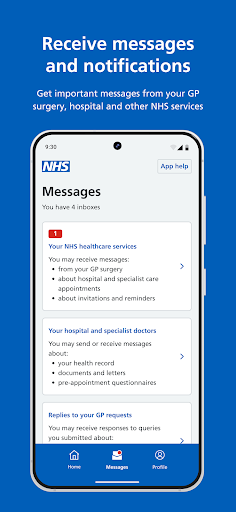
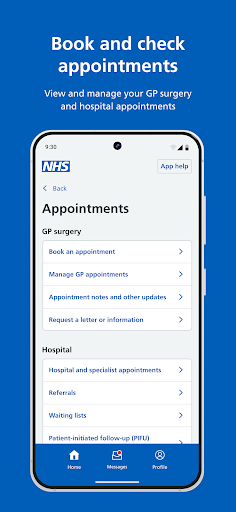
The same practical approach applies when I need to check an appointment or look for a test result. I can open the app to view health information and manage upcoming appointments where those options are available. Messages from a GP surgery or other NHS services can also arrive there, and notifications can flag new messages. It feels most helpful when I make it part of the routine rather than waiting until something feels urgent.
A service hub, not a clinic
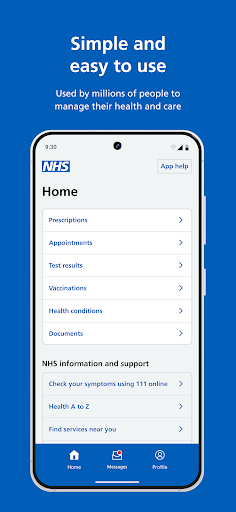
Compared with calling a surgery for every small administrative task, the NHS App can put several services in one place: repeat prescription requests, 111 online, nearby NHS services, health information and messages. Depending on the surgery, it may also support appointment booking and contacting the surgery about a health problem. That variation matters. The app connects to services provided through your NHS arrangements; it does not make every option available to every user.
I would not treat it as a general wellness tracker, a private medical service or a substitute for a conversation with a healthcare professional. Its role is narrower and more grounded: access NHS services and manage some related tasks. The 111 online service is available through it, but that does not turn the app into a personal diagnosis tool. For day-to-day admin it can be handy; for care itself, its role is limited.
Small habits that help
A little setup can make the app easier to return to. After creating or signing in with an NHS login and proving my identity, I can use the app to reach information connected to my NHS services. If my Android device supports fingerprint, face or iris recognition, I can use that to log in. The initial identity checks are a necessary step, so I would set aside a few quiet minutes rather than start during a rushed moment.
I would also make a habit of checking messages and appointment details when I am already dealing with a prescription or another piece of admin. Turning on notifications can alert me to new messages from my surgery or other NHS services. If I help manage services for someone else, profile switching may be useful, but the surgery must grant access and both people need to share the same surgery.
More From Our News Desk

Zoom Meetings, Google Meet, or Teams: Which Is Easiest to Join?

How I Build a Free Streaming Lineup With Tubi

Why Crunchyroll Is the Default Anime App for So Many Fans

YouTube TV: A Practical Guide to Cutting Cable

Rummikub and the Small Comfort of Phone Games

TeamViewer Remote Control or AnyDesk for Helping Family?
Who may find it useful
I would recommend the NHS App to people aged 13 or over who are registered with an NHS GP surgery in England or the Isle of Man and want a convenient way to reach supported services. It is especially suited to someone who regularly requests repeat prescriptions, checks test results, manages appointments or wants to keep NHS messages together. It can also be useful for a family member who has been given access to another person’s services.
It may be less useful if you are not eligible to use it, or if the tasks you need are not offered through your surgery. People who prefer handling healthcare admin by phone may not gain much from adding another digital route. I would also keep expectations measured: the app makes certain services easier to reach, but local availability varies, and using it does not remove the need to contact NHS services when appropriate.
NHS Digital is the developer. On Google Play, the NHS App has over 10 million installs and a 3.4-star rating from 50,877 ratings. It is free to download, with no in-app purchases or ads. Its content rating is Everyone.
The supplied app details give version 6.5.4, a release date of June 25, 2021, and a last update date of November 4, 2026. The minimum Android version is not included in the available details, so check Google Play for the requirement on your device.
How the NHS App Fits Daily Life
Getting started
My first impression is that this is a utility app with a clear job: connect me to NHS services, not keep me entertained. To use it, I need to be at least 13 and registered with an NHS GP surgery in England or the Isle of Man. The setup guides users through creating an NHS login if they do not already have one, then asks them to prove their identity.
That identity step is worth anticipating. It is part of connecting securely to information from NHS services, rather than a sign-up flourish I can skip. Once set up, I can use the app on a smartphone or tablet. The NHS App’s services are also accessible by logging in through the NHS website on a computer, which gives people another way to reach them.
Everyday service access
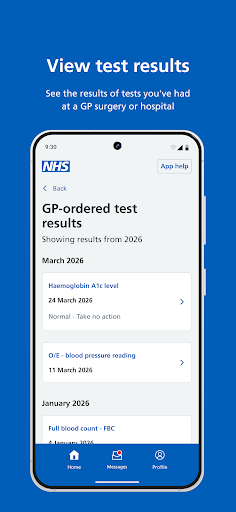
The day-to-day value is having several common tasks within reach. I can request repeat prescriptions, use 111 online, find nearby NHS services, and view health information such as test results. The app also lets me manage upcoming appointments and prescription requests. These are practical jobs rather than a broad collection of lifestyle tools, which makes the app easier to understand once I know what it is meant to do.
Some of the experience depends on the GP surgery. Appointment booking and contacting the surgery about a health problem may be available, but they are not guaranteed for every user. I would check what appears for my own account before relying on the app for a particular task. That local variation is the main reason the app can feel more comprehensive for one person than another.
Useful personal details
Viewing test results is one of the features that makes the app more than a simple request form. I can also receive important messages from my GP surgery and other NHS services, with notifications available to alert me when a new message arrives. I like the idea of having those messages alongside appointment and prescription management, since they relate to the same everyday healthcare admin.
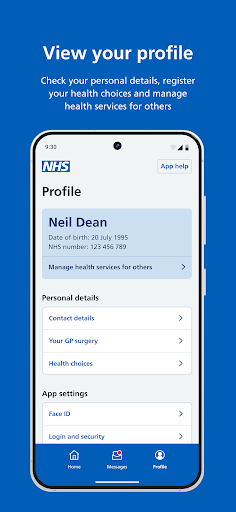
The app also lets users make choices about their health, including an organ donation decision. For households where one person has permission to help another, profile switching can open services for a child or family member. That access has conditions: the GP surgery must provide it, and both people need to share the same surgery. It is a useful option, not automatic family access.
A simple weekly check-in
A sensible routine would be to open the app when I have a specific task, such as requesting a repeat prescription or checking an upcoming appointment. I could then take a moment to look for new messages or information I need to follow up. That keeps the app useful without turning it into something I feel I have to monitor constantly.
If notifications are enabled, they can alert me to new messages from NHS services, which may reduce the chance that I overlook one. I would still open the app when I need to manage a request or appointment rather than assuming a notification covers everything. The app works best as a convenient access point for supported services, with the user choosing when to check in.
Keep expectations realistic
The biggest limitation is that not every feature is available through every GP surgery. Appointment booking and contacting a surgery about a health problem are specifically dependent on what the surgery offers. That means the app may handle one person’s routine efficiently while another person still needs to use a different route for the same task.
The NHS App also has eligibility requirements and an identity verification step. It is for people aged 13 or over who are registered with an NHS GP surgery in England or the Isle of Man. It gives access to services and information, but it is not a substitute for medical care. Keeping that distinction in mind makes its practical strengths easier to appreciate without expecting it to do everything.
The NHS App is a useful, focused option for people who qualify and want NHS services closer at hand. Prescription requests, test results, appointment management and messages make it worth trying, while surgery-by-surgery differences keep it from being equally useful to everyone.
I would recommend it to eligible users who are comfortable managing some healthcare admin digitally. Set it up when you have time for identity checks, then see which services your surgery supports. If those match your regular needs, it can be a convenient everyday companion.
NHS App Frequently Asked Questions
What is the NHS App used for?
The NHS App provides access to a range of NHS services. You can request repeat prescriptions, use 111 online, find nearby NHS services, view health information such as test results, manage appointments and receive messages. Some options, including booking appointments or contacting your surgery, depend on what your GP surgery provides.
Which devices can I use the NHS App on?
The app is for smartphones and tablets. You can also log in through the NHS website on a computer to use NHS App services. On Android devices that support fingerprint, face or iris recognition, those methods can be used to log in. Check Google Play for device compatibility and current requirements.
What Android version does the NHS App require?
The minimum Android version may vary with the current release and your device. Check the NHS App page on Google Play for the requirement that applies to your phone or tablet. You also need to be aged 13 or over and registered with an NHS GP surgery in England or the Isle of Man.
Is the NHS App free, and does it have purchases?
The NHS App is free to download. The supplied details show no in-app purchases and no ads. Store information can change over time, so Google Play is the place to check the current app details before installing.
Who is eligible to use the NHS App?
You can use the NHS App if you are aged 13 or over and registered with an NHS GP surgery in England or the Isle of Man. To connect to NHS service information, you will need an NHS login and must prove your identity. Access to another person’s services requires permission from the GP surgery.
Pros
- Combines prescription requests, test results, appointments and NHS messages in one app.
- Offers access to 111 online and nearby NHS services.
- Supports profile switching when a surgery grants access for another person.
- Can use supported Android biometric login methods.
Cons
- Some appointment and surgery contact features depend on the GP practice.
- Identity verification adds a setup step before accessing services.
- Eligibility is limited to users aged 13 or over with qualifying GP registration.
- Category
- Medical
- Version
- 6.5.4