Blood Pressure Diary
- 128.04K
- 4.8
- Installs
- 1.00M
- Price
- Free

Screenshots
Analysis by Reviewed APKs
Blood Pressure Diary is a logbook for recording blood pressure and pulse readings taken with a separate monitor. I found its appeal in the straightforward idea: enter a result, add context, and look back for patterns rather than juggling notes. It suits people who want an organized record to discuss with a clinician. My main takeaway is that it is a tracker, not a measuring device.
A Reading, Then a Record
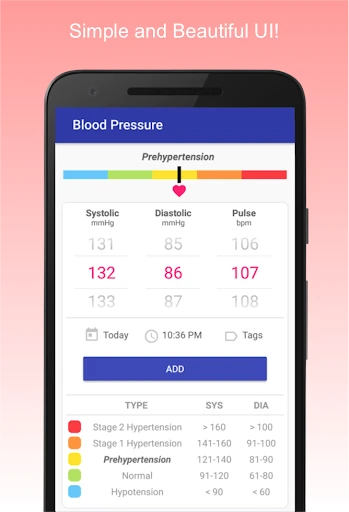
Imagine taking a blood pressure reading at home before breakfast and wanting to remember more than two numbers. With Blood Pressure Diary, I can enter systolic and diastolic values along with pulse, then add a tag such as which arm I used or whether I was seated. Those details make the entry more useful later, especially when a string of readings starts to blur together.
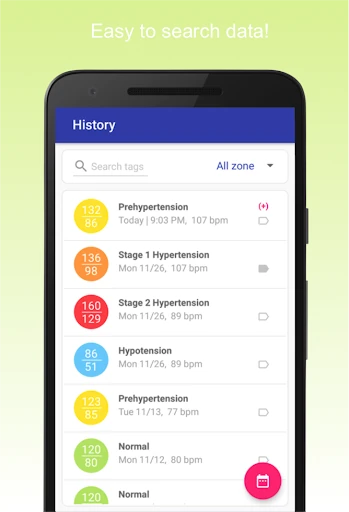
The practical routine is simple: measure with a separate blood pressure monitor, open the app, and record the result. The app calculates a blood pressure zone and keeps the entry searchable by date, tags, or zone. I like that this turns a one-off reading into part of a history. It does not take the reading itself, so the monitor remains the essential tool.
A Log, Not a Monitor
Compared with a paper notebook or a basic notes app, Blood Pressure Diary is built around blood pressure entries. It can organize readings by date and tags, calculate zones, and show statistics such as average, minimum, and maximum. That focus is helpful when I want to review a set of numbers instead of scanning handwritten pages or searching through unrelated notes.
It is not a replacement for a blood pressure monitor, a diagnosis, or a clinician’s judgment. The app cannot measure blood pressure; readings have to come from a suitable monitor. I would treat its zone labels and charts as ways to organize personal records, not as a reason to change care. If all someone needs is an occasional reminder of a reading, this dedicated tracker may be more than necessary.
Make Entries Easier to Use
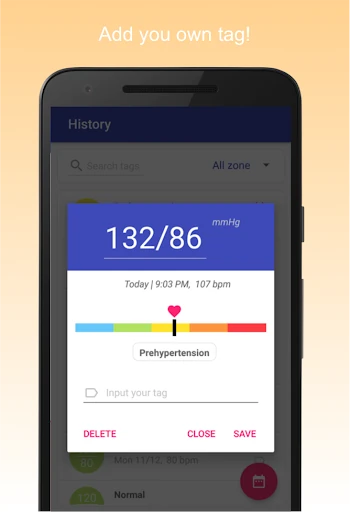
A small habit that makes the log more informative is adding the same kind of context whenever it matters. The app supports tags for things like cuff location and posture, as well as irregular heartbeat. I would use those tags consistently rather than trying to remember the circumstances days later. A record with a little context is easier to interpret than a list of numbers on its own.
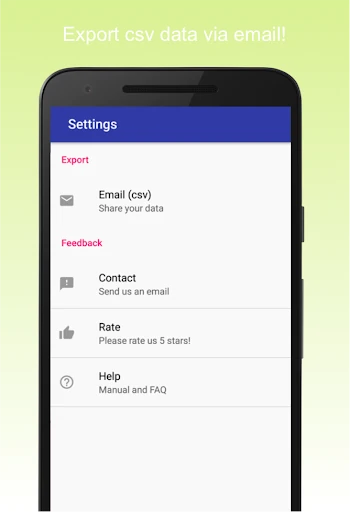
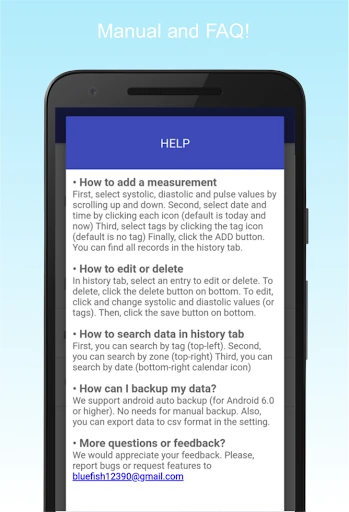
I would also make a regular moment for reviewing the charts, instead of opening them only when I am worried about a particular result. Searching by date, tag, or zone can help narrow that review. For sharing, the app supports CSV export, and its description says automatic backup is supported on Android 6.0 and above. Those options can make a maintained log easier to keep and pass along.
More From Our News Desk

Zoom Meetings, Google Meet, or Teams: Which Is Easiest to Join?

How I Build a Free Streaming Lineup With Tubi

Why Crunchyroll Is the Default Anime App for So Many Fans

YouTube TV: A Practical Guide to Cutting Cable

Rummikub and the Small Comfort of Phone Games

TeamViewer Remote Control or AnyDesk for Helping Family?
Who May Find It Useful
I would recommend Blood Pressure Diary to someone who already takes readings with a separate monitor and wants a dedicated place to record them. It is especially practical for people who value searchable entries, tags, charts, and the option to export a CSV. The ability to include pulse and notes about the reading’s context gives the log more flexibility than a bare list of blood pressure values.
It may not suit someone expecting a phone to measure blood pressure, or anyone looking for medical guidance from an app. The app explicitly does not take measurements, and its zone calculations are not a substitute for professional interpretation. People who prefer a paper record or only need to save an occasional number may also find a dedicated tracker unnecessary. I would use it as an organizer, not a decision-maker.
Blood Pressure Diary is developed by Health & Fitness AI Lab. On Google Play, it has over 1 million installs and a 4.8-star rating from about 128,000 ratings. It is free to download, contains ads, and does not offer in-app purchases. Its content rating is Everyone. The current version is 0.1.20, and the app was first released on November 29, 2018.
The app was last updated on October 26, 2025. Its description says automatic backup is supported on Android 6.0 and above, while the minimum Android version for the app itself can vary and is worth checking on Google Play. It supports recording blood pressure and pulse, viewing statistics, and exporting data as CSV. A separate blood pressure monitor is needed to obtain readings.
A Closer Look at the Daily Log
A Clear Starting Point
When I first opened Blood Pressure Diary, the central task was easy to understand: keep a record of measurements rather than trying to do the measuring. That distinction matters, and the app makes it plainly. I would have my monitor nearby before beginning, since the values need to come from an actual measurement. Once I have them, the app’s focus feels appropriately narrow.
The entry process is described as allowing systolic, diastolic, and pulse values to be logged with a finger swipe. I appreciate the emphasis on quick recording; if logging feels like a chore, it is easy to put off. Tags provide a way to add details such as posture or cuff location. Together, those basics make the app feel designed for repeat use, not just a single saved reading.
Living With the Log
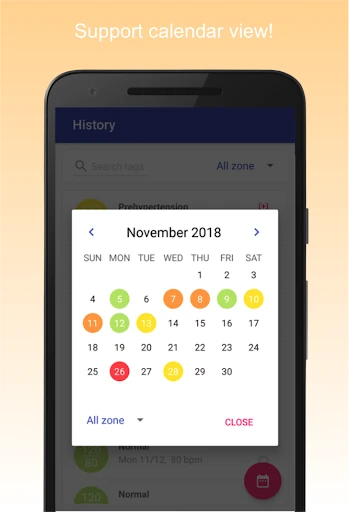
Day to day, the value of a tracker is less about any one entry and more about being able to find the history again. Blood Pressure Diary lets users search records by date, tags, and blood pressure zones. That gives me a few practical routes through the data: I can look for a particular period, revisit entries with a certain tag, or focus on readings in a particular zone.
The app also records heart rate and heartbeat, according to its description, alongside the main blood pressure values. I would keep entries consistent and avoid adding detail that I will not use later. The experience is most useful when the log reflects a routine rather than sporadic updates. It remains a personal record, though, and interpreting a pattern is a separate matter from storing it.
Charts and Context
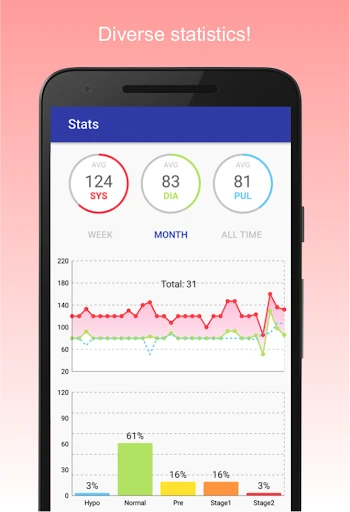
The statistics are one of the more useful reasons to keep the entries in an app instead of a loose note. Blood Pressure Diary offers graphs and charts, including average, minimum, and maximum values. I can see why that would be handy when reviewing a run of readings or preparing to share a record. A visual summary gives a different view from opening entries one by one.
The zone feature adds another layer: the app automatically calculates a zone and supports categories including normal, prehypertension, hypertension stages 1 and 2, and hypotension. Tags can record contextual details such as left or right arm, seated or reclined position, and irregular heartbeat. I would treat these as organizational features, not medical conclusions; the app’s labels do not replace a clinician’s interpretation.
A Sensible Review Routine
A realistic way to use the app is to measure with a separate monitor, then enter the values soon afterward while the details are fresh. If the reading’s context is relevant, I can add a tag at that point rather than trying to reconstruct it later. Over time, I would revisit the statistics and search tools to find the entries I need, instead of relying on memory to summarize the log.
If I wanted to share records, CSV export offers a practical route for getting the data out of the app. The description says export is available without a restrictive limit, and it also mentions automatic backup for Android 6.0 and above. I would still make sure I understand how I want to use or share the exported information. The key habit is keeping the record accurate and treating it as support for a conversation, not a verdict.
Know What It Cannot Do
The biggest limitation is also the most important expectation to set: Blood Pressure Diary does not measure blood pressure. A separate, FDA-approved monitor is needed for reliable readings. That means the app is useful after a measurement, not instead of one. Someone who downloads it expecting a phone-based check will be disappointed, so I would keep that distinction in mind before relying on it.
The calculated zones, statistics, and charts can help arrange information, but they do not turn the app into a diagnostic tool. The app is a record keeper, and health questions still belong in a conversation with a qualified clinician. Ads are present, too, which may bother users who want an entirely ad-free logging experience. For a focused tracker, those are limits worth understanding rather than overlooking.
Blood Pressure Diary does a useful, specific job: it gives readings from a separate monitor a searchable home, with tags, zone calculations, charts, and CSV export. I like the practical emphasis on recording context as well as numbers. Its strongest feature is organization; it does not measure blood pressure or interpret a person’s health for them.
I would try it if I wanted a dedicated log and was comfortable keeping the actual monitor as part of the routine. If I needed measurement or medical direction, I would look elsewhere for those needs. Used as a record-keeping companion, it is straightforward and capable, provided its limits are clear.
Blood Pressure Frequently Asked Questions
What is Blood Pressure Diary used for?
Blood Pressure Diary is used to record and review blood pressure and pulse readings taken with a separate monitor. It can organize entries with tags, search by date or zone, calculate blood pressure zones, and display statistics and charts. It does not measure blood pressure, so a separate monitor is required to get the readings.
Which devices can run Blood Pressure Diary?
Blood Pressure Diary is an Android app available through Google Play. Its description says automatic backup is supported on Android 6.0 and above, but the app’s minimum Android requirement may vary. Check Google Play for the device requirement that applies to your phone before installing.
Does Blood Pressure Diary cost money?
The app is free to download and has no in-app purchases. It does contain ads. Store details and availability can change, so it is worth checking Google Play for current information before installing.
Can Blood Pressure Diary take my blood pressure?
No. Blood Pressure Diary stores readings but does not measure blood pressure. You need a separate blood pressure monitor to obtain a reading. The app can then help you record values, add context, review charts, and export data; it should not be treated as a substitute for professional medical interpretation.
Who is Blood Pressure Diary best suited for?
It may suit someone who already uses a separate monitor and wants a searchable record with tags, charts, and CSV export. It may not suit someone expecting a phone to measure blood pressure or provide medical guidance. If you only need to save an occasional value, a dedicated tracker may also be more than you need.
Pros
- Records systolic, diastolic, pulse, and contextual tags in one log.
- Search entries by date, tags, and calculated blood pressure zones.
- Includes statistics, charts, and CSV export for reviewing records.
- Free to download with no in-app purchases.
Cons
- Cannot measure blood pressure; a separate monitor is necessary.
- Contains ads, which may distract users seeking a cleaner log.
- Zone labels and charts do not provide medical interpretation.
- Category
- Medical
- Version
- 0.1.20