Find My iPhone
Listed on App Store as “Find My”
- 18.64K
- 2.8
- Installs
- —
- Price
- Free
Screenshots
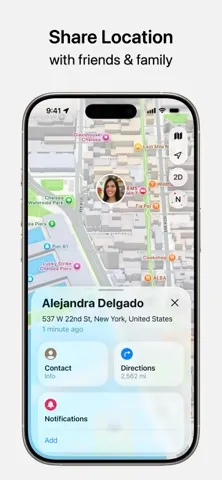
Analysis by Reviewed APKs
Find My is Apple’s place for locating its devices, AirTags and compatible Find My network accessories, while also letting you share your location with people you trust. It suits anyone who uses Apple gear and wants one spot to check when something goes missing or a meetup needs coordinating. I like how it brings several everyday tasks together, though its usefulness depends on having Apple devices and compatible items.
When Something Goes Missing
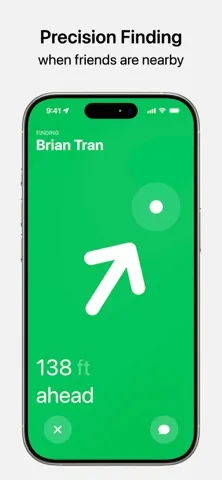
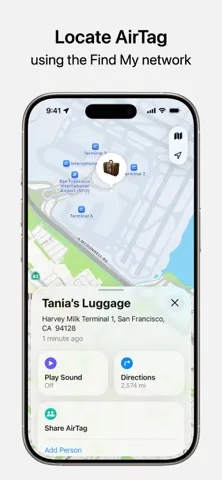
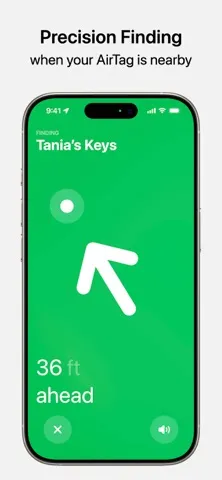
Picture the familiar rush before leaving home: keys are nowhere obvious, and the bag you need is in another room. With an AirTag attached to an item, Find My can show its location on a map and offer directions. If the item is nearby, you can play a sound; supported devices also offer Precision Finding, which gives distance and direction. That turns a vague search into a more focused one.
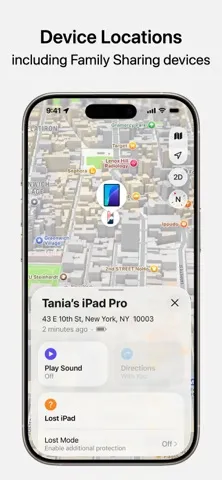
I also see the value when the missing thing is an Apple device rather than a tagged item. Find My can show the location of an iPhone, iPad, Apple Watch, Mac or AirPods, as well as devices in a Family Sharing group. If a device is close, playing a sound can help narrow things down. If it is lost, Lost Mode can lock its screen and show a message, or you can erase it remotely.
More Than a Tracker
The obvious comparison is a dedicated item tracker or a map-based location-sharing app. Find My covers some of both jobs: it brings Apple devices, AirTags, compatible network accessories and people’s shared locations into one app. That makes it handy if your daily routine already revolves around Apple products. Its strength is being a shared place to check, rather than asking you to remember which separate tool handles each kind of search.
It is not a general-purpose locator for every phone or object. Its device and item features are built around Apple hardware, AirTag and compatible Find My network accessories, and some capabilities vary by region or supported device. Nor is it a replacement for a conversation when plans change. Location sharing can help people coordinate, but it is a specific tool for sharing whereabouts, not a full messaging or travel-planning service.
Small Habits That Help
A little preparation makes a lost-item moment less stressful. Attach an AirTag to belongings you regularly misplace, then use the app’s map view when you need to check where they are. If the item should be nearby, try sound or, where supported, Precision Finding. For a borrowed or shared item, Find My lets you share an AirTag or accessory with up to five other people, so the group can help locate it.
Location sharing works best when I think about the occasion rather than leaving it open-ended by default. You can choose a duration in minutes, hours or days, set an end date and time, or pause sharing with specific people until the end of the day. For a trip or event, that gives the sharing a clear purpose and stopping point. Lost-item location can also be shared temporarily, and expires after seven days.
More From Our News Desk

Zoom Meetings, Google Meet, or Teams: Which Is Easiest to Join?

How I Build a Free Streaming Lineup With Tubi

Why Crunchyroll Is the Default Anime App for So Many Fans

YouTube TV: A Practical Guide to Cutting Cable

Rummikub and the Small Comfort of Phone Games

TeamViewer Remote Control or AnyDesk for Helping Family?
Who Will Get the Most From It
I would recommend Find My to people who own several Apple devices, use AirTags or compatible accessories, or regularly coordinate locations with friends and family. It can be especially useful for households where people want to check on a device or share an item. The ability to find nearby items with a sound, and to use Precision Finding on supported hardware, gives the app practical value beyond simply displaying a map.
It may be less useful if you do not use Apple devices or have no compatible items to track. Some features depend on the device, accessory or region, so the app’s full range will not be identical for everyone. People who do not want to share location should also treat the People tab as optional rather than a reason to use the app. Its best fit is someone who wants Apple’s location tools in one place.
Find My is published by Apple Inc. for iOS, and its App Store requirements begin at iOS 14.0. The app is free to download. The store shows a 2.8-star rating from 18,638 ratings, and the age rating is 4+. The provided store information does not give an install count, so there is no figure to add for downloads.
The recorded version is 5.12. Find My was released on June 22, 2020, and its listed last update is October 19, 2026. These details describe the App Store entry; availability of particular features can still depend on the country or region, device and accessory involved. The practical takeaway is that this is an iOS app with a stated minimum of iOS 14.0.
A Closer Look at Find My
A Familiar Apple Starting Point
When I first open an app like Find My, what matters is whether I can quickly get to the right kind of location without hunting through unrelated tools. The app brings devices, items and people into one place, so the basic idea is easy to grasp: check a map, choose what you are looking for, then use the available action to narrow the search or get directions.
The first useful setup decision is what you want Find My to help with. Apple devices can appear on the map, and AirTags or Find My network accessories can be used to keep track of personal items. Location sharing is a separate part of the experience, for friends and family. Thinking about those distinct jobs helps keep the app practical instead of treating every location as the same kind of search.
The Everyday Search
Day to day, the app’s job is straightforward: show the location of a device, item or person and offer a relevant next step. For devices and supported accessories, that may mean getting directions in Apple Maps or playing a sound when the target is nearby. I like that the sound option addresses the ordinary case of something being close but out of sight, rather than making every search feel like a map-reading exercise.
If an item or device is not nearby, Find My can use the Find My network to help track it down. Apple describes that network’s location handling as anonymous and encrypted. That gives the app a way to help beyond the immediate room, while keeping the feature focused on finding the missing thing. The map is useful, but the available actions are what make the experience more than a static location check.
Useful Details Beyond Maps
Precision Finding is one of the more distinctive options when the hardware supports it. It can provide distance and direction for an AirTag or AirPods Pro 2, and people sharing an AirTag can use Precision Finding when they are nearby. It is a nice step up from seeing a general map location when the item is close enough for a more direct search.
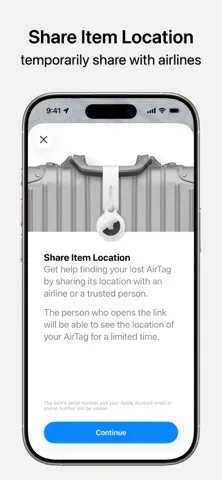
Find My also has practical safeguards for lost belongings. A missing Apple device can be put in Lost Mode, which locks its screen and displays a message; it can also be erased remotely. AirTags and Find My network accessories can display contact information to someone who finds them. For an item lost away from home, its location can be shared temporarily with others, including airlines, and that sharing expires after seven days or when the item is reunited with you.
A Routine for Trips
For a weekend away, I would use Find My in two different ways: share my location with the people I am meeting for a set period, and keep track of tagged belongings. The custom sharing duration can be set for minutes, hours or days, or stopped at a chosen date and time. That makes it easier to match sharing to the trip rather than leaving the timing vague.
If a bag goes missing, temporary item-location sharing gives other people a way to help. Once the item is back, sharing stops; otherwise, it expires after seven days. For everyday family coordination, the People tab can also help people keep in touch or know when a family member has arrived home safely. These are small uses, but they make the app fit naturally into travel and routine check-ins.
Keep the Limits in View
Find My is most useful when the items involved fit into Apple’s ecosystem. Its features cover Apple devices, AirTags, Find My network accessories and shared locations, not every phone or object. Precision Finding also applies only to supported devices and accessories. If your household uses a mix of platforms or tracking products, the one-app convenience may not extend to everything you own.
Some capabilities are not available in every country or region, and features can depend on the hardware involved. Satellite location sharing, for example, is described for iPhone 14 or later when you are without cell service or Wi-Fi. I would treat that as a specific capability, not a universal assumption. The overall experience is capable, but what you can do depends on the combination of device, accessory and location.
Find My brings device recovery, item tracking and people’s location sharing together in a way that can be genuinely useful in everyday life. Its strongest moments are specific and practical: playing a sound for something nearby, getting directions, or setting a clear end point for location sharing.
I would recommend it to Apple users who want one place for these tasks and are willing to use compatible devices or accessories. If you do not use Apple hardware, or want one tracker to cover every kind of device, the app is a less natural fit. For the right setup, it is a handy utility worth keeping close.
Find My iPhone Frequently Asked Questions
What is Apple Find My used for?
Find My helps locate Apple devices, AirTags and Find My network accessories on a map, and can provide directions in Apple Maps. For nearby supported devices or items, you can play a sound; some combinations also support Precision Finding. The People tab lets you share location with friends and family. Lost devices can be put in Lost Mode or erased remotely.
Which devices and platforms support Find My?
Find My is an iOS app, and its stated minimum requirement is iOS 14.0. Its features involve Apple devices, AirTags, compatible Find My network accessories and location sharing. Some options depend on the device or accessory, and availability can vary by country or region. Check the App Store entry for current compatibility details for your particular setup.
What iOS version does Find My require?
The listed minimum is iOS 14.0. Individual features may have additional device requirements; for example, satellite location sharing is described for iPhone 14 or later when there is no cell service or Wi-Fi. Because compatibility can depend on the feature as well as the app, it is worth checking the App Store information for your device.
Does Find My cost anything?
Find My is free to download on the App Store. The store information gives no in-app purchase details, so check the current App Store entry if you need to confirm whether any purchase information has changed. Some of the app’s functions involve separate hardware such as an AirTag or compatible accessory, so the app’s download price is not the whole story of setting up item tracking.
Is Find My right for people without Apple gear?
It is primarily useful for people using Apple devices, AirTags or compatible Find My network accessories, and it can also help them share locations with friends and family. If you do not use compatible Apple hardware or items, much of its tracking purpose may not suit you. Feature availability varies by device and region, so check the store details for your circumstances.
Pros
- Combines Apple device, item and people-location tools in one app.
- Sound and supported Precision Finding can help with nearby searches.
- Offers temporary sharing options with a defined stopping point.
- Lost devices can be locked with a message or erased remotely.
Cons
- Its tracking tools are centered on Apple devices and compatible accessories.
- Some features depend on specific hardware or regional availability.
- The App Store rating is 2.8 stars from 18,638 ratings.
- Category
- Tools
- Version
- 5.12