Shazam: Find Music & Concerts
- 12.28M
- 4.8
- Installs
- 500.00M
- Price
- Free

Screenshots




Analysis by Reviewed APKs
Shazam: Find Music & Concerts is for the moments when a song catches my ear and I want to know what it is before it disappears. It identifies music playing nearby or in supported apps, then helps me revisit discoveries, follow lyrics, and find concerts. I find it most useful as a quick music detective with a handy discovery history, rather than as a replacement for a streaming service.
Catch a song in passing
When I first started using Shazam, I pictured the familiar situation: a song comes on in a café, shop, or car, and I have only a short window to identify it. I open the app and tap to Shazam; it listens and returns the track information. That simple exchange is still the core appeal. I can spend less time guessing at lyrics and more time getting back to whatever I was doing.
The app is useful beyond music playing in the room. Shazam can recognize songs in apps such as TikTok, Instagram, YouTube, and Snapchat, and its description also mentions identifying audio while using headphones or offline. For a song I cannot place, that flexibility makes it practical to try in the moment instead of waiting until I can search by a lyric or ask someone else.
A music finder, not a player
I think of Shazam as the step before listening, not the place where I settle in for an album. It identifies a track, keeps discoveries in a library, and can open a song in services including Apple Music, Spotify, YouTube Music, Amazon Music, and Deezer. That gives me a route from curiosity to playback while leaving the actual listening experience to the service I choose.
That distinction matters if I am comparing it with a streaming app or a general web search. Shazam focuses on identifying music and making related discoveries, including concerts, lyrics, videos, and recommendations. It is not described as a full streaming catalog or a broad search tool for every kind of audio. If I already know the song, artist, or words, searching directly in my music service may be quicker.
Build a useful discovery habit
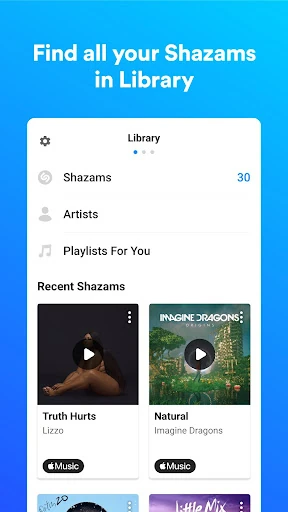
I get more from Shazam when I treat each identification as a bookmark rather than a one-off answer. The library lets me return to songs later, which is helpful after a busy commute or a night out when I have forgotten the names of several tracks. If I connect an Apple Music or Spotify account, discoveries can also be added automatically to a playlist in that service.
For hands-free discovery, Auto Shazam can search for more than one song, including after I leave the app. A Notification Bar option, Quicktile, and a home-screen widget offer other ways to start an identification quickly. I would choose whichever access point fits my routine, then check the history later. That keeps the process light instead of turning every song into a task.
Reads About Shazam
More From Our News Desk

Zoom Meetings, Google Meet, or Teams: Which Is Easiest to Join?

How I Build a Free Streaming Lineup With Tubi

Why Crunchyroll Is the Default Anime App for So Many Fans

YouTube TV: A Practical Guide to Cutting Cable

Rummikub and the Small Comfort of Phone Games

TeamViewer Remote Control or AnyDesk for Helping Family?
Who will enjoy Shazam
I would recommend Shazam to anyone who regularly hears music they do not recognize and wants a quick way to save the answer. It suits people who discover songs in social apps, hear tracks while out and about, or like browsing from one find to another. Concert discovery, lyrics, charts, and recommendations add useful follow-up for listeners who enjoy exploring artists as well as naming a track.
It may be less compelling if I already know what I want to play and spend most of my music time inside a streaming service. Shazam's job is discovery and identification, so its extra links are most valuable when I plan to follow them into another app. Some features depend on optional permissions or connected accounts, and availability can vary by country, so the experience may differ from one person or location to another.
Shazam: Find Music & Concerts is a free Music & Audio app from Apple Inc. On Google Play, it has over 500 million installs and a 4.8-star rating from around 12.3 million ratings. The app is rated Teen. Those figures give a sense of its reach, while the practical appeal is straightforward: identify music, keep track of discoveries, and explore related listening and live music.
Google Play lists Shazam as free, with no in-app purchases and no ads. Its version is shown as varying by device. The supplied app details give an October 23, 2026 last update, but no release date or minimum Android version. For Android requirements, I would check the current Google Play entry on the device I plan to use, since compatibility details can depend on the device.
A closer look at Shazam in daily use
A quick first impression
When I first opened Shazam, the purpose was easy to understand: it is there to catch a song while it is playing. That makes the first use feel low effort. Rather than setting up a complicated music library, I can start with an identification and decide afterward whether I want to listen, share the track, or keep it for later.
Permissions are worth considering as part of setup. The description says microphone access is used to identify nearby music, while location can support event information, song locations, and service quality. Notifications and access to device audio are also described for particular functions. These permissions are optional, though the app notes that some features may not be available without them.
The everyday identification loop
The everyday loop is refreshingly short: hear something, start Shazam, and get a track identification. The value is clearest when the song is about to end or when I do not have a useful lyric to search. I can then come back to the result later in my library instead of trying to remember a tune from a passing moment.
When the music is inside a supported social or video app, Shazam offers ways to identify it without treating the source app as the end of the process. The Notification Bar and Quicktile are described as access points for identifying music in other apps. A home-screen widget is another shortcut. These options are handy because the less I have to navigate, the more likely I am to capture the song.
More than a song title
The result can lead into several kinds of music discovery. Shazam includes real-time, karaoke-style lyrics and music videos from Apple Music or YouTube. It can also surface recommended songs and playlists related to tracks I have found. I like that these features give me a reason to stay curious after the identification, without changing the app's central role as a finder.
Concert discovery is another useful extra. Shazam can show live music events near me from favorite artists or through curated recommendations, and its charts show what is trending locally and globally. I would use those features when I am looking for a next step beyond listening at home. The app also supports a dark theme and sharing songs through several social platforms.
A practical listening routine
A routine I can imagine using is to Shazam unfamiliar tracks during the day, then open the library in the evening and choose which ones deserve a proper listen. If I use Apple Music or Spotify and connect my account, the app can automatically add identified songs there. Otherwise, I can open a track in my preferred supported streaming app when I am ready.
Auto Shazam makes sense for a longer stretch when I expect to hear multiple songs and do not want to tap for every one. For ordinary one-off moments, I would keep to the regular identification shortcut. The choice is useful: I can make Shazam as hands-on or as passive as the situation calls for, then use the history to revisit what it found.
Keep expectations grounded
Shazam is strongest when the goal is to identify music and continue exploring it. It is not presented as a standalone streaming replacement, and several playback options send me to another service. That is convenient if I already use one, but less seamless if I expect identification, a complete music library, and all listening to happen in one place.
Some of the surrounding features rely on permissions, account connections, or local availability. Concert information and other features can vary by country, and automatic playlist additions require a connected Apple Music or Spotify account. I would also check the current store entry for device compatibility before installing. These are reasonable limits to keep in mind rather than reasons to overlook the app's focused core.
Shazam remains a practical companion for those small musical mysteries that show up during an ordinary day. I like that a quick identification can become a saved track, a lyric check, a concert search, or a path to listening elsewhere. The history and shortcuts make repeat use feel natural without asking me to reorganize how I already listen.
I recommend it to curious listeners who often wonder what is playing nearby or in a social video. If all I need is a streaming player, I would start with my existing music service instead. But for turning passing songs into discoveries I can revisit, Shazam is focused, easy to understand, and useful.
Shazam Frequently Asked Questions
What is Shazam: Find Music & Concerts used for?
Shazam identifies music playing around you or in supported apps such as TikTok, Instagram, YouTube, and Snapchat. You can revisit identified tracks in your library, explore lyrics and videos, find concerts, and open songs in supported streaming services. It is chiefly a music identification and discovery app, rather than a replacement for a dedicated streaming service.
Which phones and platforms support Shazam?
The app details provided here are for Android, where Shazam is available through Google Play. The version is listed as varying by device. For the current Android compatibility requirements and whether your particular phone is supported, check the Google Play entry on that device. Features and availability may also vary by country.
What Android version does Shazam require?
The minimum Android version is not included in the supplied app details, so I would check the current Google Play entry before installing. Requirements can vary with device and app updates. The store page is the best place to confirm whether a particular Android phone or tablet meets the current compatibility requirements.
Does Shazam cost money or include purchases?
Shazam is listed on Google Play as free, with no in-app purchases and no ads. It can connect with supported music services, and automatically adding discoveries to Apple Music or Spotify requires an account connection. Check Google Play for current details in your region, since store information and availability may vary.
Is Shazam a good fit for casual listeners?
Yes, especially if you often hear unfamiliar songs and want to identify or save them quickly. Its library, shortcuts, lyrics, recommendations, and concert discovery give curious listeners ways to follow up. It may be less useful if you only want a music player and never need to identify tracks; some features also depend on permissions or connected accounts.
Pros
- Identifies music playing nearby and in several popular social and video apps.
- Keeps discoveries in a library for later listening and browsing.
- Offers useful shortcuts, Auto Shazam, lyrics, concert discovery, and charts.
- Free to use on Google Play, with no ads or in-app purchases.
Cons
- Playback often continues in a separate supported streaming service.
- Some features depend on permissions, connected accounts, or local availability.
- The minimum Android requirement should be checked for each device.
- Category
- Music & Audio