iTunes Store
- 2.06M
- 4.8
- Installs
- —
- Price
- Free
Screenshots
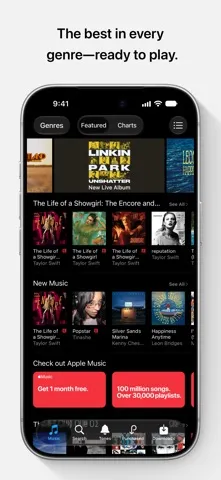
Analysis by Reviewed APKs
iTunes Store is a digital shop for buying music, browsing charts, and finding ringtones. I see it suiting listeners who like owning individual tracks or albums rather than building their whole routine around a subscription. Its focus is refreshingly direct: find something, buy it, and download it for offline use. It is less compelling if what you want is an all-you-can-stream music service.
A Music-Shop Routine
When I want to add a new album to a listening collection, iTunes Store gives me a straightforward place to look. I can search by artist, album, song, or genre, then buy the music I want with a tap. Browsing curated categories is useful when I have a general mood in mind but no particular release to search for. The basic rhythm is familiar: explore, choose, purchase, and download.
I also like the practical side of having downloads available without Wi-Fi. On a trip or during a commute with an unreliable connection, music I have already downloaded can still be there to enjoy. The store also lets me re-download past purchases on my devices. That makes it useful not only for discovering a new release, but for keeping music I have bought accessible when I change devices or revisit older favorites.
Buying, Not Streaming
The most important distinction is that iTunes Store is a place to purchase music, not a streaming subscription. That makes it a better fit for listeners who want particular songs or albums and prefer to buy them one at a time. Charts and curated sections help with discovery, but the central action is still choosing music to purchase and download rather than starting an unlimited streaming catalog.
If your ideal music app is built around playing a vast library on demand through a recurring subscription, this store is not designed to replace that experience. It is also not a general-purpose audio player or a social music community. I would think of it as a digital record shop: useful for browsing releases and making purchases, with offline downloads and past purchases helping round out the ownership-focused approach.
Small Ways to Browse
I get more from the store when I browse with a loose plan. Starting with a genre or a curated category can narrow the field without requiring me to know an artist in advance. When I do have someone in mind, searching directly by artist or album is the quicker route. The charts offer another angle, showing which artists and releases are currently popular with other shoppers.
Pre-orders are worth remembering when a release is still upcoming. The store supports pre-ordering new releases, with the music set to download automatically when it becomes available. I would also make a habit of re-downloading past purchases when setting up another device, rather than assuming everything will already be on it. For ringtones, the Tones section gives that search a dedicated place instead of mixing it into music browsing.
More From Our News Desk

Zoom Meetings, Google Meet, or Teams: Which Is Easiest to Join?

How I Build a Free Streaming Lineup With Tubi

Why Crunchyroll Is the Default Anime App for So Many Fans

YouTube TV: A Practical Guide to Cutting Cable

Rummikub and the Small Comfort of Phone Games

TeamViewer Remote Control or AnyDesk for Helping Family?
Who Will Appreciate It
I would recommend iTunes Store to people who like buying individual albums, tracks, or ringtones and want a familiar way to browse before making a choice. It can suit listeners who value having purchased music available for offline use, or who enjoy checking charts and exploring curated categories. The option to pre-order a release is handy for anyone who wants a particular new album downloaded when it becomes available.
It may not suit someone who expects a subscription-style streaming catalog or wants to listen to everything without purchasing tracks. The store's country-by-country availability can also affect which music and features are accessible. I would approach it as a focused buying and download destination, not as a complete replacement for every kind of music app. If that distinction matches how you listen, its simple purchase-first approach makes sense.
Apple Inc. is the developer of iTunes Store, an Entertainment app for iOS. It is free to download, with a stated price of $0.00, and carries a 12+ content rating. The App Store gives it a 4.8-star rating from about 2.1 million ratings. Its listed release date is June 1, 2016, and the current version shown is 1.12.
The minimum stated requirement is iOS 10.0. The listed last update date is October 26, 2026. The supplied store details do not give an install count, and they do not specify in-app purchase or advertising information. Music purchases are part of the app's described purpose, so the cost of a particular song, album, or tone is separate from downloading the app.
The Details of a Purchase-First Music Store
A Familiar First Look
When I first opened iTunes Store, the idea of it was easy to grasp: this is where I go to look for music to buy. The store covers new releases, established favorites, and independent artists, with browsing organized around familiar categories such as artist, album, song, and genre. I did not need to think in terms of a playlist or subscription to understand what the app was for.
The range described is broad, with more than 100 million high-quality, DRM-free songs available to explore. That scale gives the store room for mainstream releases and less obvious finds alike. Availability and features can differ by country, though, so what appears for one person may not be identical for someone elsewhere. The first impression is less about a clever gimmick than about having many ways into a large catalog.
The Day-to-Day Experience
In everyday use, the most natural path depends on how much I already know. A specific album or artist points me toward search, while a broad interest in a genre makes browsing more appealing. Curated categories can help when I want ideas without turning the session into an aimless scroll. Once I find something I want, the store keeps the decision grounded in a clear purchase-and-download process.
After a purchase, offline availability is one of the practical benefits. Downloaded music can be watched or enjoyed without Wi-Fi, and past purchases can be downloaded again on devices. That matters when I am preparing for a flight, dealing with patchy service, or setting up another device. I would still keep the distinction in mind: the app describes music for purchase, not an ongoing stream of every song in the catalog.
Charts, Preorders, and Tones
The charts give browsing a useful snapshot of what other people are choosing. They can be a starting point when I want to see what is popular, though popularity is only one way to find music. For a more personal search, the store's artist, album, song, and genre browsing offers other routes. Curated categories add another option for moving from a general interest toward a specific release.
A couple of features serve distinct needs beyond ordinary album shopping. Pre-ordering lets me secure an upcoming release, which is set to download automatically when it becomes available. The Tones section is for ringtone shopping, including a selection described as thousands of options. These details make the store more than a list of albums, while still keeping its overall purpose centered on finding and purchasing digital media.
A Simple Weekly Habit
A practical routine might start with a quick look at charts or curated categories when I have a few minutes to spare. If something catches my attention, I can check the artist or album and decide whether I want to buy it. I would save direct search for releases I already know I want. That split keeps casual discovery light and makes purposeful shopping quicker.
Before a trip, I would check that music I have purchased is downloaded for offline use. If I move to another device, the ability to re-download past purchases gives me a way to retrieve that collection. And if a new release is still on its way, a pre-order can handle the waiting period without needing a separate reminder to download it later. These habits suit the store's purchase-and-keep model.
Limits to Keep in Mind
The clearest limitation is also the app's defining choice: music is bought rather than presented as an all-you-can-stream subscription. Someone who wants to sample and play a large catalog without individual purchases may find that model less convenient. I would not install it expecting the experience of a subscription music service; its described features focus on shopping, downloads, charts, pre-orders, and ringtones.
Regional differences are another consideration. The app notes that availability and features may vary by country, which can affect browsing and what is offered. It is also worth remembering that its broad catalog figure does not mean every song will be available to every user. For listeners who are comfortable with those limits and prefer choosing specific purchases, the store remains a focused option rather than a one-size-fits-all music solution.
iTunes Store makes the most sense when I treat it as a digital music shop: browse, choose, purchase, and download. Charts, curated categories, pre-orders, ringtone choices, and re-downloads give that simple idea useful range. Its offline downloads are especially practical for travel and unreliable connections.
I would recommend it to listeners who prefer buying specific music and want a direct way to find it. If your priority is subscription-based streaming without separate purchases, this is not the right fit. For the purchase-first crowd, though, iTunes Store offers a clear and familiar route from discovery to download.
iTunes Store Frequently Asked Questions
What do people use iTunes Store for?
iTunes Store is used to browse and purchase music, including songs and albums, and to find ringtones in its Tones section. It also offers charts, curated categories, pre-orders for new releases, downloads for offline use, and the ability to re-download past purchases. Availability and features may vary by country.
Which devices can run iTunes Store?
iTunes Store is an iOS app, and its stated minimum requirement is iOS 10.0. It is available through the Apple App Store. The provided details do not specify a particular device model, so check the App Store entry on the device you plan to use for current compatibility information.
Does iTunes Store cost money?
The app is free to download, with a stated price of $0.00. Its purpose includes purchasing music and tones, so individual purchases may have their own prices. The supplied details do not specify in-app purchase or advertising information. Check the App Store for current purchase details and regional pricing.
What iOS version does iTunes Store need?
The stated minimum operating system requirement for iTunes Store is iOS 10.0. Compatibility can depend on the device and current App Store availability, so it is sensible to check the store entry for your specific device before downloading.
Is iTunes Store right for my music habits?
It is a good match if you want to browse and buy particular songs or albums, download purchases for offline use, or shop for ringtones. It may be less suitable if you want a subscription-style streaming catalog instead of individual purchases. Music and feature availability can vary by country.
Pros
- Large catalog with browsing by artist, album, song, genre, and curated categories.
- Purchased music can be downloaded for offline use and re-downloaded on devices.
- Charts, new-release pre-orders, and a dedicated Tones section broaden the store.
- Free to download and available for devices running iOS 10.0 or later.
Cons
- Its purchase-first model may not suit listeners looking for subscription-style streaming.
- Music and feature availability can vary by country.
- The listed details do not specify advertising or in-app purchase information.
- Category
- Entertainment
- Version
- 1.12