Exxon Mobil Rewards+
- 33.44K
- 3.7
- Installs
- 1.00M
- Price
- Free
Screenshots
Analysis by Reviewed APKs
Exxon Mobil Rewards+ is a fuel-station app for paying at participating Exxon and Mobil locations, collecting points, and keeping track of offers and savings. I found its appeal is straightforward: it brings pump payment and loyalty details together for people who already stop at these stations. It suits regular drivers more than occasional visitors, and its usefulness depends on having participating locations along your usual routes.
A stop with fewer steps
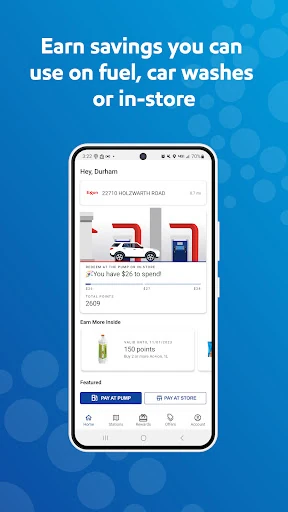
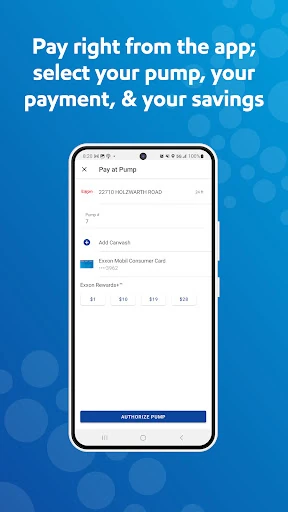
Picture pulling into an Exxon or Mobil station on the way to work. Instead of handling payment at the pump, I can open the app, choose the pump and fuel grade, and pay with an added payment method. Eligible purchases can also earn Rewards+ points, so the fuel stop does two jobs at once: I get gas and keep my loyalty activity in one place.
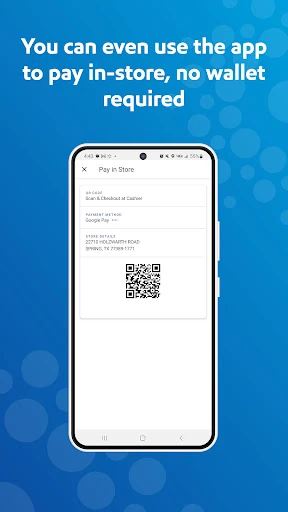
The setup takes a little preparation rather than happening at the pump. I need an account and a preferred payment method in the app, then I can use the pump payment option or generate a QR code for a purchase inside. I like that the flow covers both sides of a quick stop, though it is most useful when I already know I will be visiting a participating station.
A loyalty app, not a trip planner
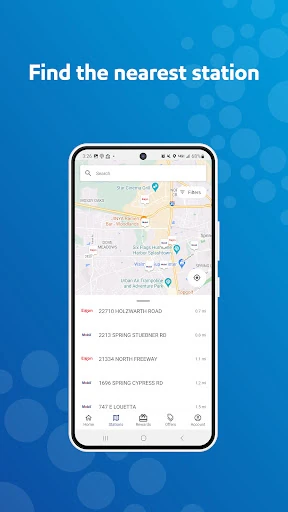
Compared with a general navigation app, Exxon Mobil Rewards+ has a narrower purpose. It can locate nearby Exxon and Mobil stations, but the main attraction is handling payment and rewards at those locations. I would use a maps app to plan a broader journey, then turn to Rewards+ when I want to pay at a participating pump or check station-specific offers.
It is not a universal fuel-payment tool or an all-brand rewards wallet. Its points and offers are tied to eligible purchases at participating Exxon and Mobil stations, and the app’s payment options are designed around those stops. Drivers who rarely use those brands may have little reason to keep it in their routine; regular customers are more likely to find the combination worthwhile.
Make points easier to follow
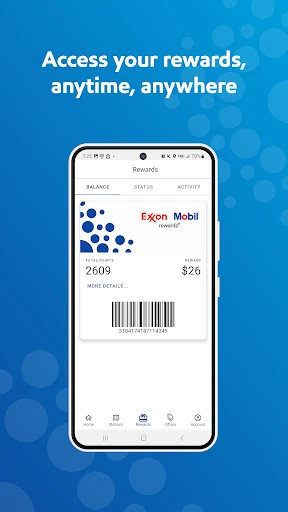
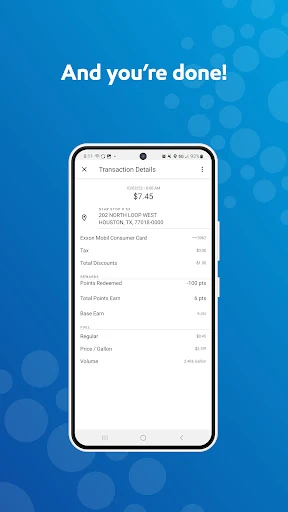
A useful habit is checking the rewards and purchase activity after a stop, rather than trying to remember what earned points later. The app tracks points, purchases, and savings, giving me a place to review the activity connected to my station visits. Points can be redeemed for savings on future purchases, so seeing the balance helps make the loyalty side feel less abstract.
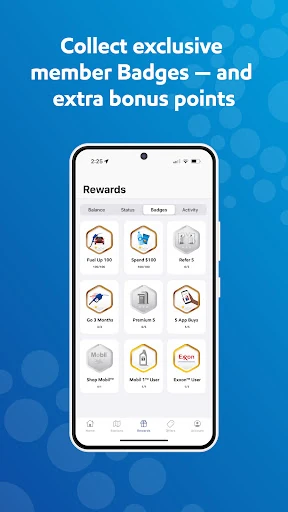
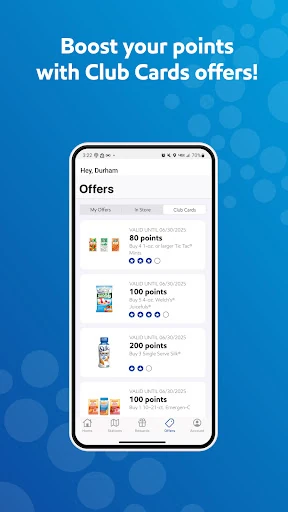
I would also take a quick look at My Offers before buying a drink or snack, since offers can apply to in-store items at participating locations. Club Cards and badges give the program additional ways to track or reward activity. These extras are best treated as occasional bonuses, not a reason to add an elaborate routine to a simple fuel stop.
More From Our News Desk

Zoom Meetings, Google Meet, or Teams: Which Is Easiest to Join?

How I Build a Free Streaming Lineup With Tubi

Why Crunchyroll Is the Default Anime App for So Many Fans

YouTube TV: A Practical Guide to Cutting Cable

Rummikub and the Small Comfort of Phone Games

TeamViewer Remote Control or AnyDesk for Helping Family?
Who will get the most from it
I would recommend Exxon Mobil Rewards+ to drivers who frequently use Exxon or Mobil stations and want payment, rewards, and offers together. Paying at the pump or showing a QR code in-store can make the app handy during a busy stop, while the station finder helps locate nearby locations. The points tracker is another practical touch for anyone who likes to see purchases and savings collected in one place.
It may not suit someone who fills up at many different brands or prefers not to set up an account and payment method for fuel. The rewards program only applies to eligible purchases at participating locations, and Direct Debit+ has separate terms and does not earn Rewards+ points. If the stations are not part of your usual routine, a dedicated app may add more friction than value.
Exxon Mobil Rewards+ is developed by ExxonMobil. On Google Play, it has over one million installs and a 3.7-star rating from around 33,000 ratings. The app is free to download, with no in-app purchases or ads. Its content rating is Everyone, making it suitable for a broad audience.
The current version is 6.3.0, and the app requires Android 9 or later. It was released on July 30, 2013, and last updated on June 20, 2025. Those details give a quick sense of its history and compatibility; I would check Google Play for current device and version information before installing.
How Rewards+ Fits a Fuel Stop
A practical first setup
When I first opened the app, the basic proposition was easy to understand: create an account, add a payment method, and use it at an Exxon or Mobil station. That setup is worth doing before a rushed commute or a low-fuel warning. It leaves the pump visit for choosing the station details and completing the payment, rather than working through account setup at the car.
The payment choices include credit and debit cards, Apple Pay, Click to Pay, and Exxon Mobil Direct Debit+. Apple Pay has a stated limitation: it is not valid for in-store app payments. Keeping that distinction in mind helps avoid assuming every option works in every part of the station.
The everyday payment flow
For a pump purchase, the app lets me select the pump and fuel grade. That is the central convenience, and it is easy to picture using when I want to stay beside the car rather than handle payment at the pump itself. In-store, the process is different: the app generates a QR code to show the cashier.
Those two flows make the app more useful than a rewards balance screen alone. I can use it for a fuel purchase and for an eligible shop purchase, while keeping track of points and activity afterward. The important caveat is that the station must participate, so this is a brand-specific routine rather than a payment shortcut for every fuel stop.
Offers and extra rewards
The app includes offers for drinks, snacks, and other items, with availability at participating locations. My Offers gives those deals a dedicated place, which is helpful when I want to check before choosing something from the store. It is a practical add-on, although I would not count on seeing the same offers at every station.
There are also badges, Club Cards, and friend referrals. Club Cards can add points across multiple in-store purchases, while referrals can earn bonus points for successful referrals. These features make the rewards program feel more layered than a simple fuel discount, but the basic value still comes from eligible purchases and offers that fit what I would buy anyway.
A simple weekly routine
I would make the app part of a regular fuel routine by checking nearby stations before a familiar drive, then using pump payment when I arrive. Afterward, I can glance at the purchase and points history instead of keeping a mental tally. If I am going inside, I can check My Offers and use the QR code at checkout when appropriate.
That routine stays light: check the station, pay, and review rewards. Points can be used for savings on future purchases, so a quick balance check can help me remember the benefit without making every stop feel like a project. I would keep Direct Debit+ separate in my thinking, since its purchases do not earn Rewards+ points.
Things to keep in mind
The biggest limit is coverage. The app is centered on participating Exxon and Mobil stations, so its station finder and payment features are only relevant when those locations suit the trip. A driver who chooses whichever station is closest or cheapest may not find the app consistently useful.
The rewards details also come with conditions. Offers depend on participating locations, and Direct Debit+ is subject to credit approval and terms. It saves 10 cents per gallon every day according to the app description, but purchases through that payment option do not earn Rewards+ points. I would read the applicable terms before deciding which payment method fits.
Exxon Mobil Rewards+ brings station finding, pump and in-store payment, points, and offers into one focused app. I like that it can make a familiar fuel stop easier to manage, particularly for drivers who already visit Exxon or Mobil regularly. The trade-off is its limited scope: the program is tied to participating locations and eligible purchases.
If those stations are already part of your routine, I think the app is worth trying for its payment and rewards tracking. If you rarely visit them, it is harder to justify adding another account and payment setup. My recommendation is simple: use it when the brand fits your driving habits, and treat the extra rewards features as a bonus.
Exxon Mobil Rewards+ Frequently Asked Questions
What is Exxon Mobil Rewards+ used for?
Exxon Mobil Rewards+ lets customers pay at the pump or in-store at participating Exxon and Mobil stations, earn points on eligible purchases, find nearby stations, and track points, purchases, and savings. It also includes offers, badges, Club Cards, and referrals. Points can be redeemed for savings on future purchases.
Which phones can run Exxon Mobil Rewards+?
Exxon Mobil Rewards+ is an Android app that requires Android 9 or later. It supports payment options including credit and debit cards, Apple Pay, Click to Pay, and Exxon Mobil Direct Debit+. Device compatibility can vary, so check the Google Play store page for the current requirements for your phone.
Does Exxon Mobil Rewards+ cost money?
The app is free to download and has no in-app purchases. Its payment choices include standard cards and other listed methods, while Exxon Mobil Direct Debit+ is subject to credit approval and terms. Payment and offer details can vary, so it is worth checking the Google Play store page and program terms.
Can I use Exxon Mobil Rewards+ at any gas station?
No. The app is designed for participating Exxon and Mobil stations. It can locate nearby stations of those brands, and its payment, points, and offers apply to eligible purchases at participating locations. Check the app or store information for details relevant to a particular location.
Who should use Exxon Mobil Rewards+?
It is best suited to drivers who regularly visit Exxon or Mobil stations and want to combine station payments with rewards tracking and offers. It may be less useful if those locations are not part of your normal routes. Offer availability and program details can vary, so check the Google Play store page for current information.
Pros
- Combines pump payment, in-store QR checkout, station finding, and rewards tracking.
- Supports several payment methods, including cards, Apple Pay, and Click to Pay.
- Offers, badges, Club Cards, and referrals add options beyond fuel points.
Cons
- Its payment and rewards value is limited to participating Exxon and Mobil locations.
- Direct Debit+ purchases do not earn Rewards+ points and have separate terms.
- Apple Pay is not valid for in-store app payments.
- Category
- Maps & Navigation
- Version
- 6.3.0











