DYMO Connect
- 1.05K
- 1.6
- Installs
- 100.00K
- Price
- Free
Screenshots
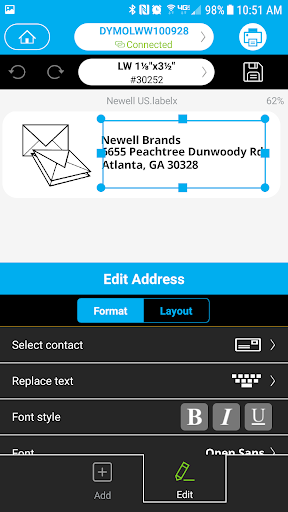
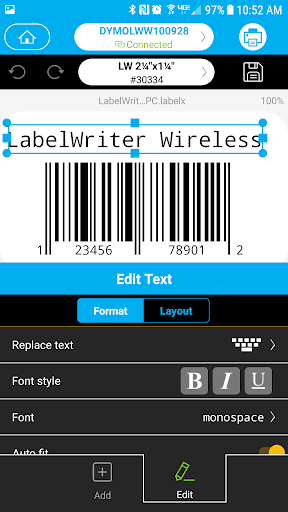
Analysis by Reviewed APKs
DYMO Connect is a mobile label-making app for creating and printing labels from an Android phone or tablet. I can see it suiting people who label storage, prepare address labels, or need a quick barcode without sitting down at a computer. Its mix of templates and custom design options is useful, though its low Google Play rating gives me pause: this is a practical tool to consider carefully, not an automatic recommendation.
Labels for everyday jobs
When I think about where DYMO Connect fits, I picture a weekend spent sorting a closet or packing a few boxes for storage. I can make a label on my phone, choose a pre-formatted type or template, and print it rather than writing each one by hand. Being able to save labels also makes sense for recurring jobs: I can keep a design around and return to it when the same need comes up.
The app also covers more than plain text. I can use fonts, borders, styles, and images from the phone’s gallery to give a label a little more context. Spellcheck is a welcome safeguard for names or addresses, while voice-to-text offers another way to enter wording. These are modest conveniences, but they suit the small, repetitive tasks where a typo or a few extra steps can be irritating.
A focused printing companion
DYMO Connect is best understood as a label design and printing companion, rather than a general document editor or a full inventory system. It puts label-specific jobs in reach, including address labels made from contacts and labels with barcodes or QR codes. That focus is helpful when I already know I need a physical label; the app is not presented as a place to manage stock, track packages, or organize a whole business operation.
Compared with typing a label on a computer, a phone-based workflow can be handy when I am already near the item I want to mark. But the mobile format also has trade-offs: a small screen is not ideal for detailed layout work or long editing sessions. I would choose it for quick, practical label tasks, not as a replacement for broader design software or a desktop workflow.
Small habits that help
I would get more from DYMO Connect by saving designs I expect to reuse instead of rebuilding them each time. A consistent label for pantry containers, storage boxes, or common mailing needs can save a few taps later. Before printing, I would also take a moment to review the wording and layout; spellcheck helps catch some mistakes, but it cannot decide whether a name or number is correct.
For addresses, using the Address object with contacts should be a more direct starting point than typing every detail from scratch. For a code label, I would choose the barcode or QR Code object and check that the result suits the item it will identify. Images and styling are available too, but I would keep functional labels easy to read rather than adding decoration that gets in the way.
More From Our News Desk

Zoom Meetings, Google Meet, or Teams: Which Is Easiest to Join?

How I Build a Free Streaming Lineup With Tubi

Why Crunchyroll Is the Default Anime App for So Many Fans

YouTube TV: A Practical Guide to Cutting Cable

Rummikub and the Small Comfort of Phone Games

TeamViewer Remote Control or AnyDesk for Helping Family?
Who may find it useful
I would recommend giving DYMO Connect a look if you regularly make physical labels and prefer to do the setup from an Android phone or tablet. Home organizers, people preparing address labels, and users who need barcode or QR code labels may appreciate having those jobs gathered in one app. The ability to save designs and start from templates is especially useful when a label needs to be repeated.
It may be a weaker fit if you rarely print labels, want a general-purpose design tool, or prefer to do detailed editing on a larger screen. The Google Play rating is low, so I would check recent user feedback and make sure the app suits your intended workflow before relying on it. It is a focused utility, and its appeal depends on having label-making as a real, recurring need.
DYMO Connect is a free Android productivity app from DYMO. Google Play shows 100,000+ installs and a 1.6-star rating from 1,047 ratings. The app is marked as containing no ads and offering no in-app purchases. Its content rating is Everyone. Those figures help set expectations: the app is free to try, but the low rating is worth weighing against the label tasks you want to handle.
The current version in the provided app details is 2.2.9. DYMO Connect was released on October 27, 2016, and its last recorded update was February 23, 2024. No minimum Android version is specified in the available details, so check the Google Play page on your device for compatibility before installing.
A Closer Look at Mobile Labeling
Opening the app
My first impression of DYMO Connect is that its purpose is easy to grasp: make a label, customize it, and print it from a mobile device. That clarity matters for a utility app. I would rather get to a usable label quickly than spend time learning a complicated design environment for a task as simple as marking a box or preparing an address.
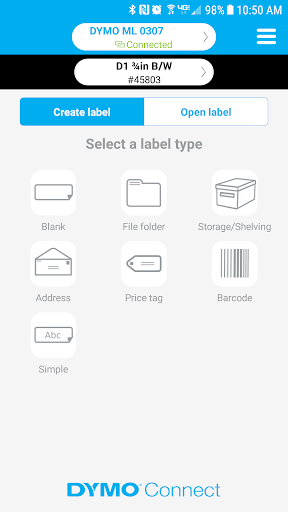
The app description points to templates and pre-formatted label types as ways to get started, alongside options for building a design with text and visual details. I like that combination in principle. A template can shorten the first attempt, while customization gives me room to adjust a label when the default layout is not quite right.
The everyday workflow
The central routine is straightforward: create a label on a phone or tablet, make any necessary changes, and print it. For a quick job, that is a sensible sequence. I can imagine using it while organizing a shelf, rather than leaving the room to find a computer and then returning with a label later. The value is less about elaborate design and more about keeping a small task moving.
Text entry has a couple of practical supports. Spellcheck can help with ordinary wording, and voice-to-text gives me another way to enter a phrase. I would still proofread before printing, particularly for an address, serial-style identifier, or other detail where a small error matters. These tools reduce friction; they do not remove the need to check the finished label.
Useful label options
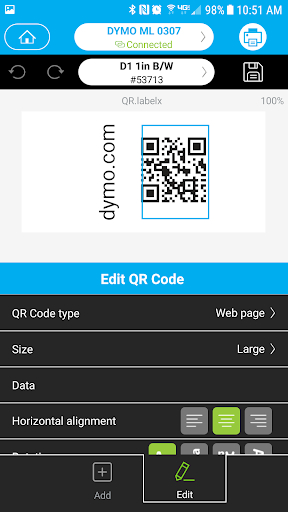
The range of supported label content is a strong part of the app’s proposition. I can create address labels using the Address object and contacts, or use Barcode and QR Code objects for code-based labels. Those options make DYMO Connect more versatile than a tool limited to typing a short line of text. They also keep the focus squarely on labels rather than trying to be a broad creative suite.
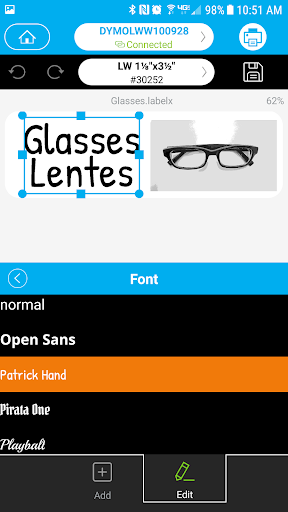
For appearance, the app supports borders, styles, popular Google fonts, and pictures from the device’s Image Gallery. That is enough to make a label more distinctive when a plain line of text is not sufficient. I would use styling with restraint for labels that need to be read quickly, but image support could be useful when a visual cue makes an item easier to identify.
Templates and pre-formatted label types offer another practical shortcut. They are useful when I want a familiar structure instead of starting with a blank design. I would treat them as a starting point, then check that the wording and layout fit the actual job before printing. Having both ready-made and customizable approaches gives the app a useful balance for quick tasks and slightly more personal labels.
A simple home routine
For a home organization session, I would begin by deciding which items genuinely need labels, then make a small batch of consistent designs. I could save a label style I expect to use again, choose a template for a more standard job, and use pictures only where they add useful visual information. That keeps the process practical instead of turning a shelf-organizing task into a design project.
Before printing, I would check spelling, names, and any contact details, then review the label’s appearance on screen. If I need an address label, I would start with the contact-based Address object; if I need a code, I would use the barcode or QR Code option. A final glance is a small habit that can prevent wasted labels and avoidable rework.
What to keep in mind
The biggest qualification is the rating: Google Play shows DYMO Connect at 1.6 stars from 1,047 ratings. That does not tell me exactly how it will behave for every person, but it is a notable warning sign for an app meant to support a practical task. I would read recent feedback and test my intended workflow before making it part of an important routine.
This is also a mobile-first tool, so I would not choose it for extensive layout work or expect it to replace a full desktop design process. Its usefulness depends on wanting to create and print labels from an Android phone or tablet. The provided details do not give a minimum Android version, so checking device compatibility in Google Play is sensible before getting started.
Finally, the app’s features are geared toward producing labels, not managing everything around them. Templates, saved designs, contact-based addresses, and code objects cover several common label jobs, but they do not turn it into an inventory or shipping-management service. Keeping that scope in mind makes it easier to judge whether the app matches the task at hand.
DYMO Connect has a clear, useful purpose: help me create, customize, save, and print labels from an Android device. Templates, contact-based address labels, spellcheck, voice-to-text, and code objects cover a good spread of practical jobs without making the app sound like a general design platform.
I would consider it if mobile label-making is something I do regularly, but I would not overlook its 1.6-star Google Play rating. Check recent feedback and device compatibility before relying on it. For occasional or specialized label tasks, it may be worth trying; for a broader design workflow, I would look elsewhere.
DYMO Connect Frequently Asked Questions
What is DYMO Connect used for?
DYMO Connect is used to create, save, and print labels from an Android smartphone or tablet. It supports templates, custom text styling, images from the device gallery, contact-based address labels, and barcode or QR Code objects. It is a focused label-making tool, rather than a general-purpose design or inventory app.
Which devices can run DYMO Connect?
The app is described for Android smartphones and tablets. The available details do not specify a minimum Android version, so check the Google Play page from your device to see whether it is compatible. DYMO Connect is the Android app; platform availability may vary, so consult the relevant store for other devices.
Does DYMO Connect cost money?
DYMO Connect is listed as free on Google Play, with no in-app purchases and no ads. Store details can change, so it is sensible to check the current Google Play page before downloading. The app’s features include creating, saving, and printing labels, along with templates and several label-specific content options.
What Android version does DYMO Connect require?
The minimum Android version is not specified in the app details available here. I would check the Google Play page on the phone or tablet you plan to use, since compatibility requirements can vary. The listed current version is 2.2.9, and the last recorded update was February 23, 2024.
Is DYMO Connect a good fit for me?
It may suit you if you regularly create physical labels and want to prepare them on an Android device, including address, barcode, or QR code labels. If you need a broad design program or rarely print labels, its focused approach may not be a match. Its Google Play rating is 1.6 stars from 1,047 ratings, so review recent feedback before deciding.
Pros
- Covers templates, custom text styling, images, addresses, barcodes, and QR Code labels.
- Spellcheck and voice-to-text offer practical help during label creation.
- Free to download, with no ads or in-app purchases listed.
- Saved labels can make recurring jobs quicker to prepare.
Cons
- Its 1.6-star Google Play rating is a significant reason to check user feedback.
- The mobile-focused workflow may not suit detailed design work on a larger screen.
- The minimum Android version is not specified in the provided app details.
- Category
- Productivity
- Version
- 2.2.9











