Dexcom G7
- 14.60K
- 3.4
- Installs
- 1.00M
- Price
- Free
Screenshots
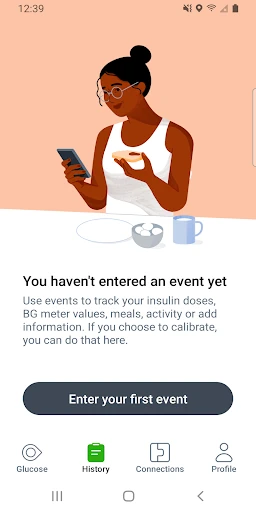
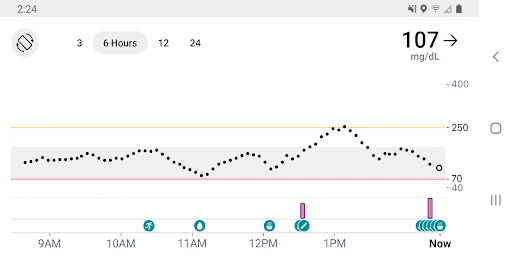
Analysis by Reviewed APKs
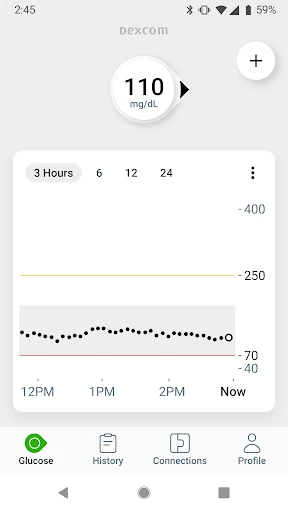
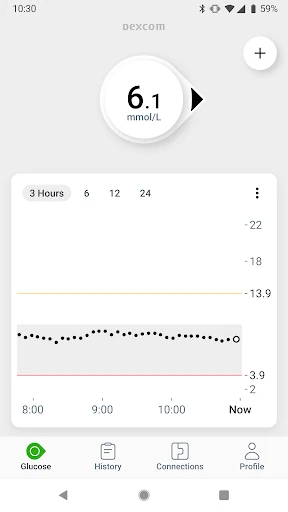
Dexcom G7 is the companion app for the Dexcom G7 continuous glucose monitoring system. It displays glucose readings and trends, sends customizable high and low alerts, and can share data with followers and care teams. I see it as a practical day-to-day viewing and sharing tool for people already using the G7 system, rather than a general health tracker. Its value depends on having the compatible sensor and device.
Reading a busy day
When I picture the app in an everyday routine, the useful part is having glucose information available while the day keeps moving. A reading can arrive on a compatible display device up to every five minutes, so checking a trend does not have to mean stopping to record each number manually. A customizable alert can also call attention to a high or low level. That combination makes the app most relevant as a companion to the wearable G7 sensor.
A simple example is checking the trend during a workday, then looking again before heading home. Quick Glance can put glucose data on the phone’s lock screen, which may make a brief check less of a production. If the user has chosen to share data, up to 10 followers can monitor readings and trends in the Dexcom Follow app. Sharing and following need an internet connection, so this is a connected workflow, not an offline handoff.
A system companion, not a logbook
The obvious comparison is with apps where someone enters meals, activity, or readings by hand, or with a phone’s built-in wellness tools. Dexcom G7 has a narrower job: show data from the Dexcom G7 CGM System, surface alerts, and support sharing and reporting. It also brings some retrospective glucose insights into the same app as real-time readings. That focused approach is useful if the G7 is already part of someone’s routine.
This is not a standalone glucose monitor, a general food diary, or a replacement for guidance from a healthcare professional. The app is intended for people using the G7 system, and its Android version works only with select devices. The description also cautions users to learn how to make treatment decisions with a healthcare professional. If a reading or alert does not fit symptoms or expectations, the guidance says to use a blood glucose meter for treatment decisions.
Small habits that help
The best habit is a modest one: check the trend at moments that already exist in the day, rather than treating the phone as something to watch constantly. Quick Glance may help with a quick look, while customizable alerts can provide a prompt when readings are high or low. Those tools work together: one supports a glance, the other can bring attention to a change without requiring repeated manual checks.
Sharing settings and connected data can be part of a regular review too. A user can share glucose data with followers, send information to a Clarity healthcare team, and use integrations with third-party health apps and lifestyle devices. Connected health and activity data can appear on the G7 trend graph. These options are not necessarily identical everywhere, so I would treat them as useful additions to a core glucose-viewing routine rather than assume every connection is available in every region.
More From Our News Desk

Zoom Meetings, Google Meet, or Teams: Which Is Easiest to Join?

How I Build a Free Streaming Lineup With Tubi

Why Crunchyroll Is the Default Anime App for So Many Fans

YouTube TV: A Practical Guide to Cutting Cable

Rummikub and the Small Comfort of Phone Games

TeamViewer Remote Control or AnyDesk for Helping Family?
Who may find it useful
I would recommend Dexcom G7 to someone who uses the Dexcom G7 CGM System and wants readings, trends, and alerts on a compatible Android phone. It may be especially useful for users who want to share glucose information with family members or a care team, or who like seeing retrospective insights alongside current data. The app’s role is clearest when the sensor and phone are already part of the person’s diabetes-management setup.
It may not suit someone looking for a general wellness tracker, a manual-only glucose log, or an app that works without the G7 system. Device compatibility matters, and sharing and Follow features require an internet connection. I would also avoid treating any app reading as a substitute for professional instruction: the description says to work with a healthcare professional before making treatment decisions and to use a blood glucose meter when readings do not match symptoms or expectations.
Dexcom G7 is developed by Dexcom and is listed on Google Play in Health & Fitness. It has over 1 million installs and a 3.4-star rating from around 14,600 ratings. The app is free to download, with no in-app purchases or ads indicated in the supplied store facts. Its content rating is Everyone.
The current version in the supplied facts is 2.15.0. The release date is February 13, 2023, and the last update date is September 2, 2026. The minimum Android version is not stated in the supplied facts; Android compatibility is limited to select devices, so checking the Google Play listing and Dexcom’s compatibility information is sensible before relying on a phone.
A Closer Look at Daily Glucose Checks
Starting with the G7 system
My first impression is that the app makes sense as one piece of a wider setup, not as an app to install first and figure out later. Its purpose is to display readings from the Dexcom G7 CGM System, so the sensor and a compatible display device are central to the experience. The supplied description emphasizes checking device compatibility before starting, which is practical advice for anyone considering a new phone.
Once the setup is in place, the app’s main promise is straightforward: current glucose information and direction of change in one place. Readings can be sent to a compatible display device up to every five minutes. The app also supports customizable alerts. I would approach the first days as a chance to learn what the displayed information and alerts mean with a healthcare professional, as the app’s own guidance recommends.
The everyday viewing experience
The core experience is less about filling in a diary and more about having an ongoing view of glucose readings and trends. That distinction matters during a day split between errands, work, and meals: the app is designed to receive data from the wearable sensor instead of relying only on manual entries. Quick Glance adds another way to see glucose data, putting it on the smart device’s lock screen.
Alerts are one of the more practical parts of that arrangement. Users can customize alerts for high or low glucose levels, giving the app a way to bring a change to their attention. That does not make the phone a substitute for judgment or professional advice. The description specifically says to use a blood glucose meter for treatment decisions if readings or alerts do not match symptoms or expectations.
Sharing and connected insights
Sharing is a meaningful extension of the core display. Users can share glucose data with up to 10 followers, who can view data and trends through the Dexcom Follow app on a compatible smart device. This could help keep a chosen support network informed without asking the G7 user to explain every reading in real time. The share and Follow functions require an internet connection.
The app also integrates Clarity Clinic in its connections tab, making it possible to share data with a Clarity healthcare team. Dexcom Clarity summary insights are integrated into the G7 app as well, bringing retrospective glucose information together with real-time insights. For someone who wants both current readings and a broader look back, this is a more useful setup than keeping those views entirely separate.
There are other data connections too. Users can log estimated fasting glucose, share glucose data with third-party health apps and lifestyle devices, and view health and activity data from connected apps and devices on the G7 trend graph. Features and partner integrations can differ by region, so the exact mix may depend on where the app is used.
A manageable daily routine
A low-friction routine might begin with a quick look at the trend when starting the day, then rely on chosen alerts to flag high or low readings as the day unfolds. Quick Glance may make a brief check easier when picking up the phone, while the full app remains available for a closer look at readings and insights. The useful point is not to add more screen time, but to make the glucose information accessible when it is relevant.
At a convenient time, a user might review connected health or activity information on the trend graph or log estimated fasting glucose. If sharing is part of the care routine, the app can also send data to followers or a Clarity healthcare team. I would keep those steps purposeful: a few consistent checks and a useful share may be easier to maintain than trying to explore every connection at once.
Limits to keep in mind
The biggest limit is also the clearest requirement: this app is for use with the Dexcom G7 CGM System, not as a standalone tracker. On Android, it works with select devices only. Checking compatibility before depending on the app is important, especially when changing phones. Some connected features also depend on internet access, and app features or partner integrations may differ by region.
It is a health app, so the context around its readings matters. The supplied description advises users to learn how to make treatment decisions with a healthcare professional. It also says a blood glucose meter should be used for treatment decisions if readings or alerts do not match symptoms or expectations. That makes the app a useful information and sharing tool, but not a replacement for professional instruction or the sensor system itself.
The Google Play score is 3.4 stars from around 14,600 ratings, which suggests the app has a mixed reception among users. That number is worth considering alongside the app’s specific purpose and compatible-device requirement. Someone already using the G7 system may judge it differently from someone expecting a broader diabetes-management app with unrelated tracking tools.
Dexcom G7 is at its best as a focused companion to the G7 sensor: it brings readings, trends, customizable alerts, sharing, and selected Clarity and app integrations together. Quick Glance and remote monitoring can make the information easier to fit into an ordinary day, provided the device and connection requirements work for the user.
I would recommend it to people already using the Dexcom G7 CGM System who want a phone-based view and sharing options. I would not choose it as a standalone tracker or assume every Android phone is compatible. Check device support, and learn how to use the information with a healthcare professional.
Dexcom G7 Frequently Asked Questions
What is Dexcom G7 used for?
Dexcom G7 displays glucose readings and trends from the Dexcom G7 continuous glucose monitoring system. It supports customizable high and low alerts, sharing data with followers, and selected reporting and app integrations. It is intended for use with the G7 system, rather than as a standalone glucose tracker. The app’s guidance recommends learning about treatment decisions with a healthcare professional.
Which phones and platforms support Dexcom G7?
The supplied app information describes an Android app that works with select Android devices. The exact compatible models can vary, so check the Google Play listing and Dexcom compatibility information before relying on a phone. Sharing and Follow features require an internet connection. The supplied facts do not specify a minimum Android version, so check the store listing for current device requirements.
Does Dexcom G7 cost money?
The supplied Google Play facts say Dexcom G7 is free to download, with no in-app purchases or ads indicated. The app is designed for use with the Dexcom G7 CGM System, so downloading the app alone does not provide the sensor-based monitoring experience. Costs related to equipment or other services may vary; check current store and product information for details.
What Android version does Dexcom G7 require?
A minimum Android version is not provided in the supplied facts. The description says the Android app works only on select Android devices, so the version number alone may not establish compatibility. Check the current Google Play listing and Dexcom’s device compatibility information before using the app, especially if you are choosing a new phone or updating an existing one.
Who is Dexcom G7 best suited for?
It is best suited to people who use the Dexcom G7 CGM System and want readings, trends, alerts, or data-sharing options on a compatible Android device. It may be less useful to someone seeking a general wellness app or a manual glucose log. The app’s health information should be used in the context of professional guidance, as its description advises.
Pros
- Shows real-time glucose readings and trends from the Dexcom G7 system.
- Customizable high and low alerts support a more hands-off checking routine.
- Sharing, Clarity insights, and Quick Glance add useful ways to access data.
- Can display connected health and activity data on the G7 trend graph.
Cons
- Requires the Dexcom G7 CGM System and a compatible Android device.
- Sharing and Follow features require an internet connection.
- Available features and partner integrations can differ by region.
- Category
- Health & Fitness
- Version
- 2.15.0