Dexcom Clarity
- 8.48K
- 3.9
- Installs
- 1.00M
- Price
- Free
Screenshots
Analysis by Reviewed APKs
Dexcom Clarity is a diabetes management app for people who use a Dexcom continuous glucose monitoring system. It turns past glucose readings into patterns, trends, and reports that users can review themselves or discuss with a healthcare professional. I see its strength in making longer-term information easier to revisit between appointments. It is a focused companion to CGM use, rather than a general health tracker or a substitute for clinical care.
A Clearer Look Back
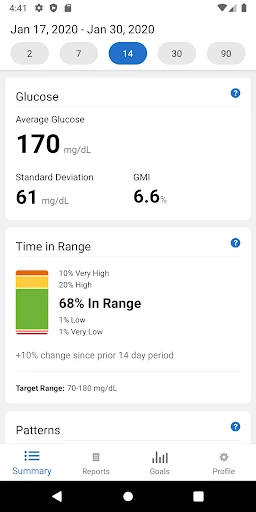
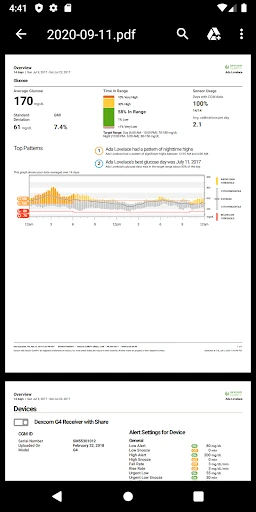
Picture checking in on glucose trends before a clinic appointment. Instead of relying on memory about how the last few weeks felt, a user can open Dexcom Clarity and review retrospective values, time in range, patterns, and other key metrics. The app is built around looking back over collected information, which can make it easier to notice recurring changes and bring specific questions to a healthcare professional.
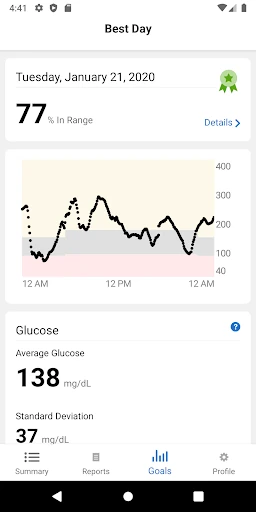
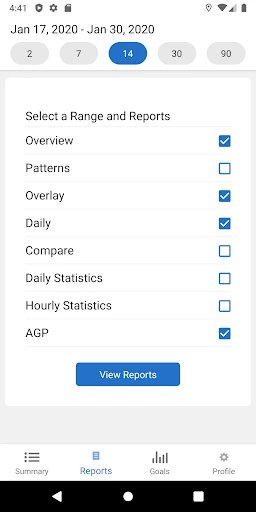
When I think about that routine, the useful part is not a single number in isolation but having a report to refer to during the conversation. Clarity lets users view, save, print, or email reports, and clinics can be given access to data. That can help make an appointment more focused, although the app presents information for review rather than explaining every possible cause or deciding what someone should do.
A Companion, Not a Replacement
Dexcom Clarity makes the most sense alongside a Dexcom CGM system. Its job is to help users examine retrospective glucose information and share reports, so it sits closer to a review and reporting tool than a broad wellness dashboard. The emphasis is on patterns over time, not on replacing the CGM itself or turning the phone into a general-purpose diabetes management service.
That distinction matters when comparing it with alternatives. Someone looking for a broad food, exercise, or medication journal may find Clarity too specialized, because the described focus is CGM data, trends, and reports. It also is not meant to replace a conversation with a healthcare professional. The app can help prepare for that conversation, but interpretation and care decisions belong in the appropriate clinical context.
Make Review a Habit
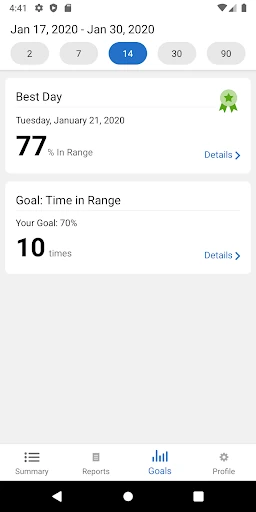
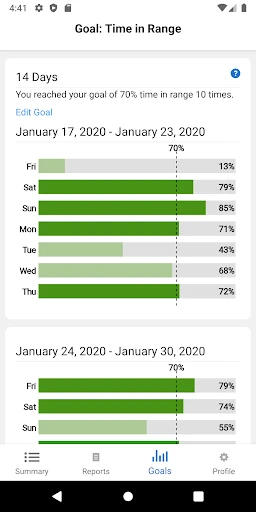
A practical way to get value from Clarity is to choose a regular moment to review the information, such as before an appointment or during a weekly check-in. The app offers daily or weekly notifications and emails, along with the option to set Time in Range goals. Those settings can serve as reminders to look back, rather than leaving reports untouched until a clinic visit is suddenly around the corner.
I would keep the workflow simple: open the app, check the key metrics and patterns, then save or share a report if it will help with a discussion. Allowing a clinic to access data can make that exchange more convenient. The point is not to turn every fluctuation into a project; it is to make relevant history easier to revisit and talk through when it is useful.
More From Our News Desk

Zoom Meetings, Google Meet, or Teams: Which Is Easiest to Join?

How I Build a Free Streaming Lineup With Tubi

Why Crunchyroll Is the Default Anime App for So Many Fans

YouTube TV: A Practical Guide to Cutting Cable

Rummikub and the Small Comfort of Phone Games

TeamViewer Remote Control or AnyDesk for Helping Family?
Who may find it useful
I would recommend Dexcom Clarity to people already using a Dexcom CGM who want a structured way to look back at glucose values and trends. It may also suit users who like bringing reports to appointments or sharing data with their clinic, rather than trying to recall patterns from memory. The tools for setting Time in Range goals and receiving reminders can support a consistent review routine.
It may be a poor fit for someone who does not use a Dexcom CGM or expects a comprehensive all-in-one health app. Its stated purpose is narrow and retrospective, and that focus is useful only when it matches the user's system and needs. Anyone seeking immediate clinical guidance should not treat report review as a replacement for professional care or for other parts of their diabetes management.
Dexcom Clarity is developed by Dexcom and is listed in the Health & Fitness category on Google Play. It is free to download, has no in-app purchases, and contains no ads. The app has an Everyone content rating. Google Play shows over one million installs and a 3.9-star rating from around 8,500 ratings.
The current version shown is 2.27.0.524. Dexcom Clarity was released on August 5, 2017, and its most recent update was December 16, 2025. An Android minimum version is not included in the available app details, so users should check Google Play for device compatibility before installing.
Making Glucose History Easier to Review
A Focused First Impression
When I first opened the idea of Dexcom Clarity, what stood out was how specific its purpose is: retrospective glucose review for Dexcom CGM users. It is not trying to be a catch-all health hub. That focus gives the app a clear reason to exist, especially for someone who wants to take a longer view of readings instead of checking only what is happening at one moment.
Getting started centers on logging in with a Dexcom account. From there, the app is intended to show relevant insights drawn from glucose values over time. I appreciate that the basic premise is easy to explain: review patterns, keep tabs on key metrics, and make reports available for discussion. The account requirement also makes clear that this is a companion to an existing Dexcom setup.
The Everyday Review
In everyday use, Clarity is about stepping back from individual readings and looking for patterns across time. The app highlights time in range and other key metrics, with retrospective values presented as information users can revisit. That makes it more suited to a planned check-in than to constant browsing. A person might open it when preparing for an appointment or when a reminder prompts a regular review.
What I like about that rhythm is that it gives the data a practical destination. A user can look over patterns and decide what would be useful to raise with a healthcare professional. The app does not make every detail self-explanatory, and that is worth keeping in mind. Its role is to make a history easier to inspect, not to supply a complete interpretation of it.
Reports and Goals
The most useful features are the ones that connect review to follow-up. Users can set Time in Range goals, turn on daily or weekly notifications and emails, and view, save, print, or email reports. Those options cover several ordinary needs: remembering to check in, keeping a copy, or having information ready to share. They make Clarity more than a passive place to glance at past values.
The option to allow a clinic access to data is another practical part of the design. Dexcom describes this as a way to help make appointments more efficient, while reports can give users something concrete to review together. Clarity also supports connections to partner apps for additional features and benefits. The central experience remains report-focused, but these sharing and connection options help it fit into a wider routine.
Before an Appointment
A routine I can imagine working well is checking Clarity a few days before an appointment. I would review the time-in-range information and patterns, then save or email a report if it would be useful to have on hand. If the clinic has access to the data, that may reduce the amount of time spent collecting information during the visit and leave more room for discussing questions.
The key is to use the report as preparation, not as a verdict. A trend may be worth bringing up, but the app itself does not establish why it happened. Keeping that distinction clear makes the tool more useful and less likely to turn routine review into guesswork. Clarity supports a conversation with a healthcare professional; it does not replace one.
Limits to Keep in Mind
The biggest limitation is also part of the app's identity: Dexcom Clarity is for Dexcom CGM users and focuses on retrospective glucose information. People looking for a general wellness tracker or a standalone solution outside that system should look elsewhere. Even for its intended audience, the app is mainly useful when someone is willing to make time to review reports and trends.
Another important boundary is that patterns can call for context. Clarity can help users and healthcare professionals identify possible causes of patterns, but a report is not the same thing as individualized guidance. The app's value depends on using its information thoughtfully and discussing it in the right setting. That careful role is sensible, though users seeking immediate answers may find a report-centered experience limited.
Dexcom Clarity has a straightforward purpose and mostly sticks to it: help Dexcom CGM users look back at glucose trends, set review goals, and share reports. I like the emphasis on making history usable in conversations with a clinic. Its value is less about novelty and more about having organized information ready when a regular review or appointment comes around.
I recommend it to Dexcom CGM users who want a dedicated place to revisit patterns and prepare reports. It is less suitable for people seeking a general health app or a replacement for professional care. If retrospective review fits your routine, Clarity offers a practical companion; just keep its focused role in mind.
Dexcom Clarity Frequently Asked Questions
What is Dexcom Clarity used for?
Dexcom Clarity is a diabetes management app for Dexcom CGM users. It helps users review retrospective glucose values, patterns, time in range, and other key metrics. Users can set Time in Range goals and view, save, print, or email reports. It can also support sharing data with a clinic so the information is available for discussion around appointments.
Which phones and platforms support Dexcom Clarity?
Dexcom Clarity is available on Android through Google Play. The information provided does not specify a minimum Android version, so compatibility can vary by device and software. Check the Google Play page for current requirements before installing. The app is described as a companion for Dexcom CGM users, so its usefulness depends on having that system.
Does Dexcom Clarity cost money?
Dexcom Clarity is free to download on Google Play, and the available app details show no in-app purchases or ads. Store details can change, so it is worth checking Google Play for the latest information before installing. The app requires a Dexcom account for login, as described in its feature information.
What Android version does Dexcom Clarity need?
A minimum Android version is not provided in the app details available here. Requirements can vary as the app and device software change, so check the Dexcom Clarity page on Google Play to see whether your phone is compatible. The app is intended for Android users who use a Dexcom CGM system.
Who is Dexcom Clarity best suited for?
Dexcom Clarity is best suited to Dexcom CGM users who want to review glucose patterns over time, prepare reports, or share information with a clinic. It may not suit someone seeking a general health tracker or a replacement for professional care. The app is focused on retrospective review, so its usefulness depends on whether that matches your needs.
Pros
- Makes retrospective glucose patterns and key metrics easier to review.
- Offers reports that users can save, print, email, or share.
- Includes Time in Range goals and daily or weekly reminders.
- Clinic data access can support more prepared appointment discussions.
Cons
- Its usefulness is focused on people who use a Dexcom CGM system.
- Reports support review but do not provide individualized clinical interpretation.
- A minimum Android requirement should be checked on Google Play.
- Category
- Health & Fitness
- Version
- 2.27.0.524