Curb - Request & Pay for Taxis
- 8.36K
- 3
- Installs
- 1.00M
- Price
- Free

Screenshots
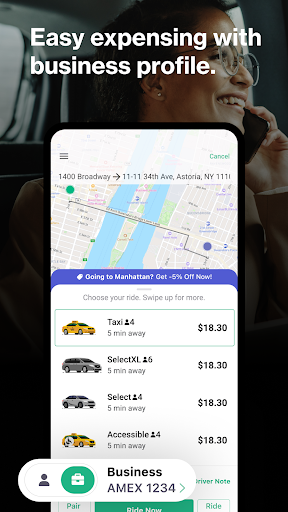
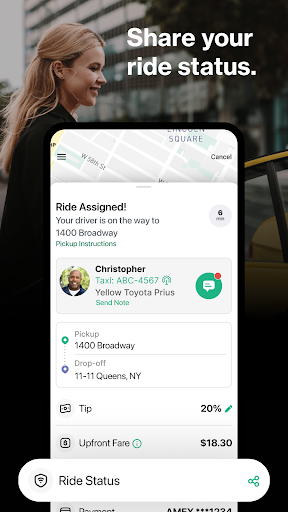
Analysis by Reviewed APKs
Curb - Request & Pay for Taxis is a taxi-booking and payment app for people who want to arrange a ride from their phone, either now or ahead of time. I like that it also supports paying for a cab hailed on the street or at an airport. It makes most sense for city travelers where Curb service is available, though local options can vary.
A Ride Before the Rush
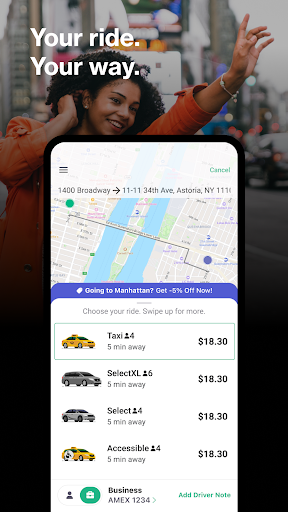
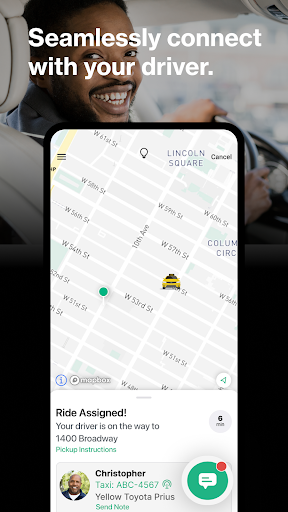
When I need to get across town for an appointment, I’d rather sort out the ride before I’m standing on a busy curb. Curb lets me enter a destination, review available vehicle options and request a taxi for pickup now. Ride details include the driver, estimated arrival time, pickup and drop-off points, and route, so I can check the plan while I’m getting ready.
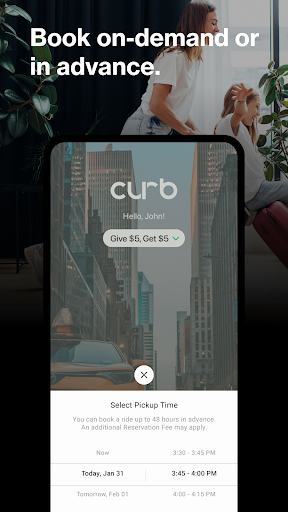
For a morning when timing matters, I can schedule a pickup up to 48 hours ahead instead of remembering to book at the last minute. Curb also provides live updates on a request’s status, which gives me a way to judge whether I should keep waiting or adjust my plans. It’s a straightforward taxi workflow: enter the trip, choose an option, then follow the ride details.
Taxi App, Not Every Ride
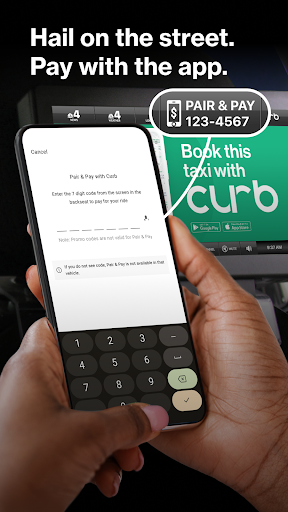
Curb is centered on taxis and professional drivers, rather than trying to cover every kind of transportation. Depending on the city, the app offers taxis, wheelchair-accessible vehicles, and a Select option. That focus suits someone who wants a taxi arranged through a phone, or who has already hailed one and wants to pay through the app with Pair & Pay.
It isn’t a universal ride option in every location, and the available services can vary by region. I’d check what Curb offers in my city before building a regular commute around it. The app is also not a general trip-planning tool: its job is to help arrange and pay for a taxi ride, not to replace every map, transit, or transport service I might use.
A Few Useful Habits
I’d start by checking pickup and drop-off details carefully before sending a request, especially when a venue has several entrances or a confusing curbside area. Once a ride is underway, the trip screen’s driver details, ETA, and route give me useful context without needing to piece together the plan from separate messages. A quick glance at those details can make the wait feel more organized.
For a trip I already know is coming, scheduling up to 48 hours ahead can take one small task off a crowded day. For an airport or street hail, Pair & Pay gives another route into the app: hail a taxi first, then use Curb to pay contactlessly. If upfront pricing is available in my city, I can review the estimate before choosing a vehicle.
More From Our News Desk

Zoom Meetings, Google Meet, or Teams: Which Is Easiest to Join?

How I Build a Free Streaming Lineup With Tubi

Why Crunchyroll Is the Default Anime App for So Many Fans

YouTube TV: A Practical Guide to Cutting Cable

Rummikub and the Small Comfort of Phone Games

TeamViewer Remote Control or AnyDesk for Helping Family?
Who Curb Suits Best
I’d recommend Curb to people in a city it serves who prefer taxis and want a phone-based way to request or pay for a ride. It has practical options for both immediate pickups and advance planning, plus wheelchair-accessible vehicles in places where that service is offered. Travelers who sometimes hail a cab directly may also appreciate being able to use Pair & Pay rather than treating every ride as an app dispatch.
It may be a poor fit if Curb’s services aren’t available where you live, or if you mainly want a broader mix of transportation choices. Availability and options differ by region, so the experience depends on the local network. I’d also compare the app’s available vehicle choices and fare details with my needs before relying on it for a trip with a tight schedule.
Curb - Request & Pay for Taxis is developed by Curb Mobility, LLC and falls under Maps & Navigation. It has over 1 million installs on Google Play and a 3.0-star rating from about 8,400 ratings. The app is free to download, and Google Play marks it as containing ads. Its content rating is Everyone.
The current version is 7.1.3. Curb’s release date is March 13, 2010, and its latest update was July 30, 2026. Google Play does not provide a minimum Android version in the supplied app details, so it’s sensible to check the store page for device compatibility before installing.
How Curb Works in Everyday Travel
A Clear First Look
When I first opened Curb, the main idea was easy to understand: use the app to arrange a taxi or handle payment for one I’ve already hailed. Its refreshed interface is intended to make navigation and access to ride details quicker. I appreciate that the trip information is treated as part of the core experience, rather than an afterthought once a request is underway.
Getting started with a ride is built around entering a destination and seeing the available vehicle options. In cities where upfront pricing is offered, Curb displays a fare estimate for those options before I choose. That estimate includes projected tolls and applicable taxes or surcharges, while tips and final adjustments can affect the amount after the trip.
The Ride, Step by Step
The everyday ride flow has three useful paths: request a taxi now, schedule a pickup for later, or use Pair & Pay after hailing a cab on the street or at an airport. That flexibility matters because not every ride starts with opening an app at home. I can use Curb as the booking tool for one trip and as a payment option for another.
After requesting a ride, live status updates help me follow what’s happening. The ride details include driver information, ETA, pickup and drop-off locations, and the full trip route. I’d use those details to confirm I’m waiting in the right place and to keep the destination in view, rather than relying on memory during a busy day.
Details That Stand Out
The clearest strength is how Curb combines several taxi situations in one app. Ride Now handles immediate pickup, Ride Later covers scheduled trips up to 48 hours ahead, and Pair & Pay is for a taxi I’ve hailed myself. Those options are more practical than a one-purpose booking button when my plans change or I’m already at a taxi stand.
Vehicle choice and trip information add useful context before and during the ride. Depending on the region, options can include taxis, wheelchair-accessible vehicles, and Select. Upfront pricing is available only in certain cities, and the estimate can be adjusted for actual tolls, taxes, surcharges, and tips. I’d treat it as a helpful preview, not as a final receipt.
A Routine That Helps
For a planned evening out, I’d enter the destination and check which vehicle options are available before choosing a ride. If the pickup time is known, I can schedule it in advance, up to 48 hours. On the day, I’d check the ride status and driver details while getting ready, then confirm the pickup and destination information once the trip appears.
For an airport run that starts with a street hail, I’d use Pair & Pay instead of assuming I have to request a car through the app. The app also describes referral codes that can give a friend $5 off a first Curb-booked trip, with a $5 reward for the person sharing the code after the friend books. I’d check the offer terms and local availability before counting on it.
Limits to Keep in Mind
Curb’s usefulness depends on local coverage. The app says its services and vehicle options may vary by region, and upfront pricing is limited to particular cities. That means I wouldn’t assume every feature shown in a general description will be available for my next trip. Checking the options in the app before depending on a particular vehicle or fare estimate is the sensible move.
Pricing also deserves a careful read. An upfront fare is an estimate based on time and distance, with estimated tolls and applicable taxes or surcharges. The final fare may change to reflect actual charges, and tips are added at the end rather than included in the estimate. For a ride where cost is a key concern, I’d review the details shown for that trip before confirming.
Curb is a focused taxi app with useful flexibility: request a ride now, book ahead, or pay for a cab hailed in person. Its driver and trip details make the ride easier to follow, while local availability and fare options remain important caveats.
I’d try Curb if I regularly use taxis in a city it serves, especially if scheduling or contactless payment would simplify my routine. If I need broader transport choices or dependable coverage everywhere, I’d keep other options available and check the local service first.
Curb Frequently Asked Questions
What is Curb - Request & Pay for Taxis used for?
Curb is for requesting taxi rides, scheduling pickups up to 48 hours ahead, and paying through the app for a taxi hailed on the street or at an airport. It also provides ride status and trip details. Vehicle options and services depend on the region, so check what is available for your location in the app.
What devices can I use Curb on?
Curb is available on Android through Google Play. The supplied app details do not specify a minimum Android version, and compatibility can vary by device, so check the Google Play store page for your phone before installing.
Does Curb cost anything to download or use?
Curb is free to download on Google Play, and the supplied facts show no in-app purchases. Taxi rides themselves are not described as free. The app contains ads, and available fare information or offers can vary, so review the details shown for your trip in the app.
Can I see the fare before booking with Curb?
Curb offers upfront pricing in certain cities, showing an estimate based on time and distance, including estimated tolls and applicable taxes or surcharges. The final amount can change based on actual charges, and tips are added at the end. Availability varies by city, so check the fare details displayed for your ride.
Who is Curb best suited for?
Curb is most useful for people who want to arrange or pay for taxi rides in a city where the service is available. Its immediate requests, advance bookings, and Pair & Pay option suit different taxi routines. It may not fit someone whose area has limited service or who needs transport choices beyond taxis.
Pros
- Supports immediate taxi requests, scheduled pickups, and payment for a cab hailed in person.
- Shows driver information, ETA, pickup and drop-off details, and the trip route.
- Offers wheelchair-accessible vehicles in areas where that option is available.
- Upfront fare estimates are available in select cities.
Cons
- Service and vehicle options vary by region, limiting consistency between cities.
- Upfront pricing is available only in certain locations, and final fares can change.
- Google Play marks the app as containing ads.
- Category
- Maps & Navigation
- Version
- 7.1.3











