Clip Studio Paint
- 34.95K
- 4.4
- Installs
- 10.00M
- Price
- Free

Screenshots
Analysis by Reviewed APKs
Clip Studio Paint is a drawing, painting, comics, and animation app for Android phones, tablets, and Chromebooks. It suits people who want more than a simple sketchpad, from curious beginners to artists building detailed projects. My overall take is that its tools offer impressive range, but the subscription rules matter: on tablets, saving or exporting requires a plan, so it is worth understanding the trial before settling in.
A sketch becomes a project
When I first opened Clip Studio Paint, I could imagine using it for the small creative gaps in an ordinary day: sketching a character on a phone during a commute, then refining the idea on a tablet later. The app is built for more than quick doodles. Layers, brushes, color tools, and reference features can take a loose sketch toward a finished illustration without changing apps.
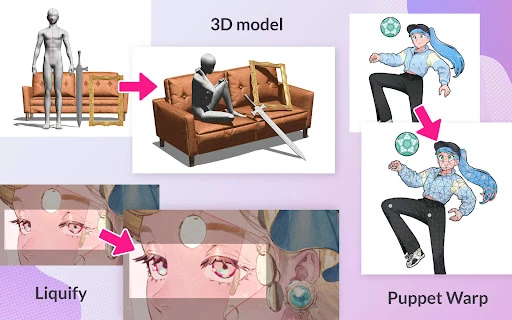
For a tricky pose, I would start with a rough gesture, then pose a 3D model as a visual guide rather than guessing at the angles. From there, I could ink on vector layers, adjust lines, and add color. The appeal is having options when a drawing gets complicated. The trade-off is that this depth can feel like a lot if all I want is a blank page and one pencil.
More studio than sketchpad
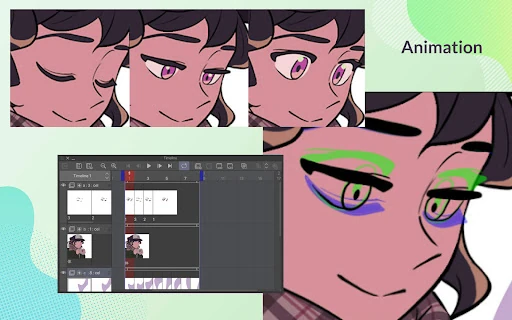
Compared with a basic phone drawing app, Clip Studio Paint is a fuller digital art workspace. It supports detailed layer-based painting, vector line work, perspective guides, comics and webtoons, and animation. That makes it a natural fit for someone who wants to develop an illustration or comic over time, rather than simply mark up a picture or make a quick note.
It is not just a casual doodle app, and its payment model makes that distinction practical as well as creative. On a tablet, a plan is required to save or export artwork. A smartphone gets a free 30-hour monthly allowance, but after that a plan is needed to save or export. If I only draw occasionally and want unrestricted free saving, I would compare those terms with simpler alternatives before committing.
Small habits, smoother work
A few habits can make a feature-rich art app feel less intimidating. I would begin in Simple Mode when I want to get a sketch down quickly, then switch to Studio Mode when I need the full set of tools. Keeping early ideas on separate layers also gives me room to test colors or line choices without disturbing the underlying drawing.
For work that involves reference, I would collect only the materials I need and use guides or 3D tools when a pose or perspective is giving me trouble. A timelapse can capture the progress of a piece for sharing, while the available tutorials and user tips offer ways to learn at my own pace. On a phone, I would also keep an eye on the monthly free-use allowance before starting a project I need to save.
More From Our News Desk

Zoom Meetings, Google Meet, or Teams: Which Is Easiest to Join?

How I Build a Free Streaming Lineup With Tubi

Why Crunchyroll Is the Default Anime App for So Many Fans

YouTube TV: A Practical Guide to Cutting Cable

Rummikub and the Small Comfort of Phone Games

TeamViewer Remote Control or AnyDesk for Helping Family?
Who will enjoy the studio
I would recommend Clip Studio Paint to illustrators, character artists, comic makers, and aspiring animators who want a broad toolkit on a mobile device. Beginners can start with Simple Mode and tutorials, while experienced artists may appreciate the custom brushes, vector tools, 3D references, and comic-focused features. The large library of creator materials also gives people room to explore different textures and approaches.
It may be a poor match for someone who wants a completely free, no-strings sketching app, particularly on a tablet where saving or exporting requires a plan. Phone users should consider whether the monthly free hours suit their routine. I would also think about device capability before relying on advanced 3D tools or large files, since the developer recommends checking supported-device specifications.
Clip Studio Paint is an Art & Design app developed by CELSYS,Inc. On Google Play, it has more than 10 million installs and a 4.4-star rating from about 35,000 ratings. It is free to install and contains no ads, with in-app purchases listed from $0.99 to $119.99 per item. The content rating is Everyone.
The current version is 4.2.7, and the listed release date is December 4, 2020, with the latest update dated January 31, 2026. Android requirements vary by device. The app description recommends checking supported-device specifications, especially for advanced features such as 3D tools and editing large files. Its phone and tablet plans also differ in how free use and saving work.
A deep toolkit with real trade-offs
A flexible first canvas
My first impression is of an app that tries to welcome newcomers without hiding its more serious tools. Simple Mode is there for getting started quickly, while Studio Mode opens access to the broader feature set. That choice helps the app serve different kinds of drawing sessions, though moving into a more involved project can still mean learning a more complex workspace.
The free trial gives a way to explore before choosing a plan, but the terms depend on the device. Smartphone users can use all features for up to 30 hours each month at no cost. On tablets, a plan is required to save or export artwork, and the description offers up to three months free with a first plan. I would check those details before starting work I need to keep.
Room for careful drawing
For everyday illustration, layers are central to the experience. The app supports up to 10,000 layers, which gives detailed projects plenty of room to separate elements. I can picture keeping a sketch, line art, flat colors, and finishing touches apart so that a change to one part does not force me to redo the rest.
Line stabilization and vector layers are useful when I want cleaner line art. Vector control points let me adjust lines after drawing them, and the smart fill tool can help lay down flat colors. These are the kinds of options that reward a little practice: they are not necessary for a quick doodle, but they can make a more deliberate illustration easier to refine.
Tools for tricky details
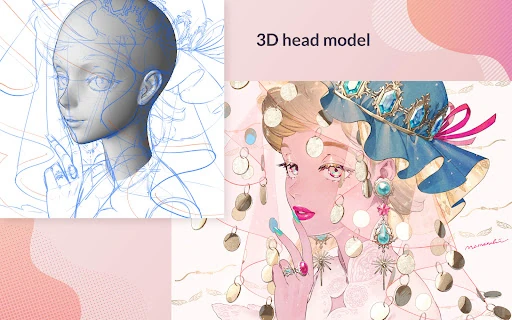
The 3D tools stand out as practical reference aids. I can pose 3D models to think through difficult angles, or use 3D primitives to sketch out a layout and perspective. There is also a feature for capturing hand poses with live video as drawing reference. These tools do not make artistic decisions for me; they give me something concrete to study when a form is hard to picture.
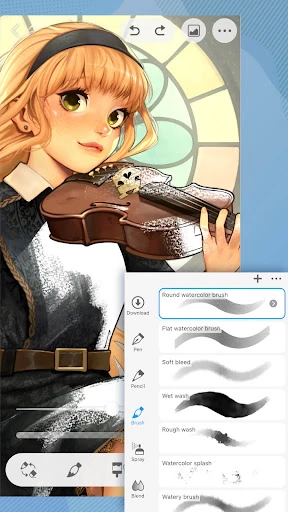
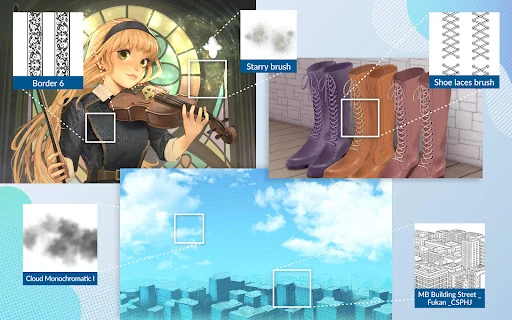
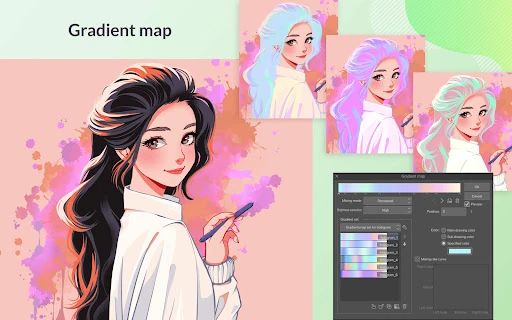
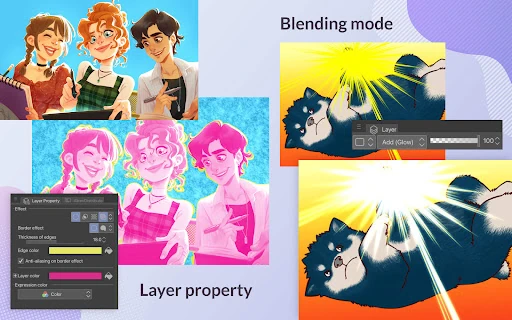
Color and brush controls offer another deep area to explore. The app includes gradient maps, perceptual color mixing, and 28 layer effects, along with options to customize brush texture, shape, mixing, and spray effects. Creator-made materials are available through the Assets store, including free and premium options. I would treat that library as a source of ideas, not a requirement for making good work.
For finishing or sharing a piece, Clip Studio Paint can record a timelapse, and it includes tools for adjusting drawings with liquify and puppet warp. Those features are most valuable when they fit a particular task. I would not add extra effects just because they are available; a clean sketch and a useful reference can matter more than a complicated workflow.
A comic-making routine
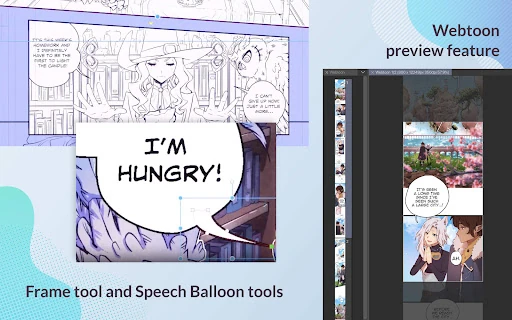
For a short comic, I would begin with rough character poses and a simple perspective layout, using a 3D reference only where an angle feels awkward. After settling the composition, I could use frames, speech bubbles, and action lines to build the page, then keep the line work and color on their own layers. That sequence makes the app's specialized tools feel connected to an actual creative goal.
The app also includes comic and webtoon features such as multi-page works in one file with EX, and a way to preview a webtoon on a smartphone. Shading Assist can add shadows, and character faces and body types can be customized and saved. I would use these selectively, especially when a project benefits from a consistent character or a quick page-layout check.
When the page is ready, a timelapse offers a way to share how the drawing developed. Tutorials and user tips can help fill in gaps as I learn unfamiliar tools. My practical rule would be to save or export a small test early, particularly on a tablet, so the plan requirement does not catch me by surprise after a long session.
Keep the limits in view
The subscription distinction is the biggest practical limitation. The smartphone plan provides up to 30 hours of free use each month, but saving or exporting requires a plan once that allowance ends. On tablets, a plan is needed to save or export artwork. That means the free trial is useful for exploring, but it is not the same as an unrestricted free drawing app.
There is also a learning curve. Simple Mode offers a gentler starting point, but the large collection of brushes, materials, layer effects, and specialist tools can take time to understand. I would avoid judging the app by how quickly I can master every feature. It makes more sense to learn the tools that solve a current drawing problem and leave the rest for later.
Finally, advanced features and large files depend on the device. The developer recommends checking specifications for supported Android devices and Chromebooks, particularly before relying on 3D tools. A phone is convenient for drawing on the go, but a tablet or Chromebook may better suit long, detailed sessions. I would match the device and plan to the kind of work I actually expect to do.
Clip Studio Paint brings serious illustration, comics, and animation tools to Android, with enough range to support both learning and ambitious projects. I especially like the mix of quick-start access and specialist features such as vector editing, 3D references, and comic tools. The main caveats are the learning curve and the device-specific rules around saving and exporting.
I would recommend it to artists who want a capable mobile studio and are comfortable exploring its tools and plan options. If I only wanted an occasional free sketchpad, I would look elsewhere. For comic makers and illustrators willing to build a workflow around it, Clip Studio Paint is a compelling choice—as long as I check the trial and saving terms first.
Clip Studio Paint Frequently Asked Questions
What is Clip Studio Paint used for?
Clip Studio Paint is used for digital drawing and painting, with tools for illustration, comics, webtoons, and animation. It includes features such as layers, customizable brushes, vector drawing, 3D references, and comic page tools. It can suit both beginners and more experienced artists, though the number of options may take time to learn.
Which devices can run Clip Studio Paint?
Clip Studio Paint is available for Android phones and tablets, and the description also covers Chromebooks. Supported device specifications can vary, especially for advanced tools such as 3D features and editing large files. I would check the Google Play store information and the developer's device guidance to see whether a particular device is supported.
What Android version does Clip Studio Paint require?
Android requirements vary by device, so I would check the Google Play store details for the phone or tablet I plan to use. The developer recommends checking supported-device specifications, particularly if I want to use advanced 3D tools or edit large files. Those tasks may make device capability more important than a quick sketch would.
Does Clip Studio Paint cost money?
The app is free to install and includes in-app purchases listed from $0.99 to $119.99 per item. Smartphone users can use all features for up to 30 hours each month for free; afterward, a plan is needed to save or export. Tablet users need a plan to save or export. Plan details may vary, so check Google Play.
Is Clip Studio Paint good for beginners?
It can work for beginners: Simple Mode is designed to help users start drawing quickly, and tutorials and user tips can support learning. At the same time, the app has many advanced tools and a subscription model that affects saving or exporting. I would recommend trying it first and checking the plan terms against the way you draw.
Pros
- Broad toolset for illustration, comics, webtoons, and animation.
- Simple Mode offers a quicker starting point for new users.
- Vector editing, 3D references, and customizable brushes support detailed work.
- No ads, with a monthly free-use allowance for smartphone users.
Cons
- Tablet users need a plan to save or export artwork.
- Smartphone users must manage a 30-hour monthly free-use allowance.
- The many tools may take time to learn and organize.
- Category
- Art & Design
- Version
- 4.2.7