AI Hairstyle Try On
Listed on Google Play as “AI Hair Styler & Hairstyles”
- 14.74K
- 4.3
- Installs
- 100.00K
- Price
- Free
Screenshots
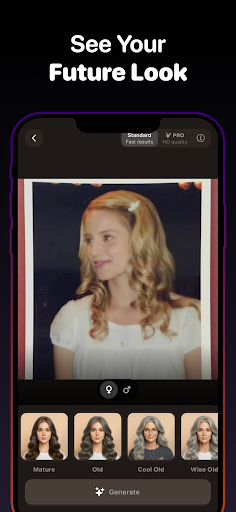
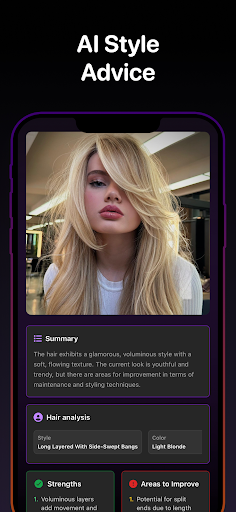
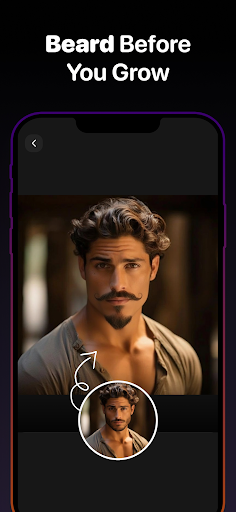
Analysis by Reviewed APKs
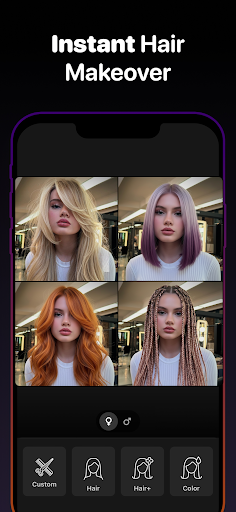
AI Hair Styler & Hairstyles is a virtual try-on app for people considering a haircut or color change. It lets you place different looks on a selfie, from bangs and bobs to fades and bright shades, before discussing an idea with a stylist or barber. I like the practical premise: it gives you a visual starting point, while leaving the real-world decision to you and your hair professional.
Picture a New Cut
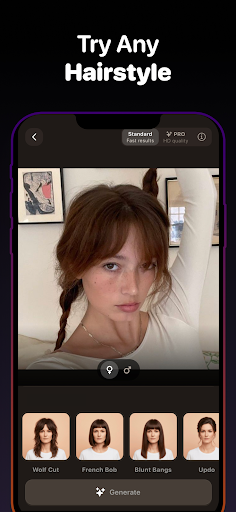
When I first opened the app, I imagined using it during the familiar pre-salon pause: I have a photo of a haircut saved, but I cannot tell whether the shape will work on me. Here, I can upload a selfie, browse styles, and preview a cut on my own face. Seeing bangs, a bob, or a shorter crop in context makes the conversation less abstract than pointing at a picture of someone else.
The appeal is not that a screen can predict exactly how a haircut will turn out. Hair texture, styling, and the cut itself matter in person. Instead, the preview helps me compare directions and notice what I am drawn to before an appointment. I can also explore color alongside the cut, which is useful when I am weighing a small change against a more dramatic switch.
A Preview, Not a Salon
Compared with scrolling through social photos or hairstyle galleries, the main difference is that the looks are placed on my selfie. That makes the app a more personal brainstorming tool than a general inspiration board. It covers ideas for men and women, including short and long cuts, bangs, layers, fades, facial hair, and color options, so it can help narrow a broad search into a few looks worth discussing.
It is not a replacement for a stylist or barber, and a digital preview is not a precise consultation about what a particular head of hair can do. I would not use it as the only basis for a major change. Its sweet spot is exploring possibilities and gathering reference images; the professional conversation still handles practical details such as maintenance and how a cut suits my hair.
Make Comparisons Useful
I get more from a try-on tool when I start with a clear, usable selfie and compare a small group of related looks. For example, I can look at a bob, a lob, and a longer layered style rather than bouncing between unrelated trends. That keeps the exercise focused on one decision, such as length or fringe, and makes it easier to remember which versions I actually liked.
It also helps to treat the app as preparation for a conversation. I can save or share a result and use it to explain the direction I have in mind, rather than expecting a stylist to reproduce a screen image exactly. If I am deciding between a cut and a new color, I can explore those separately first, then bring the strongest combinations to the appointment.
More From Our News Desk

Zoom Meetings, Google Meet, or Teams: Which Is Easiest to Join?

How I Build a Free Streaming Lineup With Tubi

Why Crunchyroll Is the Default Anime App for So Many Fans

YouTube TV: A Practical Guide to Cutting Cable

Rummikub and the Small Comfort of Phone Games

TeamViewer Remote Control or AnyDesk for Helping Family?
Who Might Find It Useful
I would recommend AI Hair Styler & Hairstyles to anyone who enjoys visualizing a change before booking a salon or barber visit. It is especially handy for people stuck between a few familiar options, or those curious about trying bangs, a shorter cut, a different shade, or facial hair. The range of styles for women and men gives it more flexibility than a tool devoted to one type of haircut.
It may be less satisfying for someone who expects a detailed haircut consultation or a perfect prediction of how a style will behave in real life. People who already know exactly what they want may have little reason to browse. I also would not judge a color or cut entirely from a preview; it is most useful as a low-pressure way to collect ideas and communicate preferences.
AI Hair Styler & Hairstyles is an Art & Design app from Nextdio. Google Play shows over 100,000 installs and a 4.3-star rating from about 14,700 ratings. The app is free to download, contains no ads, and offers in-app purchases. Its content rating is Everyone.
The current version varies with device. Google Play gives a release date of September 20, 2025. The minimum Android version and most recent update date are not included in the available app details, so check Google Play for current device compatibility and update information.
A Hands-On Look at Virtual Hair Try-On
Starting With a Selfie
The setup is easy to understand: take or upload a selfie, then browse hairstyles, colors, and other looks to see them on your face. I like that the basic idea is immediately clear. Rather than beginning with a long questionnaire, the app centers the experience on a photo, which suits a quick experiment when I have a few spare minutes.
The usefulness of a preview naturally depends on the photo I choose. A clear selfie gives me a more helpful basis for comparing looks than a picture where my hair or face is hard to see. I would pick an image that resembles how I normally wear my hair, especially if I am using the result to communicate an idea at an upcoming appointment.
Browsing the Options
Day to day, the app works best as a visual browsing space. I can move among hairstyles and see how different lengths or shapes look against my own face, then try colors without treating a real dye job as a casual experiment. That makes it easy to explore a few possibilities during a commute or while planning a salon visit, rather than waiting until I am already in the chair.
There is a broad mix of familiar cuts and trend-led ideas, including pixie and bob styles, layers, bangs, fades, and mullets. I appreciate having both classic and more adventurous directions to explore. The choices can also make browsing feel open-ended, so going in with a question—such as whether I prefer a fringe or a side without one—helps keep the session from becoming an endless scroll.
More Than Haircuts
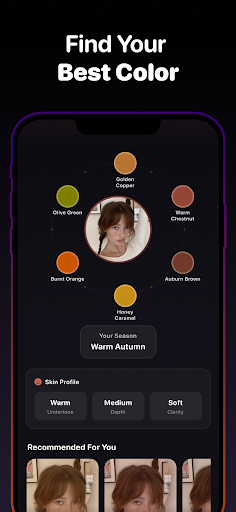
The color changer adds another useful dimension. I can consider shades such as blonde, brunette, and red, as well as options including balayage, ombre, and highlights. This is helpful when I am trying to describe a general color direction but do not yet have the vocabulary or confidence to make a firm decision. I can explore those possibilities without committing to a change in the real world.
The app also includes ways to explore face shape, beard and facial hair styles, wigs, and extensions. Those additions make it useful for more than choosing a haircut alone. I can think about a fuller look, compare facial hair with a cut, or preview an extension idea. The range gives different users more ways to experiment, even if a particular feature is not relevant to every visit.
A Pre-Appointment Routine
For a practical routine, I would start a few days before an appointment. I would choose a selfie, test a couple of related cuts, and note which length or fringe feels closest to what I want. Then I would try color options separately, rather than changing several things at once. This makes it easier to work out whether I am responding to the shape, the shade, or the full combination.
Once I have a short list, I can save or share a result with a stylist or barber, or show it in person. I would explain what I like about it—perhaps the length around the face or the overall silhouette—rather than asking for an exact copy. That turns the app into a useful conversation aid, while leaving room for a professional to adapt the idea.
Keep Expectations Grounded
A try-on preview is an illustration, not a promise of the result after a real cut or color. The description focuses on placing styles on a selfie, but it does not give me a way to judge how a particular look will behave with every hair type or styling routine. I would keep that distinction in mind, especially when considering a drastic change.
There is also a practical cost detail: hairstyle generation requires a subscription or credits, and in-app purchases are available. That means I would check the purchase terms before relying on repeated generation. The app is free to download, but that is not the same as every use being free. For a simple inspiration search, ordinary photos may be enough; the try-on feature matters most when seeing an idea on my own face helps.
AI Hair Styler & Hairstyles has a clear, useful role: it helps turn vague haircut and color ideas into visual references on a selfie. I like its mix of cuts, colors, facial hair, wigs, and extensions, along with the option to save or share results. Its strongest use is preparation, not deciding a real-world style without further discussion.
I would suggest trying it if you are curious about a change and want a more personal starting point than browsing photos. Go in with realistic expectations, compare a few options, and treat the result as a prompt for your stylist or barber. If you already know your preferred look, or want professional guidance inside the app, this may be less compelling.
AI Hairstyle Try On Frequently Asked Questions
What is AI Hair Styler & Hairstyles used for?
AI Hair Styler & Hairstyles lets you upload a selfie and preview haircuts, hairstyles, and colors on your face. It also offers ways to explore face shape, beard and facial hair styles, wigs, and extensions. People can use it to compare ideas before a salon or barber visit and save or share a result as a visual reference.
Which devices can run AI Hair Styler & Hairstyles?
The app is available on Android through Google Play. The Android version requirement is not provided in the available details, and the current version varies with device. Check the Google Play page on your device for compatibility information, since requirements can vary across devices and may change with app updates.
Does AI Hair Styler & Hairstyles cost money?
The app is free to download and has no ads, but it offers in-app purchases. Hair-style generation requires a subscription or credits, and Google Play lists in-app purchase prices from $0.99 to $49.99 per item. Check the store page for the current purchase options and terms before using paid features.
What Android version does AI Hair Styler & Hairstyles require?
The minimum Android version is not included in the available app details. Because compatibility can depend on the device and current app release, check AI Hair Styler & Hairstyles on Google Play from the Android device you plan to use. The app version itself varies with device.
Is AI Hair Styler & Hairstyles a good fit for me?
It may suit you if you want to compare haircut or color ideas on your own selfie before talking with a stylist or barber. The app includes looks for men and women, plus beard styles, wigs, and extensions. It may be less useful if you want professional advice or expect a preview to predict an exact real-life result.
Pros
- Previews hairstyles and colors on a selfie, making ideas easier to compare.
- Includes cuts and color options for men and women.
- Adds beard styles, face-shape exploration, wigs, and extensions.
- Saved or shared results can help communicate an idea to a stylist.
Cons
- A selfie preview cannot show exactly how a cut will behave in real life.
- Hair-style generation requires a subscription or credits.
- The minimum Android version is not provided in the available details.
- Category
- Art & Design











