Base44: Build with AI
- 80
- 3.1
- Installs
- —
- Price
- Free

Screenshots




Analysis by Reviewed APKs
Base44: Build with AI is a no-code app builder for turning a plain-language idea into software, with AI generating the interface, data models, backend, and logic. It suits people who want to shape a small product or internal tool without starting with code or infrastructure. I like the breadth of the promise: creation, customization, and publishing sit in one place, though the experience is more about building software than simply getting a finished app.
From Idea to Working App
Imagine I have a rough idea for a simple tool to organize a neighborhood event. Instead of opening a blank design canvas or writing code, I can describe what I want in everyday language and let Base44 generate a starting point. The app is designed to create an interface, data models, backend, and logic together, which makes that first leap from a thought to something usable its central appeal.
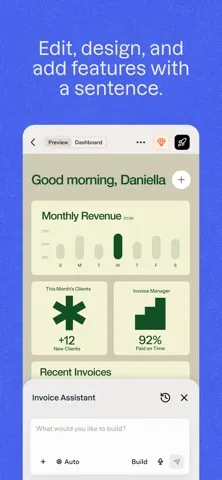
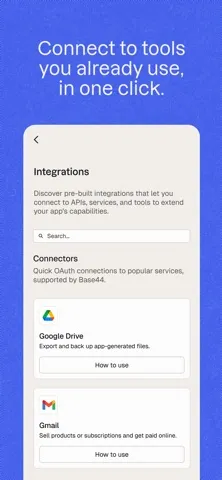
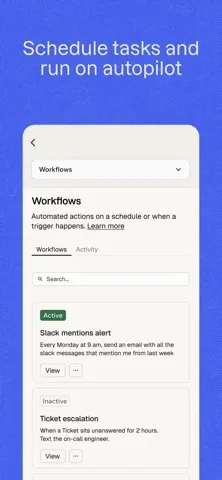
From there, I can refine the project through AI chat, adjusting its appearance with colors, fonts, layouts, and visuals. If the idea is close but not quite right, I can ask the assistant to expand it or suggest next steps, automations, and integrations. I appreciate that this is framed as an ongoing build rather than a one-shot prompt: the first draft is a starting place, not necessarily the finished product.
A Builder, Not a Shortcut
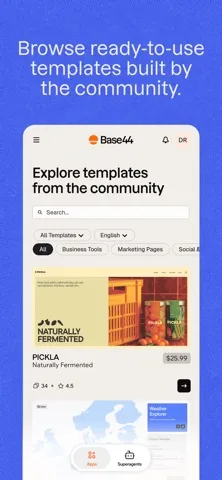
Base44 sits between a blank-page coding project and a ready-made template. It asks me to explain what I need, then uses AI to produce software components and lets me continue shaping the result. Community templates offer another entry point when starting from a description feels too open-ended. Compared with a conventional coding workflow, the emphasis is on describing and refining rather than configuring infrastructure by hand.
That focus also sets expectations. Base44 is not just a place to jot down an idea or manage a to-do list; its purpose is to help make software that can be published and shared. People who only need an off-the-shelf app may not want a builder at all, while developers who want precise control over every technical decision may prefer a more hands-on approach. The best fit is someone curious about making a product without coding.
Small Habits for Better Builds
I would start with one clear job for the app rather than asking for a sprawling all-in-one product. A plain-language description gives Base44 its direction, and a focused first version should be easier to review and refine. Once the initial software is generated, I can use AI chat to request changes or explore suggested next steps, keeping the work iterative instead of expecting one prompt to settle every detail.
Templates can help when I have a use case in mind but want a quicker starting point. I can customize the design to make the project feel more like my own, then use the available publishing and sharing tools when it is ready for others. For a team project, inviting teammates and keeping an eye on analytics and user activity are useful parts of the same workflow. The practical habit is to build, review, and adjust in manageable rounds.
More From Our News Desk

Zoom Meetings, Google Meet, or Teams: Which Is Easiest to Join?

How I Build a Free Streaming Lineup With Tubi

Why Crunchyroll Is the Default Anime App for So Many Fans

YouTube TV: A Practical Guide to Cutting Cable

Rummikub and the Small Comfort of Phone Games

TeamViewer Remote Control or AnyDesk for Helping Family?
Who May Enjoy Building
I would recommend Base44 to people with a software idea who do not want to begin by learning a programming language or arranging infrastructure. It may also suit small teams exploring a project together: the app supports inviting teammates, managing access, and tracking analytics and user activity. The combination of AI generation, chat-based refinement, templates, and publishing gives curious makers several ways to move from an initial concept toward a shareable result.
It may be less appealing if you simply want to download a finished tool and use it, since Base44 is a builder rather than the end product you are looking for. It is also worth considering whether an AI-led workflow matches how you prefer to work. People who want to make every technical choice themselves may find the plain-language approach too abstract, while someone with no concrete use case may have little reason to explore its creation tools.
Base44: Build with AI is a productivity app from BASE44 LTD for iPhone and other compatible Apple devices. The App Store lists version 3.7.0, a 17+ content rating, and a minimum requirement of iOS 16.4. The listed release date is April 10, 2026, and the most recent update date provided is November 3, 2026.
The app is free to download on the App Store. Its listed rating is 3.1 out of 5 from 80 ratings. The available details do not give an install count, so there is no install figure to add here. These store facts offer a basic snapshot, but the rating comes from a relatively small number of ratings and does not tell me whether a particular project will fit the builder.
How Base44 Turns Prompts Into Projects
A Different Kind of Start
When I first open the idea of Base44, what stands out is the change in starting point: I am meant to explain a product in words, not begin by assembling its technical pieces. The app describes generating the interface, backend, data models, and logic in real time. That makes the initial step feel approachable for a non-coder, while still making clear that the goal is software creation, not a casual chat.
I also like that there is more than one route into a project. I can begin with my own description, or browse community templates and customize one for my needs. Those options address two different moods: having a fairly clear concept already, or wanting a useful example before deciding how to shape it. The description promises no setup or infrastructure work, so the pitch is focused on spending attention on the idea itself.
The Day-to-Day Build
The core loop is describe, inspect, and refine. I give the AI a plain-language account of what I want, then continue the project through AI chat. The assistant can suggest next steps, automations, and integrations, giving me a way to develop the idea beyond its first generated version. That conversational approach is useful when I can explain the problem more easily than I can specify a technical implementation.
For everyday use, I would keep requests focused and check the direction of the project as it develops. The app promises to turn descriptions into working software, but a broad concept still needs decisions about what the experience should look like and how it should behave. Base44's design controls and chat-based refinement provide ways to make those decisions. The workflow is less about writing code and more about guiding the result.
Creation and Collaboration
One notable part of Base44 is how many stages of a product it aims to cover. Alongside generating software, it supports inviting teammates, tracking analytics and user activity, controlling access, and connecting a custom domain. Those capabilities make the app feel intended for projects that may move beyond a personal experiment, especially when other people need to review or manage the work.
Publishing is another meaningful part of the package. Base44 says a project can be published in one click and shared with a community or customers. That is a different promise from a design tool that leaves the handoff to another service: here, the builder aims to take a project toward being live. I would still treat publishing as a milestone to review carefully, rather than assuming a generated first version is ready for every audience.
A Practical Project Routine
For a realistic routine, I would use Base44 to explore one small software idea at a time. I would describe the main purpose, inspect the generated interface and functionality, then use AI chat to ask for specific refinements. If the blank start feels intimidating, a community template can provide a base to customize. Keeping that cycle narrow should make it easier to tell which changes improve the project and which add unnecessary complexity.
If the project is meant for a group, the collaboration tools can become part of the routine too. I can invite teammates, manage access, and track analytics and user activity from the same place. Design adjustments such as fonts, colors, layouts, and visuals can follow once the basic direction is in place. When the project is ready to share, publishing and a custom domain are available options in the product's described workflow.
Keep Expectations Grounded
The main limitation is built into the concept: an AI-generated starting point still depends on how clearly I can describe what I want and how carefully I review the result. Base44 offers tools to refine and expand a project, but that does not mean every idea will be straightforward to turn into software. Anyone choosing it should be prepared to make decisions and iterate, rather than expecting a single sentence to deliver a polished product.
It is also a specialized app. People looking for a ready-made consumer app, a simple note-taking space, or a conventional coding environment may not find this the right fit. Its strongest appeal is for someone who wants to create and publish software through a more accessible, AI-guided process. The App Store rating is 3.1 from 80 ratings, a modest snapshot that is useful context but not a substitute for deciding whether the workflow suits you.
Finally, the app is for compatible Apple devices running iOS 16.4 or later, so it is not a choice for someone who needs an Android version. The listed download price is free, but I would check the App Store for current details before committing to a project. A builder can be easy to try and still require time, clear goals, and thoughtful review to make that trial worthwhile.
Base44: Build with AI has a clear purpose: help people turn written ideas into software, then refine, customize, and share what they make. I find its combination of AI generation, templates, design controls, and publishing compelling for a focused project, especially when coding or infrastructure would otherwise be a barrier.
I would try it if I had a specific tool or product in mind and wanted an approachable way to explore it. I would skip it if I only needed an app to use, or if I wanted full hands-on technical control. It is a promising builder concept, best approached as an iterative workshop rather than an instant finish.
Base44 Frequently Asked Questions
What is Base44: Build with AI used for?
Base44 is used to create software from plain-language descriptions. It can generate an interface, backend, data models, and logic, then help refine a project through AI chat. The app also describes templates, design customization, teammate invitations, access controls, analytics, publishing, and custom-domain support as parts of its toolset.
Which devices can run Base44: Build with AI?
Base44: Build with AI is an iOS app available through the Apple App Store. It requires iOS 16.4 or later. The details provided do not describe a version for other platforms, so anyone who needs a particular device or operating system should check the App Store details for the current compatibility information.
What iOS version does Base44: Build with AI require?
The minimum listed requirement is iOS 16.4. The store information gives version 3.7.0 as the app version, with a release date of April 10, 2026, and a latest update date of November 3, 2026. Compatibility and version details can change, so check the App Store before downloading.
Does Base44: Build with AI cost anything?
Base44: Build with AI is listed as free to download on the App Store. The available details do not give in-app purchase information, so any current purchase options or related terms may vary. Check the App Store page for the latest pricing details before starting a project.
Who is Base44: Build with AI best suited for?
It may suit people who want to turn a software idea into a working project without starting with code, as well as teams that want to collaborate on a build. It is less suited to someone who simply wants a finished app to use, or who prefers direct technical control over an AI-guided creation process.
Pros
- Turns plain-language descriptions into software components without requiring a code-first start.
- Combines AI chat refinement with templates and visual customization.
- Includes collaboration, access controls, analytics, publishing, and custom-domain options.
Cons
- A useful result still depends on clear direction and ongoing review.
- The creation-focused workflow may not suit people who only want a ready-made app.
- The listed App Store rating is 3.1 from 80 ratings.
- Category
- Productivity
- Version
- 3.7.0











