Audio Converter: MP3, WAV, OGG
- 478
- 4.6
- Installs
- —
- Price
- Free
Screenshots
Analysis by Reviewed APKs
Audio Converter: MP3, WAV, OGG is an iOS app for changing audio files between formats and pulling audio out of video. It suits people who occasionally need a file in a more convenient format, including music listeners and podcasters working with audio for projects. My overall take is that it has a focused, useful job: it brings several common conversion needs into one place without trying to be a full audio editor.
A File That Will Not Cooperate
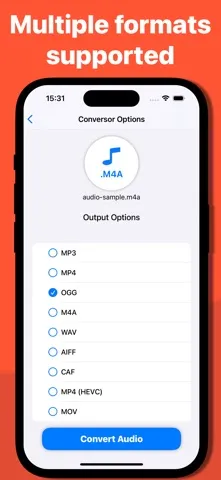
Imagine you have an audio file for a personal project, but the format does not suit the next step. Audio Converter gives you a straightforward option: choose a compatible file and convert it to a format such as MP3, WAV, OGG, AIFF, CAF, or MP4. I like the appeal of that simple handoff. Instead of abandoning the file or searching for a separate tool for each format, you can use one app for several conversion jobs.
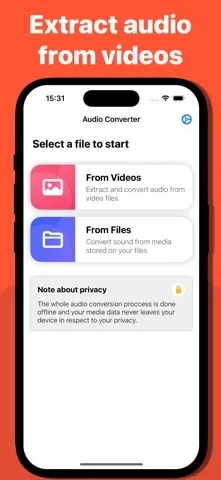
The video-audio option makes the app more useful when the source is not already an audio file. For example, a clip might contain a sound you want to use separately in a project. The app can extract audio from video and convert it, combining two steps that might otherwise require separate tools. That is a practical job, not a promise to edit or remix the result. The emphasis is on getting audio into a different form.
A Converter, Not an Editor
Audio Converter sits in a different lane from a music player or a full recording and editing suite. Its purpose is to change formats and extract sound from video, rather than organize a listening library, record a podcast, or shape tracks with editing tools. I would reach for it when a file needs conversion, then use another tool if the next task involves recording, arranging, or making detailed changes to the audio.
That narrow focus can be an advantage if you only need an occasional format change. The app supports several popular formats, so there is less reason to look for a different converter for every file type. Still, it is not a general solution for every audio project. People who want a complete production workflow should treat it as one useful utility, not as a replacement for dedicated audio software.
Make Conversions Deliberate
A useful habit is to decide what the converted file needs to do before choosing a format. If a project asks for MP3 or WAV, having those formats among the supported options gives you a direct route to a compatible file. The same thinking applies when you are extracting audio from video: start with the source and the format you need, rather than converting repeatedly and making the process harder to track.
I would also treat conversion as a small, focused task in a larger workflow. Use the app when you have a specific file to adapt, then move on to the project or listening context that needs it. The description highlights fast conversion and quality preservation, but it does not spell out detailed controls or a batch workflow. Keeping expectations centered on straightforward conversion makes the app easier to assess.
More From Our News Desk

Zoom Meetings, Google Meet, or Teams: Which Is Easiest to Join?

How I Build a Free Streaming Lineup With Tubi

Why Crunchyroll Is the Default Anime App for So Many Fans

YouTube TV: A Practical Guide to Cutting Cable

Rummikub and the Small Comfort of Phone Games

TeamViewer Remote Control or AnyDesk for Helping Family?
Who Might Find It Useful
I would recommend Audio Converter to iPhone and iPad users who sometimes run into incompatible audio formats or need to extract sound from a video file. Music enthusiasts and podcasters may find it handy for occasional project tasks, especially when they need a supported format such as MP3, OGG, WAV, AIFF, CAF, or MP4. Its appeal is practical rather than elaborate: it tackles common file-conversion needs in a dedicated app.
It may not suit someone looking for a complete recording, editing, or music-library experience. The described job is conversion, not production or playback management, so expectations matter. If you rarely handle audio files, you may not need a dedicated converter at all. And if you depend on a particular format or a specialized workflow, check the App Store details to make sure the app fits that need before relying on it.
Audio Converter: MP3, WAV, OGG is developed by Arthur Eduardo Skaetta Alvarez Desenvolvimento de Software LTDA. It is an iOS app in the Productivity category and requires iOS 15.6 or later. The current version is 1.0.165. It was released on October 27, 2023, and its most recent update was October 12, 2026.
On the App Store, Audio Converter: MP3, WAV, OGG has a 4.6 out of 5 rating from 478 ratings and a 4+ age rating. It is free to download. The available facts do not specify install counts, in-app purchases, or advertising, so check the App Store page for current details that may apply to your device or region.
A Closer Look at Audio Conversion
A Focused First Impression
The first thing I take from Audio Converter is its clear scope. It is meant to convert audio files and extract audio from video, rather than serve as an all-purpose media workspace. That clarity is welcome when you open a utility for one concrete task. The supported formats include familiar options such as MP3 and WAV, alongside OGG, AIFF, CAF, and MP4, giving users several common destinations to consider.
Setup is a practical matter of having an iOS device that meets the stated iOS 15.6 minimum and bringing a file you want to process. The app description calls the interface intuitive, though it does not detail specific screens or setup steps. I would approach it expecting a file-conversion tool, not a complicated audio workstation. That makes the basic proposition easy to understand before you begin.
The Day-to-Day Job
In ordinary use, the central task is simple to explain: take an audio file in one format and convert it to another supported format. That can help when you need to adapt a file for a project or simply want a different file type. The description also presents conversion as fast and says it is designed to avoid compromising quality. Those are useful goals for a converter, even though the exact experience can depend on the file.
Video extraction adds another everyday use. Rather than starting with an audio file, you can extract sound from a video and convert it. That is relevant when a clip contains audio you need separately for a project. I would keep the job modest in my mind: the app handles extraction and conversion, while any further editing or production belongs elsewhere. Its value is in making that format change available on iOS.
Formats and Video Extraction
The range of formats is the most notable feature. Audio Converter supports conversion between popular types including MP3, MP4, OGG, WAV, AIFF, and CAF, with the description also referring to additional formats. That breadth should help with routine compatibility problems, where the main question is whether a file can be turned into something a project accepts. It is more flexible than a tool built around only one named output format.
The other standout is audio extraction from video with conversion as part of the process. I can see the convenience of having those functions together when a video is simply the source for a sound file. The app is also described as aiming for quick conversions while preserving quality, and as having an approachable interface for beginners. Those claims speak to ease and efficiency, not to advanced editing controls.
A Simple Project Routine
A sensible routine is to identify the file you need, check what format the project calls for, and use Audio Converter for the conversion or video extraction. If you are starting from a video, decide that you need its audio separately; if you already have an audio file, choose the required format from the supported options. Thinking through the destination first can help avoid unnecessary conversions and keep the task focused.
After conversion, the next step is to use the resulting file in the context that required it, whether that is a personal audio project or another workflow. The app is positioned as a converter, so I would not assume it also manages the rest of that project. This division of labor is easy to understand: use the app to adapt the file, then continue with whichever tool handles the next part.
Keep the Scope in Mind
The main limitation is also the app's clear focus. The described features cover format conversion and extracting audio from video; they do not describe recording, detailed editing, or music-library organization. If those are the tasks you have in mind, a converter alone may leave you needing another app. It is worth matching the tool to the particular file problem rather than expecting one utility to handle every stage of audio work.
The description does not provide a detailed account of format-specific controls or how much influence users have over conversion settings. That makes it sensible to check the App Store information if your workflow depends on a particular requirement. For common conversion and extraction needs, the format range is promising. For specialized demands, I would confirm the fit before building a routine around it.
Audio Converter: MP3, WAV, OGG makes sense as a focused iOS utility for format changes and extracting audio from video. Its range of supported formats is the strongest reason to consider it, while its defined scope helps set realistic expectations. It is not presented as a full audio editor or production suite.
I would recommend giving it a look if you regularly handle audio files and want a dedicated way to convert them on an iOS device. Casual users who rarely encounter format issues may have little reason to keep a converter close at hand. Before depending on it for a specialized workflow, check that its supported formats match your needs.
Audio Converter Frequently Asked Questions
What is Audio Converter: MP3, WAV, OGG used for?
Audio Converter: MP3, WAV, OGG converts audio files between supported formats, including MP3, MP4, OGG, WAV, AIFF, and CAF. It can also extract audio from video and convert it. It is intended for file-format tasks rather than described as a recording or full editing app.
Which devices can run Audio Converter: MP3, WAV, OGG?
Audio Converter: MP3, WAV, OGG is an iOS app, available through the App Store. It requires iOS 15.6 or later. Check the App Store page for current compatibility details for your particular device and region.
What iOS version does Audio Converter: MP3, WAV, OGG require?
The stated minimum requirement for Audio Converter: MP3, WAV, OGG is iOS 15.6. If you are unsure whether your device or installed system version is compatible, check the app's current App Store page before downloading.
Does Audio Converter: MP3, WAV, OGG cost money?
Audio Converter: MP3, WAV, OGG is listed as free to download on the App Store. Details about in-app purchases or advertising are not included in the available app facts, so check the store page for current pricing details.
Who should use Audio Converter: MP3, WAV, OGG?
It may suit iOS users who need to convert audio files or extract audio from video for a project. Its supported formats include several common options. People seeking recording, detailed editing, or a complete music-management experience may need a different kind of app; this one is focused on conversion.
Pros
- Converts between several popular formats, including MP3, WAV, OGG, AIFF, CAF, and MP4.
- Can extract audio from video and convert it as part of the same task.
- A focused option for iOS users who need occasional audio-format changes.
Cons
- Its described focus is conversion, not recording or detailed audio editing.
- Specialized format requirements are worth checking against the current App Store details.
- Category
- Productivity
- Version
- 1.0.165











