Chat AI: Ask Agent Anything
- 1.49M
- 4.6
- Installs
- 10.00M
- Price
- Free

Screenshots




Analysis by Reviewed APKs
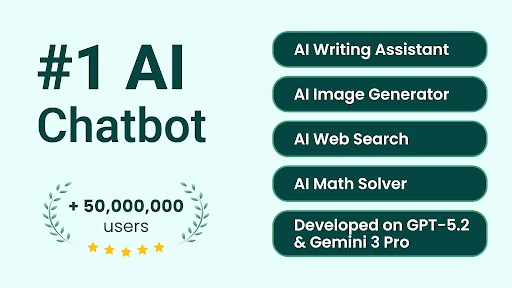
Chat AI: Ask Agent Anything is a mobile productivity app for chatting with AI, getting help with writing and study tasks, exploring images, and asking questions about documents or links. It suits curious people who want several kinds of assistance in one place rather than a single-purpose tool. I like the range of things it can help with, though it is best treated as a flexible helper, not an authority on every subject.
A Helper for the In-Between
When I first think of using Chat AI, it is during one of those small gaps in the day: I have a half-formed idea for a message, a question about something I have seen, or a document I would rather understand quickly. The app is built for that mix. I can ask a general question, turn to a writing assistant, or upload a document and ask about its contents.
That flexibility makes it easy to picture using it at a kitchen table, on a commute, or between other tasks. Say I am planning a short blog post and also want a quick explanation of an unfamiliar topic. Chat AI can support both kinds of requests, and it can also help generate images or interpret a photo. The useful part is having these different jobs gathered in one app.
One App, Not One Answer
Compared with a dedicated writing tool, language-learning app, or image generator, Chat AI takes a broader approach. Its assistants cover areas such as creative writing, business planning, logo design, and fitness coaching, while the general chat can handle questions and recommendations. That breadth is appealing when I am still figuring out what kind of help I need, or when my tasks change from one day to the next.
The trade-off is that a broad assistant is not the same thing as a specialist product or a verified reference source. I would use it to brainstorm, get an explanation, or explore an idea, rather than assume every response is definitive. It is also not simply a conventional search engine: it offers AI chat and a simple web search feature, but its main appeal is interactive assistance.
Small Ways to Make It Useful
I get more from an AI assistant when I give it a clear, practical prompt. Instead of asking for help with writing in general, I would explain whether I need an outline, a short email, or ideas for a story. Chat AI’s writing help is intended for those varied tasks, from composing posts and emails to developing longer passages, so naming the format gives the request a useful direction.
For research or reading, a handy habit is to bring the material into the conversation: the app supports uploading a document or pasting a link to an article or video, then asking questions or requesting a summary. I would also separate a big request into smaller questions. That makes it easier to use the app as a thinking partner instead of expecting one prompt to do every step.
More From Our News Desk

Zoom Meetings, Google Meet, or Teams: Which Is Easiest to Join?

How I Build a Free Streaming Lineup With Tubi

Why Crunchyroll Is the Default Anime App for So Many Fans

YouTube TV: A Practical Guide to Cutting Cable

Rummikub and the Small Comfort of Phone Games

TeamViewer Remote Control or AnyDesk for Helping Family?
Who May Get the Most From It
I would recommend Chat AI to people who regularly switch between quick questions, writing, creative prompts, and learning. Students may find the homework support and explanations useful as a starting point; writers can use idea generation and outlines; and curious users can try image creation, photo questions, or conversational language practice. Its variety is the main reason to consider it, especially if you want more than a basic chat window.
It may be less appealing if you want a narrowly focused tool with a single, predictable workflow, or if you need every answer to be independently verified. The app can support learning and planning, but I would still check important information rather than rely on a chatbot alone. People who only want an image editor or a structured language course may also prefer an app built specifically around that one activity.
Chat AI: Ask Agent Anything is a free Android productivity app from Codeway Technologies. Google Play shows over 10 million installs and a 4.6-star rating from around 1.5 million ratings. The app is rated Everyone. Its listed version is 3.7.2, with a release date of March 3, 2023, and a last update dated October 31, 2026.
There are no ads, but the app offers in-app purchases. Listed in-app items range from $1.49 to $149.99 each, so the free download does not mean every possible purchase has the same cost. Android version requirements can vary by device or app release, so it is worth checking the Google Play page for compatibility with a particular phone.
A Closer Look at Everyday AI Help
An Open-Ended First Impression
Chat AI’s premise is immediately understandable: ask a question or choose an AI assistant suited to a task. The description presents it as a chat-based tool that can adapt to different requests, from recommendations to learning something new. That makes for an approachable starting point, particularly if you do not want to learn a complicated specialist workflow before trying a simple prompt.
The variety also shapes what I would expect from a first session. I might arrive with a question, then notice that the app can help with writing, image generation, or document summaries. Rather than treating it as a single-purpose product, I would approach it as a collection of AI-assisted activities. That broad framing is useful, although it means the best experience depends on choosing a clear task.
Chat Across Daily Tasks
The core experience is conversation: I can ask for information, recommendations, inspiration, or help with a particular task. The app describes conversations with historical figures and business gurus as one way to explore ideas, alongside assistants focused on different fields. Those options make the chat feel less limited to factual questions and give it room for creative or practical requests.
For writing, the assistant can help with ideas, outlines, and longer passages. That could be useful when I know what I want to say but need a first draft or a structure to work from. I would still review and revise the result to fit my voice and the situation. The app is most compelling as a way to get unstuck, rather than as a reason to skip that final human edit.
Images, Links, and Summaries
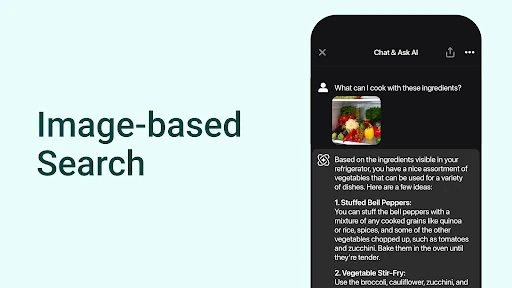
Image tools give Chat AI another use beyond text. The app can generate pictures from a description, with examples such as book covers, social posts, and postcards. It also supports image input: I can take a photo of something like a building, artwork, or landscape and ask for information about it. That pairing makes the image feature useful both for making something and for asking about the world around me.
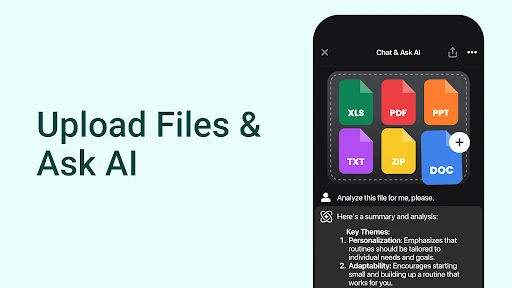
The summary assistant is another practical addition. Users can upload a document or paste a link to an article or video, then ask questions about the material or seek a summary. I like that the app’s description connects summarizing with follow-up questions, since a short overview is often only the first thing I need. It gives reading and viewing tasks a more conversational shape.
A Useful Daily Routine
A straightforward routine would be to use Chat AI when a task is too small to justify opening several separate apps. I could ask for a quick explanation, request an outline for a piece of writing, or paste an article link and ask for its main points. For a creative break, I could describe a scene for image generation. Each use starts with a concrete need, which helps keep the app from becoming an endless prompt playground.
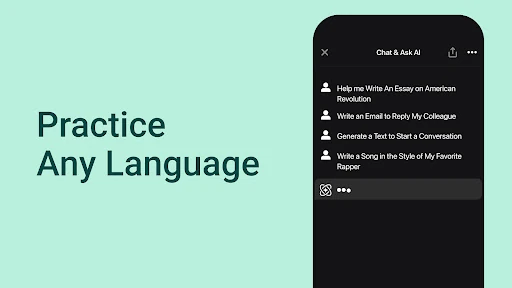
For language practice, the app describes interactive scenarios such as learning Japanese through a samurai adventure or practicing Spanish in a virtual restaurant. I would treat that as a playful way to practice, rather than a complete course. Homework support can fit a similar pattern: ask for guidance on a problem, then use the response to work through the assignment. Keeping the goal specific makes both activities more purposeful.
Keep Expectations Grounded
The biggest limitation to keep in view is the nature of AI assistance. A fluent response can still need checking, especially when the question matters or depends on current information. The app includes a simple web search feature for asking about current topics, but I would not treat a generated answer as proof by itself. For schoolwork, writing, and research, it works better as support than as a substitute for understanding or review.
Its wide range of assistants is appealing, but it can also make the experience feel less focused than a dedicated tool. Someone who wants a structured language curriculum, a specialized image-editing workflow, or a single-purpose writing environment may not find that broad approach ideal. There are also paid in-app purchases despite the free download, so it is sensible to check the available purchase details before deciding whether the app’s extra offerings are worth it.
Chat AI: Ask Agent Anything makes a persuasive case for an all-purpose AI helper. Its combination of chat, writing support, image tools, photo questions, language practice, homework help, and summaries covers plenty of everyday curiosities. I especially like the ways it can help turn a vague question or unfinished idea into a more manageable next step.
I would try it if I wanted one app for varied, lightweight AI assistance and was comfortable checking important answers. I would look elsewhere for a highly structured specialist tool or treat the app as a complete replacement for research and study. The free download makes it accessible to explore, while its in-app purchases are worth reviewing before spending.
Chat AI Frequently Asked Questions
What is Chat AI: Ask Agent Anything used for?
Chat AI: Ask Agent Anything is a productivity app for chatting with AI and getting help with a variety of tasks. It offers writing assistance, specialized AI assistants, image generation, questions about photos, language practice, homework support, simple web search, and summaries or questions about documents and linked articles or videos.
Which phones and platforms support Chat AI: Ask Agent Anything?
Chat AI: Ask Agent Anything is an Android app available through Google Play. The Android version requirement can depend on the device and the app’s current release, so check the Google Play page to see whether it supports your particular phone. The app’s described features include chat, image tools, and document or link questions.
Does Chat AI: Ask Agent Anything cost money?
The app is free to download and does not contain ads, but it offers in-app purchases. Google Play lists in-app items in a range from $1.49 to $149.99 each. The available items and their prices may vary, so check the current store page for the purchase details that apply to you.
Can Chat AI: Ask Agent Anything summarize documents or videos?
Yes. Chat AI: Ask Agent Anything describes a summary assistant that can work with uploaded documents and links to articles or videos. You can ask questions about the material as well as request key points. The app also supports image input, so users can ask about photos of subjects such as buildings, artwork, or landscapes.
Who should use Chat AI: Ask Agent Anything?
It may suit people who want one app for brainstorming, writing help, casual learning, homework guidance, image generation, and questions about linked material. It may be less suitable if you need a dedicated specialist workflow or want to accept every AI response without review. Its answers are best treated as assistance, with important information checked independently.
Pros
- Combines conversational help, writing support, image generation, and summaries in one app.
- Supports questions about uploaded documents, article links, video links, and photos.
- Offers assistants for creative, business, learning, and other everyday tasks.
- Free to download and has no ads.
Cons
- In-app purchases range widely, so check costs before buying.
- Broad AI assistance may feel less focused than a dedicated specialist app.
- Important answers still need review rather than automatic trust.
- Category
- Productivity
- Version
- 3.7.2











