AOL: Email News Weather
- 186.22K
- 4.1
- Installs
- 10.00M
- Price
- Free

Screenshots


Analysis by Reviewed APKs
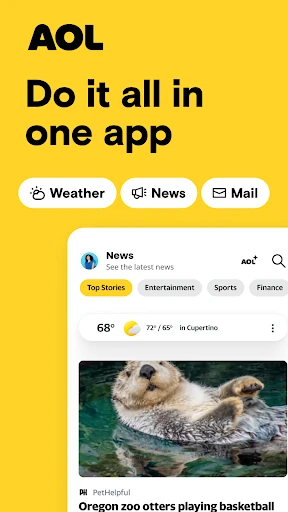
AOL: Email News Weather brings an email inbox, news coverage, and weather forecasts together in one Android app. I can see it suiting people who want a familiar daily check-in without jumping between several separate apps. After looking at what it offers, my overall take is that its breadth is useful, especially for existing AOL email users, though the combination may feel busier than a dedicated mail or news app.
A Morning Check-In
I can picture opening AOL: Email News Weather over breakfast to check for overnight messages, scan a few headlines, and see whether the day calls for a jacket. That is the app’s central convenience: email, news, and weather are gathered in one place, so a quick morning routine does not have to begin with three separate apps. It gives a practical reason to return throughout the day, even when I only have a minute.
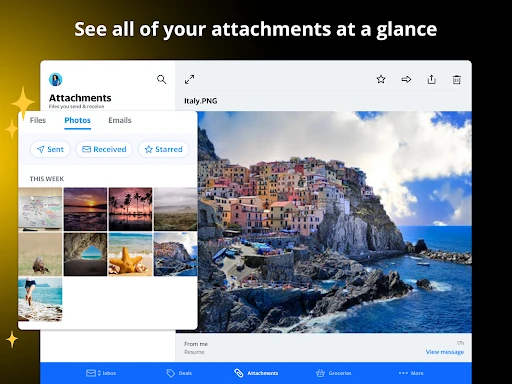
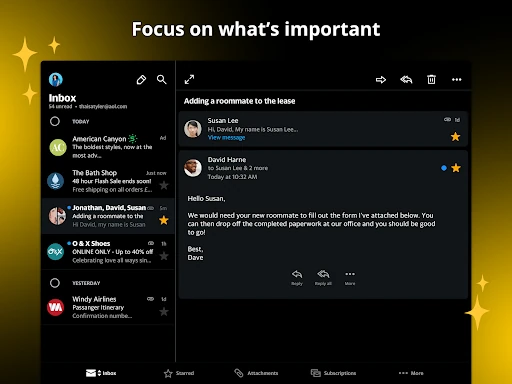
The email side is more than a basic inbox. The description points to attachment previews in a dedicated tab, shortcuts for organizing messages, and automatic sorting for gift cards and coupons. If I receive a message with a document or need to find a purchase-related email, those tools could make routine inbox checks less fiddly. I would still expect the value of these conveniences to depend on how much of my everyday email I actually manage through AOL.
A Bundle, Not a Specialist
Compared with using a dedicated email app alongside separate news and weather apps, AOL’s appeal is consolidation. I like the idea of checking a forecast and then moving straight to a saved story or my inbox without changing apps. The news section draws on a range of named outlets, including ABC News, CNN, BBC, Reuters, and USA Today, which gives it a broader editorial mix than a single-publication reader.
That all-in-one approach also sets a limit. AOL is not just a focused mail client, a newspaper subscription, or a detailed weather tool; it gives each of those jobs a place within a wider app. Someone who wants deep inbox controls, an especially tailored news experience, or specialized forecast detail may prefer a dedicated alternative. I see AOL as a convenient daily hub, rather than a replacement for every specialist app.
Small Habits That Help
A few small habits could make the bundle feel more useful. I would save a longer article when I spot it during a quick headline scan, then return when I have time to read properly. The saved-story option is a simple bridge between browsing and reading, and it avoids relying on memory when a headline catches my eye in the middle of another task.
For email, I would use the organization shortcuts as I go rather than putting off inbox cleanup until it becomes a project. Gift-card and coupon sorting may also help when I am looking for a specific offer or balance. On the weather side, hourly and daily forecasts suit different planning windows: a quick look before heading out, or a broader check while thinking through the next day.
More From Our News Desk

Zoom Meetings, Google Meet, or Teams: Which Is Easiest to Join?

How I Build a Free Streaming Lineup With Tubi

Why Crunchyroll Is the Default Anime App for So Many Fans

YouTube TV: A Practical Guide to Cutting Cable

Rummikub and the Small Comfort of Phone Games

TeamViewer Remote Control or AnyDesk for Helping Family?
Who May Like the Bundle
I would recommend AOL: Email News Weather to people who already use AOL email and would welcome headlines and forecasts alongside it. It also makes sense for anyone who likes a single starting point for ordinary daily checks: inbox first, a little news next, weather before heading out. The combination is easy to understand, and the saved-article and email-sorting features give regular users a few practical ways to stay organized.
It may be less appealing if you prefer keeping email, news, and weather in separate apps with specialized controls, or if you mainly want one of those functions. The presence of ads is also worth considering if you are sensitive to advertising in a daily app. I would treat AOL as a broad convenience rather than a perfect fit for every person’s preferred mail workflow or way of following the news.
AOL: Email News Weather is an Android productivity app from AOL Media LLC. Google Play shows more than 10 million installs and a 4.1-star rating from about 186,000 ratings. The app is free to download, contains ads, and offers in-app purchases. The listed in-app purchase range is $1.99 to $99.99 per item.
Google Play gives the app an Everyone 10+ content rating. Its version varies with device. The release date shown is July 22, 2010, and the last update date is November 2, 2026. The available details do not specify a minimum Android version, so anyone checking compatibility should look at the app’s Google Play page for the requirements shown for their device.
A Closer Look at the Daily Mix
A Familiar Starting Point
When I first consider an app that combines mail, headlines, and weather, I look for a clear reason to use the bundle instead of just opening separate tools. AOL’s pitch is straightforward: it puts those familiar daily tasks together. That makes the first impression less about learning a complicated new system and more about deciding whether one shared destination fits the way I already check my phone.
The app is described as having an intuitive interface, with navigation between email, news, and weather. I would approach setup by choosing which of those jobs I expect to use most, rather than trying to explore every area at once. For someone arriving mainly for AOL email, that means starting with the inbox and treating the other sections as useful additions, not mandatory stops.
The Day-to-Day Rhythm
In daily use, the strongest idea is the short hop between unrelated tasks. I might check a message, glance at a headline, and look at the forecast before leaving home. The app’s mix is best suited to those small gaps in the day, when convenience matters more than settling into a long reading session or carefully managing a complicated email archive.
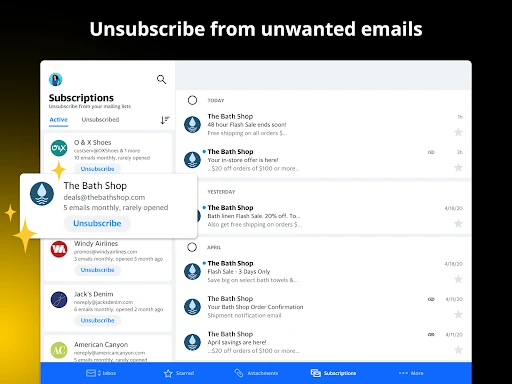
The email tools address some everyday annoyances. Attachment previews can help when I want to check a file without searching through a message, while shortcuts offer a way to organize mail as it arrives. Unsubscribing from junk in a tap is another appealing option for keeping unwanted messages under control. These are practical details, though they will matter most to people who use the AOL inbox regularly.
Beyond Mail and Headlines
The news section gives the bundle more substance than a mail app with a token headlines page. AOL describes coverage across politics, finance, entertainment, sports, and lifestyle, drawing from outlets such as NBC News, Fox News, and Reuters. I like the breadth of that idea: it gives a reader a chance to move between topics and sources without making the app’s news experience depend on a single publication.
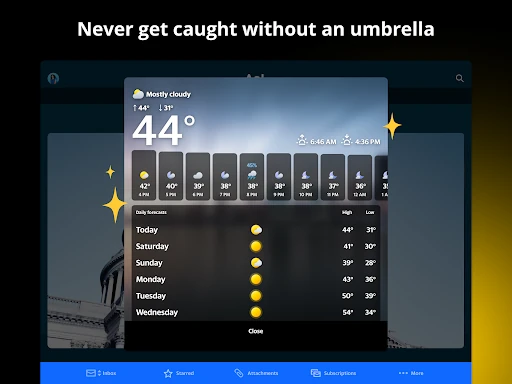
Saving a story for later is a small feature, but it fits real mobile reading habits. I often come across an interesting article at a moment when I cannot give it proper attention. A saved list provides a simple way to come back to it. The weather section adds another distinct use, with local and global forecasts and hourly and daily views for different kinds of planning.
There are also email-related extras beyond ordinary message handling. The description includes 1 TB of email storage, automatic sorting for gift cards and coupons, and a coupon tab. Those features may be useful for people who keep purchase messages in their inbox. I would think of them as organizational conveniences within the email experience, rather than reasons to use the app as a full personal-finance tool.
A Useful Daily Routine
A routine I can imagine is a quick check before work: scan the inbox for anything time-sensitive, preview an attachment if needed, and then check the day’s forecast. If a headline looks worth a closer read but I am about to head out, I can save it and move on. That sequence uses the app’s combined layout without turning a brief phone check into a long browsing session.
Later, I might return to the news section during a break and read the article I saved earlier. If I am sorting email, shortcuts and the gift-card or coupon categories could make it easier to find purchase-related messages. The useful habit is to use each feature at the moment it solves a small problem. The app’s value comes from those repeated modest conveniences, not from needing to explore everything every day.
Trade-Offs to Keep in Mind
A combined app inevitably asks users to accept several kinds of content in one experience. If I only want to clear email, headlines and weather may feel like extra material around a simple task. Conversely, someone opening the app for news may not want email tools sharing the same space. The bundle saves app switching, but it is not automatically less distracting for every person or every routine.
Ads are part of the free app, and in-app purchases are also offered. That is worth weighing if I want a particularly uncluttered experience or prefer to avoid optional spending prompts. I would also check Google Play for device compatibility before installing, since the minimum Android version is not included in the available app details. The version itself varies with device, so the exact experience can depend on the device.
Finally, I would not expect the app to replace a specialist service in every category. Its described weather coverage includes hourly and daily forecasts, while the news offering spans many topics and sources. Those are useful everyday features, but people with very specific requirements may prefer dedicated tools. AOL makes most sense when the convenience of a shared home for email, news, and weather is the main attraction.
AOL: Email News Weather is an appealingly practical bundle for people who want email, headlines, and forecasts close at hand. Its saved stories, inbox organization options, and varied news sources give the combination more purpose than a simple collection of links. Ads and the broad, rather than specialist, approach are the main trade-offs I would keep in view.
I would try it if AOL email is already part of my routine or if I want one app for a few everyday checks. If I care most about a highly focused mail, news, or weather experience, I would compare it with dedicated alternatives before settling in. The app’s strengths are convenience and variety, not doing just one job.
AOL Frequently Asked Questions
What is AOL: Email News Weather used for?
AOL: Email News Weather combines email, news, and weather in one Android app. Its described email tools include attachment previews and message organization shortcuts, while the news area covers multiple topics and sources. Users can save articles to read later, and the weather section offers hourly and daily forecasts. It is designed for everyday communication and information checks rather than one specialized task.
Which devices can run AOL: Email News Weather?
AOL: Email News Weather is an Android app available through Google Play. The minimum Android version can vary by device or change over time, so check the Google Play page for the compatibility details shown for your phone or tablet before installing. The app version is also listed as varying with device.
Is AOL: Email News Weather free?
The app is free to download on Google Play. It contains ads and offers in-app purchases, with listed purchase prices ranging from $1.99 to $99.99 per item. The available details do not describe each purchase, so check the Google Play page and in-app purchase information for current options before buying anything.
Does AOL: Email News Weather include email and forecasts?
Yes. AOL: Email News Weather brings email, news, and weather together. The email description includes attachment previews and shortcuts for organizing messages; the weather section provides hourly and daily forecasts. The app also lets users save news articles for later. How useful that combination feels will depend on which parts you expect to use most.
Who should try AOL: Email News Weather?
It may suit people who already use AOL email or want one Android app for routine inbox, news, and weather checks. It may be less suitable for someone who wants a highly specialized tool for just one of those jobs, or who prefers to avoid ads. For device fit and current terms, check the Google Play page.
Pros
- Combines email, news, and weather for convenient everyday checks.
- Saved articles make it easier to return to stories later.
- Email tools include attachment previews and shortcuts for organizing messages.
- News coverage spans several topics and named sources.
Cons
- Ads may be unwelcome during routine email or news checks.
- The all-in-one approach may feel less focused than specialist apps.
- In-app purchases are offered alongside the free download.
- Category
- Productivity











