Your Texas Benefits
- 137.84K
- 4.7
- Installs
- 1.00M
- Price
- Free

Screenshots
Analysis by Reviewed APKs
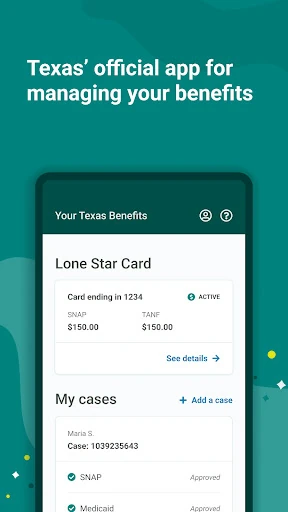
Your Texas Benefits is a state benefits app for Texans who have applied for or receive SNAP, TANF cash assistance, or health care benefits such as Medicaid. I see its value in bringing case details, document sharing, renewal alerts, and Lone Star Card tools together on a phone. It is most useful for people already managing a benefits case, rather than anyone looking for general health information.
A Case Check in Daily Life
When I imagine using Your Texas Benefits during a busy week, the appeal is being able to check case status and benefit amounts without setting aside time to sit at a computer. I could open the app while planning groceries, see whether a renewal is coming up, and check Lone Star Card activity in the same place. For someone juggling household errands, those quick checks could make routine case management easier to fit in.
The app is built around an existing benefits relationship, so the first practical step is setting up a Your Texas Benefits account if you do not already have one. After that, the phone becomes a place to read case messages, look at case history, and send requested forms or documents as photos. I like that this connects several small but important tasks instead of making each one a separate errand.
A Benefits Tool, Not a Health Guide
The obvious alternative is using the Your Texas Benefits website, which the app complements by offering case information and document handling on a phone. It is a focused way to manage SNAP, TANF, and health care benefits, including Medicaid and the Medicare Savings Program. Rather than trying to explain health topics broadly, it deals with practical details tied to a person's Texas benefits case.
That narrow focus is also a useful expectation to set. This is not a general wellness tracker, a nutrition planner, or an app for comparing insurance plans. Its tools concern case status, notices, reported changes, and Lone Star Card management. If you are not applying for or receiving the benefit programs it supports, most of the app's functions will not have much to do for you.
Small Habits That Help
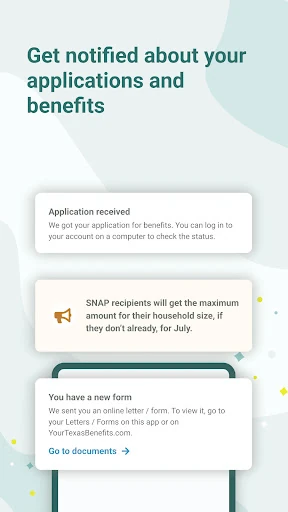
I would make a habit of checking alerts and messages when I open the app, especially around a renewal period. The app can alert users when it is time to renew, and it can show case messages and history. Keeping an eye on those updates is more practical than waiting until a paperwork deadline feels urgent, although users still need to respond to what their own case requires.
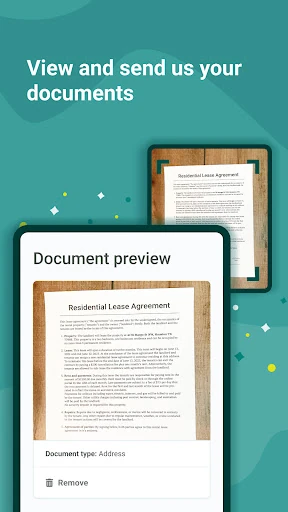
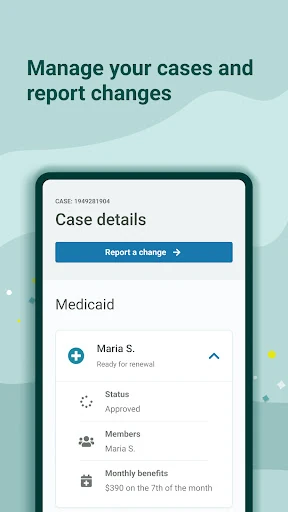
Another good routine is to take clear photos of requested documents when they are already in hand, then attach and send them through the app. If something changes at home, the app supports reporting items such as an address, household members, housing or utility costs, and job information. I would review the details before submitting, so a quick phone task does not become a careless one.
More From Our News Desk

Zoom Meetings, Google Meet, or Teams: Which Is Easiest to Join?

How I Build a Free Streaming Lineup With Tubi

Why Crunchyroll Is the Default Anime App for So Many Fans

YouTube TV: A Practical Guide to Cutting Cable

Rummikub and the Small Comfort of Phone Games

TeamViewer Remote Control or AnyDesk for Helping Family?
Who will find it useful
I would recommend Your Texas Benefits to Texans who have an active case or application for SNAP, TANF cash help, or supported health care benefits. The strongest fit is someone who wants to check benefit amounts, follow messages, send documents, or keep up with a Lone Star Card from a phone. It puts several recurring case tasks in one place, which can be helpful when time or transportation makes an office visit inconvenient.
It may not suit someone who wants broad health advice, a general budgeting app, or a service unrelated to Texas benefits. It also depends on setting up an account to use the account-based features, so it is not a substitute for having a case. If you prefer handling every task on a computer or in person, the phone format may add little; the app's value is convenience for people who will use those tools.
Your Texas Benefits is developed by the Texas Health & Human Services Commission. Google Play shows more than 1 million installs and a 4.7-star rating from about 138,000 ratings. The app is free to download, has no in-app purchases, and contains no ads. Its content rating is Everyone, which gives a quick sense of the store's age classification.
The current version is 6.7.8. Google Play gives November 2, 2014 as the release date and August 26, 2026 as the latest update date. The Android version requirement is worth checking on Google Play before installing, since compatibility details can change. Those store details are useful context, but the app's day-to-day usefulness depends most on whether you have a supported Texas benefits case.
A Closer Look at Case Management
Getting Started
My first impression is that this app has a clear purpose: manage Texas benefits cases from a phone. It is not trying to be a general-purpose portal for every state service. That focus should help new users understand why they might open it, whether to review a case, send a requested document, or look at Lone Star Card information.
Getting started requires a Your Texas Benefits account if you do not already have one. Once that is in place, the app gives access to account-based features such as case details and settings. I would approach setup with the information needed for my existing account nearby, then take time to check that I am looking at the right case before making changes.
The Everyday Experience
The day-to-day appeal is reducing the distance between a question and an answer. Instead of wondering whether a renewal is due or what amount is available, a user can check case information on the phone. Messages and case history also give a place to review updates and see changes that have been reported, rather than relying on memory alone.
I appreciate the combination of reading and action. The app is not just a viewing window: users can send requested documents, report certain changes, and manage parts of their Lone Star Card. That makes it more useful during ordinary moments, such as when a document is ready to submit or a household detail needs to be updated.
Tools That Stand Out
Document submission is one of the most practical features. Users can attach photos of documents or forms requested for their case and send them through the app. Case history can show documents sent through the app or website, and users can review changes they have reported. That collection of related tasks makes the app feel aimed at ongoing case management rather than one-time enrollment.
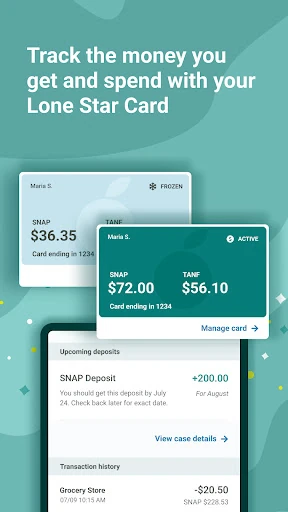
Lone Star Card tools add another distinct use. The app can show a balance, transaction history, and upcoming deposits, and users can change their PIN or freeze or replace a card that is lost or stolen. It also supports office searches for HHSC benefit offices and community partner offices, using a current location or ZIP code.
A Practical Weekly Routine
A simple routine could be to open the app once or twice a week, check alerts and case messages, and review any renewal information. If a document is requested, taking a photo and sending it while it is already accessible can make the task easier to finish. This is a small workflow, but it connects the app's reminders and submission tools to things a user has to do anyway.
When household circumstances change, I would use the reporting tools as a prompt to consider whether the case needs an update. Supported changes include phone number, home or mailing address, household members, housing and utility costs, and job information. For card-related needs, checking activity or upcoming deposits can be part of the same routine, without mixing those details up with case messages.
Limits to Keep in Mind
The app is only relevant to the programs it supports: SNAP, TANF cash help, and certain health care benefits. It is not a universal benefits app for every state or a general resource directory. Its usefulness also depends on having an account and a related application or case, so someone with no connection to these programs may find little reason to install it.
A phone-based view is convenient, but it does not remove the need to pay attention to case requirements or review information before submitting changes and documents. The app offers a way to report specified details and read alerts; users still need to keep their own information accurate and respond to what applies to their case. People who prefer a larger screen may find the website a better fit for some tasks.
Your Texas Benefits is a practical companion for managing supported Texas benefit cases, with a useful mix of status checks, document submission, alerts, change reporting, and Lone Star Card controls. I like that it has a clear job and gathers several recurring tasks in one phone app. Its focus is a strength for the right user, but also means it will not serve much purpose outside that audience.
I would recommend it to Texans who already use or have applied for SNAP, TANF, or supported health care benefits and want to handle routine case tasks on mobile. If that describes you, the app is worth trying. If you are seeking general health guidance or services unrelated to a Texas benefits case, this is probably not the tool you need.
Your Texas Benefits Frequently Asked Questions
What is Your Texas Benefits used for?
Your Texas Benefits helps Texans who have applied for or receive SNAP, TANF cash help, or health care benefits manage parts of their cases. It can show case status and benefit amounts, provide alerts and messages, accept photos of requested documents, and support certain case changes. It also includes tools for viewing and managing a Lone Star Card.
What devices can run Your Texas Benefits?
Your Texas Benefits is available on Android through Google Play. The app is designed for phone-based access to Texas benefits information and account tools. Check Google Play for the current device and Android compatibility details before installing, since requirements can vary as the app is updated.
What Android version does Your Texas Benefits require?
The Android version requirement can vary with app updates and device compatibility. Check the Your Texas Benefits page on Google Play for the current requirement before downloading. You will also need a Your Texas Benefits account to access account-based features such as case details, document submission, and card tools.
Is Your Texas Benefits free, and does it have purchases?
Your Texas Benefits is free to download on Google Play. It has no in-app purchases and contains no ads. Store details can change over time, so it is worth checking Google Play for current information before installing. Using the app also requires an account for its case-management features.
Who should use Your Texas Benefits?
The app is intended for Texans who have applied for or receive SNAP, TANF cash help, or supported health care benefits, including Medicaid and the Medicare Savings Program. It may suit people who want to manage case tasks on a phone. It is not a general health app or a service for benefits unrelated to Texas.
Pros
- Combines case status, benefit amounts, messages, and renewal alerts in one phone app.
- Lets users send photos of requested documents and review case history.
- Includes Lone Star Card balance, transaction, deposit, PIN, and card controls.
- Supports reporting several household and employment changes from the app.
Cons
- Its tools are aimed specifically at people with supported Texas benefit cases.
- Account setup is needed to access case-management features.
- Phone-based tasks may be less comfortable than the website for users who prefer a larger screen.
- Category
- Health & Fitness
- Version
- 6.7.8











