WellSky Personal Care
- 34.93K
- 3.8
- Installs
- 1.00M
- Price
- Free

Screenshots
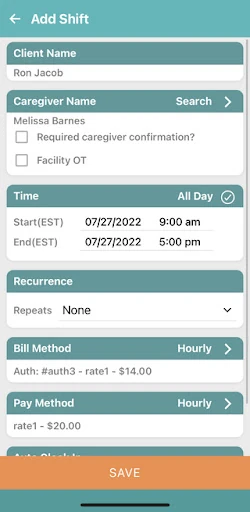
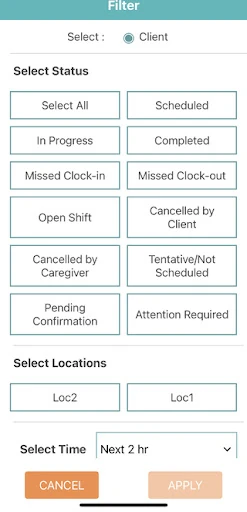
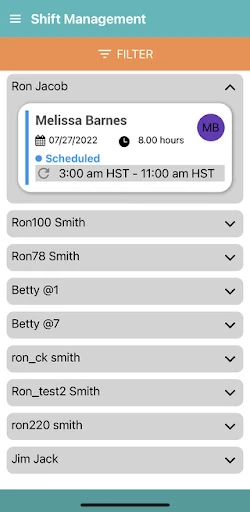
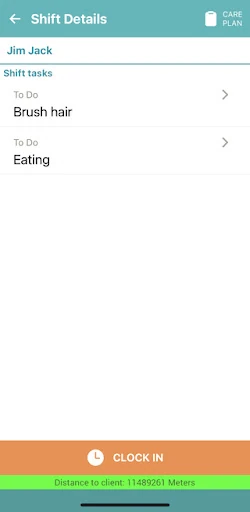
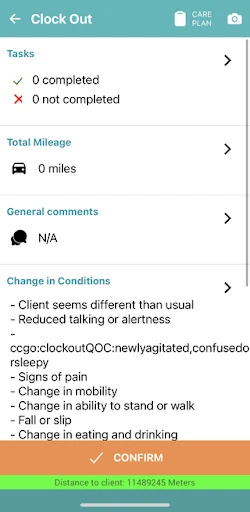
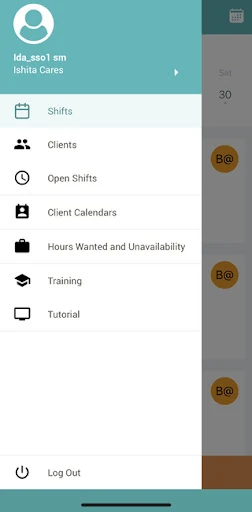
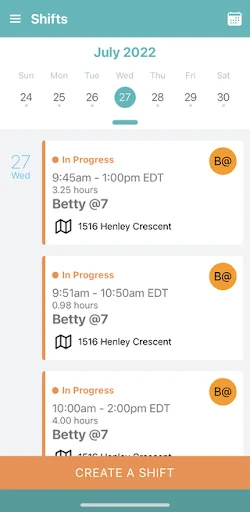
Analysis by Reviewed APKs
WellSky Personal Care is a work-focused mobile app for caregivers and administrators who need to keep track of schedules, shifts, tasks, and profiles. It is aimed at people coordinating care, not at individuals looking for a personal health tracker. My overall impression is of a practical companion for the moving parts of a care shift: its appeal is less about extras and more about having key work details close at hand.
Keeping a Shift in View
Picture a caregiver checking the day’s schedule before heading out, then needing to keep track of a shift and its assigned tasks while moving between care responsibilities. WellSky Personal Care is built around that kind of workday. Its focus on schedules, shifts, tasks, and profiles gives caregivers a place to consult the information tied to their work, rather than relying only on memory or a separate paper note.
When I think about the app in an everyday routine, the value is in reducing the small administrative interruptions around a visit. A caregiver can use a mobile device to manage work details while away from a desk, and administrators have access to the same broad set of work-focused areas. That does not make care itself simpler, but it can make the surrounding organization feel more manageable.
A Work Tool, Not a Health Tracker
The obvious comparison is with a calendar, a to-do list, or a personal health app. WellSky Personal Care is more specific than those general-purpose tools: it is designed for caregivers and administrators managing schedules, shifts, tasks, and profiles in a care setting. A general calendar may be flexible, but this app’s stated purpose is to bring those work-related pieces together for people delivering or coordinating care.
It is not presented as a consumer health dashboard, a medication reminder, or an appointment booking service for personal use. I would not choose it simply to log my own wellness or keep a household calendar. Its usefulness depends on having a caregiving or administrative role where the listed work information matters. That narrower purpose is a strength for the intended audience, but it also makes the app less relevant to everyone else.
Small Habits That Help
A useful habit is to make the app part of the start-of-shift routine: check the schedule, review the shift details, and look over the tasks before the day gets busy. Because the app is intended for mobile use, that check can happen away from a desk. I would also revisit the relevant information during the workday instead of treating the app as something to open only once and then forget.
For administrators, a regular glance at schedules and profiles may help keep the day’s coordination in view. Caregivers can make a similar habit of checking tasks alongside shift information, so the work details stay connected in one place. These are modest workflows, not hidden tricks. The app’s stated tools are straightforward, and the benefit comes from returning to them consistently as part of an existing routine.
More From Our News Desk

Zoom Meetings, Google Meet, or Teams: Which Is Easiest to Join?

How I Build a Free Streaming Lineup With Tubi

Why Crunchyroll Is the Default Anime App for So Many Fans

YouTube TV: A Practical Guide to Cutting Cable

Rummikub and the Small Comfort of Phone Games

TeamViewer Remote Control or AnyDesk for Helping Family?
Who May Find It Useful
I would recommend WellSky Personal Care to caregivers and administrators who need mobile access to schedules, shifts, tasks, and profiles. It suits people whose work already involves coordinating care and keeping track of practical details during the day. If those details often need attention while away from a desk, having a work-focused app on a mobile device could be more convenient than depending on separate reminders or paper notes.
It may not suit someone looking for an all-purpose personal health app, a general calendar, or a tool for managing care without a caregiver or administrator role. The app’s purpose is fairly specific, and that is worth keeping in mind before installing it. I would also check whether it fits the way a particular care team organizes work, since the app is designed around caregiver and administrator needs rather than serving every kind of user.
WellSky Personal Care is developed by WellSky Mobile Apps. On Google Play, it has over one million installs and a 3.8-star rating from about 35,000 ratings. It is free to download, has no listed in-app purchases, and does not contain ads. The content rating is Everyone, which is a store classification rather than a description of the app’s intended professional audience.
The current version shown is 26.10. The app was released on September 28, 2017, and its latest update is dated October 30, 2026. The minimum Android version is not included in the available app details, so users should check the Google Play page for device compatibility before installing. The app is designed for caregivers and administrators using a mobile device.
A Closer Look at the Workday
A Focused First Impression
When I first opened the description of WellSky Personal Care, what stood out was its narrow, practical purpose. This is not framed as a broad collection of lifestyle features; it is a mobile tool for caregivers and administrators to manage schedules, shifts, tasks, and profiles. That focus makes it easy to understand who the app is for, even before thinking about whether it fits a particular team’s routine.
Getting started is best approached with the intended work context in mind. The app is designed for people involved in caregiving or administration, so its value is tied to the work information they need to manage. I would begin by checking whether the app’s role matches the way I handle those responsibilities. The available description does not spell out a setup walkthrough, so I would avoid expecting a particular onboarding sequence.
The Day-to-Day Experience
The core experience centers on keeping work details accessible from a mobile device. Schedules and shifts help frame the day, while tasks and profiles give caregivers and administrators other relevant areas to manage. I like that the stated purpose stays close to everyday coordination rather than promising to solve every challenge in care work. The app’s role is to make those administrative details more convenient to handle.
In a busy routine, usefulness often comes down to whether a tool is easy to return to at the right moment. WellSky Personal Care is intended for mobile access, which makes it suited to checking work information away from a desk. I would use it as a companion to the shift, not assume it replaces the judgment, communication, or hands-on attention involved in care. Its stated job is organizational support.
The Main Tools
Schedules and shifts are central to the app’s purpose. They give users a way to manage when work takes place and to keep shift information within reach. Tasks add another practical layer, while profiles provide a place to manage profile-related information. Together, these are the features that make the app feel tailored to caregiving work rather than simply another general-purpose organizer.
What surprised me was how clearly the feature set points back to the same everyday problem: keeping work details organized while care is being delivered. The app is described as serving both caregivers and administrators, so its focus is not limited to one role. Still, I would keep expectations tied to those stated tools. The material supports schedule, shift, task, and profile management, not a wider set of health or communication features.
A Practical Shift Routine
A straightforward routine might start with checking the schedule before a shift, then reviewing the shift details and tasks as the day unfolds. When a caregiver needs to keep work information close by, a mobile app can be easier to consult than a paper reminder kept somewhere else. I would make those checks part of the normal work rhythm, rather than waiting until a detail becomes urgent.
An administrator could use a similar approach when keeping schedules and profiles in view. The app’s stated audience includes administrators as well as caregivers, and its set of work-focused areas gives both roles a reason to consult it. I would keep the routine simple: use the relevant information when planning or carrying out the day’s work, and avoid adding unnecessary steps just because an app is available.
Limits to Keep in Mind
The app’s focused scope is also its main limitation. Someone who wants personal health tracking, medication reminders, or a general appointment calendar should not assume those tools are included. The supported feature description is about managing schedules, shifts, tasks, and profiles for caregivers and administrators. That is a useful boundary to know before treating it as a more comprehensive care platform.
I would also consider how closely the app fits a team’s existing way of organizing work. The available details do not explain every screen or workflow, so I would not count on a specific feature beyond the stated areas. The Google Play rating is 3.8 stars, based on about 35,000 ratings, which offers context but cannot tell an individual caregiver whether the app will fit their daily needs.
WellSky Personal Care makes the most sense as a mobile work companion for caregivers and administrators who need to manage schedules, shifts, tasks, and profiles. Its focused purpose is easy to understand, and the free, ad-free download lowers the barrier to trying it. The key question is whether those are the details your workday needs to keep close at hand.
I would recommend it to people in caregiving or care administration who want those work areas accessible on a mobile device. I would skip it as a personal wellness tracker or general organizer. Before relying on it, check that it suits your team’s routines and confirm device compatibility in Google Play.
WellSky Personal Care Frequently Asked Questions
What is WellSky Personal Care used for?
WellSky Personal Care is a mobile app for caregivers and administrators. It is used to manage schedules, shifts, tasks, and profiles from a mobile device. Its stated focus is helping with the day-to-day organization around care work, rather than serving as a general personal health tracker or a broad-purpose calendar.
Which devices can run WellSky Personal Care?
WellSky Personal Care is available for Android through Google Play and is designed for use on a mobile device. The minimum Android version can vary with app and device compatibility, so check the Google Play page for the current requirement before installing. The available details do not describe support for other platforms.
Does WellSky Personal Care cost money?
The app is free to download on Google Play. The available store details show no in-app purchases and no ads. Store information can change over time, so it is worth checking the Google Play page for current pricing and availability before downloading.
What Android version does WellSky Personal Care require?
The minimum Android version is not provided in the available app details. Requirements can vary as the app is updated and may depend on a device, so check the Google Play listing for the current compatibility information before installing WellSky Personal Care.
Who is WellSky Personal Care best suited to?
WellSky Personal Care is intended for caregivers and administrators who need to manage work schedules, shifts, tasks, and profiles. It may be a poor fit for someone seeking a personal health tracker or general organizer. Whether it suits a particular care team depends on how well its stated tools match that team’s daily routines.
Pros
- Designed specifically for caregivers and administrators rather than general personal organization.
- Brings schedules, shifts, tasks, and profiles into a mobile work-focused app.
- Free to download, with no listed in-app purchases or ads.
- Available on Google Play with over one million installs.
Cons
- Its narrow work focus may not suit people seeking personal health tools.
- The minimum Android requirement should be checked on Google Play.
- The available feature details do not describe every workflow or screen.
- Category
- Medical
- Version
- 26.10











